19 minutes ago: Please note that the webserver will soon get its weekly reboot at 4:00 am Eastern Time. You may continue to use the site as normal, but you will be logged off at that time. You should be able to log right back on immediately, however. If you are in the process of placing an order, please make sure to complete it as quickly as possible, or come back after the reboot. Thank you. Sorry for any inconvenience.  Dismiss
 
Free Lessons
Courses
Seminars
TechHelp
Fast Tips
Templates
Topic Index
Forum
ABCD
 
Home   Courses   TechHelp   Help   Contact   Merch   Join   Order   Logon   Forums   
 
Back to Access Forum    Comments List
Upload Images   @Reply   Bookmark    Link   Email   Next Unseen 
Installed Fonts Listed in Combo Box
David Campbell 
     
12 months ago
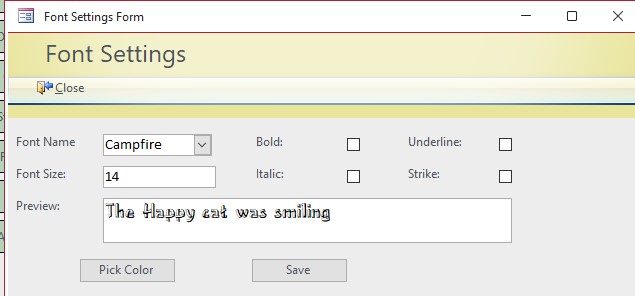
I would like to find out the best way to populate a combo box with the fonts installed on a computer.
Alex Hedley  @Reply  
            
12 months ago
Alex Hedley  @Reply  
            
12 months ago
DEVelopers HUT: VBA - List Fonts
David Campbell OP  @Reply  
     
12 months ago
did not look into vault ty Alex
David Campbell OP  @Reply  
     
12 months ago
Thank Alex  That got me in right direction and I made a standard module and form module code now everything works
David Campbell OP  @Reply  
     
12 months ago

Dave Clark  @Reply  
           
12 months ago
That's Awesome!!
Lisa Snider  @Reply  
       
12 months ago
David Just one question... what's a happy cat?
Alex Hedley  @Reply  
            
12 months ago
A fed one :p
Kevin Yip  @Reply  
     
12 months ago
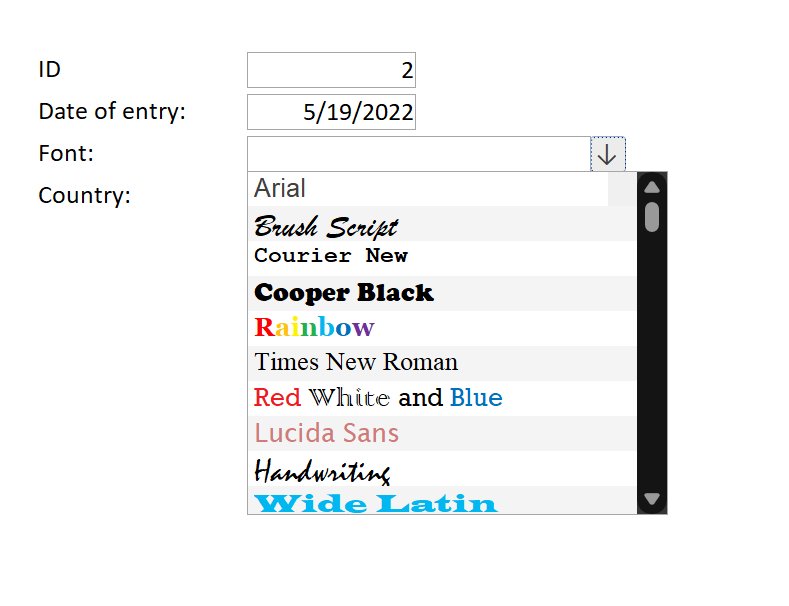
I once made a "rich text combo box" to show what the fonts look like right inside the combo box (picture below), similar to what you often see in font selectors in apps.  Since combo boxes can't show rich text, I used a subform to act as a fake combo box.  That drop-down button is fake too, and it shows or hides the fake combo box.
Kevin Yip  @Reply  
     
12 months ago

Kevin Yip  @Reply  
     
12 months ago
I believe Richard has a tech-help video on using a subform as a fake combo box or listbox.  Can't remember which video it is.
Kevin Robertson  @Reply  
          
12 months ago

This thread is now CLOSED. If you wish to comment, start a NEW discussion in Access Forum.
 

Next Unseen


What's This?


The following is a paid advertisement
Computer Learning Zone is not responsible for any content shown or offers made by these ads.
 

Learn
 
Access - index
Excel - index
Word - index
Windows - index
PowerPoint - index
Photoshop - index
Visual Basic - index
ASP - index
Seminars
More...
Customers
 
Login
My Account
My Courses
Lost Password
Memberships
Student Databases
Change Email
Info
 
Latest News
New Releases
User Forums
Topic Glossary
Tips & Tricks
Search The Site
Code Vault
Collapse Menus
Help
 
Customer Support
Web Site Tour
FAQs
TechHelp
Consulting Services
About
 
Background
Testimonials
Jobs
Affiliate Program
Richard Rost
Free Lessons
Mailing List
PCResale.NET
Order
 
Video Tutorials
Handbooks
Memberships
Learning Connection
Idiot's Guide to Excel
Volume Discounts
Payment Info
Shipping
Terms of Sale
Contact
 
Contact Info
Support Policy
Mailing Address
Phone Number
Fax Number
Course Survey
Email Richard
[email protected]
Blog RSS Feed    YouTube Channel

LinkedIn
Copyright 2026 by Computer Learning Zone, Amicron, and Richard Rost. All Rights Reserved. Current Time: 9/6/2026 3:49:05 AM. PLT: 1s