Free Lessons
Courses
Seminars
TechHelp
Fast Tips
Templates
Topic Index
Forum
ABCD
 
Home   Courses   TechHelp   Help   Contact   Merch   Join   Order   Logon   Forums   
 
Back to Access Forum    Comments List
Upload Images   @Reply   Bookmark    Link   Email   Next Unseen 
Finding Customers Children Records
James Hopkins 
     
12 months ago
Hey Richard and the Crew, I am trying to write a Sub Procedure that I can “Delete” the Customer the Table and Delete the Children Record that are associated with the Customer ID in other Tables like, Estimates, Contacts, and Invoices. But like Richard always say, just mark them, “Inactive”. Question I have is, what is the better way to Look Up the Child Records in the associated Tables then using multiple DLookups to find and set them "Inactive"?
Donald Blackwell  @Reply  
       
12 months ago
You could do something like:


Private Sub MarkCustomerInactive(TableName as string, ID as long)

     ' Usage: Button_Click() - MarkCustomerInactive "CustomerT", 15
     CurrentDB.Execute("UPDATE " & TableName & " SET isActive = FALSE WHERE CustomerID = " & ID)

End Sub


Or you could put all the relevant table names in an array and loop through them:


Private Sub MarkCustomerInactive()

     Dim MyTables as Variant, i as long

     MyTables = Array("CustomerT", "EstimateT", "ContactT", "InvoiceT")

     For i = 0 to ubound(MyTables) - 1

          CurrentDB.Execute("UPDATE " & MyTables(i) & " SET isActive = FALSE WHERE CustomerID = " & CustomerID)

     next

End Sub
John Davy  @Reply  
         
12 months ago
Hi James, I hope you realize that deleting invoices may skew your data when analyzing, or doing taxes etc. John
Joe Holland  @Reply  
      
12 months ago
Hi Donald. Nice usage for an array. Thanks for sharing.
James Hopkins OP  @Reply  
     
12 months ago
Thanks guys for the Help. Donald, I will try this out and John you are right, so I will not mark the Invoices.
James Hopkins OP  @Reply  
     
12 months ago
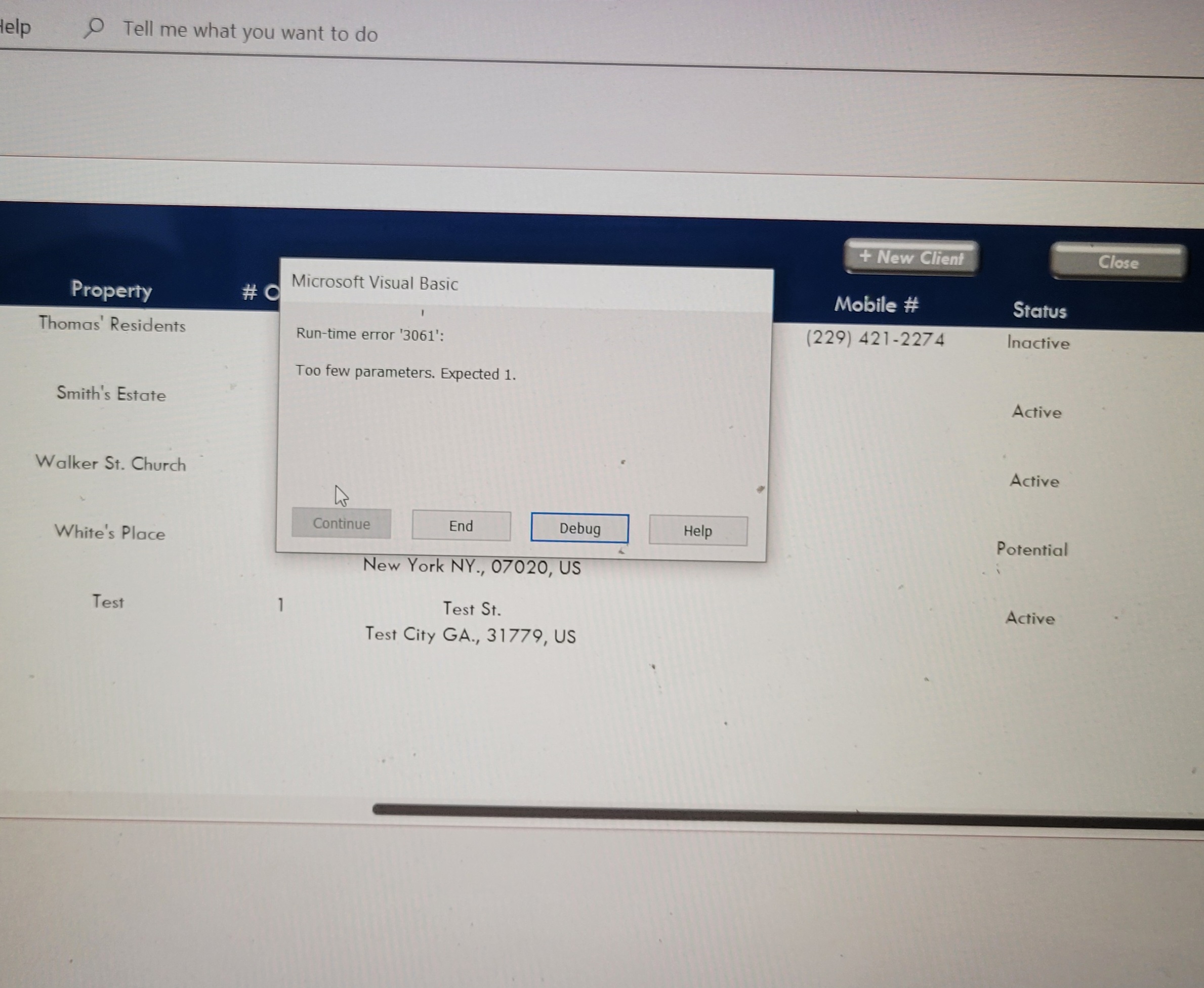
Hey Guys, I receiving a Error Message.
James Hopkins OP  @Reply  
     
12 months ago

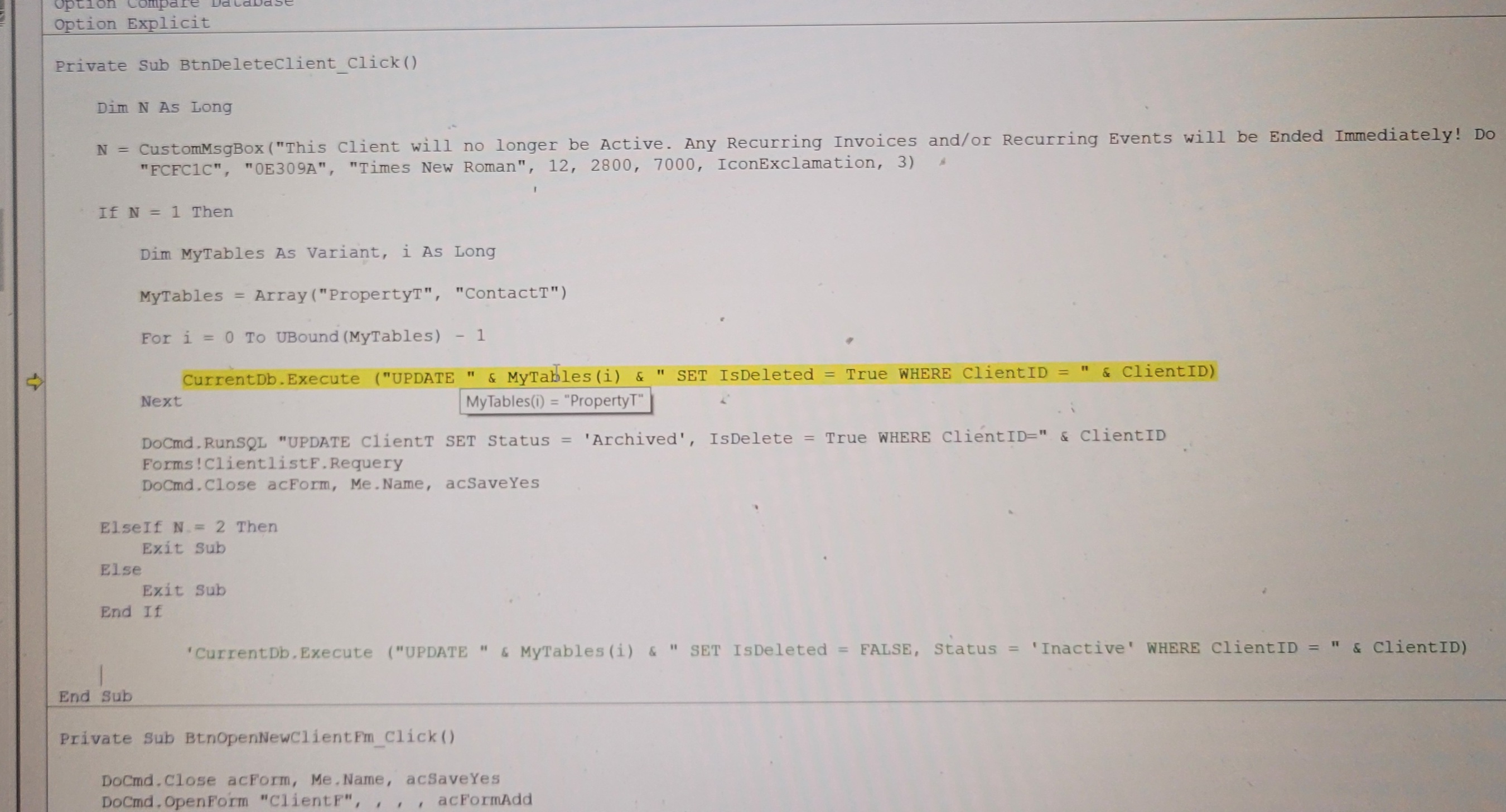
James Hopkins OP  @Reply  
     
12 months ago

Donald Blackwell  @Reply  
       
12 months ago
Have you hovered over "ClientID" in that same part to verify it exists?

Possibly add: if isnull(ClientID) then exit sub

at the top of the procedure in case it's a blank record ... Just in case to add an extra layer unless the button isn't available if there is no client id
Donald Blackwell  @Reply  
       
12 months ago
Hi Darrin,

The reason for the "-1" in the For/Next loop is that Arrays are zero based. So the loop starts with i = 0 and gives us:
"UPDATE PropertyT SET"...
Then the next increments i to 1 and we get:
"UPDATE ContactT SET"...
The next then increments it to 2. Without the "-1" we would get and error because there is no index 2 in the Array.

For a better explanation: Arrays
Darrin Harris  @Reply  
     
12 months ago
Hi Donald

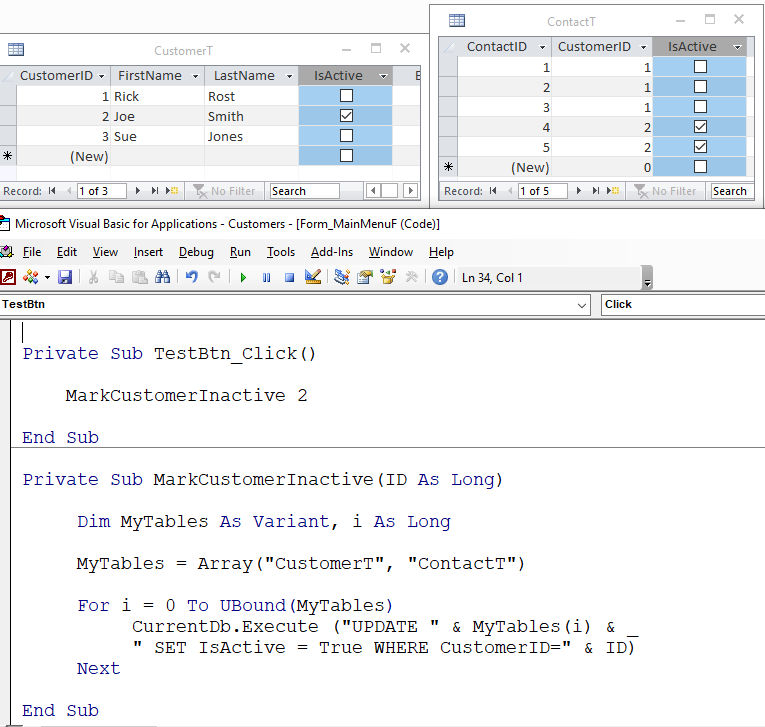
Didn't work that way for me, I tried the code in Blank Templet and removing the -1 to Updated ContactT and CustomerT isActive no error?.

I program in vba and java I know all about arrays.
Darrin Harris  @Reply  
     
12 months ago

James Hopkins OP  @Reply  
     
12 months ago
Hey Harris, after removing the -1 for VBA Code. I still receiving the the same Error.
Darrin Harris  @Reply  
     
12 months ago
Hi James

Of course you have to fix the error first, I produced the exact same error with a spelling mistake.
I changed CustomerID to CustomeID 3061 error

Try to put a number where ClientID is?

And did you try what Donald suggested, hope you figure it out.
Donald Blackwell  @Reply  
       
12 months ago
James
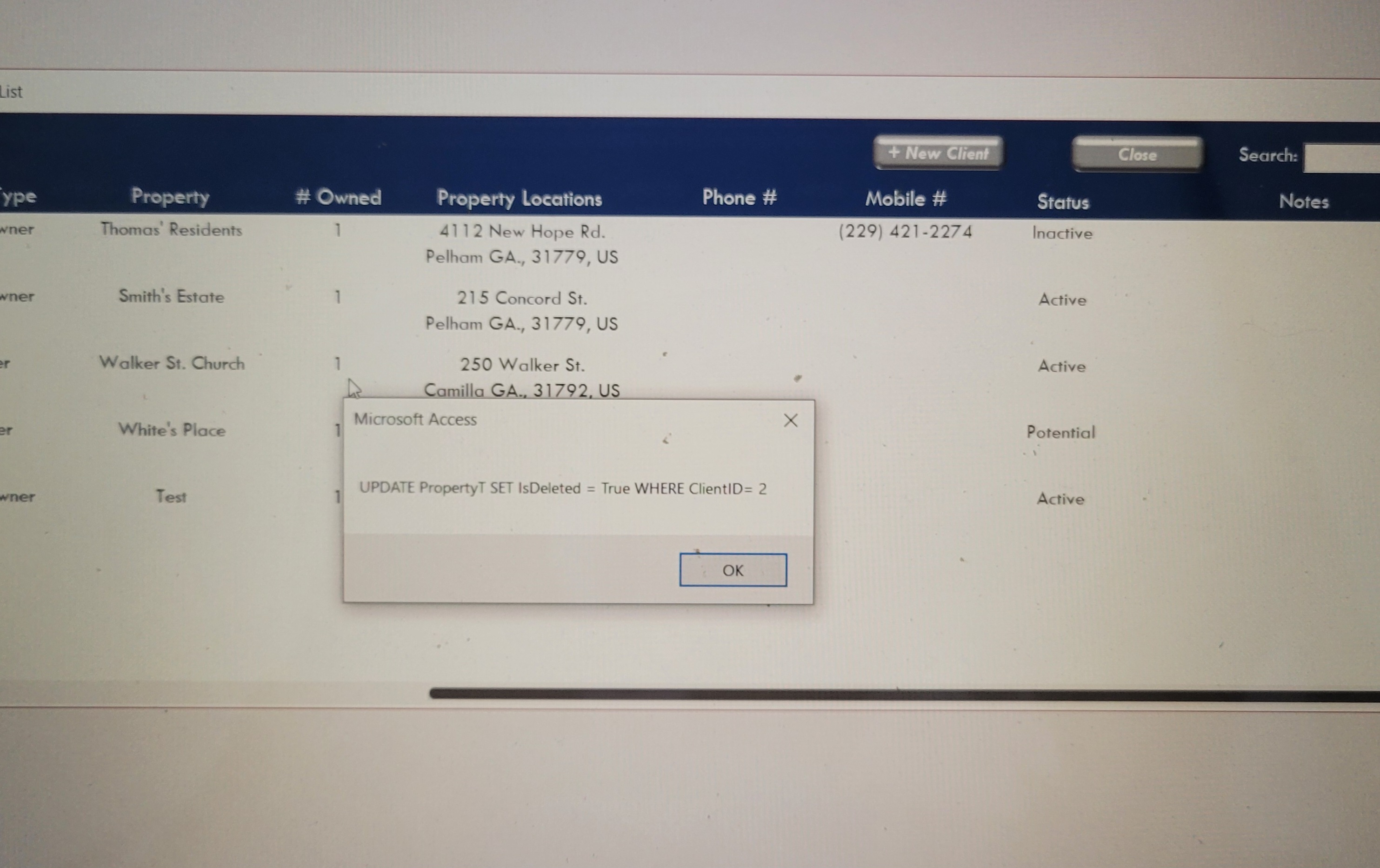
I would suggest moving the text into a string and showing it in a msgbox before trying to execute like:

    
DetailsDim S as String
     For i = 0 to ubound(MyTables) - 1
          S ="UPDATE " & MyTables(i) & " SET isDeleted= TRUE WHERE ClientID= " & ClientID
          msgbox S
          CurrentDB.Execute(S)


This would show exactly what is not giving enough parameters.
James Hopkins OP  @Reply  
     
12 months ago

James Hopkins OP  @Reply  
     
12 months ago
Hey Donald, I figured out the Problem was, that I had to Declare what ID was:

Dim MyTables As Variant, i As Long

    ID = Forms!ClientListF!ClientID
    
    MyTables = Array("PropertyT", "ContactT")
    
    For i = 0 To UBound(MyTables)
       CurrentDb.Execute "UPDATE " & MyTables(i) & " _
            SET Status = 'Archived', IsDeleted = True WHERE ClientID= " & ID
      
    Next
Donald Blackwell  @Reply  
       
12 months ago
Glad you figured it out!

I'm guessing you've seen enough of Richard's videos to have heard, "Debug - Compile, Once in a While"

As long as you have "Option Explicit" at the top of your VBA, the compiler will catch undeclared variables like that and alert you.

I added the compile, comment, and uncomment buttons to my VBE toolbar just to save those few extra steps of clicking on the menu to get to them, lol. Makes it much easier to prevent, or even you don't catch, find errors that creep in when you're typing.

---Don

This thread is now CLOSED. If you wish to comment, start a NEW discussion in Access Forum.
 

Next Unseen


What's This?


The following is a paid advertisement
Computer Learning Zone is not responsible for any content shown or offers made by these ads.
 

Learn
 
Access - index
Excel - index
Word - index
Windows - index
PowerPoint - index
Photoshop - index
Visual Basic - index
ASP - index
Seminars
More...
Customers
 
Login
My Account
My Courses
Lost Password
Memberships
Student Databases
Change Email
Info
 
Latest News
New Releases
User Forums
Topic Glossary
Tips & Tricks
Search The Site
Code Vault
Collapse Menus
Help
 
Customer Support
Web Site Tour
FAQs
TechHelp
Consulting Services
About
 
Background
Testimonials
Jobs
Affiliate Program
Richard Rost
Free Lessons
Mailing List
PCResale.NET
Order
 
Video Tutorials
Handbooks
Memberships
Learning Connection
Idiot's Guide to Excel
Volume Discounts
Payment Info
Shipping
Terms of Sale
Contact
 
Contact Info
Support Policy
Mailing Address
Phone Number
Fax Number
Course Survey
Email Richard
[email protected]
Blog RSS Feed    YouTube Channel

LinkedIn
Copyright 2026 by Computer Learning Zone, Amicron, and Richard Rost. All Rights Reserved. Current Time: 9/6/2026 6:42:28 AM. PLT: 0s