Free Lessons
Courses
Seminars
TechHelp
Fast Tips
Templates
Topic Index
Forum
ABCD
 
Home   Courses   TechHelp   Help   Contact   Merch   Join   Order   Logon   Forums   
 
Back to Access Forum    Comments List
Upload Images   @Reply   Bookmark    Link   Email   Next Unseen 
Features Needing Improvement
Richard Rost 
          
12 months ago
What is the one feature in Access you wish Microsoft would improve or update?
Raymond Spornhauer  @Reply  
          
12 months ago
Functionally: I need the Reports and SubReports to work as good as the Forms and SubForms.

Not having code run in subreports is crippling.  I know you've said you don't use them much, but I have many instances where I'm trying to combine completely different reports into one report and I don't have the same capabilities in the subReports that I have in subForms.


Aesthetically: I would like to see more modern aesthetic options for controls.  

They can work the same, but why can't I have more text box and button shape options?  (I would think many of these shape options could be taken from their other Microsoft products.)  I've seen many of the work around's people use... I just think it would be simpler and more functional if Access would give us more shape options for many of their controls.


Documentation:  Microsoft needs to do a better job with the documentation on their Reference Library.  

The current VBA Reference Library has inconsistent documentation.  Additionally, it seems the intended audience is seasoned programmers, not beginning users.  This is one of the reasons people struggle finding solutions with Access.  

-Raymond
Sami Shamma  @Reply  
             
12 months ago
For me, closer integration with SQL Server and making use of T-SQL features.
The other items I know are coming in the development roadmap, such as:
- Zoom
- Documentation
- Version control
Donald Blackwell  @Reply  
       
12 months ago
Following Raymond's example:

Functionally: I'd like to see more granular control over continuous forms/report rows so that it would be easier on a row-by-row and record-by-record basis be able to act and react to user input and activity.

Aesthetically: I think MS should revamp the system (won't happen) but instead of such rigid restrictions and limitations on "styling" forms, reports, and controls, enable styling comparable to css so you could easily manipulate size, color, and shape of controls.

Documentation: I agree with Raymond here. Both on general Access documentation as well as VBA they have a lot of room for improvement.

Other than that, just continue with bug fixes
Richard Rost OP  @Reply  
          
12 months ago
Raymond I know you posted about it in the forums before, but give me an example of one thing that you're trying to do with the sub-report that won't work. Maybe I can look into it. Keep it simple for me, don't blow my brain up lol.
Raymond Spornhauer  @Reply  
          
12 months ago
Richard

Example:  In a Shift Turnover Database, Management wants to generate one report, which contains multiple subReports to print out for the oncoming crews.  This report consists of 15-20 subReports.  

The subReports include:
A Turnover Checklist
Operations Department Standing Orders
Shift Orders
Condition Reports from the last 12 hours (from a Maximo Database)
Scheduled work for the next 4 days (from a Primavera Database)
Narrative Logs (from eSOMS database)
Employee Qualifications (from Vision Database)
etc.....

When I first  built these reports, I had code that would run during the OnLoad Event to set parameters or field values based on certain conditions in the data that would help the crews using the report.  (The Reports on their own looked nice and worked great)  Once I found out the Code would not run in a subReport, I had to abandon the "enhancements" for other workarounds.  

The point is that the code was specific to the report (which could also be generated as a single report from it's respective Form).  Trying to put the code into the main report became too cumbersome for the time I had to work on it.  It never made since to me why I could build a report and have it work exactly the way I wanted, then as soon as it becomes a subReport, the code no longer runs.  And there is no information anywhere (outside of help from people here) to tell the user that this function in Access doesn't work the way you'd expect.

I hope this makes sense.

-Raymond
Adam Schwanz  @Reply  
           
12 months ago
All my Access complaints are weakness of doing things at run time, in comparison to what you can do with like web design. For example dynamically creating and destroying objects.
Richard Rost OP  @Reply  
          
12 months ago
Raymond I get it. Can you give me a specific example of a line of code that wouldn't run, for example? Like, where were you putting it? In the onFormat event, the onPrint?
Raymond Spornhauer  @Reply  
          
12 months ago
Richard

The OnLoad event does not run at all for a subReport.

When I tried putting code in the OnOpen event, the code wouldn't work because the controls weren't loaded.

I would try to set text box values, conditional formatting of text boxes or combo boxes.   I don't have a specific example because I had to remove everything.

I did not try the OnFormat or OnPrint events as I don't know when (or if) these run.

-Raymond
Juan Rivera  @Reply  
            
12 months ago
I wish they make the check box adjustable linf od like fonts pick how big to make it, and report design wish to zoom in so i can et the lines done right i always find my self switch between preview and desing and fine tuning the forms.
Debbie Heaney  @Reply  
     
12 months ago
Whilst playing around with one of my projects i wrecked it. Accidentally deleting a bunch of stuff.
I thought i had a backup but didn't. well not a recent one anyway. I had to go back a few revisions and rebuild from there.
Good job I build just for the fun of it.

Having it be like Word, or Excel, or any other Office application where by when you click close you get prompted to save changes or discard them.
Had that been possible i would have just closed without saving then reopened.
Kevin Yip  @Reply  
     
12 months ago
Debbie  Word and Excel keep an undo history, which a database program like Access doesn't and can't do.  Every action is once-and-done in Access, so the only recovery option is via backups.  If you need an undo system in Access, you need to implement it yourself.  One way to do it is with unbound forms.
Richard Rost OP  @Reply  
          
12 months ago
Raymond OK, I'll play around with this one and see what I can do.
Sami Shamma  @Reply  
             
12 months ago
Last year, Richard, in response to a request from me, built an "undo" in Access.
Access Developer 46.
Alex Hedley  @Reply  
            
12 months ago
Raymond Spornhauer  @Reply  
          
12 months ago
Alex

I have this saved on my browser.

I understand how to use the functions in Access and the VBA reference library is okay for basic uses in Access.  Where it's not helpful is with everything else.  If you try to lookup how to use AllForms, or how to loop thru Tables properties, or how to use API calls, etc... the Reference Library is useless.

Another example is QueryDefs... the Reference Library provides no help on how this is used.

I see posts on forums where people talk about using more advanced features available with VBA and I can never find how they're finding these features.

For example, how to use dialog boxes, color picker, sleep function, etc.  I don't want to be shown how to use these (I already have these)... I want to learn how i can find additional features so I can decide what I would like to use.

I hope this makes sense.

-Raymond
Alex Hedley  @Reply  
            
12 months ago
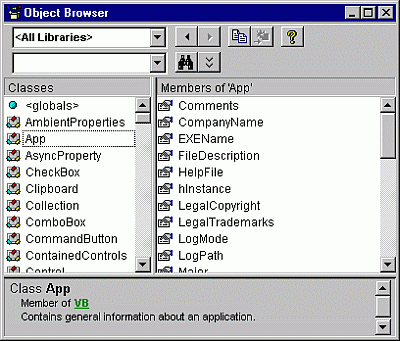
You could investigate each property/method from:

Use the Object Browser
https://learn.microsoft.com/en-us/office/vba/language/reference/user-interface-help/use-the-object-browser

Kevin Yip  @Reply  
     
12 months ago
Raymond Documentation only documents; it doesn't necessarily teach or walk-through.  It is all written in standard tech lingo instead of a teacher's lingo.  For instance, Microsoft's documentation for QueryDefs says that "a QueryDefs collection contains all QueryDef objects of a Database object..."  Translated to simpler terms: QueryDefs stores all the queries saved in your database's navigation pane, under the Query section.  Maybe that is the kind of "bridge" you need.  Only teaching material, like Richard's courses or books like Access 2019 Bible, can translate tech-lingo into everyday lingo.  But no teacher or book can teach everything.  Eventually you'll need to learn how read the tech-lingo used in documentation.  That's part of the training.
Donald Blackwell  @Reply  
       
12 months ago
I agree with both Raymond and Kevin about the documenttation.. on some things they have good examples others and just has the technical explanation
Gary James  @Reply  
      
12 months ago
Maybe Twin Basic will have it, but I've always been disappointed that VBA lacked the full features of VB6 when it comes to the design of various types of Menus, and the variety of controls that can be used to build application forms and dialogs.

I also don't like the idea that Access presents it's main application window as an entity withing the Access application itself.  
Why couldn't Access generate a stand-alone.EXE application that represents the main user interface, with Access running underneath as a coded library.
Kevin Yip  @Reply  
     
12 months ago
Gary  That's because everything in Access is under the Application object (which is Access itself).  Pretty all the VBA code -- Forms, TableDefs, QueryDefs, DoCmd, etc. -- are properties of the Application object, which is the parent of everything.  That is the structure of the entire VBA object model, which you can't change.  That's why Access apps can never be stand-alone.  They always need Access running in order to run.
Gary James  @Reply  
      
12 months ago
Kevin, I agree, but you have to remember this blog was about suggestions for IMPROVMENTS.   I know how Access works in its current state, my suggestion was for an IMPROVEMENT.
Kevin Yip  @Reply  
     
12 months ago
Gary  They "improved" it my making Visual Studio (which does allow you to create stand-alone executable).  Sometimes, companies don't improve existing products; they make new ones instead.  Microsoft has done this for a long time regarding Access.  They have given tons of features that we wish Access would have to other Microsoft products instead.  We need to be realistic about this.  If we keep waiting Access to have certain features, maybe we should switch to other products that have those features instead.
A Glenn Yesner  @Reply  
     
11 months ago
Seems minor compared to other suggestions but this is annoying.
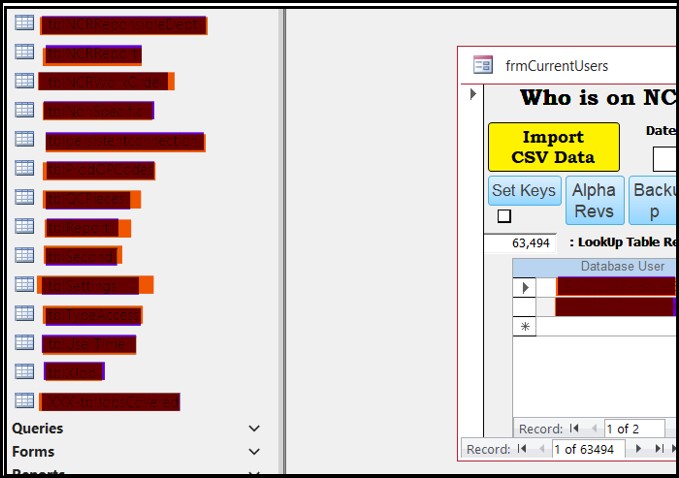
I have my navigation pane on the left side of the Access window normally closed (minimized?).
When I have open forms/reports and click on the navigation pane to open it, it pushes the open forms to the side such that I can see the open navigation pane and still see the forms/reports. No problem.
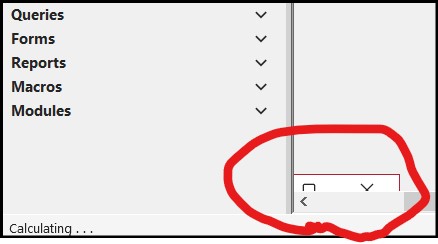
If I have a form or report (or several) minimized as a little rectangle at the bottom left of the Access window and click to open the navigation pane the navigation pane does not push the little minimized rectangles to the side, it covers them. It would be nice if the navigation pane would push the little minimized rectangles to the side as it does the opened forms/reports.
A Glenn Yesner  @Reply  
     
11 months ago

A Glenn Yesner  @Reply  
     
11 months ago

Richard Rost OP  @Reply  
          
11 months ago
A Glenn yes, I wish that when the navigation pane slid open, it just opened as an overlay on top of the rest of the windows because yeah, I hate that too when it pushes stuff off the right side.

This thread is now CLOSED. If you wish to comment, start a NEW discussion in Access Forum.
 

Next Unseen


What's This?


The following is a paid advertisement
Computer Learning Zone is not responsible for any content shown or offers made by these ads.
 

Learn
 
Access - index
Excel - index
Word - index
Windows - index
PowerPoint - index
Photoshop - index
Visual Basic - index
ASP - index
Seminars
More...
Customers
 
Login
My Account
My Courses
Lost Password
Memberships
Student Databases
Change Email
Info
 
Latest News
New Releases
User Forums
Topic Glossary
Tips & Tricks
Search The Site
Code Vault
Collapse Menus
Help
 
Customer Support
Web Site Tour
FAQs
TechHelp
Consulting Services
About
 
Background
Testimonials
Jobs
Affiliate Program
Richard Rost
Free Lessons
Mailing List
PCResale.NET
Order
 
Video Tutorials
Handbooks
Memberships
Learning Connection
Idiot's Guide to Excel
Volume Discounts
Payment Info
Shipping
Terms of Sale
Contact
 
Contact Info
Support Policy
Mailing Address
Phone Number
Fax Number
Course Survey
Email Richard
[email protected]
Blog RSS Feed    YouTube Channel

LinkedIn
Copyright 2026 by Computer Learning Zone, Amicron, and Richard Rost. All Rights Reserved. Current Time: 9/5/2026 3:13:46 PM. PLT: 0s