No need to keep a list of reserved words. You can look them up here: https://support.microsoft.com/en-us/office/learn-about-access-reserved-words-and-symbols-ae9d9ada-3255-4b12-91a9-f855bdd9c5a2
There are lots of examples of naming conventions online that are very useful. This will also help you when it comes time to debug errors.
-Raymond
Kevin Yip
@Reply 12 months ago
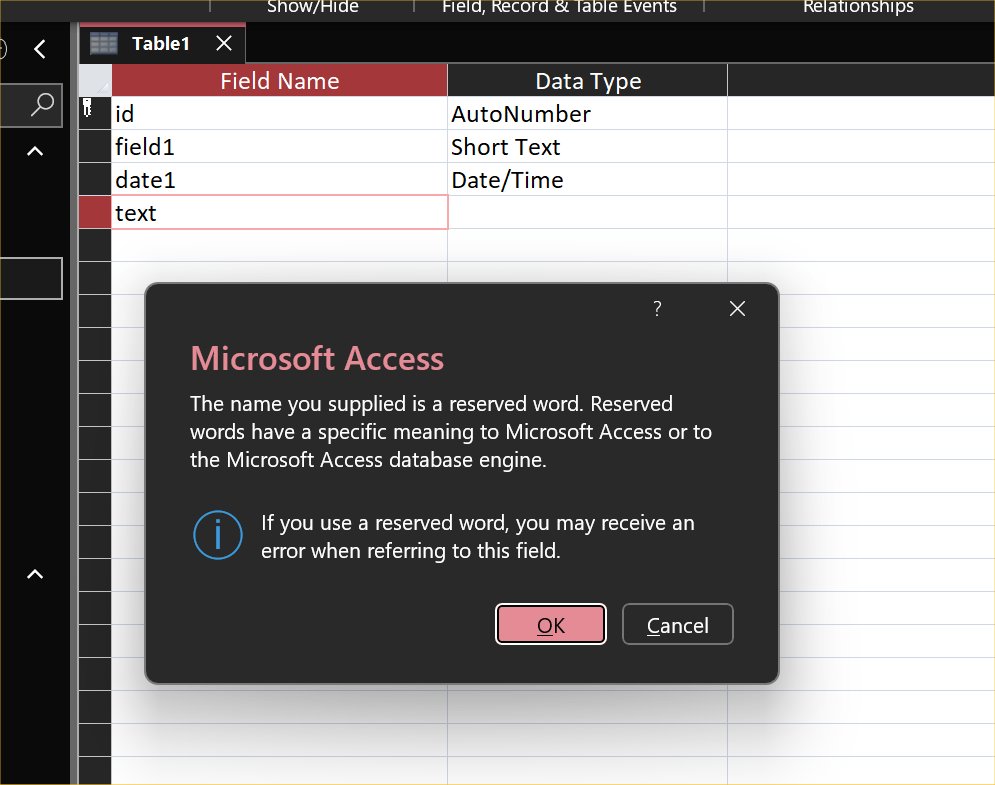
The most important names to get right are table names and field names, because it may become difficult to rename them down the road, as any developer can attest. Access table design actually warns you about some reserved words (picture below), but not others. It warns you when you use "Name" or "Text", but doesn't warn you if you use "Caption", "Height", "Width", etc., even though they are all common property names. Therefore, the user has to be vigilant when Access doesn't give a warning, because that does NOT necessarily mean it's okay. Sometimes you can get by with reserved words, but sometimes you get conflicts. E.g. Me.Caption could be a form field named Caption or the form caption itself.
Kevin Yip
@Reply 12 months ago
Kevin Yip
@Reply 12 months ago
Raymond Those are Lezynski naming conventions, and there are supporters and detractors for them. I don't use them, and neither does Richard, I believe. But I do use some form of conventions (as most coders would), especially for non-local names that have wide scope. Local variables I usually don't worry about; if I keep procedures short (a good general practice for any coder), the reader can usually see the Dim statements at the top. But public vars and procedure names have wide scope and can show up anywhere, potentially confusing the reader. What I usually do is use "G_" to denote public vars for all modules, "M_" to denote public vars for one module only, and verbs for naming procedures:
I was thinking of developing something that people could install on their databases. Basically a table with all the reserved words and a little bit of code that could just scan all of your object names and your field names. And make a list of any ones it finds that are reserved words like the ones you mentioned: Name, Text, Caption, Height, etc.
Some platforms (including .Net) support "overloading," which allows the same name to be used for different functions, properties, etc. That means reserved words can also be re-used as something else. In fact, VB.Net uses many of its own reserved words for different purposes. For instance, the Right() string function shares the same name as the Right property of a control, its right margin:
s = Strings.Right(s, 2) ' The rightmost 2 characters of s
i = MyTextbox.Right ' Distance from the textbox to the right edge of the form
Dim right As Integer ' User-defined variable named right
If you are a Visitor, go ahead and post your reply as a
new comment, and we'll move it here for you
once it's approved. Be sure to use the same name and email address.
This thread is now CLOSED. If you wish to comment, start a NEW discussion in
Access Expert 6.