Free Lessons
Courses
Seminars
TechHelp
Fast Tips
Templates
Topic Index
Forum
ABCD
 
Home   Courses   TechHelp   Forums   Help   Contact   Merch   Join   Order   Logon  
 
Back to Value From Subform    Comments List
Upload Images   @Reply   Bookmark    Link   Email   Next Unseen 
How to Save Calculated Field to the Table
Stephen Gledhill 
     
8 months ago
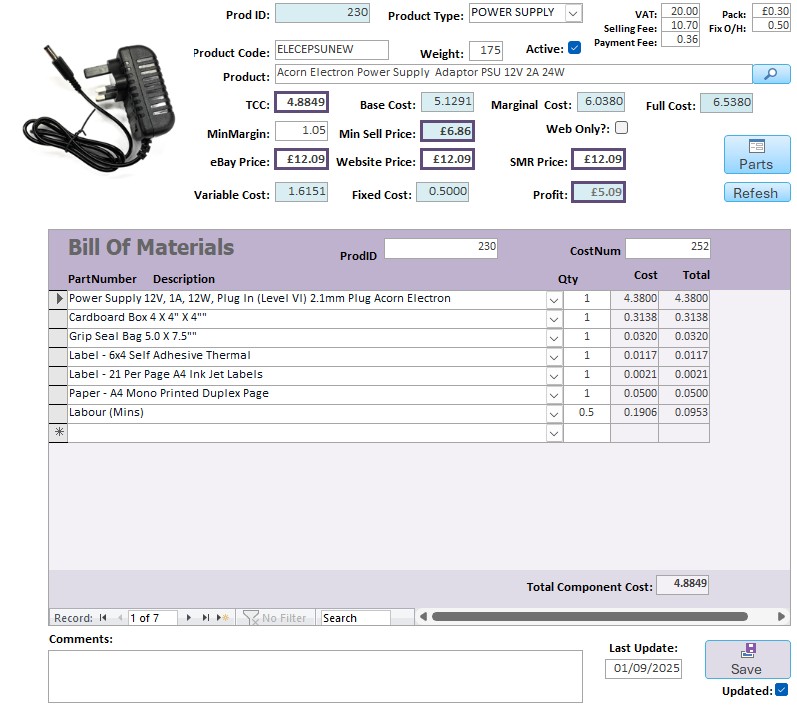
I have a Product form with a Bill of Materials subform to calculate the Total Component Cost (TCC) of a product. The TCC is the sum of the line items in the subform.
The main form also has the TCC field (which picks up its value from the subform TCC field). This field forms the base for a series of calculated fields for the the full costing and suggested selling price etc.
I want the value of the TCC field on the main form to be saved in the Product Table as it is a key field in several reports, but I don't know how to do this.
Could you help? I will attach a snip so hopefully you can workout what I am trying to describe.
Stephen Gledhill OP  @Reply  
     
8 months ago

Donald Blackwell  @Reply  
        
8 months ago
You could add the TCC field to your ProductT table and then set the control source of that field to be the table field.

You would just need to add event handlers in the sub form (after update) to update the value in the parent form to make sure the value stays current. I would also recommend disabling deletes in the subform and then if you want to allow deletions, add a button that you control so you can make sure that that updates the parent field as well.
Stephen Gledhill OP  @Reply  
     
8 months ago
Hi Donald
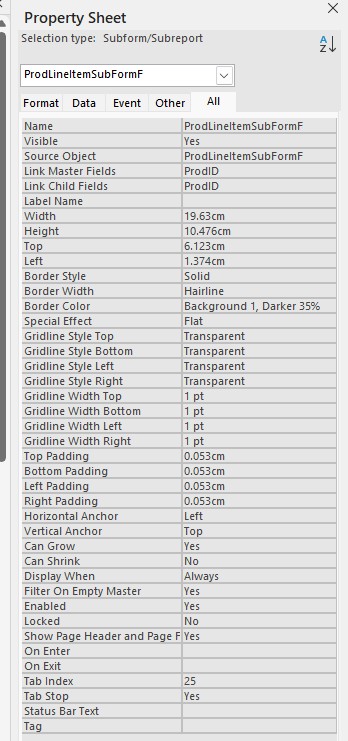
The main form TCC is already in the main Table, but it's control source is the TCC field in the subform (=[Forms]![ProductCostBuildF]![ProdLineItemSubFormF].[Form]![SumTotalCost]), so it it doesn't get saved to the table.
It's getting it into the Table that I can't work out how to do.
Am I understanding you correctly?
Donald Blackwell  @Reply  
        
8 months ago
Stephen Yeah, that's what I was getting at, but sorry if I was unclear. There are 3 methods I can think of off the top of my head:

1) The field in the Main Product form needs to be bound to the table and use VBA or a Macro from the subform to update the value in the main form when the subform gets updated

2) You'd need to have, again, VBA or a Macro in the subform that updates the Product table's TCC value when the subform is updated

3) You'd need to have VBA or a Macro in the Main form that when it unloads (closes or moves to a new record) checks to see if the value in the table is different than the value on the form and if it is, update the table at that point.
Stephen Gledhill OP  @Reply  
     
8 months ago
That makes sense Donald - I think option 1 would be the one to go for.
Would you be able to help me with the VBA code to use on the After Update event of the TCC subform field?
Donald Blackwell  @Reply  
        
8 months ago
Sure.

I would use the form's AfterUpdate event for the Subform.

Close the main form and then just open the form that's in the subform in design view. When you've got the "Form" selected (so it shows "Form" in the drop down in the properties window). Go to the events tab and click in the "AfterUpdate" line of the events tab. Then click the 3-dots to open the VBA editor. If you get a popup asking you to choose a builder, choose "Code Builder".

It will then bring you to the VBEditor window with the Form_AfterUpdate() sub procedure in view:

DetailsPrivate Sub Form_AfterUpdate()
    
     ' Update the parent form's TCC field
     Parent.TCC = SumTotalCost
     Parent.Refresh

End Sub


Change the TCC to the name of the field in the main form. The "Refresh" will make sure it gets saved.

The proceeding will work as long as this form is always used as a sub-form, however, if you might use it as a standalone form, you would need to modify it as follows:

Private Sub Form_AfterUpdate()

    'Update the FORMNAME TCC field
     Forms(FORMNAME)!TCC = SumTotalCost
     Forms(FORMNAME).Refresh

End Sub
Stephen Gledhill OP  @Reply  
     
8 months ago
Brilliant Donald - thank you very much indeed.
I will do this and report back!
Stephen Gledhill OP  @Reply  
     
8 months ago
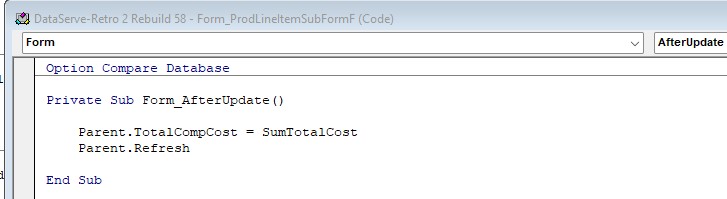
Unfortunately it didn't work Donald.
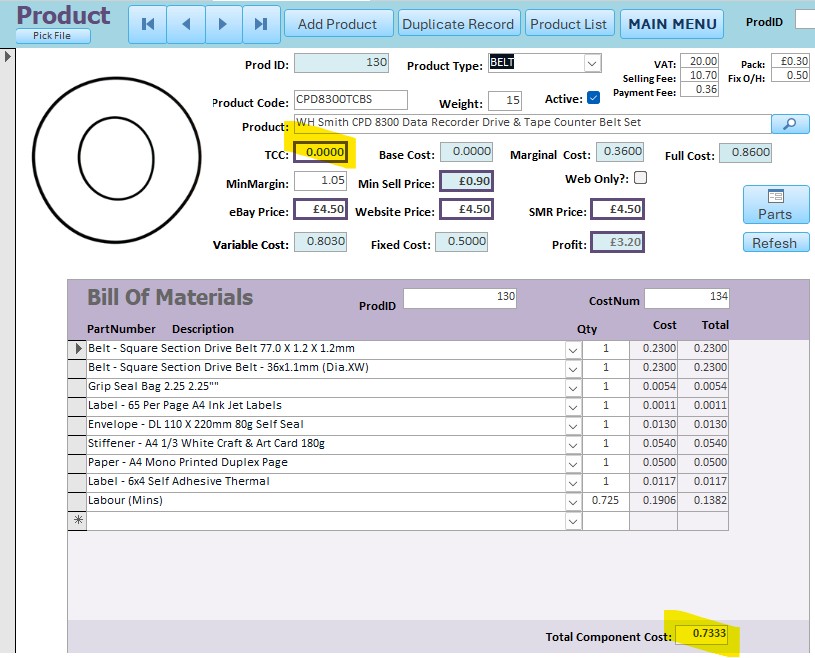
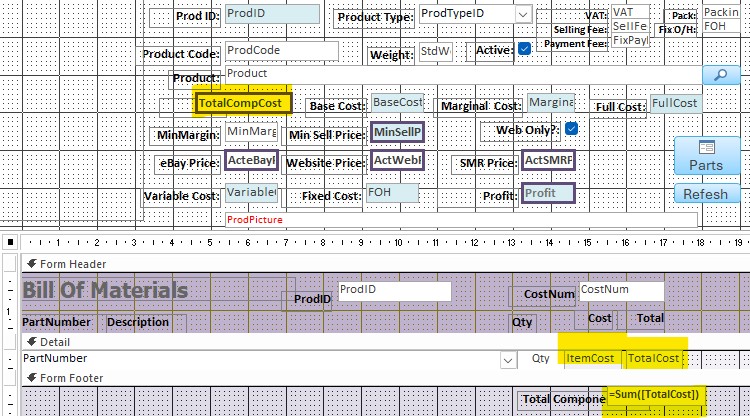
I added the code as instructed, but now when I make a change to the Bill of Materials Subform, the Subform [SumTotalCost] field recalculates, but the [TotalCompCost] field on the main form is changed to 0.0000.
I have attached snips of the code I entered, and the results on the form with the two fields highlighted.
Can you see anything I did wrongly?
Should I have made any changes to the [TotalCompCost] field's  Control Source on the parent form? It is currently the [TotalCompCost] field on ProductT (the Product Table).
Stephen Gledhill OP  @Reply  
     
8 months ago

Stephen Gledhill OP  @Reply  
     
8 months ago

Donald Blackwell  @Reply  
        
8 months ago
Stephen, please accept my apologies.
1. for the delayed response - been handling a family situation for the last couple weeks so my time online is more sporadic than usual

2. I mistyped the notation. Try:

Parent!TotalCompCost = SumTotalCost
Parent.Refresh

When addressing the field name it should be a bang (!) and when addressing a property, it should be a dot (.) If that doesn't resolve the issue then maybe give screen shots of your table forms and tables again in design view where we can see if I'm missing something.

Again, sorry for delayed response.

Don
Stephen Gledhill OP  @Reply  
     
8 months ago
No apologies necessary Donald - I appreciate your help!
Hope family is OK.
I corrected the typo, but sadly still the same - the [TotalCompCost] field is changed to 0.000 when I make any change to the BOM subform.
I tried Forms!ProductCostBuildF!TotalCompCost = SumTotalCost as well, but just the same result.
Stephen Gledhill OP  @Reply  
     
8 months ago

Stephen Gledhill OP  @Reply  
     
8 months ago

Donald Blackwell  @Reply  
        
8 months ago
Hmm, maybe we're trying to catch the new total too soon... I did run into similar problems in my trials. But seemed to work just changing one thing:

DetailsPrivate Sub Form_AfterUpdate()
    
     ' Update the parent form's TCC field
     Me.Requery
     Parent!TotalCompCost = SumTotalCost

End Sub

Stephen Gledhill OP  @Reply  
     
8 months ago
That's cracked it Donald! Thank you so much.
I have a similar issue with another parent - subform with Parts and suppliers.
I'll try this with that one too.
Thanks again.
Donald Blackwell  @Reply  
        
8 months ago
Glad it worked :) The problem was that even though the fields had updated, then underlying query of the subform hadn't updated. I should have thought of that first. Richard has shown that in most of his videos.
Stephen Gledhill OP  @Reply  
     
8 months ago
I never saw that in Richard's videos (unless it went over my head). I watched several before posting, but they all seemed to be just calculated field to calculated field, not to a field which had a control source to the table. Or buttons to field.
I'm new to Access (as you have probably noticed!) and struggling in particular to get my head around VBA.
Donald Blackwell  @Reply  
        
8 months ago
You're doing fine :) As you continue through Richard's courses, you'll get more comfortable with everything. And you're always welcome to post questions if something has you stumped, it usually doesn't take long for someone or some people to happily offer suggestions here.
Stephen Gledhill OP  @Reply  
     
8 months ago
I still have an issue Donald - the TotalCompCost field on the main form updates perfectly now from the TotalCompCost on the subform as we discussed, but I'm not quite there.
If I update the price of a part (in the PartT table), which is one of the line items in the Bill Of Materials subform, the cost of the line item and the TotalCompCost in the subform update automatically as they should, but the TotalCompCost in the main form doesn't. I guess it doesn't trigger the AfterUpdate event code. Is there a way to automatically trigger the AfterUpdate event (or put the code in a different event)?
Hope you can understand what I am struggling to describe.
Donald Blackwell  @Reply  
        
8 months ago
In the after update event of the PartCost in your Bill of Materials, you should be able to just add:

TotalCompCost = ProdLineItemSubFormF.Form!SumTotalCost

Unfortunately, the afterupdate events in the subform that we set up earlier don't trigger from code unless you specifically call them.
Stephen Gledhill OP  @Reply  
     
8 months ago
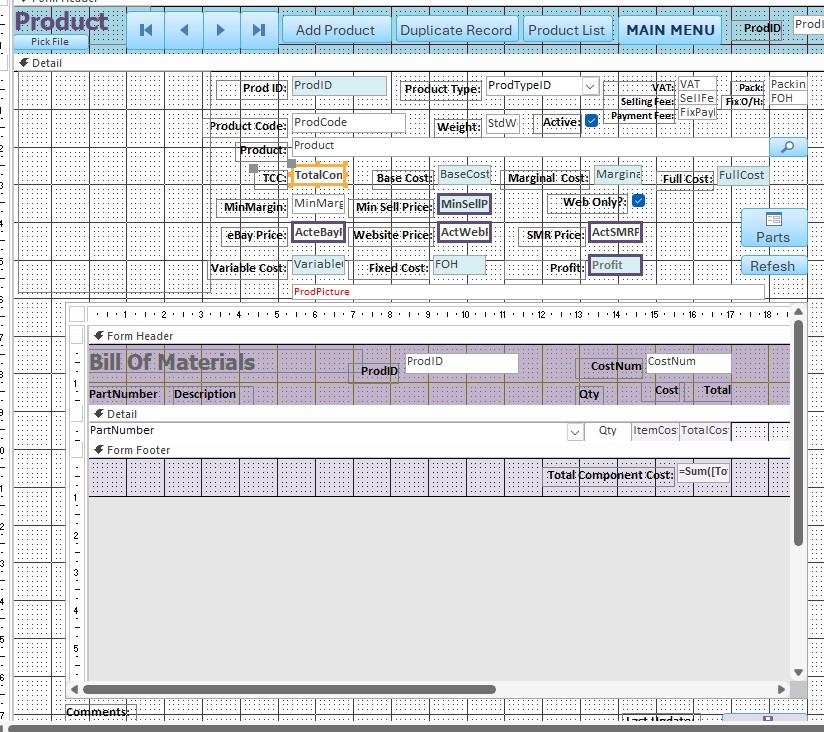
The Bill of Materials subform, I doesn't have a filed called [PartCost] Donald. I have tried putting the code into the [ItemCost] AfterUpdate event, but it didn't work. The parent form TotalCompCost field updates if I make any changes to the BOM subform items whilst the parent form is open. That part of the problem is solved.
However, when they are closed and an adjustment is made to a part price in the PartT table, it flows through to the BOM subform OK, but doesn't get through to the all important TotalCompCost on the BOM's parent form.
Should your code suggestion be:
Parent!TotalCompCost = ProdLineItemSubFormF.Form!SumTotalCost
based on your earlier advice?
I have attached another screen snip so you can see the highlighted field names more clearly.
Thanks for your continued patience.
Stephen Gledhill OP  @Reply  
     
8 months ago

Donald Blackwell  @Reply  
        
8 months ago
Hmm, not sure why I didn't  see the field name and get it right from the subform, sorry.

Since we're still working from within the subform, we can just tweak what we had earlier before a little bit so we don't need to duplicate a lot of code.

Our previous code can be deleted:
Private Sub Form_AfterUpdate()
    
     ' Update the parent form's TCC field
     Me.Requery
     Parent!TotalCompCost = SumTotalCost

End Sub


Can be replaced with a function that can be called from anywhere in the subform so that we don't have to have duplicate code:

DetailsPublic Function UpdateProductTotalCompCost()
    
     ' 1st, make sure this form as updated its record so that we get the most current information
     Me.requery
     Parent!TotalCompCost = SumTotalCost
     ' Save the new data to the product form as well
     Parent.Dirty = False

End Function


Then, back in the even properties of the form and controls for the subform, you can call this directly. This way, any field that updates the total will update the Parent (Product) form.

For example, in the form AfterUpdate event, in the ItemCost AfterUpdate event, and even instead of "[Event Procedure]" you can put:

Details=UpdateProductTotalCompCost()


If the name I gave the function is too long, feel free to change it, "UpdateProductTCC()" or whatever you like.

Let me know if I got this wrong and I'll dig deeper.

Don
Stephen Gledhill OP  @Reply  
     
8 months ago
Thanks for trying again Donald.
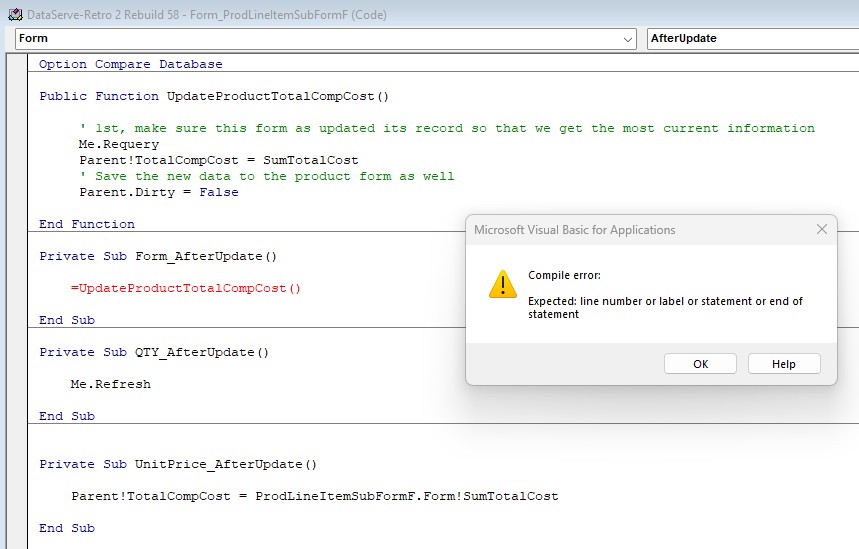
I can't get this to work I'm afraid - I just get a VBA Compile error when trying to call the function.
I just can't get my head around the VBA - I'm sure I have done something wrong, but I can't understand the error message.

I've watched some more Richard's videos on functions, but I got more confused as I can't understand the "return value" parts he describes, in relation to the function code you sent me.

I have attached a screenshot again...
Stephen Gledhill OP  @Reply  
     
8 months ago

Donald Blackwell  @Reply  
        
8 months ago
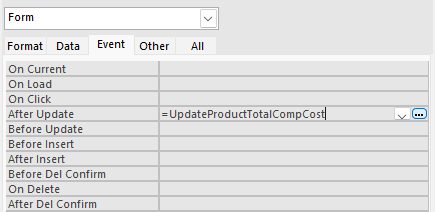
Ahh, yeah, I should have given you a screen shot. That line doesn't go in the VB Editor code. It goes right in the form event properties.

See the following image.
Donald Blackwell  @Reply  
        
8 months ago

Stephen Gledhill OP  @Reply  
     
8 months ago
I did some more research and managed to get the function call to work by removing the "=" sign from start and the brackets at the end.
I then put the working function call into the AfterUpdate events of the QTY and ItemCost fields, but that final update of the main form TotalCompCost still only updates when the main form and subform are open. Changing the price of a part doesn't flow through. There must be a way to do it...
Stephen Gledhill OP  @Reply  
     
8 months ago
Sorry - got out of synch with posts!
I'll reverse what I did and try again.
Which form though - the subform I assume?
How do I put it in the fields? Directly on the field properties (not the VBA for those either)?
Stephen Gledhill OP  @Reply  
     
8 months ago
In your last screenshot Donald, you didn't put the open and close brackets at the end of the function name. In your earlier screenshot, you had them in. Which one should I use?
Donald Blackwell  @Reply  
        
8 months ago
Oops, sorry, in the form properties you do need the opening and closing parenthesis. And the other way you got it to work by adding it in the code for each of the fields to the AfterUpdate event for each without the equal sign. The property dialog method just saves having so much code.

As for still not updating, maybe I miss interpreted something. Are you trying to directly update the numbers in the table datasheet view and it's not updating the value? It's not recommended to do that. You would have to create some table level macros.
Stephen Gledhill OP  @Reply  
     
8 months ago
The first part of what I want to achieve is now working - I can build the Bill of Materials of a product by summing up the component parts from the PartT table, then automatically transfer that value to the TotalCompCost field in the main Product form. Before your help I had to remember to manually copy and paste between the two.
The cost of the parts in the PartT table (which make up the Product Line Items) regularly change, and I update these monthly in the PartT table.
When I update the parts cost, I want that to flow right through to the TotalCompCost field in the Product table so that the overall Product cost stays up to date.
If I do this manually for each part cost change, it would take me a very long time. One part can be in up to 200+ products.
I use the Product costs to review selling prices which I update separately. Product costs don't change the selling price directly.

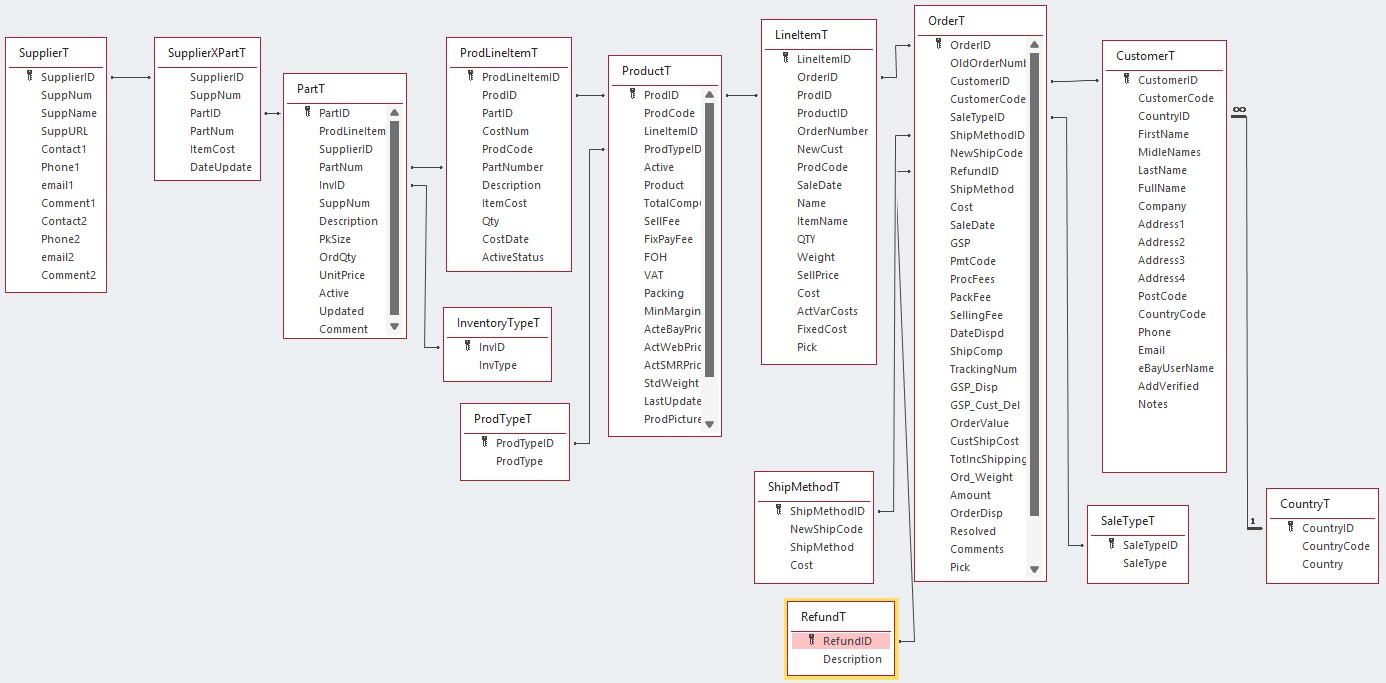
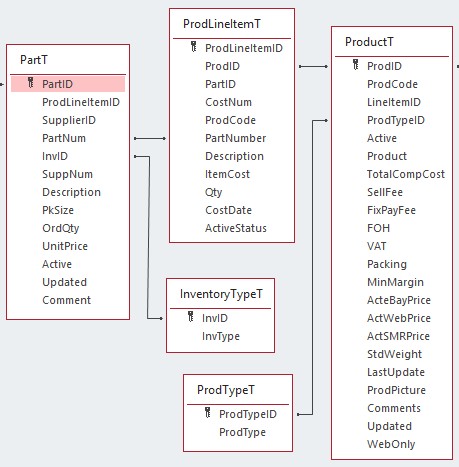
I have attached a couple of relationship diagrams - one showing the overall database and one focused on just the area you are helping me with.
Hope this helps you understand what I'm trying to do?
Stephen Gledhill OP  @Reply  
     
8 months ago

Stephen Gledhill OP  @Reply  
     
8 months ago

Donald Blackwell  @Reply  
        
8 months ago
OK, say it's updating everything up to the Subform, but when you load the form, it isn't automatically updating the TotalCompCost with the updated price.

If this is where the problem is, it's because we currently have it updating that only after an update to the fields in the subform. If that is what you want to accomplish, it will be easy enough. We will just have the main form recheck the Total each time it loads. May add a second or so to the load time.

DetailsPrivate Sub Form_Current()

     TotalCompCost = ProdLineItemSubformF.Form!SumTotalCost
     Me.Dirty = False

End Sub


This would be placed in the Form->On Current event for your main product form
Stephen Gledhill OP  @Reply  
     
8 months ago
That logic sounds solid - I'll try that and report back.
Thanks again.
Stephen Gledhill OP  @Reply  
     
8 months ago
All good now Donald - many thanks.
One knock on effect of this - when I am entering product line items into the BOM subform, when I reach the end of the row, the cursor would normally move down to the start of the next product line item row.
Now, it shoots back up to the first field of the first line entered. If I don't notice I over-write the first line item.

Is this a consequence of the me.requery in the subform afterupdate event we added?
Donald Blackwell  @Reply  
        
8 months ago
That probably is it. You could try adding:

DetailsDoCmd.GotoRecord ,, acNewRec


after the requery line and that should get you back to where you need to be.
Stephen Gledhill OP  @Reply  
     
8 months ago
That's done the trick Donald - thanks for your help again. I'll try and leave you alone for a bit now!
Donald Blackwell  @Reply  
        
8 months ago
Glad we got it sorted out :) Always happy to help.

This thread is now CLOSED. If you wish to comment, start a NEW discussion in Value From Subform.
 

Next Unseen

 
New Feature: Comment Live View


The following is a paid advertisement
Computer Learning Zone is not responsible for any content shown or offers made by these ads.
 

Learn
 
Access - index
Excel - index
Word - index
Windows - index
PowerPoint - index
Photoshop - index
Visual Basic - index
ASP - index
Seminars
More...
Customers
 
Login
My Account
My Courses
Lost Password
Memberships
Student Databases
Change Email
Info
 
Latest News
New Releases
User Forums
Topic Glossary
Tips & Tricks
Search The Site
Code Vault
Collapse Menus
Help
 
Customer Support
Web Site Tour
FAQs
TechHelp
Consulting Services
About
 
Background
Testimonials
Jobs
Affiliate Program
Richard Rost
Free Lessons
Mailing List
PCResale.NET
Order
 
Video Tutorials
Handbooks
Memberships
Learning Connection
Idiot's Guide to Excel
Volume Discounts
Payment Info
Shipping
Terms of Sale
Contact
 
Contact Info
Support Policy
Mailing Address
Phone Number
Fax Number
Course Survey
Email Richard
[email protected]
Blog RSS Feed    YouTube Channel

LinkedIn
Copyright 2026 by Computer Learning Zone, Amicron, and Richard Rost. All Rights Reserved. Current Time: 6/16/2026 4:43:09 PM. PLT: 0s