Free Lessons
Courses
Seminars
TechHelp
Fast Tips
Templates
Topic Index
Forum
ABCD
 
Home   Courses   Templates   Seminars   TechHelp   Forums   Help   Contact   Join   Order   Logon  
 
Home > Forums > Access
Back to Access Forum    Comments List
Upload Images   @Reply   Bookmark    Link   Email   Next Unseen 
Multiple Addresses, Pick 1 For Order
Liem Khen 
     
2 months ago
I am confusing,I know how to use one to many or many to many relationship

I have CUSTOMERT ; InvoiceT ;Adresst

I can create a form 1 Customer with 3 Adresses but in the InvoiceF I want to display the addres as well so the relation ARE BETWEEN the Invoicet and the Addresst with Customert

I need your help
THANKS
  
Liem Khen OP  @Reply  
     
2 months ago
In the INVOICEF used CUSTOMERID and to display the ADDRESS using CUSTOMERID as well

With this relationship there was no displaying fields

Ihope you can help me
Thank you
Richard Rost  @Reply  
          
2 months ago
Well, in your invoice, you'll just have one field for the address, which is for the address that that order was sent to. To pick that address, you'll need a combo box to show all of the addresses for that customer. Make a combo box with those criteria and then store that single address in the invoice table.
Liem Khen OP  @Reply  
     
2 months ago
Formerly I used
Customert or Vendort related to Addresst of office
Customert related to Addresst of the warehouse (for retyrning goods to vendors)
Custvendt related to Addressforinvoice table
In the invoice displaying the ADDRESS is easy

CUSTOMERS OR VENDORS I used only one table with a FILTERFIELD to choose customer or vendor ...tablename CUSTVENDT

in the invoice FORM I used a query
Custvendt - Address for invoice table - transaction table

I am  confused as I am trying to use the address mixed to ONE TABLE
Here in invoice form the relationship become

           Addresst - Custvendt - Transaction table

And no fields displayed as a result
Liem Khen OP  @Reply  
     
2 months ago
Sorry doubled
Raymond Spornhauer  @Reply  
         
2 months ago
Liem Khen OP  @Reply  
     
2 months ago
Ya I did
So that the customer form precisely as in the RICHARDS multiple address video one customer relates to more than one address

But in my invoice form, there are 3 tables
       Transaction table for invoice -
        Custvendt and Addresst

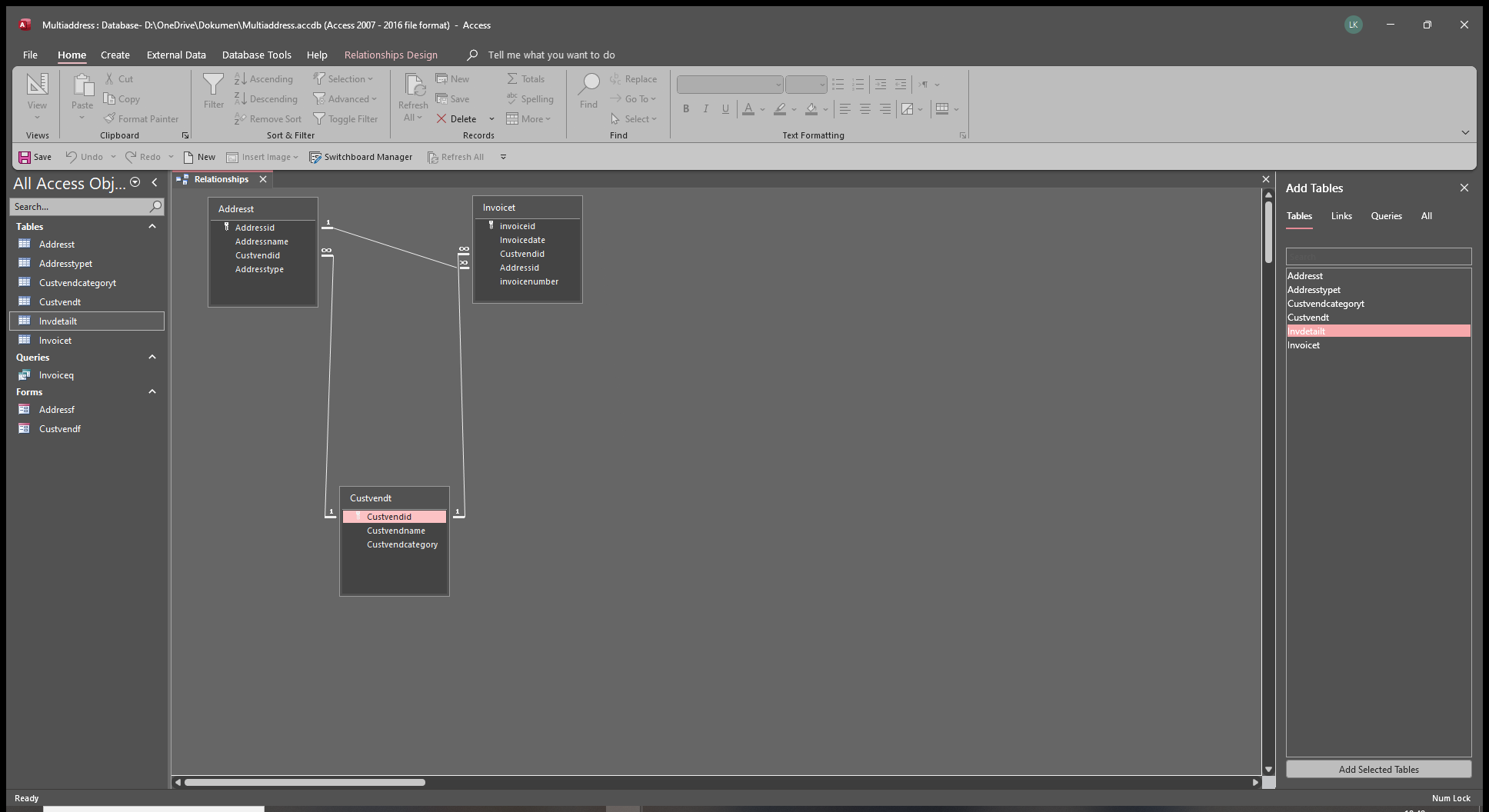
In transaction table (custvendid-foreign key) relates to Custvendt (Custvendid) and Addresst (Custvendid-foreign key)

This relationship has no fields displayed if I open the form

Help me the correct way
Thanks
Richard Rost  @Reply  
          
2 months ago
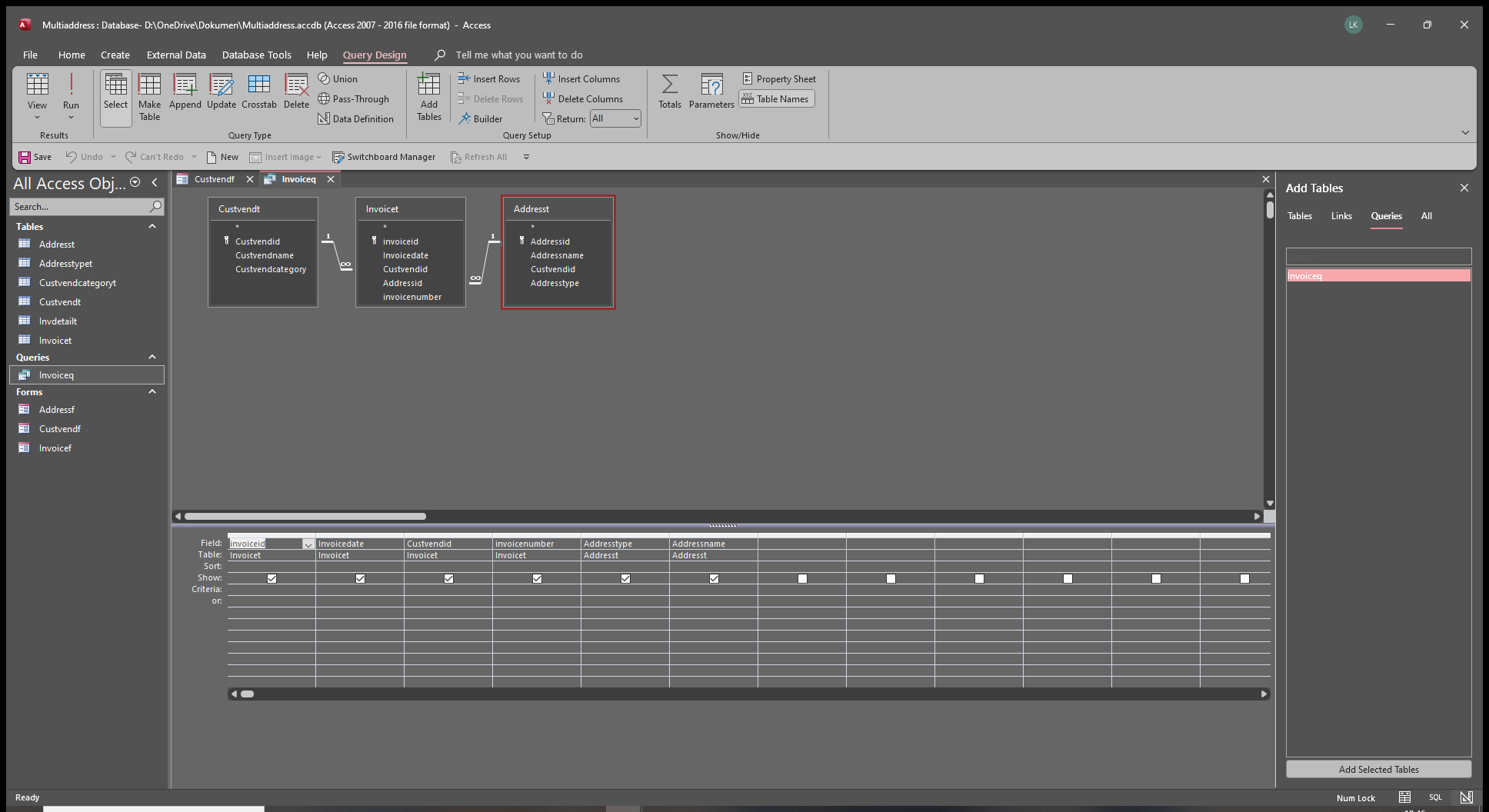
Show us a picture of your query.
Liem Khen OP  @Reply  
     
2 months ago
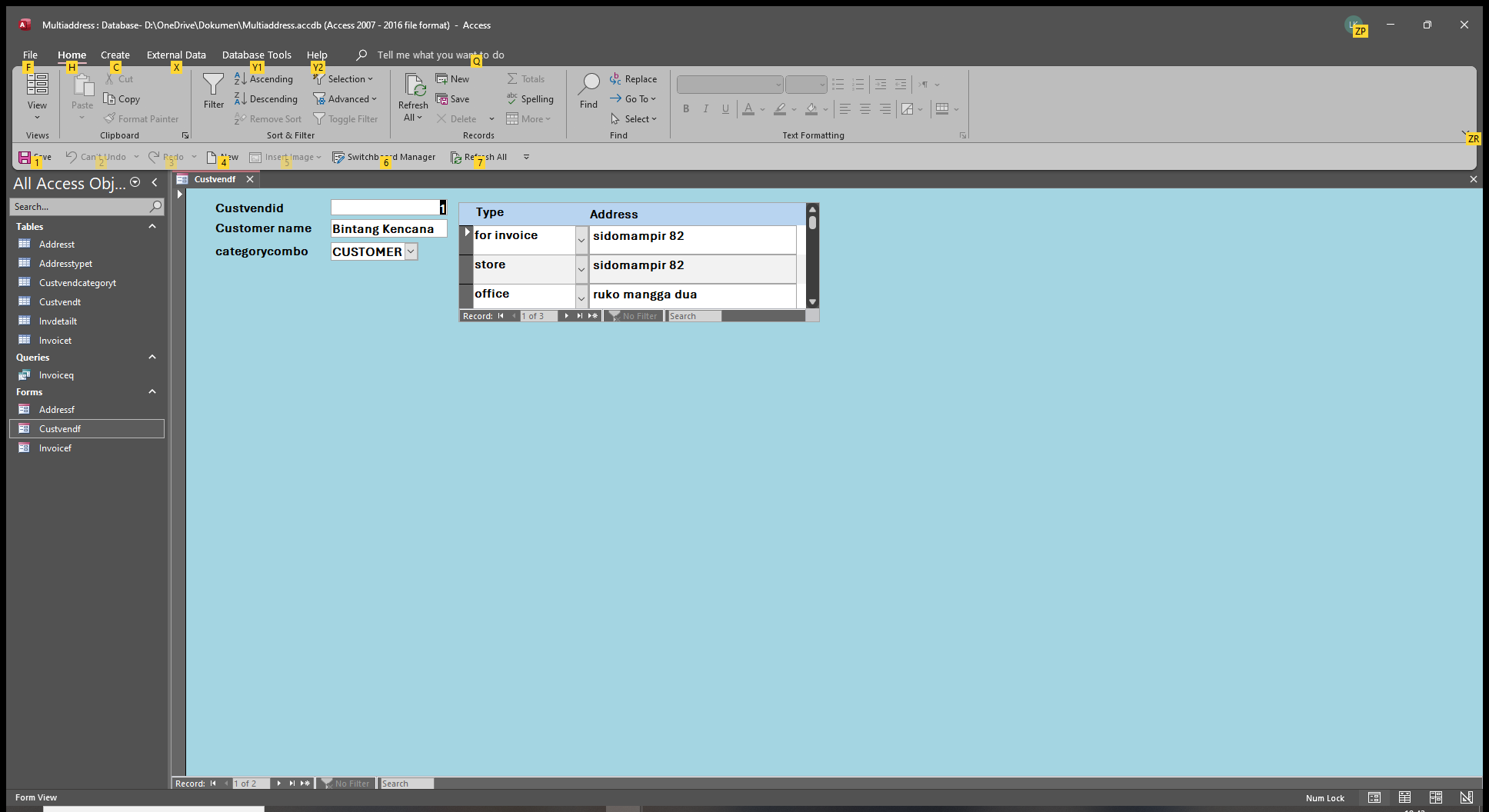
There are no fields displayed
I want to display the store type Address in the INVOICE
Liem Khen OP  @Reply  
     
2 months ago

Richard Rost  @Reply  
          
2 months ago
Okay maybe we're not understanding each other. On each invoice, you want to pick a single customer that the invoice belongs to, correct? And then you also want to pick a single address from that customer where the invoice is being shipped, right?
Liem Khen OP  @Reply  
     
2 months ago
Ya correct RICHARDS and how is the correct relationship
I am used to do the other way around,I put each ADDRESS in the Custvend table.
Also po box -city ...etc I put all of them in Custvend table

With multitable relationship as in the video you hhave,how to display the Address to ship or
Displaying the ADDRESS (destination) if we send letters

I hope you know what I meant
Thank you


Liem Khen OP  @Reply  
     
2 months ago
Sorry multiaddress video
Kevin Yip  @Reply  
     
2 months ago
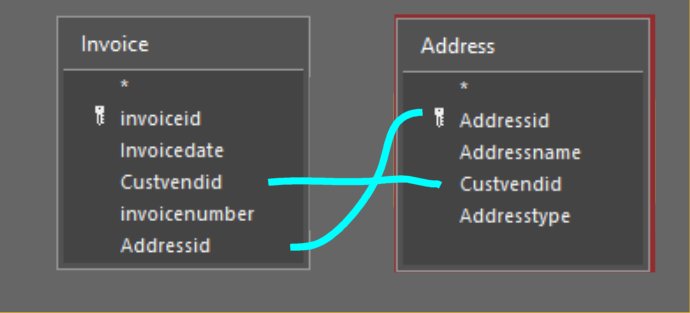
Liem  Richard is correct.  You need the AddressID field in your Invoice table too, and link the AddressID and CustVendID fields on both sides, similar to the picture below.  In my old job, I had the invoice table set up the same way.  In the industry I worked in (yours may be the same too), each invoice should be made for each shipping address.  If a customer places an order to be shipped to 500 stores, then you need to make 500 separate invoices.  The only way this is possible is to have both the invoice ID and the shipping address ID in the invoice table.
Kevin Yip  @Reply  
     
2 months ago

Liem Khen OP  @Reply  
     
2 months ago
One customer to many ADDRESSES...IAM SORRY
Liem Khen OP  @Reply  
     
2 months ago
Oooh...okay KEVIN
Liem Khen OP  @Reply  
     
2 months ago
Sorry...sending letters are not problems because no other table in the relationship
Liem Khen OP  @Reply  
     
2 months ago
displaying the Address in the invoice intend for the salesman where to ask for payment
I am sorry I still can display the address
Liem Khen OP  @Reply  
     
2 months ago

Liem Khen OP  @Reply  
     
2 months ago

Liem Khen OP  @Reply  
     
2 months ago

Liem Khen OP  @Reply  
     
2 months ago
that is query for my invoice,but I have to choose the type field firstly FOR INVOICE to display the correct address
Liem Khen OP  @Reply  
     
2 months ago
I still can not display the address
Liem Khen OP  @Reply  
     
2 months ago
If what I am doing above is not correct
I HOPE you will help me by showing the correct way
I know creating the multi address but I am confused  using it
May be the relationshi I made was not CORRECT
Richard Rost  @Reply  
          
2 months ago
Okay, I tell you what, since you're having trouble, I'm going to make a video about this. I'm going to base it on the database from my Multiple Addresses series, so if you have not yet watched those 5 videos, watch those first. Later today or tomorrow, I'll make a video on how to pick one of those addresses to put on an invoice.
Liem Khen OP  @Reply  
     
2 months ago
Oooo my GOD !!!
That is what I am waiting for

THANK YOU VERY MUCH *RICHADS*
Richard Rost  @Reply  
          
2 months ago
Should have it for you tomorrow. I got it outlined today. Recording it tomorrow. Definitely watch that Multiple Addresses series I linked to above. I'll be using that database.
Liem Khen OP  @Reply  
     
2 months ago
THANK YOU RICHARDS
Richard Rost  @Reply  
          
2 months ago
Start here: Pick Address

Part 2 soon.
Liem Khen OP  @Reply  
     
2 months ago
RICHARDS , thank you for the attention.
Now I can display the address in my FORM.
I also follow the cascading combo box video

This thread is now CLOSED. If you wish to comment, start a NEW discussion in Access Forum.
 

Next Unseen


The following is a paid advertisement
Computer Learning Zone is not responsible for any content shown or offers made by these ads.
 

Learn
 
Access - index
Excel - index
Word - index
Windows - index
PowerPoint - index
Photoshop - index
Visual Basic - index
ASP - index
Seminars
More...
Customers
 
Login
My Account
My Courses
Lost Password
Memberships
Student Databases
Change Email
Info
 
Latest News
New Releases
User Forums
Topic Glossary
Tips & Tricks
Search The Site
Code Vault
Collapse Menus
Help
 
Customer Support
Web Site Tour
FAQs
TechHelp
Consulting Services
About
 
Background
Testimonials
Jobs
Affiliate Program
Richard Rost
Free Lessons
Mailing List
PCResale.NET
Order
 
Video Tutorials
Handbooks
Memberships
Learning Connection
Idiot's Guide to Excel
Volume Discounts
Payment Info
Shipping
Terms of Sale
Contact
 
Contact Info
Support Policy
Mailing Address
Phone Number
Fax Number
Course Survey
Email Richard
[email protected]
Blog RSS Feed    YouTube Channel

LinkedIn
Copyright 2025 by Computer Learning Zone, Amicron, and Richard Rost. All Rights Reserved. Current Time: 12/9/2025 7:14:41 PM. PLT: 1s