Free Lessons
Courses
Seminars
TechHelp
Fast Tips
Templates
Topic Index
Forum
ABCD
 
Home   Courses   TechHelp   Forums   Help   Contact   Merch   Join   Order   Logon  
 
Back to Access Forum    Comments List
Upload Images   @Reply   Bookmark    Link   Email   Next Unseen 
Program Files X86 Vs Program Files
Ray White 
      
6 months ago
If you build a custom 64-bit Access App when you distribute it for installation to your customers Should you install it in the " Program Files (x86) OR Program Files ".?

I know that the Program Files folder is for 64 bit programs
But what will it do if you install the 64bit app in the Program Files (x86) folder.?
Richard Rost  @Reply  
          
6 months ago
How are you distributing it?
Kevin Yip  @Reply  
     
6 months ago
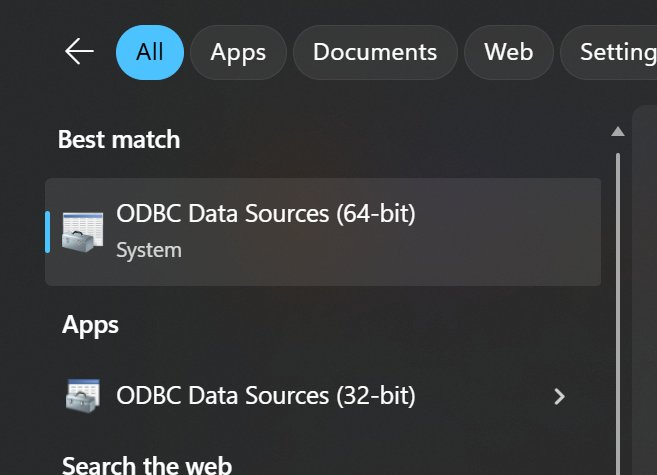
Ray  You should let the user install your app in any folder, a quality-of-life feature that any user would welcome.  Any software can be installed in any folder.  "Program Files (x86)" and "Program Files" are just ways for Windows to organize the files, since Windows contains both 64-bit and 32-bit programs and components.  Sometimes, a single program comes in two versions, 32- and 64-bit, such as Windows "ODBC Data Sources" app (pictured below).
Kevin Yip  @Reply  
     
6 months ago

Ray White OP  @Reply  
      
6 months ago
Richard using SSE installer.
I have always used 32 bit.
I just started using 64 bit Access
Ray White OP  @Reply  
      
6 months ago
I was just wondering what would happen if I distributed the 64 bit version and installed them into the same folders that I always have..
I guess I will play by microsofts rules and install the 64 bit version into the Program File folder and not the Program File folder x86
Richard Rost  @Reply  
          
6 months ago
Yeah, like I said before, I've never used that installer and everything that I've done for the past couple of years is 64-bit. Fortunately, I have the luxury of telling my students, "Hey, you need to upgrade to 64-bit, otherwise this ain't gonna work." But I realize those who are still consulting are still going to deal with customers that are running 32-bit in their offices. So that's just a decision you're going to have to make. I would go with Microsoft's recommendation because every time I've tried to buck the trend and do what Microsoft didn't recommend, I've paid for it later.
Ray White OP  @Reply  
      
6 months ago
Richard Thanks Richard.
I build a 32 and 64 bit version of my software.
All new computers come out with Office 64 bit and a lit of my customers will not uninstall it and reinstall the 32 bit version of Office , So I'll just have to keep building 32 for my old customers and 64 for the new ones.
I sell my programs as SaaS .
Just got to keep the customer happy.
I know you been there done that.
Thanks for all you do...
Ray White OP  @Reply  
      
6 months ago
Richard Also about SSE installer.
Chris the developer of it has retired.  He said that he may do one last update on it.
Im trying to get him to sell the SSE business .
I would like to keep the installer going.
Its the only installer out that is made for Access. I'll keep you posted on it.
Richard Rost  @Reply  
          
6 months ago
Ray if that happens and you do end up acquiring it, let me know. Maybe we can work something out, and I'll help you promote it.
Ray White OP  @Reply  
      
6 months ago
Richard Will do Thanks
Joe Holland  @Reply  
      
6 months ago
Ray what does your software do? We help each other on this forum but we rarely see what others are making.

This thread is now CLOSED. If you wish to comment, start a NEW discussion in Access Forum.
 

Next Unseen

 
New Feature: Comment Live View


The following is a paid advertisement
Computer Learning Zone is not responsible for any content shown or offers made by these ads.
 

Learn
 
Access - index
Excel - index
Word - index
Windows - index
PowerPoint - index
Photoshop - index
Visual Basic - index
ASP - index
Seminars
More...
Customers
 
Login
My Account
My Courses
Lost Password
Memberships
Student Databases
Change Email
Info
 
Latest News
New Releases
User Forums
Topic Glossary
Tips & Tricks
Search The Site
Code Vault
Collapse Menus
Help
 
Customer Support
Web Site Tour
FAQs
TechHelp
Consulting Services
About
 
Background
Testimonials
Jobs
Affiliate Program
Richard Rost
Free Lessons
Mailing List
PCResale.NET
Order
 
Video Tutorials
Handbooks
Memberships
Learning Connection
Idiot's Guide to Excel
Volume Discounts
Payment Info
Shipping
Terms of Sale
Contact
 
Contact Info
Support Policy
Mailing Address
Phone Number
Fax Number
Course Survey
Email Richard
[email protected]
Blog RSS Feed    YouTube Channel

LinkedIn
Copyright 2026 by Computer Learning Zone, Amicron, and Richard Rost. All Rights Reserved. Current Time: 5/6/2026 10:54:37 AM. PLT: 0s