Free Lessons
Courses
Seminars
TechHelp
Fast Tips
Templates
Topic Index
Forum
ABCD
 
Home   Courses   TechHelp   Forums   Help   Contact   Merch   Join   Order   Logon  
 
Back to Access Forum    Comments List
Upload Images   @Reply   Bookmark    Link   Email   Next Unseen 
Unbound Form Associated with Unbound Subform
Manish Kashikar 
    
5 months ago
Dear Sir,
here is the details of the database, table and forms
CaseMasterT Data TypeCaseMasterF (Field Name)
CardID(AutoNumber)txtCardID
CardNo(Number)txtCardNo
CourtID(Combobox)cmbCourtID
INSCcitation(Short Text) txtINSC
Category (Combobox)cmbCategory
FirstParty (Combobox)CmbFirstParty
SecondParty (Combobox)CmbSecondParty
JudgmentDate (Date/Time)    tdtJudgmentDate
TPages (Number)txtPages
Recept_Date (Date/Time)txtRecptDate
LastUpdated (Date/Time)Default Now()

This is an unbound Form CaseMasterF, and related Table CaseMasterT

JudgesID autoNumber
CardIDNumber (Foreign Key)
JudgeID (Combobox)
DesignationID Number

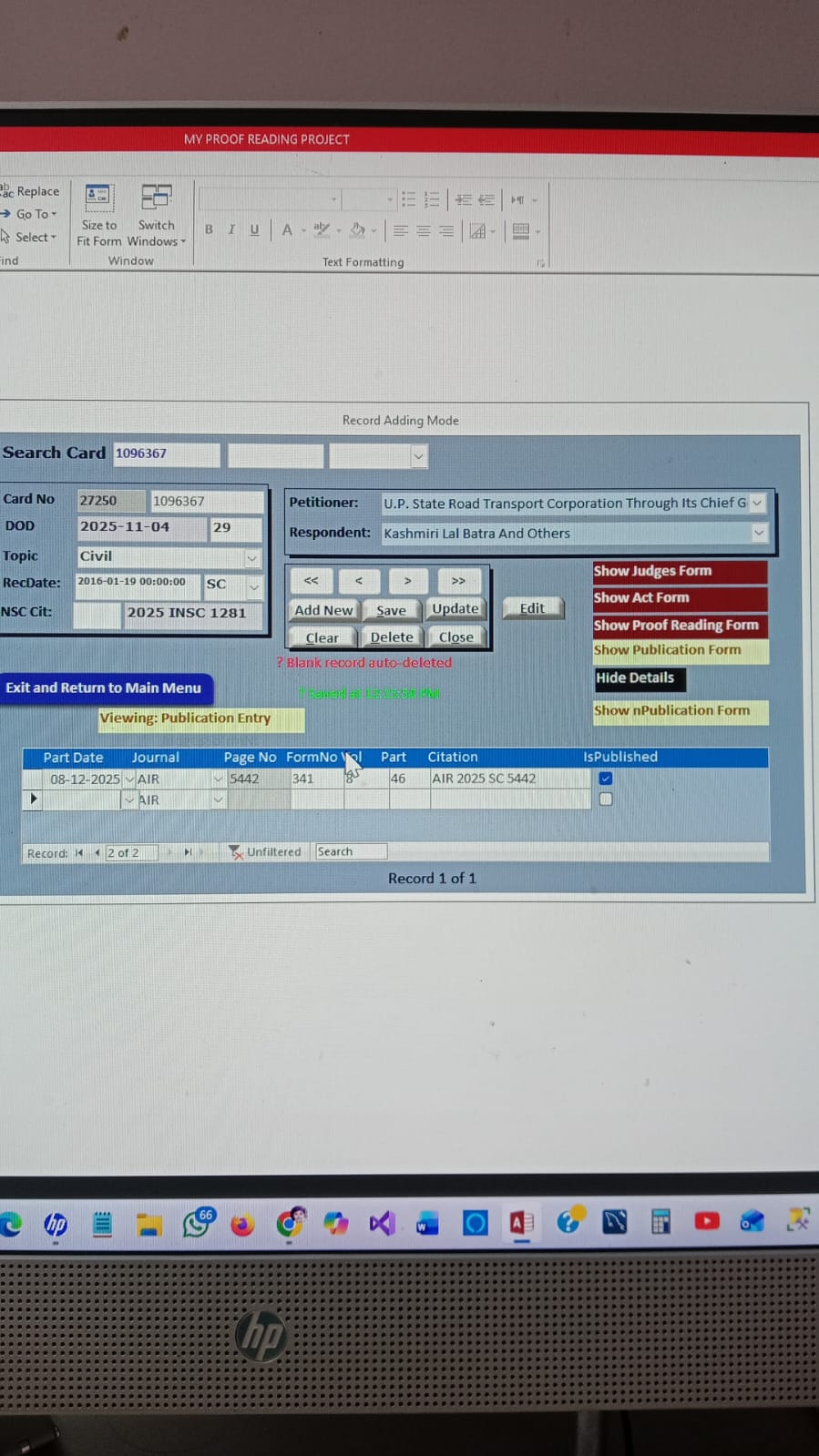
I want to link three  unbound forms JudgesF, ActF, PublicationF (All have CardID as Foreign Key)
I Want to Link above three unbound subForms  to Main Form CaseMasterF dynamically.

it is easy to link bound forms to Main Form, in case of unbound I found it very Difficult.


Kindly help me.

Manish Kashikar
Nagpur-Maharashtra- India
Donald Blackwell  @Reply  
       
5 months ago
Hi Manish, I have had a similar experience in the past. What I found was that the reason Access struggles to link the parent and subforms is because the links are created on the recordsets behind the form(s). Since they are unbound, there is no recordset in the forms themselves to bind.

It has been a while so I don't remember exactly what I did to make it work, but I believe it involved a lot of code to get the form and subform(s) to talk to one another. I think I had to pretty much go through and create procedures for every event in each form to keep everything synced up. For example, manually changing the data in the subforms as the main form changed to a new record, etc.

Or maybe I was just too new at working with Access and VBA at the time and did it the hardest way possible, lol. I'll look around and see if I can find my old files/notes.
Manish Kashikar OP  @Reply  
    
5 months ago


    ' Insert new CardNo
    sql = "INSERT INTO casemastert1 (CardNo) VALUES (" & nCardNo & ")"
    CurrentDb.Execute sql, dbFailOnError

    ' Get new CardID which is primary Key
    Me.txtCardID = DMax("CardID", "casemastert1", "CardNo = " & nCardNo)

    Exit Sub
What I done is that, as the CardID is Primary Key, Autonumber, with insert into command I added one field CardNo, and then Call CardID to unbound form, as I have to link the subform with CardID Field.  but with Sub Form I could not
Donald Blackwell  @Reply  
       
5 months ago
Yeah, you essentially have to have the key field on the main form and each of the subforms somewhere and then dynamically set the recordsources for the subforms manually as needed to respond to events in the main form and then if you update and save any data in the subforms that effect the main form you have to manually refresh that data as well.

Essentially, the forms all start out unbound, but you essentially dynamically binding them through code. Without knowing more about your need to link multiple unbound forms, I don't have any other suggestions. Typically, unbound forms are used for things like menus that don't contain static data, for temporary data, like preparing a list of checks to print from a register, or, the most common I know of is for security and/or to have stricter control of your forms.

In the latter scenario, binding at runtime can be more secure by using VBA as I noted above because if you encrypt your front end by creating an accde file, most users won't know how to decrypt and de-compile the VBA to find the tables.
Kevin Yip  @Reply  
     
5 months ago
Manish  Unbound forms don't have records.  Forms need to have records (i.e. be bound) in order to be linked together.  If all your forms are unbound and have no records, they might as well be just any random forms on the screen.  As Donald said, you need to fill your forms with data in the recordsource (i.e. make them bound) before they can be linked.  This can be done either with code at run-time or manually at design time.
Manish Kashikar OP  @Reply  
    
5 months ago
Thank you for your kind words, I am already happy with main form i.e. unbound linked with three bound subforms to it. I thought I will learn something new.
Regards.
Manish.
Manish Kashikar OP  @Reply  
    
5 months ago

Garry Smith  @Reply  
    
5 months ago
I just use a tempvar that is populated in the Main form in the oncurrent event and use that tempvar in the queries in each subforms to populate them. Don't forget to requery each of the subforms. This will also work with listboxes.

This thread is now CLOSED. If you wish to comment, start a NEW discussion in Access Forum.
 

Next Unseen

 
New Feature: Comment Live View


The following is a paid advertisement
Computer Learning Zone is not responsible for any content shown or offers made by these ads.
 

Learn
 
Access - index
Excel - index
Word - index
Windows - index
PowerPoint - index
Photoshop - index
Visual Basic - index
ASP - index
Seminars
More...
Customers
 
Login
My Account
My Courses
Lost Password
Memberships
Student Databases
Change Email
Info
 
Latest News
New Releases
User Forums
Topic Glossary
Tips & Tricks
Search The Site
Code Vault
Collapse Menus
Help
 
Customer Support
Web Site Tour
FAQs
TechHelp
Consulting Services
About
 
Background
Testimonials
Jobs
Affiliate Program
Richard Rost
Free Lessons
Mailing List
PCResale.NET
Order
 
Video Tutorials
Handbooks
Memberships
Learning Connection
Idiot's Guide to Excel
Volume Discounts
Payment Info
Shipping
Terms of Sale
Contact
 
Contact Info
Support Policy
Mailing Address
Phone Number
Fax Number
Course Survey
Email Richard
[email protected]
Blog RSS Feed    YouTube Channel

LinkedIn
Copyright 2026 by Computer Learning Zone, Amicron, and Richard Rost. All Rights Reserved. Current Time: 4/30/2026 10:29:20 AM. PLT: 1s