Hey everyone, I just finished the Amortization Seminar, which I found extremely helpful with a project that I am working on. Just a little bit of backstory, I am a newly minted bookkeeper, and I am developing some tools that will help me in that endeavor. There are a couple of things that would be helpful in the Amortization database.
They are a depreciation schedule, which should be easier to put together based on the amortization schedule, since there will not be anything too complicated involved, like random payment amounts or things like that. Just taking the total value and dividing it out over the items' serviceability period.
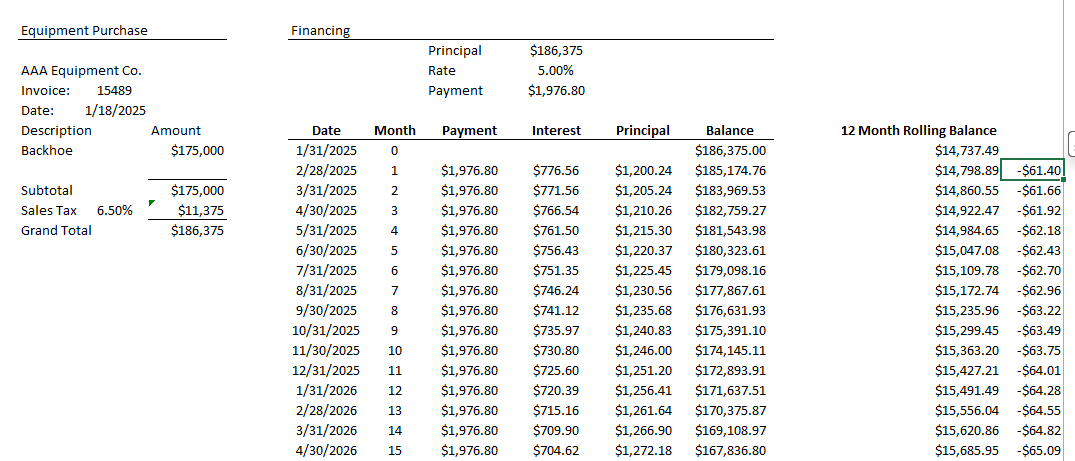
The other thing that may be a bit trickier would be a schedule that shows a rolling 12-month balance tied to the amortization schedule. This would provide a list where it takes the principal amount of the next 12 payments and adds them up each month. Along side that I need a column that shows the difference between those amounts month to month.
I will add an example excel file of what I am talking about.
No, it is basically a rolling, but depreciating value that shows what the current liability is for a business in regard to the loan. It would be under the liability section in a balance sheet of a business under Current Portion of Long-Term Debt. The column on the far right is the monthly adjustment that is made to that account.
Arlyn HenkenOP
@Reply 7 months ago
I have tried using the philosophy from the video you linked to and swapped the DAvg function for Dsum, but I am not getting the amounts right. Here is the formula I am using, but it does not seem to be adding up the entire range of records: X: Format(DSum("Principal","tblSchedule","PaymentNumber=" & [PaymentNumber] & " AND PaymentNumber<=" & [PaymentNumber]+12),"Currency")
Arlyn HenkenOP
@Reply 7 months ago
After some online research and some help from another form I was able to get what I needed for part of what I am trying to accomplish, that being getting the 12 month rolling balance based on the monthly principal amount. Here is the sql for the query:
SELECT
tblSchedule.ScheduleID,
tblSchedule.LoanID,
tblSchedule.PaymentNumber,
tblSchedule.DueDate,
tblSchedule.Principal,
sum(tblSchedule_1.Principal) AS Rolling12MonthBalance
FROM
tblSchedule
INNER JOIN tblSchedule AS tblSchedule_1 ON (tblSchedule.LoanID = tblSchedule_1.LoanID)
AND (
tblSchedule_1.PaymentNumber < tblSchedule.PaymentNumber + 12
)
AND (
tblSchedule_1.PaymentNumber >= tblSchedule.PaymentNumber
)
GROUP BY
tblSchedule.ScheduleID,
tblSchedule.LoanID,
tblSchedule.PaymentNumber,
tblSchedule.DueDate,
tblSchedule.Principal;
Now, I need to figure out how to get the difference between each row. Does anyone know of a way to do that within the same query or should it be handled in another query?
Sorry, only students may add comments.
Click here for more
information on how you can set up an account.
If you are a Visitor, go ahead and post your reply as a
new comment, and we'll move it here for you
once it's approved. Be sure to use the same name and email address.
This thread is now CLOSED. If you wish to comment, start a NEW discussion in
Access Forum.