Free Lessons
Courses
Seminars
TechHelp
Fast Tips
Templates
Topic Index
Forum
ABCD
 
Home   Courses   TechHelp   Forums   Help   Contact   Merch   Join   Order   Logon  
 
Back to Access Forum    Comments List
Upload Images   @Reply   Bookmark    Link   Email   Next Unseen 
Date Input Giving Error Until Entire Date Entered
Sharon Collachi 
     
7 months ago
I responded to a survey from Richard Rost about what I liked and didn't like about the recorded courses. One of the things I mentioned was that he says to do something and it doesn't work for me.  He asked me to post this particular problem here.  I have a new laptop with Windows 11 (I was previously using Windows 7 on a 15-year old laptop that was starting to fail). I haven't used Access in several decades so I consider myself to be a beginner starting from scratch.

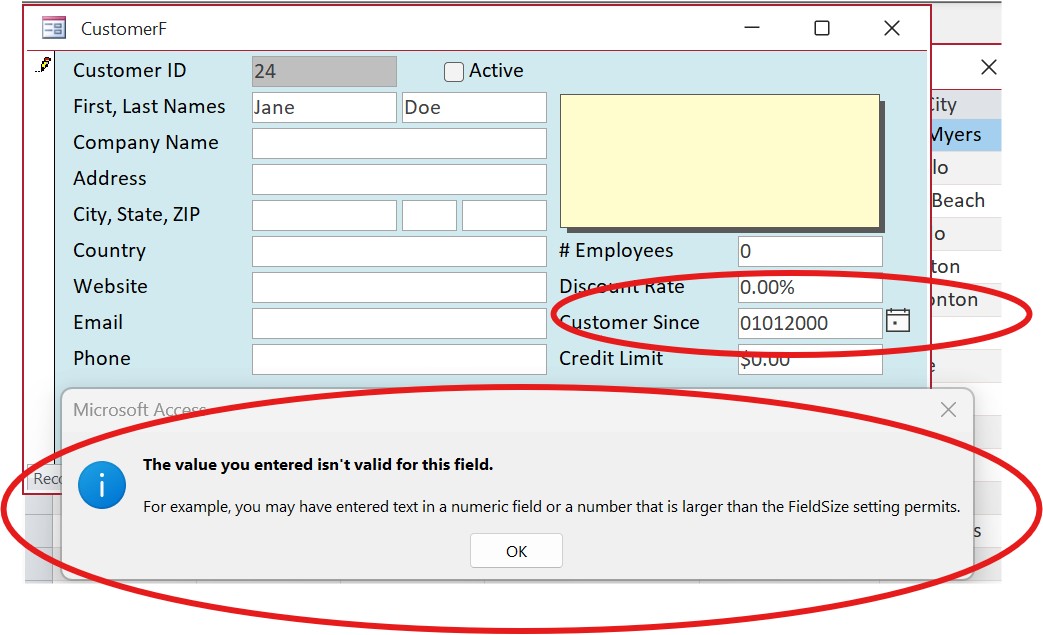
When I type a date into a date field in Access, unless I put the whole date, I get an error. For instance, in a date field with no input mask, I typed in 01012000 then hit tab, and got an error.  I did some troubleshooting in Excel, and there in a formatted date field, I can type in 0101 and I get 04/10/1900, if I type in 01012025, I get 10/29/4670 as the date.

So this leads me to believe that it's my computer settings, and Google has not been helpful.

Any advice?

Sharon Collachi OP  @Reply  
     
7 months ago

Sharon Collachi OP  @Reply  
     
7 months ago
Sorry, I forgot to say that if I type 01/01/2025 with the / included, there is no error and the data/date is as expected.
Donald Blackwell  @Reply  
       
7 months ago
I'm guessing there are a couple things going on.

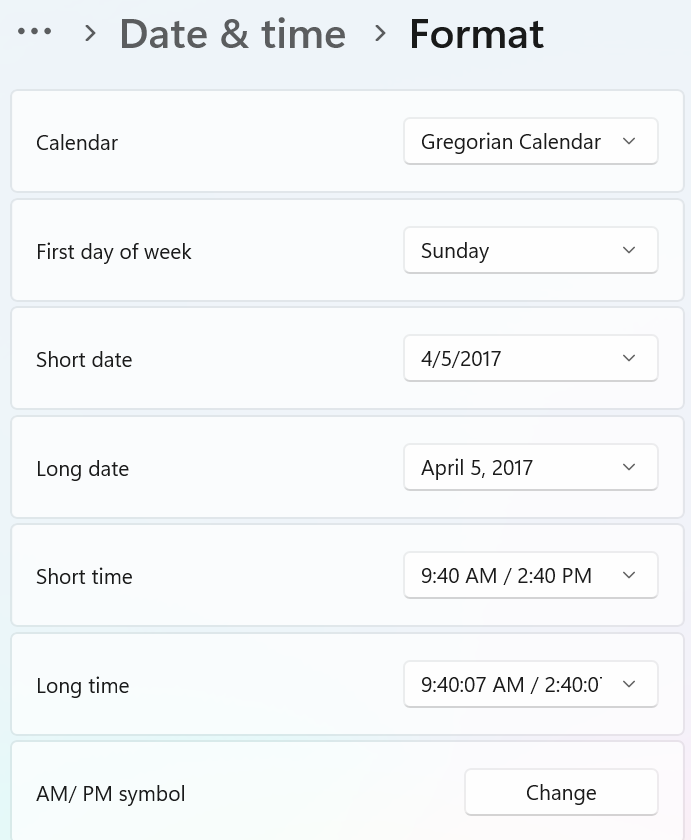
1) Your date format settings in windows likely are set to something like ISO dates and/or the database is set for ISO dates
In any case if you have a field set up as a date field in Access, then, unless you have an input mask assigned, then you'll need to type the /'s.

If your windows system settings are set to ISO, even with an input mask you would need to type your dates as yyyymmdd. (20250101).

ISO Date Format
ISO Date Addendum 1
Convert ISO Date Time
Convert ISO Date Time 2
Date Problems
Access DateTime Seminar
Sharon Collachi OP  @Reply  
     
7 months ago
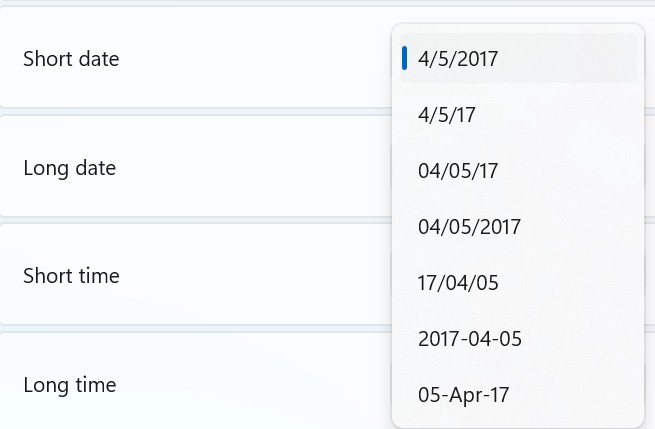
Checked all the settings for system, access, and excel. There are formatting examples (instead of specifically ISO format).  Looks like I have a bunch of videos to watch to try to figure this out.
Sharon Collachi OP  @Reply  
     
7 months ago

Sharon Collachi OP  @Reply  
     
7 months ago

Donald Blackwell  @Reply  
       
7 months ago
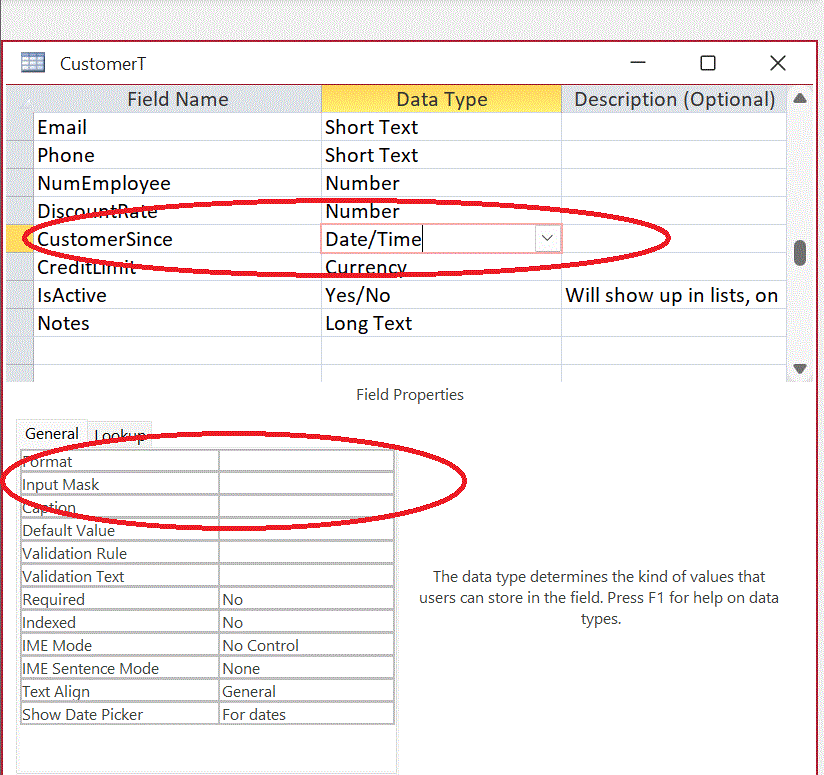
With that being the case, I would look at the field you're typing in to verify input masks/lack of as well as format properties. Then do the same for the actual table(s) and query(s) fields.

If you're field is set with a date/time data type, then you'll either have to enter the date with dashes or slashes or add an input mask that displays them and access will handle appropriately. However, that alone won't explain why you're getting dates that look like they are ISO date format when you're system is not.

Another thing to look at when looking at your table fields and Access settings, is if the fields are  listed in the "Date/Time Extended" or "DateTime2" format. I've seen that mess with inputs and formats and sometimes they don't play well with system settings.
Sharon Collachi OP  @Reply  
     
7 months ago
The Access table is one I downloaded from Richard for the courses, and here are the settings - see screenshot.
Sharon Collachi OP  @Reply  
     
7 months ago

Donald Blackwell  @Reply  
       
7 months ago
You can get it to let you just enter #'s by adding an input mask either on the table or the forms: 00-00-0000 would require 2 digit month, 2 digit day and 4 digit year but you could type 10102025 and it should give you the right date with your system settings... You could also set the format to "Short Date" to reinforce that. If you click the arrow to the right of the format property to open the list of options, it will show you how it will format.

You could also shorten your input mask to 09-09-0099 which would allow a 1 or 2 digit month, a 1 or 2 digit day and a 2 or 4 digit year, but where you have single digits, you'd need to enter a space or a "-"

If it still puts it in ISO date format, that will require a bigger dive into your settings. I know window's 11s date parser is more strict than windows 7's so that might be a reason you may have been able to just enter digits before without an input mask.

I use ISO Dates on my machine so my input mask is 0099-09-09 and if I enter 20251102 or 25-11-2, it will present 2025-11-02
Sharon Collachi OP  @Reply  
     
7 months ago
I get all of that as a way to make it work and I appreciate the info, but the point Richard was making by having me post it (I believe), is that Access (nor Excel) should work that way.  I've been using Excel for decades, and I always enter dates by the month and day and hit tab (so 1012 for 10-12-25).  I use Windows 10 at work and the 1012 "method" works on Excel there.  

I have searched online and perhaps I'm using the wrong search terms. I was hoping to find at least an acknowledgment of the situation, and either what settings to change to fix it or the definitive answer that it cannot be fixed (without input masks or workarounds).
Sharon Collachi OP  @Reply  
     
7 months ago
Donald Color me surprised (and a bit embarrassed as well).  The first thing I did at the office today was open Excel and play with dates. So, apparently all the spreadsheets I use on a regular basis are ones I created years ago.  I have the dates doing automatic things (adding dates, subtracting dates) so that I don't have to actually enter a date.  Today I entered a date by hand, and got the same "error" that I described as happening on my laptop. So one part of the mystery solved.

The remaining mystery is why Richard can enter 0112 and get 01/12/2025 in Access, and I cannot, but I can live with that, with input masks.
Kevin Robertson  @Reply  
          
7 months ago
Type in 01/12 and you will get 01/12/2025.

This thread is now CLOSED. If you wish to comment, start a NEW discussion in Access Forum.
 

Next Unseen

 
New Feature: Comment Live View


The following is a paid advertisement
Computer Learning Zone is not responsible for any content shown or offers made by these ads.
 

Learn
 
Access - index
Excel - index
Word - index
Windows - index
PowerPoint - index
Photoshop - index
Visual Basic - index
ASP - index
Seminars
More...
Customers
 
Login
My Account
My Courses
Lost Password
Memberships
Student Databases
Change Email
Info
 
Latest News
New Releases
User Forums
Topic Glossary
Tips & Tricks
Search The Site
Code Vault
Collapse Menus
Help
 
Customer Support
Web Site Tour
FAQs
TechHelp
Consulting Services
About
 
Background
Testimonials
Jobs
Affiliate Program
Richard Rost
Free Lessons
Mailing List
PCResale.NET
Order
 
Video Tutorials
Handbooks
Memberships
Learning Connection
Idiot's Guide to Excel
Volume Discounts
Payment Info
Shipping
Terms of Sale
Contact
 
Contact Info
Support Policy
Mailing Address
Phone Number
Fax Number
Course Survey
Email Richard
[email protected]
Blog RSS Feed    YouTube Channel

LinkedIn
Copyright 2026 by Computer Learning Zone, Amicron, and Richard Rost. All Rights Reserved. Current Time: 6/16/2026 7:03:11 PM. PLT: 0s