Free Lessons
Courses
Seminars
TechHelp
Fast Tips
Templates
Topic Index
Forum
ABCD
 
Home   Courses   TechHelp   Forums   Help   Contact   Merch   Join   Order   Logon  
 
Back to Access Forum    Comments List
Upload Images   @Reply   Bookmark    Link   Email   Next Unseen 
Subform Stopped Populating When Id is 7 Charact.
Molly Finch 
   
7 months ago
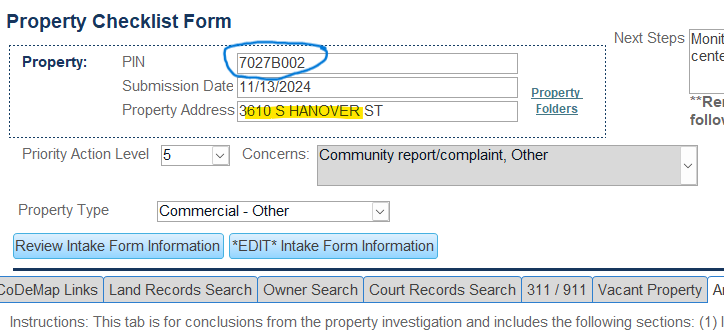
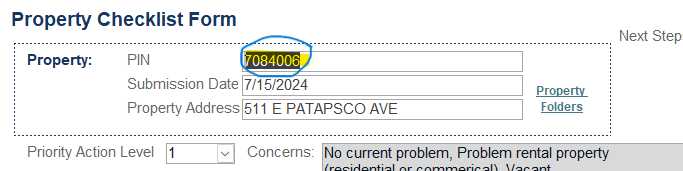
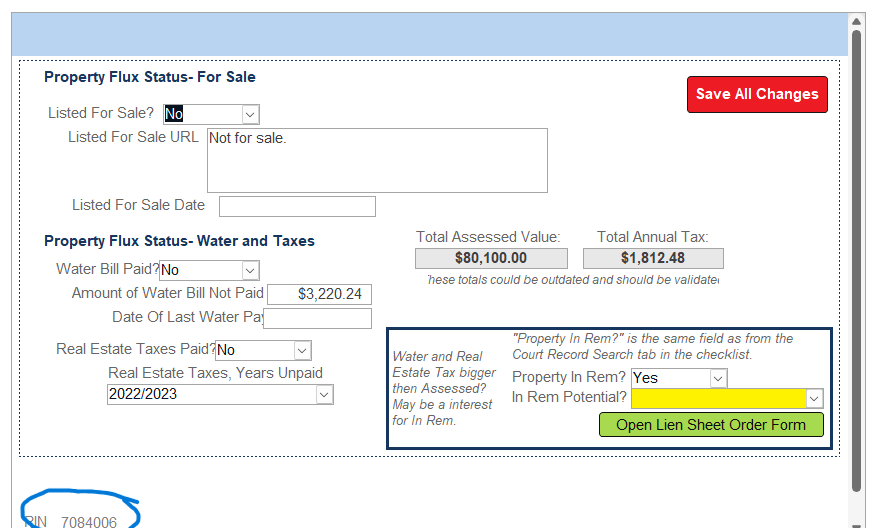
Hello Forum, I have a bug that seems to have come up out of nowhere. I have a form + multiple subforms (accessed through tabs) set up that been working fine for months. The form/subforms is used to update information about a property. I use a search function in an 'address search' form that then opens the primary form/subforms to a specific property. Everything is linked ('address search' form, primary form, and subforms) using property ID (called PIN). Recently I noticed that for any property that has an PIN >7 characters, one subform is opening blank as if there is no data, yet there is data in the table for that PIN/property. Other subforms within this same primary form are populating with data just fine - no issues. I have tried recreating the subform and adding it back to the primary form with no change - still blank. I also have tried opening the subform outside of the primary form by adding a button to the 'address search' form and setting button functionality to open to address/PIN - still blank is the PIN >7 characters. Anyone have experience with a similar issue?
Molly Finch OP  @Reply  
   
7 months ago

Molly Finch OP  @Reply  
   
7 months ago

Molly Finch OP  @Reply  
   
7 months ago

Molly Finch OP  @Reply  
   
7 months ago

Molly Finch OP  @Reply  
   
7 months ago
Above I included two scenarios - the primary form with a 7 character PIN (ID) and a primary form with a >7 character PIN. When the PIN is >7 characters, the subform shows blank (even though there is data in the linked table), while when the PIN is 7 characters the subforms shows data (see linked PIN number in the bottom left corner to confirm subform is linked to primary form).
Adam Schwanz  @Reply  
            
7 months ago
Can you share the search function? Can you confirm if other PINS with text (strings) work if 7 characters or is it only PINS that could be an int that are working?
Molly Finch OP  @Reply  
   
7 months ago
I will try to answer those questions. The function from the address search form to the primary form using a form-open button is a Where Condition (=="[PIN]="&"'"&[PIN]&"'"). The connection function between the primary form and subform is Link Master Fields = PIN and Link Child Fields =PIN. Within the subform the PIN field Default Value is set as =[Forms]![f_PropertyChecklist_]![PIN] (the PIN included at the top of the primary form). Within the master data table (that the primary form field PIN links to) the PIN data type is short text with no field size limits. I tested whether I could create a >7 character PIN that is only numbers (PIN=12345678) and confirmed that the subform displays blank (so not an integer/letter issue?). I also tested whether I could create a >7 character PIN that is only letters (PIN = ABCDEFGH) and confirmed that the subform also displays blank (so double confirms not a integer/letter issue?). Seems to be a >7 any type of character issue.

This thread is now CLOSED. If you wish to comment, start a NEW discussion in Access Forum.
 

Next Unseen

 
New Feature: Comment Live View


The following is a paid advertisement
Computer Learning Zone is not responsible for any content shown or offers made by these ads.
 

Learn
 
Access - index
Excel - index
Word - index
Windows - index
PowerPoint - index
Photoshop - index
Visual Basic - index
ASP - index
Seminars
More...
Customers
 
Login
My Account
My Courses
Lost Password
Memberships
Student Databases
Change Email
Info
 
Latest News
New Releases
User Forums
Topic Glossary
Tips & Tricks
Search The Site
Code Vault
Collapse Menus
Help
 
Customer Support
Web Site Tour
FAQs
TechHelp
Consulting Services
About
 
Background
Testimonials
Jobs
Affiliate Program
Richard Rost
Free Lessons
Mailing List
PCResale.NET
Order
 
Video Tutorials
Handbooks
Memberships
Learning Connection
Idiot's Guide to Excel
Volume Discounts
Payment Info
Shipping
Terms of Sale
Contact
 
Contact Info
Support Policy
Mailing Address
Phone Number
Fax Number
Course Survey
Email Richard
[email protected]
Blog RSS Feed    YouTube Channel

LinkedIn
Copyright 2026 by Computer Learning Zone, Amicron, and Richard Rost. All Rights Reserved. Current Time: 6/16/2026 11:25:20 AM. PLT: 0s