Free Lessons
Courses
Seminars
TechHelp
Fast Tips
Templates
Topic Index
Forum
ABCD
 
Home   Courses   TechHelp   Forums   Help   Contact   Merch   Join   Order   Logon  
 
Back to Access Forum    Comments List
Upload Images   @Reply   Bookmark    Link   Email   Next Unseen 
Subform Misbehaving
Monica Jones 
       
5 months ago
Hi all,
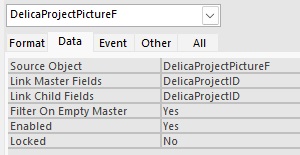
My subform is refusing to recognize its parent. When I add an entry to the continuous subform it defaults to the wrong ID# from the parent form. I've double checked my links, and Master and Child are set to ProjectID but when I try and add to the Picture subform it puts the picture on project ID# 65. Any help is appreciated. Let me know if you need more information, I'm at a loss on where else to look.
Richard Rost  @Reply  
          
5 months ago
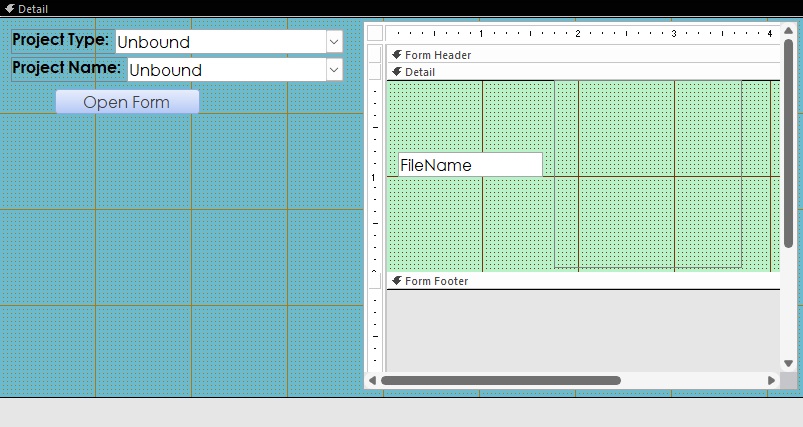
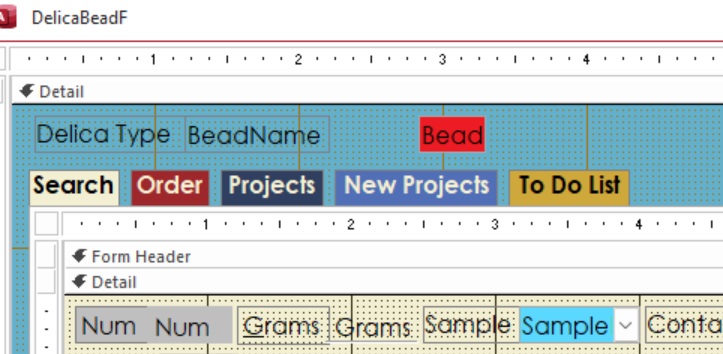
Let's see some design screenshots.
Monica Jones OP  @Reply  
       
5 months ago

Monica Jones OP  @Reply  
       
5 months ago

Monica Jones OP  @Reply  
       
5 months ago
Additional info that might be relevant
Master form record source: SELECT DelicaProjectID, DelicaProjectT.BeadTypeID, DelicaProjectT.ProjectName FROM DelicaProjectT WHERE (((DelicaProjectT.BeadTypeID)=[Forms]![DelicaBeadF]![BeadTypeID].[Value])) ORDER BY DelicaProjectT.ProjectName;

Subform record source: SELECT DelicaProjectPictureT.*
FROM DelicaProjectT INNER JOIN DelicaProjectPictureT ON DelicaProjectT.DelicaProjectID = DelicaProjectPictureT.DelicaProjectID
WHERE (((DelicaProjectPictureT.DelicaProjectID)=[Forms]![DelicaBeadF]![SubformControl].[Form]![ProjectNameCombo]));
Richard Rost  @Reply  
          
5 months ago
I think you may be running into a couple of classic Access issues at the same time. First, your parent form appears to be unbound (your controls show "Unbound"), which means there is no current parent record for the subform to link to. When that happens, Access will often reuse an old value, which would explain why new records keep defaulting to ProjectID 65. The subform really needs to be linked to a control on the parent form that actually contains the DelicaProjectID value, usually a textbox (it can be hidden), not just a combo showing a name.

Second, your WHERE clause is referencing controls on other forms and subforms, including something called "SubformControl," which is not a reserved name and must exactly match the name of the subform control on the parent form. That, combined with referencing a combo that appears to display a project name instead of the numeric ID, can easily cause Access to pull the wrong value.

As a first troubleshooting step, I'd simplify things: put the selected DelicaProjectID directly on the parent form, link the subform using Link Master/Child Fields only, and temporarily remove the cross-form WHERE clause. If that fixes the issue, you'll know the problem is the linking and filtering logic rather than the data itself.
Monica Jones OP  @Reply  
       
5 months ago
SUCCESS!!!!!!! This thing has had me questioning if I've ever known a thing about Access. That Developer badge don't mean much when I'm still working my way through the Expert classes.
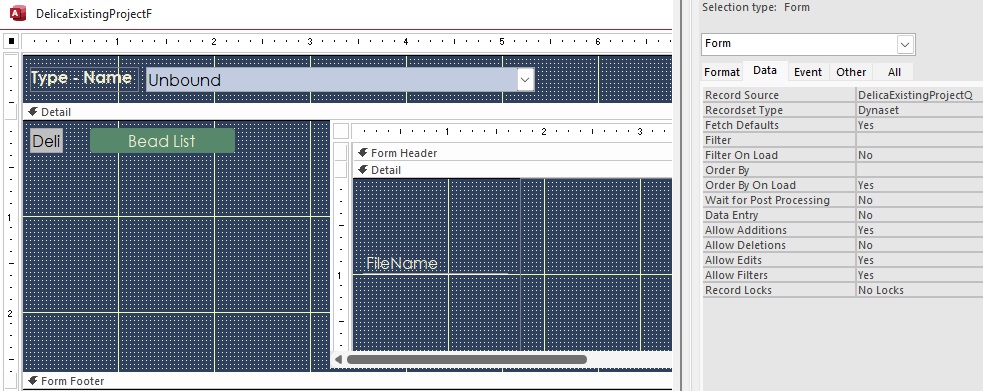
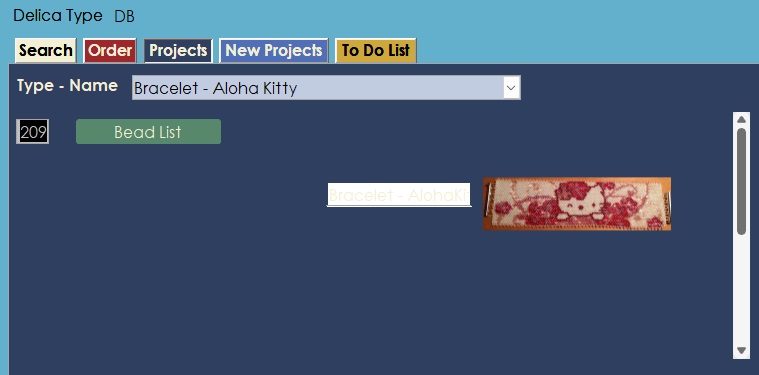
I made a new query concatenating the project type and name and made a new combo box in the form header to filter the detail section. Pics just 'cause I'm soooo happy!
Monica Jones OP  @Reply  
       
5 months ago

Monica Jones OP  @Reply  
       
5 months ago

Monica Jones OP  @Reply  
       
5 months ago

Richard Rost  @Reply  
          
5 months ago
Good job, I'm glad you figured it out. And yeah, the developer badge just means that you've purchased the developer courses. It doesn't necessarily mean that you've watched them. That's actually something that's on my list for an upgrade to the website is I want to make it so that you only get the badge when you've watched the videos on that course. So that's a whole different set of data to work through. But it's coming.

I started the badge system mostly so the moderators and I can get an idea for what kind of answer to give people in the forums. Obviously we'll give someone a different answer if we know they're only in the beginner lessons vs if we know they're up to developer 20. So that's just a quick way to say, "Okay, I can give this person a more advanced answer or point them to a more advanced class."

This thread is now CLOSED. If you wish to comment, start a NEW discussion in Access Forum.
 

Next Unseen

 
New Feature: Comment Live View


The following is a paid advertisement
Computer Learning Zone is not responsible for any content shown or offers made by these ads.
 

Learn
 
Access - index
Excel - index
Word - index
Windows - index
PowerPoint - index
Photoshop - index
Visual Basic - index
ASP - index
Seminars
More...
Customers
 
Login
My Account
My Courses
Lost Password
Memberships
Student Databases
Change Email
Info
 
Latest News
New Releases
User Forums
Topic Glossary
Tips & Tricks
Search The Site
Code Vault
Collapse Menus
Help
 
Customer Support
Web Site Tour
FAQs
TechHelp
Consulting Services
About
 
Background
Testimonials
Jobs
Affiliate Program
Richard Rost
Free Lessons
Mailing List
PCResale.NET
Order
 
Video Tutorials
Handbooks
Memberships
Learning Connection
Idiot's Guide to Excel
Volume Discounts
Payment Info
Shipping
Terms of Sale
Contact
 
Contact Info
Support Policy
Mailing Address
Phone Number
Fax Number
Course Survey
Email Richard
[email protected]
Blog RSS Feed    YouTube Channel

LinkedIn
Copyright 2026 by Computer Learning Zone, Amicron, and Richard Rost. All Rights Reserved. Current Time: 5/6/2026 6:29:56 PM. PLT: 1s