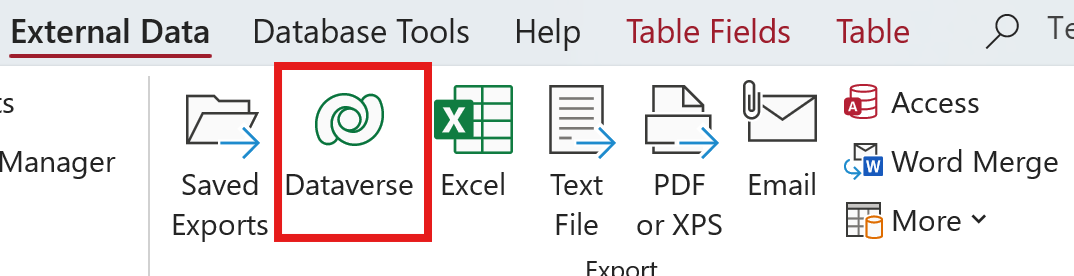
My current version of Access (Microsoft Access – Version 16.) via Office 365 has an additional button called Dataverse on the External Tab on the ribbon. I will attach a screen clip to show what it looks like. Richard doesn't include this export option in these videos (being made 11 years ago). Does he cover what this does anywhere else?
Not yet, but maybe in the future, depending on how many people are interested.
Alan StevensOP
@Reply 10 months ago
Thomas Gonder
@Reply 10 months ago
You mean this explanation from Microsoft doesn't clearly explain what dataverse is?
"Add grounded enterprise data and make your copilots actionable with Microsoft Dataverse, the enterprise data platform for Copilot."
I worked in advertising for 30 years. You would think I would love inane gibberish as much as the next guy. Is that grounded data like grounded airplanes? Remember the old joke about "What if Microsoft made airplanes (with the same reliability as Windows)"?
I talked a little bit about Dataverse way back in QQ55. At the time I was considering putting together some lessons for beginner Access developers who want an easy way to get their data online - and I still may. However for serious Access developers (which make up the vast majority of my students), Dataverse is just a bump in the road on the way to SQL Server.
I've actually been putting this together for an upcoming video, or even just another QQ mention:
Microsoft Dataverse is a managed, cloud-based data platform designed primarily for the Power Platform, not a full-featured relational database engine. It works well when you are building Power Apps solutions, need built-in security, authentication, and auditing, and want tight integration with Power Automate, Teams, and Microsoft 365. In those scenarios, Dataverse removes a lot of friction and lets non-developers build apps quickly without worrying about server management. That convenience is its strength, but also its limitation.
For most serious Access developers, Dataverse starts to feel restrictive pretty quickly. It does not offer true T-SQL, advanced query optimization, stored procedures, or the same level of control over indexing, performance tuning, and schema management that experienced developers expect. You also have to accept licensing costs, storage limits, and platform constraints that you do not control. If you enjoy designing normalized databases, writing complex queries, and scaling applications deliberately, Dataverse is going to feel like it gets in the way more than it helps.
That is why SQL Server remains the natural next step for Access developers. The migration path is clean, the concepts transfer directly, and Access continues to work extremely well as a front end. You gain scalability, performance, and professional-grade database features without losing the development model you already understand. Dataverse is not a bad tool, but it is a platform convenience layer, not a destination for people who want to get serious about databases.
The smart move is knowing both and using each where it makes sense. SQL Server should be your foundation, and Dataverse is something you reach for only when Power Platform requirements demand it. In Star Trek terms, Dataverse is the holodeck. SQL Server is engineering.
Thomas Gonder
@Reply 10 months ago
Still looking for that SQL Server seminar that takes us from converting an only Access application to something that runs with SQL Server as the backend, as well as setting up SQL Server locally for developers and how to administer it.
Those dumb corporate buzzwords have been around forever. Just ask Dilbert. LOL
Thomas Gonder
@Reply 10 months ago
Richard I've been around for almost forever, and it's gotten way worse. I can't understand anything they say other than "and" and "the".
On a side note, being under a rock (down under "America"), I recently read what happened to Scott Adams, and it is so sad how PC stifled his brilliant mind. Also the cancer diagnosis. Lesson: Just repeating what you read in the news can get you canceled.
Sorry, only students may add comments.
Click here for more
information on how you can set up an account.
If you are a Visitor, go ahead and post your reply as a
new comment, and we'll move it here for you
once it's approved. Be sure to use the same name and email address.
This thread is now CLOSED. If you wish to comment, start a NEW discussion in
Access Expert 19.