Free Lessons
Courses
Seminars
TechHelp
Fast Tips
Templates
Topic Index
Forum
ABCD
 
Home   Courses   TechHelp   Forums   Help   Contact   Merch   Join   Order   Logon  
 
Back to Access Forum    Comments List
Upload Images   @Reply   Bookmark    Link   Email   Next Unseen 
Personal Log
David Clement 
      
4 months ago
Good morning Richard,
I hope all is well.
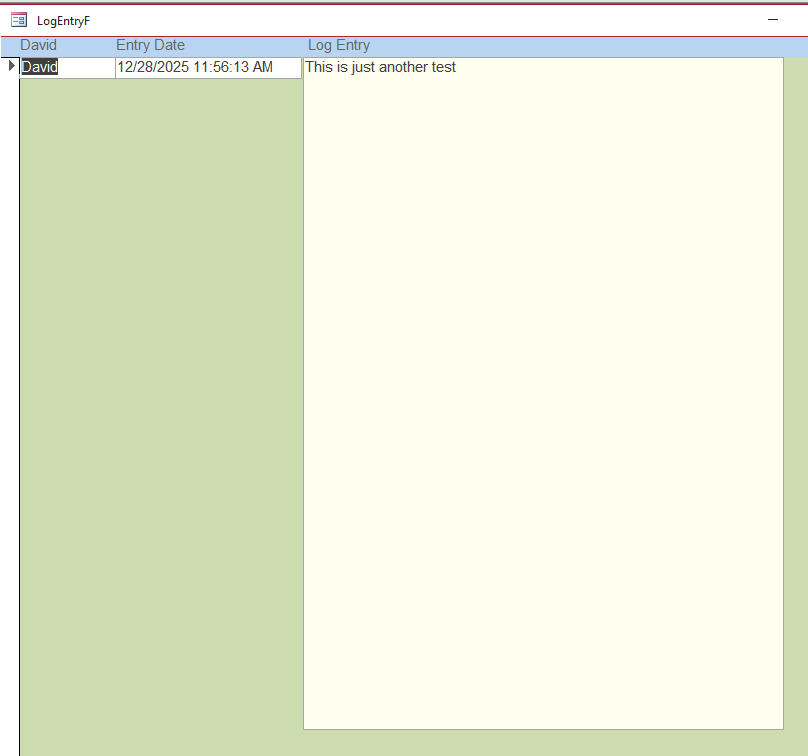
I just wanted to know if you have a better solution to what I am calling a Personal Log.
Right now I am just using a large formatted Long Text field to enter daily entires and it is working just fine, but was just wondering how you would create one.
that's all it does, for now anyway.
Any input would be greatly appreciated.
Thank you.
David Clement OP  @Reply  
      
4 months ago

Kevin Robertson  @Reply  
          
4 months ago
Aleece Landis  @Reply  
     
4 months ago
David Well, what is your purpose for the Personal Log entries?  Or what is the purpose of doing it in a Database?
If it is simply a Log for personal entries, I see no reason to do anything differently other than as Kevin mentioned, using forms for creating/viewing the entries.
If you have some additional purposes you might want to add a few more fields so you can add whatever you want for sorting/recall purposes without having to search all the text.  But then you need to remember to enter those other things for them to be useful so it is really up to you depending on your purpose for doing the log.  Is this part of a larger database or is this a stand alone thing?
David Clement OP  @Reply  
      
4 months ago
Aleece, I wanted this to be like a journal entry. I didn't much care for the way Word does such things, and just thought that this might be better, that's all.
Thank you!
Kevin Robertson  @Reply  
          
4 months ago
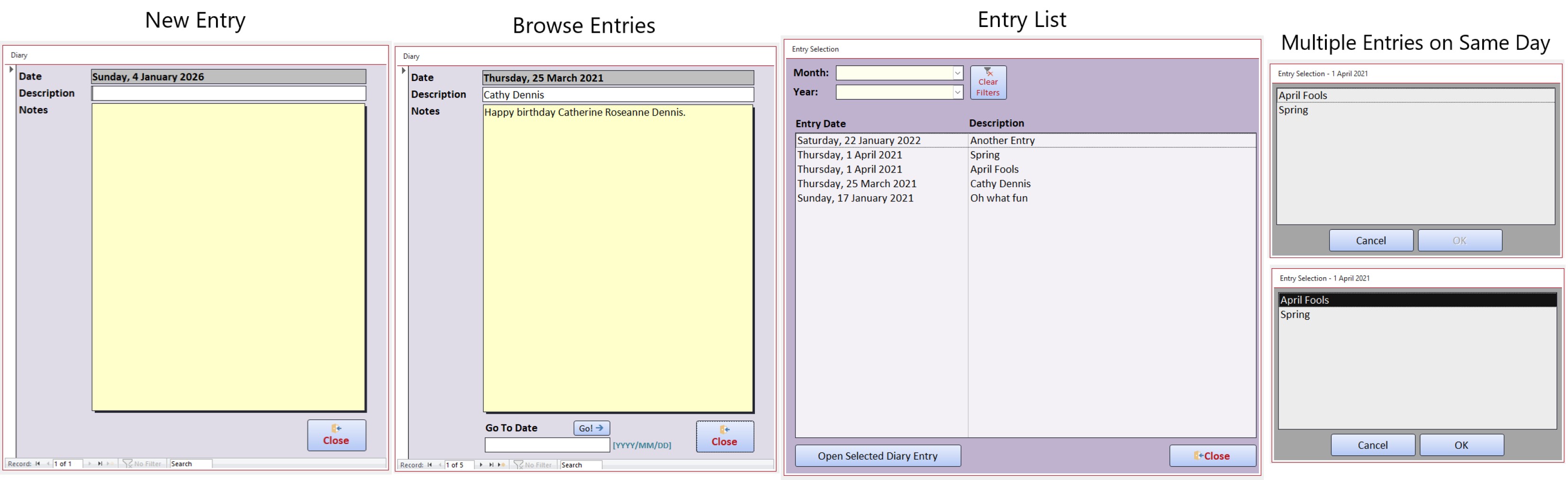
The first screenshot below shows the Forms associated with my diary.
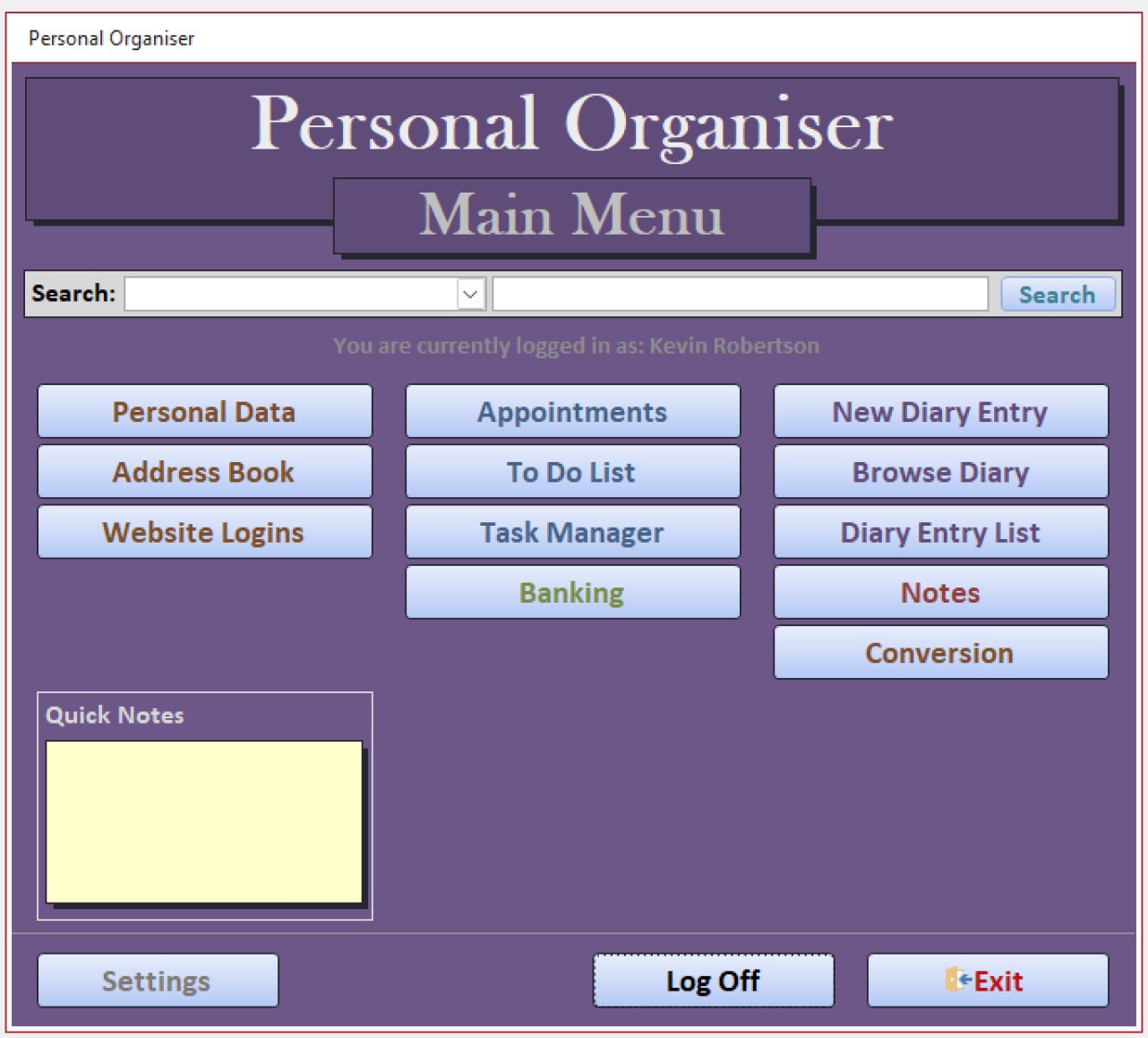
This was part of my Personal Organiser database.
The second screenshot shows the Main Menu from that database.
Kevin Robertson  @Reply  
          
4 months ago

Kevin Robertson  @Reply  
          
4 months ago

Donald Blackwell  @Reply  
       
4 months ago
David Depending on how you might be using it, another possible field I've added is a summary field. A short text field that might contain keywords or just a brief overview. Again, if it's a personal journal, may not be important, but can be useful example for faster searching later if you're trying to remember when something happened.

One of the journals I've done had an ID field (autonumber), userid (long integer - for when multiple people might be using), subject field (short text), summary field (short text) and entry field (long text/rich text) again, just depends on how you're using it. Just sharing ideas. But if what you have meets your needs, Kevin's suggestions above might give you some guidance.

Another videos that's similar is the implementation of Contacts in Richard's template. Essentially the same type of thing. And, even Followups if you ever have something you enter that maybe you want to remember to review in the future.
Donald Blackwell  @Reply  
       
4 months ago
Very nice Kevin
John Sahagian  @Reply  
     
4 months ago
Kevin Your Personal Organizer could be a Medication Tracking template.
Complex features like drug interactions / side effects can be simple external links.

.. CommentID=112245  Medication Database  Rudolpho Galicia
Joe Holland  @Reply  
      
4 months ago
Nice looking database Kevin. I love it when the forms look good and the screen is laid out well.
Sam Domino  @Reply  
      
4 months ago
Kevin Nice!  Three suggested improvements:  1) Give it an LCARS theme, 2) Add voice-to-text input, and 3) Allow references to files (i.e. audio, video, PDF, etc.) LLAP!  :-)

This thread is now CLOSED. If you wish to comment, start a NEW discussion in Access Forum.
 

Next Unseen

 
New Feature: Comment Live View


The following is a paid advertisement
Computer Learning Zone is not responsible for any content shown or offers made by these ads.
 

Learn
 
Access - index
Excel - index
Word - index
Windows - index
PowerPoint - index
Photoshop - index
Visual Basic - index
ASP - index
Seminars
More...
Customers
 
Login
My Account
My Courses
Lost Password
Memberships
Student Databases
Change Email
Info
 
Latest News
New Releases
User Forums
Topic Glossary
Tips & Tricks
Search The Site
Code Vault
Collapse Menus
Help
 
Customer Support
Web Site Tour
FAQs
TechHelp
Consulting Services
About
 
Background
Testimonials
Jobs
Affiliate Program
Richard Rost
Free Lessons
Mailing List
PCResale.NET
Order
 
Video Tutorials
Handbooks
Memberships
Learning Connection
Idiot's Guide to Excel
Volume Discounts
Payment Info
Shipping
Terms of Sale
Contact
 
Contact Info
Support Policy
Mailing Address
Phone Number
Fax Number
Course Survey
Email Richard
[email protected]
Blog RSS Feed    YouTube Channel

LinkedIn
Copyright 2026 by Computer Learning Zone, Amicron, and Richard Rost. All Rights Reserved. Current Time: 5/6/2026 5:20:38 AM. PLT: 0s