Free Lessons
Courses
Seminars
TechHelp
Fast Tips
Templates
Topic Index
Forum
ABCD
 
Home   Courses   TechHelp   Forums   Help   Contact   Merch   Join   Order   Logon  
 
Back to Access Forum    Comments List
Upload Images   @Reply   Bookmark    Link   Email   Next Unseen 
Happy New Year!
Raymond Spornhauer 
          
4 months ago
Happy New Year to all the Access users.  

Hope you've all made some good New Years Resolutions.

Personally, I'm prioritizing my health more this year by exercising and eating better (using the fitness database).

I'm also going to be working a new Shift Turnover Database with equipment status tracking, work in progress tracking, Compensatory Action tracking as well as some other items required at a power plant.  

Many of the techniques I will be using have been covered in Rick's classes and seminars as well as some new ones I've recently picked up.

I've got some ideas I would like to share and would be curious if anyone has done anything like this or has suggestions.

-Raymond
Richard Rost  @Reply  
          
4 months ago
Happy 2026 to you, too Raymond. Great to see you back! :)

I've never done shift turnover or compensatory action tracking, but if you can give me some details as far as what you need to track, I'm sure we can put something together, at least some ideas. As far as equipment status tracking, I do have the asset tracking database that I built (that I see you have), but yeah, post whatever your thoughts are, and I'm sure the guys and I'll be happy to jump in and help figure out what you need.
Raymond Spornhauer OP  @Reply  
          
4 months ago

Raymond Spornhauer OP  @Reply  
          
4 months ago
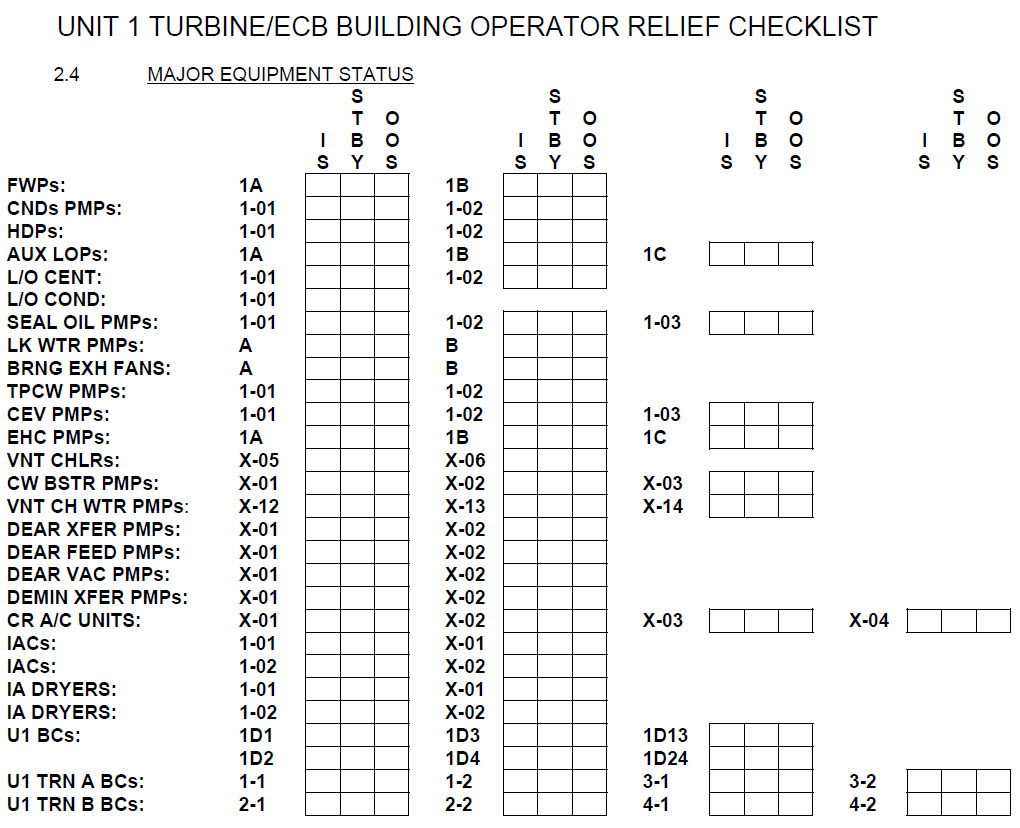
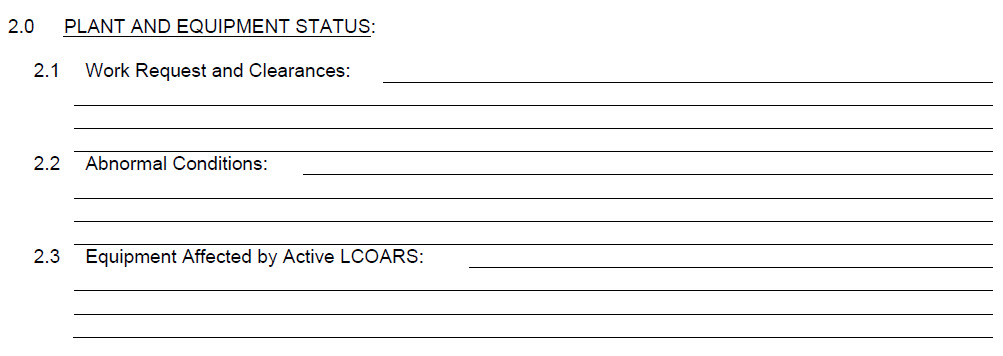
They are currently using MS  Word for their Turnovers.  This is a Table in Word with certain borders visible and other not visible.  They  put "X"s in the boxes to track "In Service", "Standby" or "Out of Service".

One of the site challenges here is that some components are tracked on more than 1 Turnover, so sometimes there are discrepancies due to Human Error or changes take place by some watch standers that are unknown to other watch standers who were busy with other tasks.

From a database development standpoint, it took me a while to come up with a solution to have multiple columns with selective printing.
Raymond Spornhauer OP  @Reply  
          
4 months ago

Raymond Spornhauer OP  @Reply  
          
4 months ago
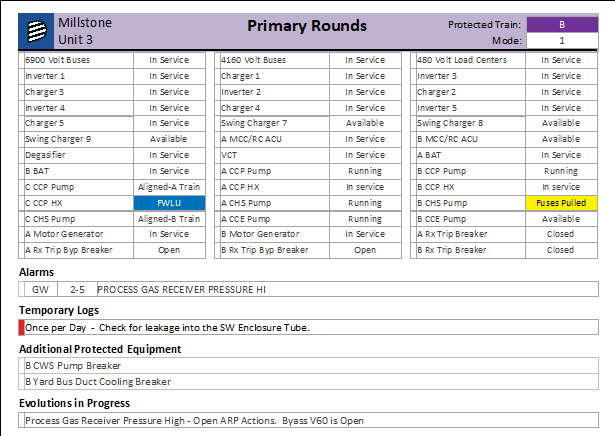
This is a sample I am using to get the report to print having the equipment in 4 columns.  

I am using the PrintSection property to determine if the details section of the report gets print in conjunction with a Position counter.

Option Compare Database
Option Explicit

Dim intPosition As Integer

Private Sub PageHeaderSection_Format(Cancel As Integer, FormatCount As Integer)

    'Starting Position for PrintSection
    intPosition = 1

End Sub

Private Sub Detail_Format(Cancel As Integer, FormatCount As Integer)

    'Prints 'Detail Section' in the corresponding Print Position. (based on Page Setting of 4 Columns)
        '  -------------------------------
        '  |   1   |   2   |   3  |  4   |
        '  -------------------------------
        '  |   5   |   6   |   7  |  8   |
        '  -------------------------------
        '  |   9   |  10   |  11  |  12  |
        '  -------------------------------
        '  |  13   |  14   |  15  |  16  |
        '  -------------------------------
    
    If intPosition = PrintPosition Then
        Me.PrintSection = True
        Me.NextRecord = True
        
        'Show Status Bar if Change was in the last 12 hours
        If StatusDT > Now() - 0.5 Then
            StatusChange.Visible = True
        Else
            StatusChange.Visible = False
        End If
    Else
        Me.PrintSection = False
        Me.NextRecord = False
    End If

    'Kickout if greater than 1000 cycles to prevent lockup
    If intPosition = 1000 Then
        MsgBox "Greater than 1000 records"
        Exit Sub
    End If

    intPosition = intPosition + 1

End Sub
Raymond Spornhauer OP  @Reply  
          
4 months ago
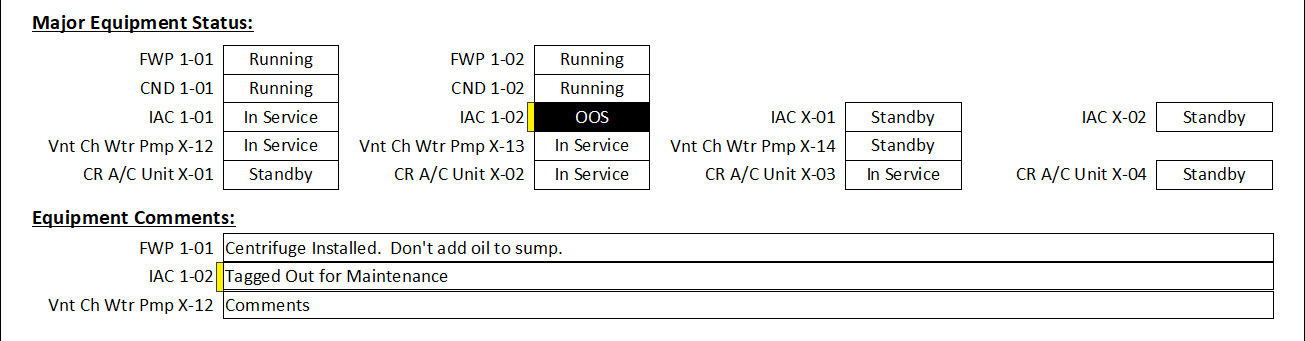
I am also putting "Change Flags" at the edge of the Status Box and Comment Box to show if changes were made in the last 12 hours so it's clear to the on-coming shift what changes were made.
Raymond Spornhauer OP  @Reply  
          
4 months ago
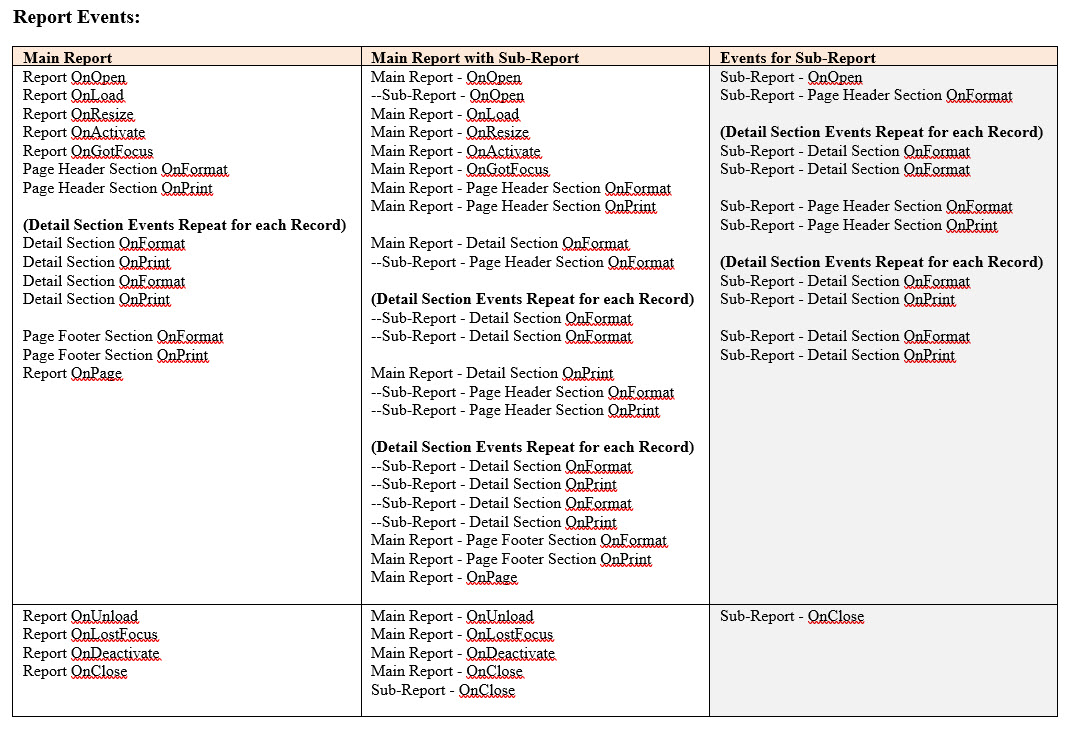
One of the issues I've brought in the past that was preventing me from getting this to work in the past is some Events don't trigger when they are Sub-Reports.

I ended up making reports and sub-reports, putting code in each event, then comparing which events fired in various setups.  It wasn't difficult, but just took some time putting code in each section.
Raymond Spornhauer OP  @Reply  
          
4 months ago

Raymond Spornhauer OP  @Reply  
          
4 months ago
This is part of my notes where I listed out which Events run for reports

There is only for Reports in "Print Preview" as this is the only way I use reports.  There are more events for "Report View", but some of the Events for "Print Preview" don't run in "Report View".

This is another issue I've had with Microsoft's Website... it's not always clear which Properties or Events go with specific objects.  More on that another time.
Raymond Spornhauer OP  @Reply  
          
4 months ago
A few books I've been using which have been helpful:

Access Solutions: Tips, Tricks, and Secrets from Microsoft Access MVPs
Microsoft Office Access 2007 Forms, Reports, and Queries
Access Hacks: Tips & Tools for Wrangling Your Data
Raymond Spornhauer OP  @Reply  
          
4 months ago

Raymond Spornhauer OP  @Reply  
          
4 months ago

Raymond Spornhauer OP  @Reply  
          
4 months ago
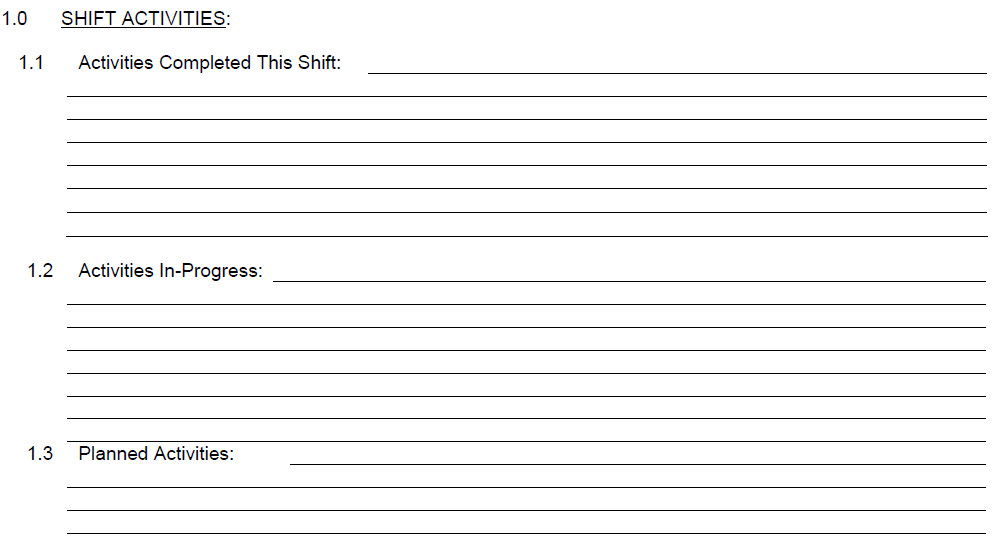
These are a few more of the other sections, which are tracked.

Each of these will be subreports within a Main Report for the watchstation.

Turbine Building Turnover: (Main Report)
Shift Activities: (sub-report)
Equipment Status (sub-report)
Equipment Comments (sub-report)
Compensatory Actions (sub-report)
etc.

Some of these will have unique features.
Equipment Status sub-report will have 4 columns using the Print.Section and NextRecord Properties
Equipment Comments sub-report will only show records for equipment that has comments
Compensatory Actions sub-report will be group sorted based on priority

Our plant has a Corrective Action Program where employees write Condition Reports for Equipment issues, so I will also need a to have Condition Report tracking for the equipment and comments.
Raymond Spornhauer OP  @Reply  
          
4 months ago
All of this is for 1 Shift Position Turnover.  There are also some other sections I will be adding they currently do not have.

There are 15 Watch station positions, each will have some of their own challenges.  For the equipment that is displayed on more than 1 turnover, I have to make sure I can get the printing to allow each turnover having it's own Print Position.  (will probably need a table with many-many relationship)

Some sections I would like to have conditional formatting, with some limitations.
(Allow Bold, Underline, Italics, Change Color, but not allow changing font or font size)
Raymond Spornhauer OP  @Reply  
          
4 months ago
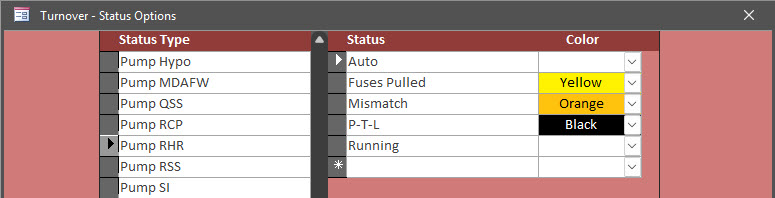
For the Equipment status, because we will no longer be limited to the 3 selections shown on the MS Word Turnover, we can allow more options which will also allow me to use additional formatting options.

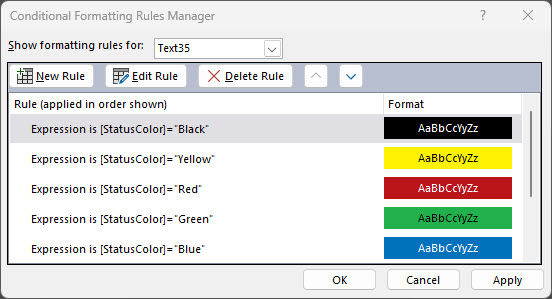
In the past, I had a setup which allowed the user to select the colors they wanted based on a condition, which print on the report.
Raymond Spornhauer OP  @Reply  
          
4 months ago

Raymond Spornhauer OP  @Reply  
          
4 months ago

Raymond Spornhauer OP  @Reply  
          
4 months ago

Raymond Spornhauer OP  @Reply  
          
4 months ago
For these... I built all the Color Combo Boxes to allow a bunch of colors, then used the 'Expression is' with all those same colors on the Forms and Reports.
Kevin Robertson  @Reply  
          
4 months ago
Welcome back Raymond

Great to see you back on the site.
Matt Hall  @Reply  
          
4 months ago
I am also working in a power plant.  I am working on our instrument database, tracking instruments, DCS points, and Drawings.  Mine has turned out to be almost exclusively form-driven.  My work usually centers around turn-arounds, not daily operations.  I have one report, for blank calibration sheets, and another for turn-around summary, to track status of the turn-around work.  My user base is a just a couple of engineers, team leads, and the odd electrician.  The two surprisingly useful things I did were creating a change log table and creating an ERD.

Richard Rost  @Reply  
          
4 months ago
Raymond Great to see you back.

And wow... this is seriously impressive work. I love seeing real-world Access projects like this, especially taking a Word-based turnover checklist and turning it into a proper database with equipment status tracking, comments, change flags, and reports that actually communicate what changed between shifts.

The multi-column printing setup and the PrintSection / NextRecord trick is slick, and the "changed within last 12 hours" flags is a fantastic idea for shift turnover handoffs.

Definitely keep posting updates as you build it out. I'm sure you'll get some great feedback here, and I think a lot of folks on the site will learn a thing or two from seeing how you're approaching it.

And if you do have any questions, and no one is able to help you within like a day or two, just post a comment and tag me (AT)Richard should do it. :)

This thread is now CLOSED. If you wish to comment, start a NEW discussion in Access Forum.
 

Next Unseen

 
New Feature: Comment Live View


The following is a paid advertisement
Computer Learning Zone is not responsible for any content shown or offers made by these ads.
 

Learn
 
Access - index
Excel - index
Word - index
Windows - index
PowerPoint - index
Photoshop - index
Visual Basic - index
ASP - index
Seminars
More...
Customers
 
Login
My Account
My Courses
Lost Password
Memberships
Student Databases
Change Email
Info
 
Latest News
New Releases
User Forums
Topic Glossary
Tips & Tricks
Search The Site
Code Vault
Collapse Menus
Help
 
Customer Support
Web Site Tour
FAQs
TechHelp
Consulting Services
About
 
Background
Testimonials
Jobs
Affiliate Program
Richard Rost
Free Lessons
Mailing List
PCResale.NET
Order
 
Video Tutorials
Handbooks
Memberships
Learning Connection
Idiot's Guide to Excel
Volume Discounts
Payment Info
Shipping
Terms of Sale
Contact
 
Contact Info
Support Policy
Mailing Address
Phone Number
Fax Number
Course Survey
Email Richard
[email protected]
Blog RSS Feed    YouTube Channel

LinkedIn
Copyright 2026 by Computer Learning Zone, Amicron, and Richard Rost. All Rights Reserved. Current Time: 5/6/2026 3:59:06 PM. PLT: 1s