Free Lessons
Courses
Seminars
TechHelp
Fast Tips
Templates
Topic Index
Forum
ABCD
 
Home   Courses   TechHelp   Forums   Help   Contact   Merch   Join   Order   Logon  
 
Back to Access Forum    Comments List
Upload Images   @Reply   Bookmark    Link   Email   Next Unseen 
Reverse Sum Amount
David Clement 
      
4 months ago
Good morning Richard,
I am just wondering if is possible to do a Reverse Sum Total in a Form Footer.
By that I mean, from a starting total of whatever amount, then subtract from that total after a lets say a deposit is entered.
I.E. Starting Amount =$1000.00, Deposit Amount=$100.00, New Starting Amount=$900.00
I know that sounds kind of weird, but there is a method to my madness.

Thank you.

Richard Rost  @Reply  
          
4 months ago
You mean like a running balance?
David Clement OP  @Reply  
      
4 months ago
A backwards one, if that's possible or makes sense.
Let's say you have a Benefit Amount of $1000.00 and that's the maximum amount you have for one year. You get a Payment Amount of $100.00 that needs to be Deducted from the $1000.00 Amount, leaving you with $900.00
Then you get another Payment of $200.00, now you have an Amount of $700.00 and so on. So I guess it's a Running Balance.
I hope that doesn't sound like I have gone off the deep end!
David Clement OP  @Reply  
      
4 months ago
I think there is way to do this in Excel, but would rather do it with Access, just not sure how to.
With you being such a Great Instructor, I thought I would ask.
Thank you!
David Clement OP  @Reply  
      
4 months ago
I guess another way you could think of it is as if it were a reloadable debit card. You have a starting set amount and each month you take away from that amount until you get to zero. I would rather see what's left in the amount than to keep a running total that gets added to an amount until you reach a Maximum Set Amount.

I know that sounds as clear as mud, and I'm sorry I can't explain what I am trying to do better.
David Clement OP  @Reply  
      
4 months ago
If I could email you Richard, I could explain this a little better. The details of what I am trying to do I would rather not have in an open forum format.
Donald Blackwell  @Reply  
       
4 months ago
Would it work for you to just create a continuous form that has a starting balance field in the header.

The detail would be the continuous rows of the form with the Amount field.

In the footer would be your "Balance" field with a record source something like "=[BeginningBalance] - Sum([Amount])"

Is that going in the right direction?
David Clement OP  @Reply  
      
4 months ago
I will try that. Thank you!
Richard Rost  @Reply  
          
4 months ago
Yeah, it would literally be just a backwards running balance. You just put your starting amount in as like $10,000, and then every transaction after that, subtract it or add it as a negative transaction, whichever way you want to do it. It's the same concept, same exact concept. I am probably going to do another video on running balance soon because I just Google searched it and I do have a video that shows up, but it's not a very good one. I'll definitely bump this up the list a little bit.
David Clement OP  @Reply  
      
4 months ago
Sounds great.
I want to do this for retirement purposes. Maximum earnings amount, then go backwards to zero amount. I thought it would be easier to track it this way (in reverse) than to do a sum total. More lead time as to when you max out, I think.
Thank you!
David Clement OP  @Reply  
      
4 months ago
Richard, I know how to do this in Excel, but you have spoiled me with Access. I would MUCH rather do this in Access.

I guess your GREAT teaching skills really must have gotten to me!

Thank you!
David Clement OP  @Reply  
      
4 months ago
Richard,
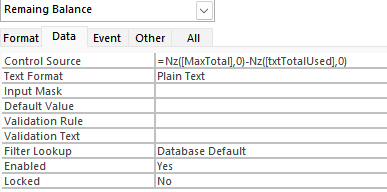
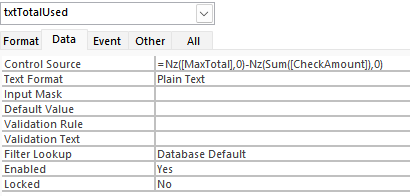
I had to cheat on this one, I asked ChapGPT how to do this, and this is what it gave me:

=Nz(Sum([Amount]),0)

txtTotalUsed

=Nz([MaxTotal],0) - Nz(Sum([CheckAmount]),0)

It works.
Just wondering how you would have done it.

Thank you!
David Clement OP  @Reply  
      
4 months ago

David Clement OP  @Reply  
      
4 months ago

Richard Rost  @Reply  
          
4 months ago
Yeah, that's pretty much how I do it. I think I use DSUM, so it's independent of the current form, but same principle.
David Clement OP  @Reply  
      
4 months ago
Thank you!
Richard Rost  @Reply  
          
4 months ago
David no problemo. Thanks to Donald for the assist.

This thread is now CLOSED. If you wish to comment, start a NEW discussion in Access Forum.
 

Next Unseen

 
New Feature: Comment Live View


The following is a paid advertisement
Computer Learning Zone is not responsible for any content shown or offers made by these ads.
 

Learn
 
Access - index
Excel - index
Word - index
Windows - index
PowerPoint - index
Photoshop - index
Visual Basic - index
ASP - index
Seminars
More...
Customers
 
Login
My Account
My Courses
Lost Password
Memberships
Student Databases
Change Email
Info
 
Latest News
New Releases
User Forums
Topic Glossary
Tips & Tricks
Search The Site
Code Vault
Collapse Menus
Help
 
Customer Support
Web Site Tour
FAQs
TechHelp
Consulting Services
About
 
Background
Testimonials
Jobs
Affiliate Program
Richard Rost
Free Lessons
Mailing List
PCResale.NET
Order
 
Video Tutorials
Handbooks
Memberships
Learning Connection
Idiot's Guide to Excel
Volume Discounts
Payment Info
Shipping
Terms of Sale
Contact
 
Contact Info
Support Policy
Mailing Address
Phone Number
Fax Number
Course Survey
Email Richard
[email protected]
Blog RSS Feed    YouTube Channel

LinkedIn
Copyright 2026 by Computer Learning Zone, Amicron, and Richard Rost. All Rights Reserved. Current Time: 6/20/2026 4:24:01 AM. PLT: 1s