Free Lessons
Courses
Seminars
TechHelp
Fast Tips
Templates
Topic Index
Forum
ABCD
 
Home   Courses   TechHelp   Forums   Help   Contact   Merch   Join   Order   Logon  
 
Back to Access Forum    Comments List
Upload Images   @Reply   Bookmark    Link   Email   Next Unseen 
Date Update
Miguel Rodas 
    
2 months ago
Hello Guys,
I have a table with a date that instead of updating it myself, I would like to set it to refresh or update itself every three years. For example, the table includes a period of three years cycle with a start date (1/1/23) and an end date (12/31/25). What I want is that at the end of the three years, the two dates changes with another three years cycle, that is 1/1/26 to 12/31/29. Thanks.
Alex Lewis  @Reply  
       
2 months ago
You could use a Parameter Query and input the dates you want, or you could use an Update Query to update the year(s) in your table.

Do you have a form to show the dates you want? What are the dates you’re storing in the table?
Donald Blackwell  @Reply  
        
2 months ago
If you want it to happen automagically without you having to run any query manually, you'll need to be able to use macros or VBA. Are you comfortable doing or trying to do that? If so you would need to give us an idea of your table fields and if you have a main menu or other form that opens regularly that could automate it.

For example, if you have a table such as "SettingT" that has fields in one record like "CycleStartDate" and "CycleEndDate" or however your structure is and then at the minimum, the name of a form that could be set to check the end date and, if it's passed, then update the dates.

But we need more info to be able to help you specifically.

Please be more specific. See Rule #2.
Richard Rost  @Reply  
          
2 months ago
As they guys have mentioned, we'll need a bit more detail about your table setup and whether you're comfortable using VBA or macros. If you can provide the structure of your table and give us more details, we'll do our best to get you going.
Miguel Rodas OP  @Reply  
    
2 months ago

Donald Blackwell  @Reply  
        
2 months ago
The simplest way, IMO, to accomplish this is to process it in the On Open or On Load event of a form, such as a main menu. Something that you open regularly so that it processes frequently enough to do the update. I might also use a TempVar to indicate whether it has already been done recently while the database is open if you have a lot of activity in your database to help reduce busy time. Listed below are some videos that discuss these topics:

Form Opening Events
Date Math
TempVars

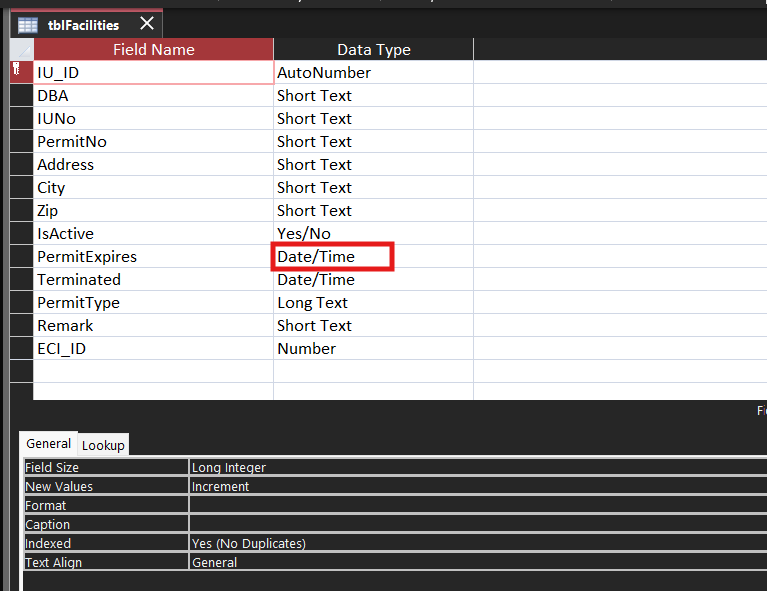
If you want help putting the code together after watching these videos, let us know. And again, be specific. In your first post, you mentioned a Start Date and End Date and you table image shows PermitExpires and Terminated, so we'd need to know exactly which field to trigger the change on, etc.
Richard Rost  @Reply  
          
43 days ago
Miguel, the key thing to understand is that Access is not going to just wake up one day and magically change those dates for you. If you want something to happen automatically, something has to trigger it. That trigger can be an event, some code, a button you click, or a query that runs on a schedule. You just have to decide when you want that check to occur.

For example, like Donald said, you could put VBA code in the On Open or On Load event of a form that opens regularly, like your main menu. When the form opens, it can check the current end date, and if today's date is past it, update both the start and end dates to the next three-year cycle. That way it happens automatically as part of normal use.

Another option is a button on a form that runs an update query. That's not fully automatic, but it gives you control. Or you could run a maintenance routine when the database first opens each month that checks and adjusts the dates if needed.

So the real question is not "can Access do this?" It absolutely can. The question is "when do you want it to check and update?" Once you decide on that trigger, the rest is just straightforward date math.

Miguel Rodas OP  @Reply  
    
42 days ago
Richard, thanks for the easy-to-understand explanation; Donald on the other hand is more technical, yet helpful. I will try his top two suggestions.
I will also try a button with an update query.
Thanks

This thread is now CLOSED. If you wish to comment, start a NEW discussion in Access Forum.
 

Next Unseen

 
New Feature: Comment Live View


The following is a paid advertisement
Computer Learning Zone is not responsible for any content shown or offers made by these ads.
 

Learn
 
Access - index
Excel - index
Word - index
Windows - index
PowerPoint - index
Photoshop - index
Visual Basic - index
ASP - index
Seminars
More...
Customers
 
Login
My Account
My Courses
Lost Password
Memberships
Student Databases
Change Email
Info
 
Latest News
New Releases
User Forums
Topic Glossary
Tips & Tricks
Search The Site
Code Vault
Collapse Menus
Help
 
Customer Support
Web Site Tour
FAQs
TechHelp
Consulting Services
About
 
Background
Testimonials
Jobs
Affiliate Program
Richard Rost
Free Lessons
Mailing List
PCResale.NET
Order
 
Video Tutorials
Handbooks
Memberships
Learning Connection
Idiot's Guide to Excel
Volume Discounts
Payment Info
Shipping
Terms of Sale
Contact
 
Contact Info
Support Policy
Mailing Address
Phone Number
Fax Number
Course Survey
Email Richard
[email protected]
Blog RSS Feed    YouTube Channel

LinkedIn
Copyright 2026 by Computer Learning Zone, Amicron, and Richard Rost. All Rights Reserved. Current Time: 4/13/2026 6:41:35 AM. PLT: 0s