Free Lessons
Courses
Seminars
TechHelp
Fast Tips
Templates
Topic Index
Forum
ABCD
 
Home   Courses   TechHelp   Forums   Help   Contact   Merch   Join   Order   Logon  
 
Back to Access Forum    Comments List
Upload Images   @Reply   Bookmark    Link   Email   Next Unseen 
Is This Possible to Make It Work
Lee Shastid 
    
38 days ago
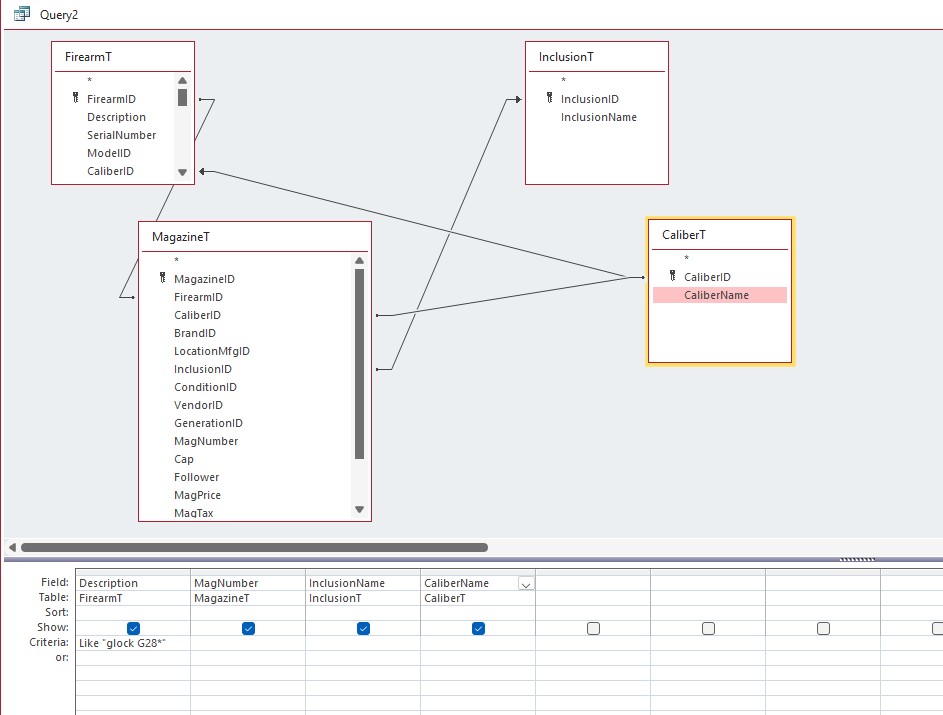
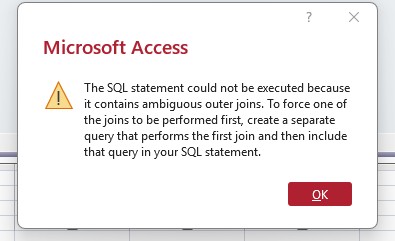
I am trying to use one CaliberT to join to A FirearmT and MagazineT. Is this possible, it seems like I shouldn't have two Caliber Tables one to match each of the others. It seems redundant. If I run the query as is I get this message box. If I change the joins between the CaliberT & MagazineT I get the same message box. If I remove the relationship between CaliberT & MagazineT it works fine. Is there A way to make it work, or am I doing something wrong? I have this same DB with everything separated such as 2 caliber tables and 2 of others also but it seems redundant. Just playing with it and learning.
Lee Shastid OP  @Reply  
    
38 days ago

Lee Shastid OP  @Reply  
    
38 days ago

Donald Blackwell  @Reply  
       
38 days ago
Did you try bringing in CaliberT a 2nd time then have MagazineT relate to CaliberT and FirearmT relate to CaliberT_1.
Lee Shastid OP  @Reply  
    
38 days ago
I have not but I will. Thank you.
Lee Shastid OP  @Reply  
    
38 days ago
I think that will solve my problem. Thank you.
Juan Rivera  @Reply  
            
38 days ago
Multiple Join
This video may help/
Lee Shastid OP  @Reply  
    
38 days ago
Watched it several times. YouTube knows me well. Just having issues grasping it but I think I may have it now. Thank you very much. All help is appreciated.
Bryan Coleman  @Reply  
     
38 days ago
What happens if you remove the join between CaliberT and FirearmT?
Lee Shastid OP  @Reply  
    
38 days ago
Bryan it works fine.
Richard Rost  @Reply  
          
35 days ago
Donald nailed it above.

You don't need two Caliber tables in your database, but you DO need to bring CaliberT into the query twice if you want to join it to both FirearmT and MagazineT.

Right now you're trying to use one instance of CaliberT for two different relationships at the same time, which forces both joins to match the same record. That's why things break or return no results.

Add CaliberT a second time in the query (Access will name it something like CaliberT_1). Then join one to FirearmT and the other to MagazineT. That lets each side resolve independently.

Also, just something to think about design-wise: if MagazineT is already tied to FirearmT via FirearmID, you may not even need CaliberID in MagazineT unless you specifically want to allow mismatches. Otherwise you're storing the same data in two places and will have to keep it in sync.
Lee Shastid OP  @Reply  
    
35 days ago
Richard Thank you....First question is, those relationship were made by Access automatically, and I understand now about bringing it in twice in the query. So will all be good leaving it like that and just add the second table when I do my queries? When you say mismatches you mean like it is showing now? Because what I want to do is connect the magazines to the firearm they go to when I need to, but I also want to use them by themselves without connecting to the firearm. Hope I explained that correctly.
Richard Rost  @Reply  
          
35 days ago
Yep, you're fine leaving the tables and relationships as they are. The important part is that in the query, if you need to connect both FirearmT and MagazineT to CaliberT, then just bring CaliberT into the query twice. That's normal and that's how Access handles it. By "mismatches" I mean situations where a magazine could be assigned one caliber and the firearm it's tied to could be assigned a different caliber. If you want magazines to be usable by themselves sometimes, then keeping CaliberID in MagazineT makes sense. If you also want to optionally connect a magazine to a firearm, that's fine too. Just understand that once you store caliber in both places, it's up to you to make sure they stay consistent when a magazine is linked to a firearm. So yes, your design can work, just be aware you're trading a little redundancy for flexibility.
Lee Shastid OP  @Reply  
    
35 days ago
Gotcha. Thank you. I understand so basically anytime I have the joins like that just bring table in a second time and split it off. Understand.

This thread is now CLOSED. If you wish to comment, start a NEW discussion in Access Forum.
 

Next Unseen

 
New Feature: Comment Live View


The following is a paid advertisement
Computer Learning Zone is not responsible for any content shown or offers made by these ads.
 

Learn
 
Access - index
Excel - index
Word - index
Windows - index
PowerPoint - index
Photoshop - index
Visual Basic - index
ASP - index
Seminars
More...
Customers
 
Login
My Account
My Courses
Lost Password
Memberships
Student Databases
Change Email
Info
 
Latest News
New Releases
User Forums
Topic Glossary
Tips & Tricks
Search The Site
Code Vault
Collapse Menus
Help
 
Customer Support
Web Site Tour
FAQs
TechHelp
Consulting Services
About
 
Background
Testimonials
Jobs
Affiliate Program
Richard Rost
Free Lessons
Mailing List
PCResale.NET
Order
 
Video Tutorials
Handbooks
Memberships
Learning Connection
Idiot's Guide to Excel
Volume Discounts
Payment Info
Shipping
Terms of Sale
Contact
 
Contact Info
Support Policy
Mailing Address
Phone Number
Fax Number
Course Survey
Email Richard
[email protected]
Blog RSS Feed    YouTube Channel

LinkedIn
Copyright 2026 by Computer Learning Zone, Amicron, and Richard Rost. All Rights Reserved. Current Time: 4/30/2026 2:29:52 AM. PLT: 1s