Free Lessons
Courses
Seminars
TechHelp
Fast Tips
Templates
Topic Index
Forum
ABCD
 
Home   Courses   TechHelp   Forums   Help   Contact   Merch   Join   Order   Logon  
 
Back to Quick Queries #84    Comments List
Upload Images   @Reply   Bookmark    Link   Email   Next Unseen 
Access Stopped Working Error
Bryan Coleman 
     
35 days ago
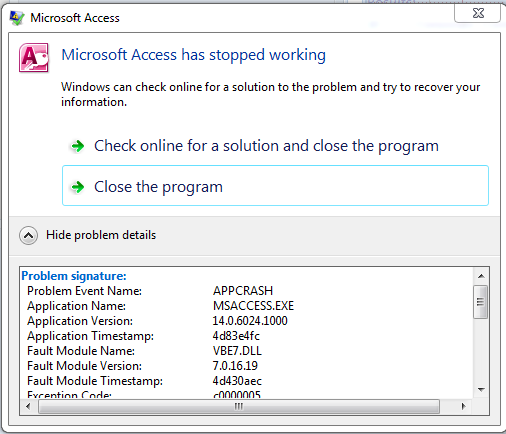
The following image is the error that I get when I switch to VBA editor. Not always and not always the same DB. I was really thrown when it happened in the TechHelp FREE Template 1.98.accdb.
I am running 2010 MS Office 32bit on Windows 7 64bit
The following txt is the rest that didn't fit in the screen shot;
Problem signature:
  Problem Event Name:APPCRASH
  Application Name:MSACCESS.EXE
  Application Version:14.0.6024.1000
  Application Timestamp:4d83e4fc
  Fault Module Name:VBE7.DLL
  Fault Module Version:7.0.16.19
  Fault Module Timestamp:4d430aec
  Exception Code:c0000005
  Exception Offset:00020418
  OS Version:6.1.7601.2.1.0.256.48
  Locale ID:1033

Additional information about the problem:
  LCID:1033
  skulcid:1033

Read our privacy statement online:
  http://go.microsoft.com/fwlink/?linkid=104288&clcid=0x0409

If the online privacy statement is not available, please read our privacy statement offline:
  C:\Windows\system32\en-US\erofflps.txt
Bryan Coleman OP  @Reply  
     
35 days ago

Richard Rost  @Reply  
           
35 days ago
That kind of APPCRASH in VBE7.DLL is usually something environmental, not specific to your database, especially since you're seeing it across multiple files. I'd recommend running through my standard Access Troubleshooter first since it walks through the most common causes step by step like Office repairs, add-ins, references, and system issues. Given that you're on Access 2010 and Windows 7, you're also dealing with some pretty old components, so instability like this can pop up. Start with the troubleshooter and if it's still happening after that, post back and we can dig deeper.
Bryan Coleman OP  @Reply  
     
35 days ago
Thank you, Richard... I was afraid it would be a "old technology" problem...
Thanks for the Troubleshooter, I had tried that.

peace and long life
Bryan Coleman OP  @Reply  
     
23 days ago
Today I was working on "re-creating a wheel". I call it that because most of the data came from Wikipedia. So what is this wheel I thought needed to be re-created? I made a Star Trek DB with episodes, starships and characters - the first 4 series.
So you may say, "thats cool, but what does it have to do with this post?". Maybe nothing, and it my still be a "old technology" problem - decompile.bat may be the only solution, but this time I did a Compact and Repair and then clicked on the VBA editor and then - KABLOOEY!!!
Richard Rost  @Reply  
           
22 days ago
That's not cool. Update recently?
Bryan Coleman OP  @Reply  
     
22 days ago
After my last post, I did find 2 kb updates on the flash drive I store the office exe on. I installed them on this laptop that has windows 7 64bit. Your troubleshooter says to try another computer - and that laptop is windows 7 32bit and I don't remeber it ever not working... those 2 kb's I would have downloaded back when I downloaded office 2010;

So you may be saying to yourself..."Self, why would someone want to have office 2010 when that that is.... so yesterday?"
Well, my reasoning is that Microsoft offered office 2010 to military members for $10... no, that is NOT a typo; ten dollars - and not being much more then a hobbyist - I can't justify any newer version
Bryan Coleman OP  @Reply  
     
22 days ago
It must be every version of office, because I have 2003, 2007 and 2010... but I must have missed the email for 2013, 2016, 2019 and 2024.
Richard Rost  @Reply  
           
22 days ago
Yeah, I honestly don't know much about that old military discount program, but I do remember it being a great deal back in the day.

As far as the crash goes, I really can't offer much more help with Office 2010 at this point. It's just so far out of support that you're likely to run into weird, random issues like this.

One thing that did jump out at me though... if you're actually running Office off a flash drive, definitely don't do that. Install it locally on your hard drive. Running it from external media can cause all kinds of instability, especially with something like the VBA editor.

Other than that, I'm afraid I'm out of ideas on this one unless something new comes up.
Bryan Coleman OP  @Reply  
     
22 days ago
Thanks Richard; I guess my taste in software matches my Star Trek

___________________          _-_
            \__________________/________-_^___ _
      -     /           /            /                   -----------
     -     /           /            /                       \( )/
    -     /______/_______/                         \_/
Richard Rost  @Reply  
           
21 days ago
ANSI Art! Love it.
Bryan Coleman OP  @Reply  
     
20 days ago
Richard
I installed kb2687455 and kb2883019 and that appears to have fixed it. I spect that when I downloaded the office file from Microsoft, those 2 files came with it and I have kept the 3 file together all these years.
I do have MS Office installed on the HDD, I store the setup files on flash drive

Thanks for all you do

peace and long life
Add a Reply Upload an Image
Next Unseen

 
New Feature: Comment Live View


The following is a paid advertisement
Computer Learning Zone is not responsible for any content shown or offers made by these ads.
 

Learn
 
Access - index
Excel - index
Word - index
Windows - index
PowerPoint - index
Photoshop - index
Visual Basic - index
ASP - index
Seminars
More...
Customers
 
Login
My Account
My Courses
Lost Password
Memberships
Student Databases
Change Email
Info
 
Latest News
New Releases
User Forums
Topic Glossary
Tips & Tricks
Search The Site
Code Vault
Collapse Menus
Help
 
Customer Support
Web Site Tour
FAQs
TechHelp
Consulting Services
About
 
Background
Testimonials
Jobs
Affiliate Program
Richard Rost
Free Lessons
Mailing List
PCResale.NET
Order
 
Video Tutorials
Handbooks
Memberships
Learning Connection
Idiot's Guide to Excel
Volume Discounts
Payment Info
Shipping
Terms of Sale
Contact
 
Contact Info
Support Policy
Mailing Address
Phone Number
Fax Number
Course Survey
Email Richard
[email protected]
Blog RSS Feed    YouTube Channel

LinkedIn
Copyright 2026 by Computer Learning Zone, Amicron, and Richard Rost. All Rights Reserved. Current Time: 4/30/2026 11:42:54 AM. PLT: 1s