Free Lessons
Courses
Seminars
TechHelp
Fast Tips
Templates
Topic Index
Forum
ABCD
 
Home   Courses   TechHelp   Forums   Help   Contact   Merch   Join   Order   Logon  
 
Back to Access Forum    Comments List
Upload Images   @Reply   Bookmark    Link   Email   Next Unseen 
Design Question - 1 Table or 2?
Mitchell Layne 
     
7 days ago
I completed the beginner 2 course and found it very informative. I was particularly interested in the relationship section which indicated that you should not duplicate data. I believe the example in the course was that if you have cell, home and work phone number you do not need to break them up but if you start to go over 3 you should create multiple tables. Although I knew that databases should be broken into smaller tables and relationships made to be able to access all the data, I found it difficult to do from a total application design point of view.

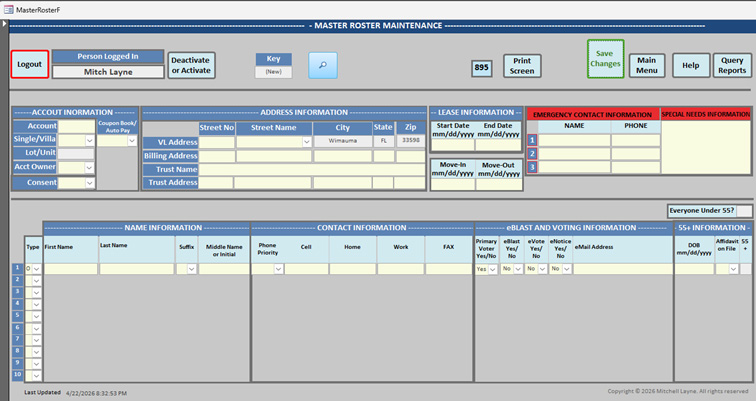
This is for an HOA where there are homes and people living in the homes. Logically it is not difficult to create two tables, one table for the house information and another for the people living at the house. The house information has fields like account, the home address, a billing address, a trust name and address, as well as other fields. The people table has first name, last name, if the person is an owner or just a resident, their cell, work and home phone numbers as well as other fields. For each person in the home, the table would have one record per person, and they would all be related to the house table via an account number.

I am a firm believer in garbage in means garbage out. To protect the database from saving garbage, there are edits that prevent the user from leaving certain fields blank or enter a field before another is populated. I check that start dates cannot come after end dates and a host of other things. I even change the field to normal case or upper-case dependent on the field.

There are also many cross edits between the house information and the people information to ensure what is entered is correct.

Given all of that, what I ended up doing is having all of that information in one table so I can do all of the edits and cross edits before allowing the data to be written to the database. I was not able to work out a way to do it with two tables or if I did, the logic would be much more complex.

Was what I did a really bad way to do it with too much in one table or is it that I have to learn more about how to organize it with multiple tables, update form and reports.

I’m happy to send a screenshot of the form, but I could not figure out how to do that in the forum.
Mitchell Layne OP  @Reply  
     
7 days ago

Juan Rivera  @Reply  
            
7 days ago
I recommend continuing with the classes. You are doing the same thing I did when I first got started. As you move through the lessons, things will begin to become clearer, and you will start to see how tasks can be done better and more efficiently.

I noticed by your badge that you are a beginner, and I would encourage you not to jump around too much. Try to build your skills by following the videos in order, since they often build on each other. What you have now will work for your current needs, and that is a good start. As your database grows, though, you will likely want ways to manage it faster and find information more easily.

You are on the right track, so keep going.
Matt Hall  @Reply  
          
7 days ago
Juan nailed it, especially "You are doing the same thing I did...."  

You are experiencing "Excel" thinking vs "Access" thinking.  It seems easier to build everything flat and simple, because it is.  Maintaining it is the problem.  The time you save in building will likely be given up in use and maintenance.  For instance, what is involved when the new family with 13 people moves in.  

Any working database, by definition, is not "bad".  I have really enjoyed my time learning from Richard and I hope you do as well.  Welcome aboard.
Mitchell Layne OP  @Reply  
     
7 days ago
Thanks. Appreciate your comments. I definitely will continue with my learning and going through the courses. The database I created already has many functions and tables where relationships were made via the account number. It was because of all the cross edits that I felt I could not separate what I presented into two or more tables.

Yes, I am a beginner to Access, but not a beginner to application development. Although I have been retired for about 10 years, in the earlier years, I designed coded and implemented many large-scale applications in Cobol, CICS and DB2 for banks and manufacturing establishments.

Were you able to accomplish many cross edits between the tables especially where the is a one-to-many relationship between in this case one house table and many in the people table. I already created another database to split the tables and if not for all the cross edits, it was not that difficult. I am trying it using sub-forms or popping up a separate form on a button, but from a user interface, it is becoming very messy for them to work through what they would need to do to make it all come together. thanks again. mitch
Mitchell Layne OP  @Reply  
     
7 days ago
Matt I agree and also am enjoying the classes. To answer your question, if a new family moves into the home, there is a deactivate button, which will not delete the record but mark it inactive. A new account number will be assigned to the new owner with the new residents. Note, in the background, all of these changes are kept in a history table and there are reports that can be viewed or printed to show who changed what when. If something was done incorrectly, and hopefully with all the cross edits it won't happen, although I know it is inevitable that it will happen, it may indicate more user training is required or code changes.
Richard Rost  @Reply  
          
7 days ago
Mitchell You're not wrong... but you did take the "easy now, harder later" path.

What you built will absolutely work, and for a small system it might even feel easier because all your validation is in one place. The problem is you've traded proper relational design for convenience, and that's going to come back to bite you as the data grows.

The house/people setup you described is a textbook one-to-many relationship. One house, many people. That really should be two tables. The moment you get situations like multiple residents, changing occupants, history tracking, etc., a single flat table starts getting messy fast.

The key thing to understand is that validation doesn't belong in the table structure. It belongs in your forms.

You can still do all of your "cross edits" with separate tables. That's what forms and subforms are for. For example, a main form for the house, and a subform for the people. That gives you a clean UI and still keeps your data normalized underneath.

If the UI is getting messy, that's not a sign the tables should be combined, it just means the form design needs a little more work. Sometimes that means using subforms, sometimes popups, sometimes just simplifying what the user sees at once.

Also, coming from COBOL/DB2, you already understand relational data. Access just handles the UI side differently, and that's the piece that takes some getting used to.

So no, it's not a "bad" database... but yes, I would strongly recommend splitting it back into proper tables and moving your validation logic into the form layer. You'll thank yourself later when this thing grows.

For my more advanced students reading this, this is actually one of those "full circle" things. In Access, I start by teaching only very basic table-level validation. Then as you get into real applications, I shift you toward doing most of your validation in the forms because you've got way more control over the user experience in Access.

But when you move up to something like SQL Server, where you might have multiple front ends, imports, scripts, or even other applications touching the same data, the responsibility shifts back to the database (back-end). SQL Server gives you much more powerful tools to enforce rules at the table level, and at that point the database has to protect itself, not just rely on the form.

So for where you are right now, Mitchell, I'd stick with form-level validation. Just make sure your users have one clean path to enter and edit data through your forms. You don't want the same field being edited in five different places with five slightly different sets of rules. Keep it centralized, keep it consistent, and you'll be in good shape.
Richard Rost  @Reply  
          
7 days ago
Also, Mitchell, welcome aboard!

And just a quick note for anyone reading this. Mitchell is new here. He originally reached out to me via email, which is totally fine, especially when you're new. But for technical questions like this, the forums are really the best place for them.

Not only does it give me a chance to jump in when I have time, but it also lets our moderators and other advanced students share their input too, which is often just as (if not more) valuable. Plus, it helps build up a knowledge base that others can benefit from later, and I can even turn discussions like this into future Quick Queries videos.

So if you've got questions like this, the forums are definitely the place to post them.
Richard Rost  @Reply  
          
7 days ago
Just to clarify something you mentioned from the beginner classes, the "rule of three" is really just a rule of thumb, not a hard rule.

If you've got something like phone numbers, having one field is fine. Two or three, like home, work, and cell, is still manageable. But once you start getting beyond that, that's usually a good sign it should be moved into a separate related table.

A classic example is order line items. I see beginners all the time try to do Item1, Item2, Item3... all the way up to Item20. That's where things really break down, and it's a clear case for a proper one-to-many relationship.

Now, can you break that rule? Sure. There are times where denormalizing makes sense, and I've got videos where I talk about that. Sometimes performance or simplicity for a specific use case wins over textbook design.

At the end of the day, database design is part science and part art. The theory is important, but so is what works in the real world. Like I always say, I'm just dumping out a bucket of Legos and showing you different ways to put them together. You've got to build what works best for your situation.
Matt Hall  @Reply  
          
7 days ago
Mitchell As I understood the original post, the form shown was based on a single table.  My question was more about having to modify the table to accept the additional 3 people, how many new fields would that require, and how close does that get you to the 255 field limit.  It was just food for thought.
Juan Rivera  @Reply  
            
7 days ago
Mitchell welcome on boradwe are here to help if you need lets start with the basic.  use richards cutomer databse to build from.  then develop the next part.  I have no idea of what you will need but I can almose bet the ABCD richard built will point you in the right direction but that is very involved in programing.  my thought is input 1st family information then build an address/aprtment so this is where the thinking cap comes on.  Do you have several buildings? 1 building several apartments? As i say lets eat this cookie one bit at a time.  so feel free to ask I am most happy to help if i can.

V/r
Juan
Mitchell Layne OP  @Reply  
     
7 days ago
I want to thank everyone for your thoughtful replies. I really appreciate it. I am currently in the middle or working through breaking the tables up and seeing if I can make it work. To me, that is all the fun of programming. I just need to work out how to allow the users to see all the data and make it easier for them to operate. I am now thinking in terms of having the house form and table with all it edits and the people table with all its edits and maybe using tempvars having certain information accessible to each form doing the updating for the cross edits. I will certainly let you know how that methodology works out.
Juan Rivera  @Reply  
            
7 days ago
I recomend using chat gpt and make up fake names and data this way you dont violate personal information and lets make this fun.  

V/r
Juan
Mitchell Layne OP  @Reply  
     
7 days ago
Thanks Juan, Yes, Personal Identifiable Information (PII) is something I am very familiar with from my banking days.
Mitchell Layne OP  @Reply  
     
3 days ago
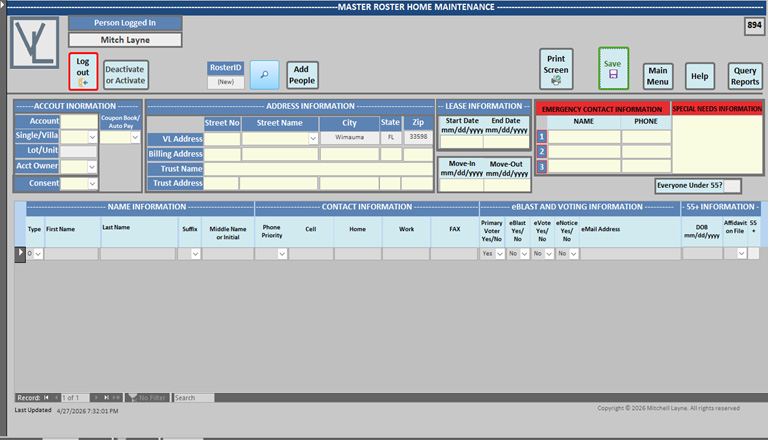
Just to keep everyone up to date on my progress, I was able to split the tables into a Home Table and a people table. The people table has one record per person all related to an account number in the two tables.

I then created a separate form for the home table and another for the people table. The home form updates the home table and the people form updates the people table.

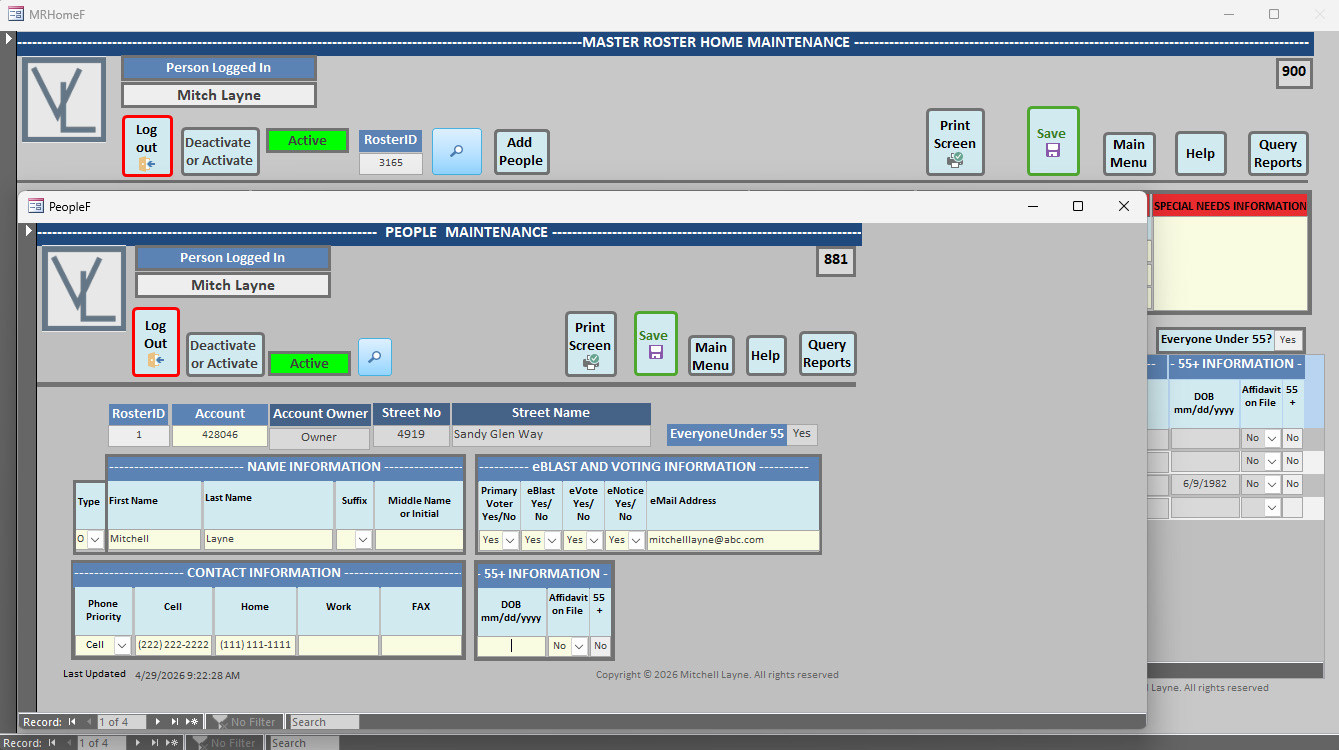
Next, I created a separate people continuous form that is not used for updating anything and disabled and lock all the fields. In the home form I access a query that populates the continuous form with the people for that account on the home table. I then put the continuous form as a sub form at the bottom of the home form so when they are updating the home table via the home form they can see all the people. That form is enclosed.

On the home form, you will see a button, that when clicked, brings up the people table so they can add or change people.

It all works well and after doing all of that, I must say, I do not know how many hundreds of lines of code I was able to remove in doing it this way.

I am still struggling with the cross edits. One thing I have to figure out is possibly using a record set to loop through all the people in the people table for that account because one of the edits is that if all the people for that account are under 55, I have to mark another fields indicating that no one in the home is 55 or over. There are other edits between the home and people table but not as many as I thought. There is certainly more reading, watching videos and learning for me to do, but I am making a lot of progress and having a blast.

Thanks for listening. mitch
Mitchell Layne OP  @Reply  
     
3 days ago

Richard Rost  @Reply  
          
2 days ago
Sounds like you've really taken things to the next level, Mitch. Breaking the data out into Home and People tables with proper relationships is the right way to go, and it makes the whole application a lot more manageable as things grow. It's really satisfying, isn't it, when you realize you can do more with less code and things start to feel organized?

For the cross edits, like checking if everyone in a home is under 55, you're thinking in exactly the right direction. I'd use either a DCount or open a recordset (like you mentioned) to check the ages of the related people for a given home. The DCount or DMax/DMin functions can often save you from looping explicitly, but if your logic is more complex, a recordset loop gets the job done. For example, you might run a DMin to find the lowest age and a DMax to find the highest, or just loop through checking conditions as you go.

You're definitely right to keep on reading, watching, and experimenting - there's no textbook substitution for getting your hands dirty. Thanks for sharing your progress. Feels like you've hit warp speed. Keep the updates coming - it helps other folks to see how this process evolves.
Mitchell Layne OP  @Reply  
     
14 hours ago
Yes, it was satisfying. I do not know if I am a warp speed but certainly faster than impulse power. Here is what I decided to do, and it looks like it is working. On the people table not only is there a DOB to check if someone 55 or over, but some people do not want us to know their DOB. If that is the case, they can fill out an affidavit that they are at least 55. To make it easier, there is a field called 55+ in the people table that will have a Yes or No in it. It is a protected field, and the application determines the Yes or No.

I then created a query selecting all the records for that account that has Yes in the 55+ field. If no records were selected, I set the EveryoneUnder55 to YEs or No. That field is displayed on the Home Form.


Private Sub UpdateEveryoneUnder55RTN()
   Dim rs As Recordset, SQL As String
   SQL = "SELECT * FROM EveryoneUnder55Query Where RosterID=" & Forms!PeopleF!RosterID & dbOpenSnapshot
   Set rs = CurrentDb.OpenRecordset(SQL)
   If rs.EOF Then
        EveryoneUnder55 = "No"
    Else
        EveryoneUnder55 = "Yes"
    End If
    rs.Close
    Set rs = Nothing
End Sub

Mitchell Layne OP  @Reply  
     
14 hours ago

Add a Reply Upload an Image
Next Unseen

 
New Feature: Comment Live View


The following is a paid advertisement
Computer Learning Zone is not responsible for any content shown or offers made by these ads.
 

Learn
 
Access - index
Excel - index
Word - index
Windows - index
PowerPoint - index
Photoshop - index
Visual Basic - index
ASP - index
Seminars
More...
Customers
 
Login
My Account
My Courses
Lost Password
Memberships
Student Databases
Change Email
Info
 
Latest News
New Releases
User Forums
Topic Glossary
Tips & Tricks
Search The Site
Code Vault
Collapse Menus
Help
 
Customer Support
Web Site Tour
FAQs
TechHelp
Consulting Services
About
 
Background
Testimonials
Jobs
Affiliate Program
Richard Rost
Free Lessons
Mailing List
PCResale.NET
Order
 
Video Tutorials
Handbooks
Memberships
Learning Connection
Idiot's Guide to Excel
Volume Discounts
Payment Info
Shipping
Terms of Sale
Contact
 
Contact Info
Support Policy
Mailing Address
Phone Number
Fax Number
Course Survey
Email Richard
[email protected]
Blog RSS Feed    YouTube Channel

LinkedIn
Copyright 2026 by Computer Learning Zone, Amicron, and Richard Rost. All Rights Reserved. Current Time: 4/30/2026 12:59:51 AM. PLT: 1s