Free Lessons
Courses
Seminars
TechHelp
Fast Tips
Templates
Topic Index
Forum
ABCD
 
Home   Courses   TechHelp   Forums   Help   Contact   Merch   Join   Order   Logon  
 
Back to Track Log On    Comments List
Upload Images   @Reply   Bookmark    Link   Email   Next Unseen 
Pulling in Windows Environment Variables
Chuck Corvec 
    
4 days ago
I have watched the Track Log on video and am trying to get it to work. It does mot error out but I get nothing in the text box.

I am doing this on my MainMenu_frm Form

I user a variation of Richard's code

ADUser = Environ("COMPUTERNAME") & "\" & Environ("USERNAME")

I could not user Username as that is a tempvar on my logon form. It at this point did error out. Variable not found. I had to add Dim ADUser As String at the beginning of the onload

ADUser is the name of the textbox

Now the form loads but there is nothing in the text box ADUser. Did I miss something real simple. And being as ADUser is an object on the form why is id not recognizing it causeing me to add the dim statement for it.
Richard Rost  @Reply  
          
4 days ago
From what you described, the main thing that's tripping you up is how textboxes and variables interact in VBA. In Access, just declaring a variable like Dim ADUser As String in the Form_Load event doesn't actually put anything in the textbox named ADUser on your form. The Dim statement just makes a place in memory for your own use in code - it doesn't set or update a control on the form with that value.

If you want your ADUser textbox to display the current user's info, you need to explicitly assign the value to the textbox, like this:

Me!ADUser = Environ("COMPUTERNAME") & "\" & Environ("USERNAME")

Put that line somewhere in your Form_Load event, and as long as the textbox is called ADUser (check the Name property, not the Caption!), it will show the value when the form loads. However, to avoid confusion, it's actually better to name your textbox something a little different from your variable - like ADUserTxt or something similar. That way you don't run into any weird referencing issues in your code.

A couple other quick things to check: Make sure your ADUser textbox's ControlSource is blank (unbound), or if you have a field in your form's record source named ADUser, be sure you really intend to overwrite it. Also, spelling really matters - if you have even one letter off in Me.ADUser or in your control name, you'll end up with nothing showing, or sometimes get an error.

About your tempvar Username: good call to avoid conflicts there. It won't interfere unless you try to use both with ambiguous references.

Long story short, the box stays empty because Access doesn't automatically connect a variable with the textbox - you have to assign it. Try using Me!ADUser = ... as above in your Form_Load and you should warp right through to the solution. If you still have trouble, double-check the textbox name and watch out for typos... they can be more elusive than a cloaked Romulan!
Chuck Corvec OP  @Reply  
    
4 days ago
Richard
The code I used to populate the text box was ...

   ADUser = Environ("COMPUTERNAME") & "\" & Environ("USERNAME")

Should that not have populated the box, The only difference between my code and yours is I used ADUser instead of UserName. In your video you did not have to add a Dim statement to prevent variable not found. I feel I am missing something very basicand this old brain just cant fathom what it is. LOL
Alex Hedley  @Reply  
           
4 days ago
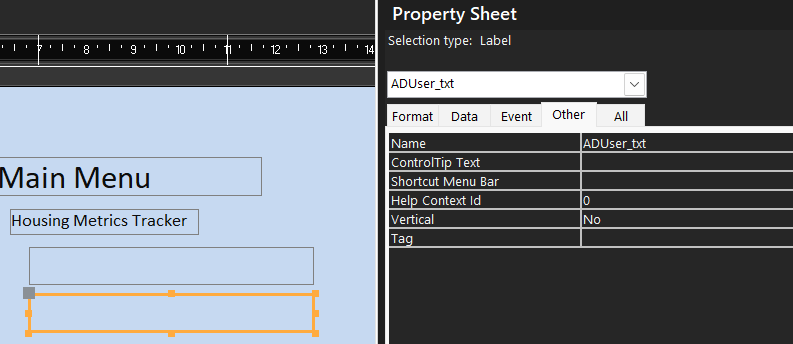
Can you share the form with the textbox highlighted and the name of the textbox in your property sheet?
Chuck Corvec OP  @Reply  
    
4 days ago
Richard UPDATE!

So I took the following steps
I named the text box ADUser_txt

I then copied that name and pasted it into my code to avoid typo's

My new code to populate the box is as follows

ME!ADUser_txt = Environ("COMPUTERNAME") & "\" & Environ("USERNAME")

I of course change the Dim to Dim ASUser_txt as String

I get Runtime error 438, Object doesn't support this property or method

I am confused It seems like Access is not recognizing my text box. I am going to take a screen shot of the entire onload event
I MUST be missing something
Chuck Corvec OP  @Reply  
    
4 days ago

Chuck Corvec OP  @Reply  
    
4 days ago
Alex Will do, One sec
Richard Rost  @Reply  
          
4 days ago
You've got ADUser_txt set as the name of your local variable. (I'm not a fan of underscores in VBA, but they're allowed).

Make that the name of the TEXTBOX CONTROL on your form.

Make your LOCAL variable AdUser so there's no confusion between the two. Or just called it ADU. Something DIFFERENT than the name of the form control.

Dimmed LOCAL variable is not the same as the FORM CONTROL.

:)
Chuck Corvec OP  @Reply  
    
4 days ago

Chuck Corvec OP  @Reply  
    
4 days ago
The box above the highlighted one is for a TempVar that works perfectly
Richard Rost  @Reply  
          
4 days ago
You're not using the local variable at all.

Just delete the line that says:

Dim AdUser_txt As String

Chuck Corvec OP  @Reply  
    
4 days ago
Richard So I am completely baffled. I started over using a modified version of the code in your Track Log video
In that video us named the text box UserName and referenced that name in your code. I did the same thing but used ADUser as the name of the text box and referenced that in my code

Now it works perfectly. Thank you. Wish I could figure out what i was doing wrong. Thanks again
Richard Rost  @Reply  
          
4 days ago
I don't know how many times I pulled my hair out over a specific problem, then decided to start over from scratch and do pretty much the same thing, and the problem went away. No clue. You did have a variable declared that you weren't using that could have been interfering with the name of the control on the form, but aside from that everything else looked fine.
Add a Reply Upload an Image
Next Unseen

 
New Feature: Comment Live View


The following is a paid advertisement
Computer Learning Zone is not responsible for any content shown or offers made by these ads.
 

Learn
 
Access - index
Excel - index
Word - index
Windows - index
PowerPoint - index
Photoshop - index
Visual Basic - index
ASP - index
Seminars
More...
Customers
 
Login
My Account
My Courses
Lost Password
Memberships
Student Databases
Change Email
Info
 
Latest News
New Releases
User Forums
Topic Glossary
Tips & Tricks
Search The Site
Code Vault
Collapse Menus
Help
 
Customer Support
Web Site Tour
FAQs
TechHelp
Consulting Services
About
 
Background
Testimonials
Jobs
Affiliate Program
Richard Rost
Free Lessons
Mailing List
PCResale.NET
Order
 
Video Tutorials
Handbooks
Memberships
Learning Connection
Idiot's Guide to Excel
Volume Discounts
Payment Info
Shipping
Terms of Sale
Contact
 
Contact Info
Support Policy
Mailing Address
Phone Number
Fax Number
Course Survey
Email Richard
[email protected]
Blog RSS Feed    YouTube Channel

LinkedIn
Copyright 2026 by Computer Learning Zone, Amicron, and Richard Rost. All Rights Reserved. Current Time: 5/2/2026 7:11:52 AM. PLT: 1s