Free Lessons
Courses
Seminars
TechHelp
Fast Tips
Templates
Topic Index
Forum
ABCD
 
Home   Courses   TechHelp   Forums   Help   Contact   Merch   Join   Order   Logon  
 
Back to Access Forum    Comments List
Upload Images   @Reply   Bookmark    Link   Email   Next Unseen 
Checkbox in a Continous Sub Form
Neal Austin 
      
5 hours ago
HI, i am trying to work on my accounting database i am making, it is to replace the use of quickbooks for my personal use. i am at the point where i am making a form with a sub form, that pulls in all my unpaid orders. I want to add a check box next to each unpaid order, that i can check individually, not all at once, to select which order i will be receiving a payment for, i have tried unbound check box, that makes them all check off at once. I have tried to bind it to a yes/no field, but then it becomes uncheckable with out a beep error, i am guessing that it is because the sub form is based off of a query i created that brings in my order id, total amount of order - that calculates things like sales tax, qty, etc. so i am kind of stuck on what to do. I want it to work similar to how quickbooks does it for receive payments.

any ideas would be great. thanks
Kevin Robertson  @Reply  
           
5 hours ago
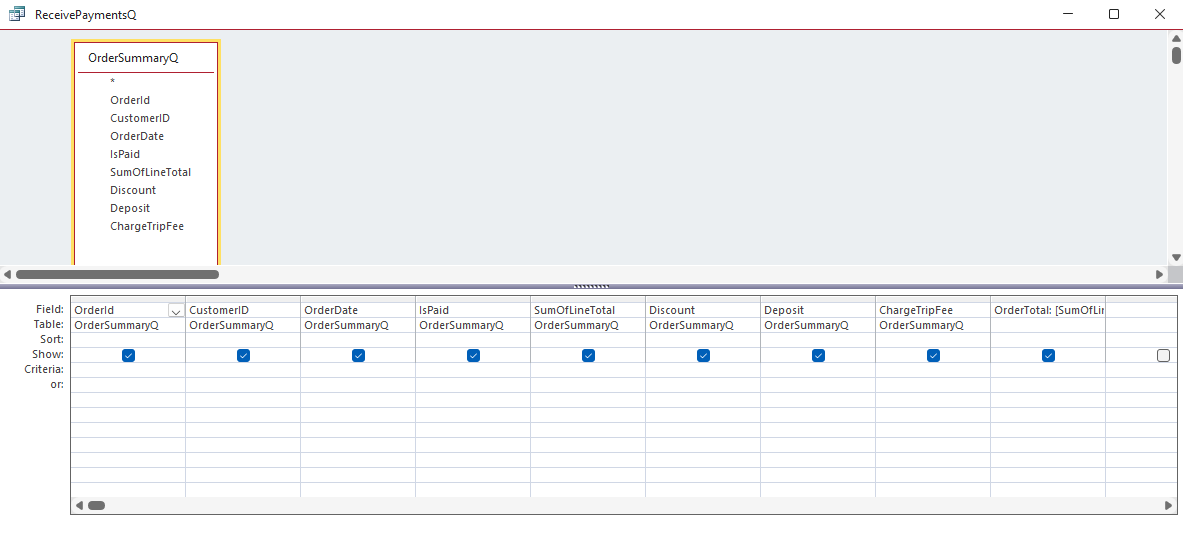
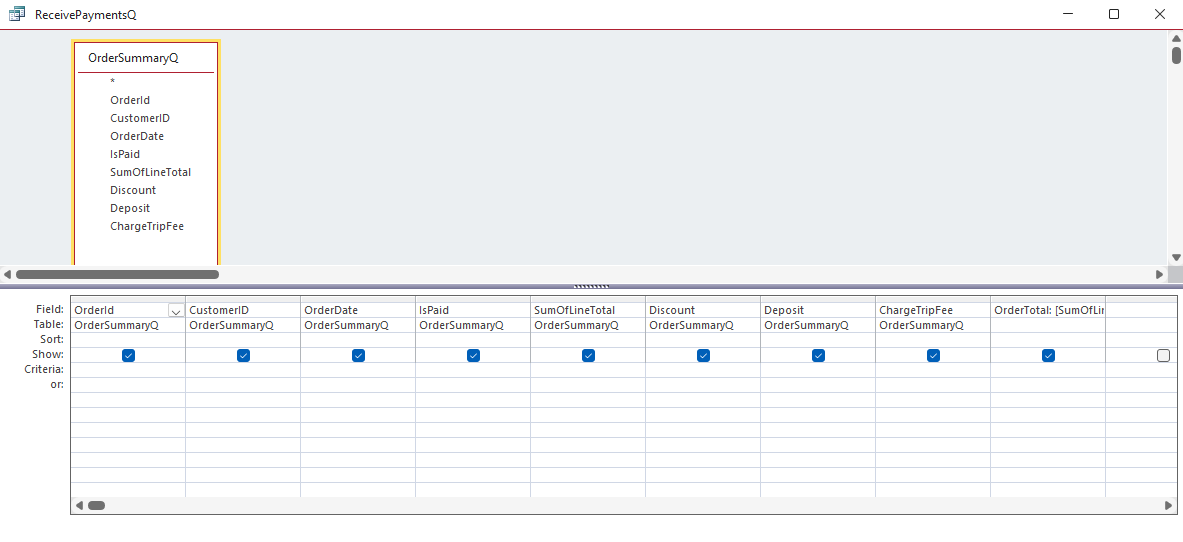
Please post a screenshot of your Query in Design View.
Neal Austin OP  @Reply  
      
5 hours ago

Neal Austin OP  @Reply  
      
5 hours ago

Neal Austin OP  @Reply  
      
5 hours ago
i am sure the issue, is that i have a qry based off a qry, etc..
Neal Austin OP  @Reply  
      
5 hours ago
i just dont know how to take the details from the order form, and calculate the totals with out a qry, all of the lessens say not to do the calulations like sales tax, qty, amounts, etc. in the forms
Alex Lewis  @Reply  
       
5 hours ago
Calculated Fields: https://599cd.com/Calculated
Richard Rost  @Reply  
          
3 hours ago
You're right - you can't use an unbound checkbox in a continuous (datasheet-style) subform if you want to check them individually. If you use an unbound control, all the checkboxes will reflect the same value. That's just how continuous forms work in Access.

When you tried to bind your checkbox to a yes/no field and got the "beep" error, that's usually because the form or subform is not editable. Most often, that's because the query behind your subform is not updateable. Usually, stacking queries upon queries, or having calculated (non-stored) fields in the results, can make a query read-only.

You're correct: you shouldn't be calculating sales tax, totals, etc., in the form itself, but rather in the query (or as an expression in the query). That's good practice. The trick is to have the query return editable data, with only the calculated fields being uneditable.

Here's what you need:
You should have a checkbox bound to a yes/no field in your main orders table (or whatever table tracks each order). Let's call this field something like SelectedForPayment. The rest of your fields - totals, sales tax, whatever - can be calculated in the query, but those calculated fields shouldn't cause the whole query to be uneditable as long as they're just expressions and not aggregating (like GROUP BY or SUM).

What usually breaks things is having your main query do a GROUP BY or join to other uneditable queries, or including calculations that make it non-updateable. You can check this by opening your subform query in Datasheet view and seeing if you can edit the yes/no field directly.

If you can't type into your yes/no field in the query, then that's the root problem - Access won't let the form edit what the query can't. You'll need to adjust your query: make sure your base table is editable, join only what you need, and use expressions for calculated fields, but avoid GROUP BY or too many layers of subqueries.

You want the query to pull all the fields you need to display (totals, sales tax, etc.) but keep your "SelectedForPayment" field tied directly to your order table so it stays editable.

Once that's working, you should be able to click that checkbox for each individual order in your subform. Then, with a button on your form, you can run some logic to process payments just for those checked orders. Just remember, make a backup before messing with any payment/finance-related data, because we don't want any Ferengi-style book-cooking disasters.

If you get stuck, post a screenshot of the SQL view of your query, especially how you're joining tables and how your calculated fields are set up. That'll make it easier to spot what's keeping it from being updateable.
Neal Austin OP  @Reply  
      
39 minutes ago
thank you, i will work on what you recommend and see how far i get.
Neal Austin OP  @Reply  
      
24 minutes ago
i do have a question though, i based my forms, tables, querys, etc. on your invoicing tech help very long and indepth video, helped out a lot. i then watched a lot of other videos to piece things together, along with the course materials. What i had to do was i had a table for order details, in there was each field that held the data for qty, amount, sales, tax, etc. then i had to make a querry and use the group function to pull each line item in the order details, to come up with the order totals. Is there another way to do this with out using a grouped querry, i followed your video, where the calculation of the line totals are totaled in the form, but that total number is just for viewing purposes in the form, it does not save back to a field in a order table. hence why i had to use a group option in a query to combine each line total...
Add a Reply Upload an Image
Next Unseen

 
New Feature: Comment Live View


The following is a paid advertisement
Computer Learning Zone is not responsible for any content shown or offers made by these ads.
 

Learn
 
Access - index
Excel - index
Word - index
Windows - index
PowerPoint - index
Photoshop - index
Visual Basic - index
ASP - index
Seminars
More...
Customers
 
Login
My Account
My Courses
Lost Password
Memberships
Student Databases
Change Email
Info
 
Latest News
New Releases
User Forums
Topic Glossary
Tips & Tricks
Search The Site
Code Vault
Collapse Menus
Help
 
Customer Support
Web Site Tour
FAQs
TechHelp
Consulting Services
About
 
Background
Testimonials
Jobs
Affiliate Program
Richard Rost
Free Lessons
Mailing List
PCResale.NET
Order
 
Video Tutorials
Handbooks
Memberships
Learning Connection
Idiot's Guide to Excel
Volume Discounts
Payment Info
Shipping
Terms of Sale
Contact
 
Contact Info
Support Policy
Mailing Address
Phone Number
Fax Number
Course Survey
Email Richard
[email protected]
Blog RSS Feed    YouTube Channel

LinkedIn
Copyright 2026 by Computer Learning Zone, Amicron, and Richard Rost. All Rights Reserved. Current Time: 4/30/2026 2:05:57 PM. PLT: 0s