Free Lessons
Courses
Seminars
TechHelp
Fast Tips
Templates
Topic Index
Forum
ABCD
 
Home   Courses   TechHelp   Forums   Help   Contact   Merch   Join   Order   Logon  
 
Back to Access Forum    Comments List
Upload Images   @Reply   Bookmark    Link   Email   Next Unseen 
Opening a File
Colin Smyth 
      
9 days ago
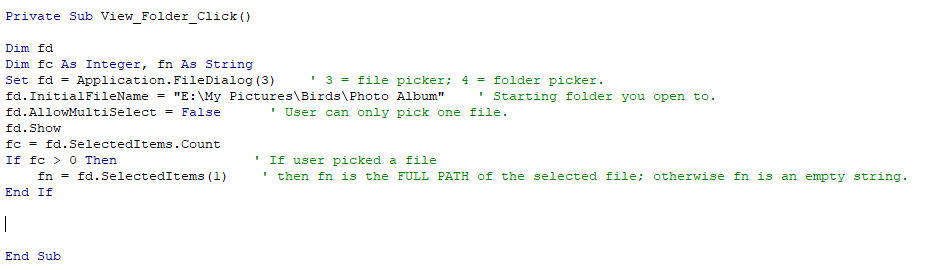
My VBA knowledge is limnited. I use the following code from one of Richard's courses to open a folder from a form: (as per attached file)

The starting folder as per the code is "E:\My Pictures\Birds\Photo Album"
However, under that folder are many different folders with specific birds in each folder e.g. Australian Magpie, Fairywren etc and each of those folders have many photos of that particular bird.
So I can scroll down and choose the appropriate foldere.g. Australian Magpie and when I click on it, it opens icon type views of all the birds in that folder. If I click on one photo, the code closes down. If I right click on one bird, it opens that photo and then I can scroll through all the birds.
Is there a way to be able to open the folder to see all the birds more directly?
Colin Smyth OP  @Reply  
      
9 days ago

Juan Rivera  @Reply  
            
9 days ago
Open Folder

Try this video and let us know if this helped...
Colin Smyth OP  @Reply  
      
8 days ago
Thank you Juan. That seemed to be helping. When I ran the msgbox trial, that brought up the correct ID for the bird that was displayed on the form.
If I took out the Msgbox command then I got a a run time error 53, saying the file was not found.
Maybe the problem might be that my database is on C Drive but my photos are on E:Drive.
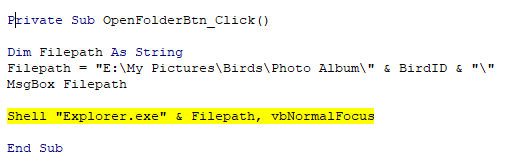
I have attached the VBA Code. Not sure where to from here.
Colin Smyth OP  @Reply  
      
8 days ago

Kevin Robertson  @Reply  
           
8 days ago
Colin You are missing a space.

Shell "Explorer.exe " & FilePath, vbNormalFocus
Colin Smyth OP  @Reply  
      
8 days ago
Thank you Kevin.
That opened Explorer, which went to the documents page which Richard said, it meant the folder didn't exist.
The folder under the Photo Album folder is not named as the BirdID but as the bird's name. e.g. BirdID 20 might be a blackbird and this is the name of the folder.  In the database, the BirdID and the Birdname are next to each other. Is there someway to overcome that issue,so finding the BirdID, then opens the folder with the name of the bird of that BirdID
Kevin Robertson  @Reply  
           
8 days ago
Change BirdID to BirdName (assuming this is the name of the field in the Table).

FilePath = "E:\My Pictures\Birds\Photo Album\" & BirdName & "\"

This should give you the correct folder path: E:\My Pictures\Birds\Photo Album\Blackbird\

If it is a folder you are opening I would change the variable to FolderPath.
Colin Smyth OP  @Reply  
      
8 days ago
Thank you Kevin. I tried that and when I use the message box, it brings up E:\my Pictures\Birds\Photo Album\Bird Name.
When I set up the database, I named the field as Bird Name (before I started looking at Richard's post about not having spaces in field names.) So in the file path it actually is "E:\My Pictures\Birds\Photo Album\" & "Bird Name" & "\"
Am I doing something wrong?
Kevin Robertson  @Reply  
           
8 days ago
You have quotes around the field name. Change to square brackets.

"E:\My Pictures\Birds\Photo Album\" & [Bird Name] & "\"
Colin Smyth OP  @Reply  
      
8 days ago
Thank you very much Kevin.

That is all working now. Really appreciate Juan and Richard's help and thank you for tidying things up for me.
Add a Reply Upload an Image
Next Unseen

 
New Feature: Comment Live View


The following is a paid advertisement
Computer Learning Zone is not responsible for any content shown or offers made by these ads.
 

Learn
 
Access - index
Excel - index
Word - index
Windows - index
PowerPoint - index
Photoshop - index
Visual Basic - index
ASP - index
Seminars
More...
Customers
 
Login
My Account
My Courses
Lost Password
Memberships
Student Databases
Change Email
Info
 
Latest News
New Releases
User Forums
Topic Glossary
Tips & Tricks
Search The Site
Code Vault
Collapse Menus
Help
 
Customer Support
Web Site Tour
FAQs
TechHelp
Consulting Services
About
 
Background
Testimonials
Jobs
Affiliate Program
Richard Rost
Free Lessons
Mailing List
PCResale.NET
Order
 
Video Tutorials
Handbooks
Memberships
Learning Connection
Idiot's Guide to Excel
Volume Discounts
Payment Info
Shipping
Terms of Sale
Contact
 
Contact Info
Support Policy
Mailing Address
Phone Number
Fax Number
Course Survey
Email Richard
[email protected]
Blog RSS Feed    YouTube Channel

LinkedIn
Copyright 2026 by Computer Learning Zone, Amicron, and Richard Rost. All Rights Reserved. Current Time: 5/25/2026 2:06:06 AM. PLT: 0s