Free Lessons
Courses
Seminars
TechHelp
Fast Tips
Templates
Topic Index
Forum
ABCD
 
Home   Courses   TechHelp   Forums   Help   Contact   Merch   Join   Order   Logon  
 
Back to Access Forum    Comments List
Upload Images   @Reply   Bookmark    Link   Email   Next Unseen 
Building a Waitlist Database
Samantha Mafua 
     
3 days ago
Hey all, I'd love some help!
I have a small team of 8 early childhood consultants, we are currently using Excel for our waitlist, which I'm sure you could have predicted is having issues with so many people accessing it and saving data.
I've taken all of the beginner Access classes and most of the Expert.
I'm trying to build an Access database.
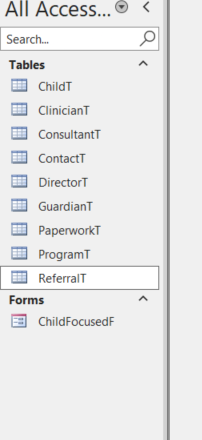
I will post pictures of the tables I have created.
I've kept all the tables separate so they have only one type of data.

I'm struggling to figure out how to add several different tables into one form.

For instance, we have a Program Focused Consultation, so I would need to bring in the, director table, Paperwork table, program table and referral table, as well as a field to assign a consultant.
Samantha Mafua OP  @Reply  
     
3 days ago

Samantha Mafua OP  @Reply  
     
3 days ago

Samantha Mafua OP  @Reply  
     
3 days ago
Samantha This is the picture of our column names in Excel
Alex Hedley  @Reply  
           
3 days ago
Are there any Relationships between the Tables?
John Williams  @Reply  
     
3 days ago
Samantha Look at Helper Data (https://599cd.com/blog/display-article.asp?ID=1386).  Your ClinicianT, ConsultantT, DirectorT tables could be in one table, with an additional field for type.  Add drop down lists on your ChildFocusedF form for each type, with the dropdown's query distinguishing the proper type.  Only the ID would need to be stored in the table. You may need an event table as the item that glues it together as a child may have multiple events associated.  Step back and map fields, relationships as Richard suggests.  Throw a little sample data in to see how it behaves, revise as necessary.
Samantha Mafua OP  @Reply  
     
3 days ago
John Thank you so much! I thought I did but my brain is struggling with applying it to my particular situation. I thought I understood things until I started mine from scratch. I did start to figure this out this afternoon! I think I might be on a good road with your explanation and my connections! Thank you again!
Samantha Mafua OP  @Reply  
     
3 days ago
Alex Not at the moment, I'm trying to build them from scratch and got stuck on Friday. Trying to figure out how it will all work before my consultants start entering data.
Matt Hall  @Reply  
          
2 days ago
Sounds to me like building a query would be the next step.
Add a Reply Upload an Image
Next Unseen

 
New Feature: Comment Live View


The following is a paid advertisement
Computer Learning Zone is not responsible for any content shown or offers made by these ads.
 

Learn
 
Access - index
Excel - index
Word - index
Windows - index
PowerPoint - index
Photoshop - index
Visual Basic - index
ASP - index
Seminars
More...
Customers
 
Login
My Account
My Courses
Lost Password
Memberships
Student Databases
Change Email
Info
 
Latest News
New Releases
User Forums
Topic Glossary
Tips & Tricks
Search The Site
Code Vault
Collapse Menus
Help
 
Customer Support
Web Site Tour
FAQs
TechHelp
Consulting Services
About
 
Background
Testimonials
Jobs
Affiliate Program
Richard Rost
Free Lessons
Mailing List
PCResale.NET
Order
 
Video Tutorials
Handbooks
Memberships
Learning Connection
Idiot's Guide to Excel
Volume Discounts
Payment Info
Shipping
Terms of Sale
Contact
 
Contact Info
Support Policy
Mailing Address
Phone Number
Fax Number
Course Survey
Email Richard
[email protected]
Blog RSS Feed    YouTube Channel

LinkedIn
Copyright 2026 by Computer Learning Zone, Amicron, and Richard Rost. All Rights Reserved. Current Time: 5/29/2026 4:33:48 PM. PLT: 1s