Free Lessons
Courses
Seminars
TechHelp
Fast Tips
Templates
Topic Index
Forum
ABCD
 
Home   Courses   TechHelp   Forums   Help   Contact   Merch   Join   Order   Logon  
 
Back to Access Forum    Comments List
Upload Images   @Reply   Bookmark    Link   Email   Next Unseen 
Backup Change
Colin Smyth 
      
35 hours ago
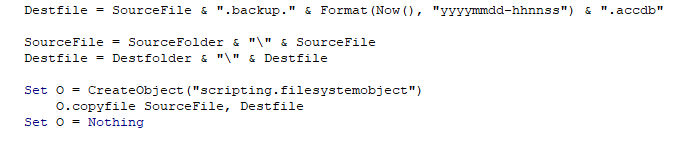
I use Richard's backup for my database and this works really well and I am grateful for it. However, everytime I close the programme, it makes a backup. This creates quite a lot of files, especially if I am working on my database and making programme changes. Is there a way to add a line that allows me the option of asking me if I want to delete all the backups if they are more than 2 months old. I will attach part of the VBA for the current backup system.
Colin Smyth OP  @Reply  
      
35 hours ago

John Davy  @Reply  
         
31 hours ago
Check the On Close of the MainMenu.  John
Raymond Spornhauer  @Reply  
          
30 hours ago
There is, but I would caution... you can go down a path of making database changes and wish you had older copies.  Additionally, if you make a mistake while coding this, you can do a lot of damage very quickly.

-Raymond
Richard Rost  @Reply  
          
30 hours ago
Colin my Access Backup Template uses a rotating scheme where it keeps the last five daily backups, plus it keeps a backup from every month. If it sees that the day of the month from that backup is 01 then it keeps that as well. This way you have rolling backups going back every month plus the last five days.

I might do something like this in a TechHelp video, but if you need a solution now, that's what I use for my personal backups. What I do manually once a year is I go back and delete everything except the previous year's Dec 31st backup. I've got an end-of-2025 backup, and now I've got January through June 1st of 2026, and I've got one going back every year. That's usually good enough.
Colin Smyth OP  @Reply  
      
15 hours ago
Thank you for the suggestions and advice.
Add a Reply Upload an Image
Next Unseen

 
New Feature: Comment Live View


The following is a paid advertisement
Computer Learning Zone is not responsible for any content shown or offers made by these ads.
 

Learn
 
Access - index
Excel - index
Word - index
Windows - index
PowerPoint - index
Photoshop - index
Visual Basic - index
ASP - index
Seminars
More...
Customers
 
Login
My Account
My Courses
Lost Password
Memberships
Student Databases
Change Email
Info
 
Latest News
New Releases
User Forums
Topic Glossary
Tips & Tricks
Search The Site
Code Vault
Collapse Menus
Help
 
Customer Support
Web Site Tour
FAQs
TechHelp
Consulting Services
About
 
Background
Testimonials
Jobs
Affiliate Program
Richard Rost
Free Lessons
Mailing List
PCResale.NET
Order
 
Video Tutorials
Handbooks
Memberships
Learning Connection
Idiot's Guide to Excel
Volume Discounts
Payment Info
Shipping
Terms of Sale
Contact
 
Contact Info
Support Policy
Mailing Address
Phone Number
Fax Number
Course Survey
Email Richard
[email protected]
Blog RSS Feed    YouTube Channel

LinkedIn
Copyright 2026 by Computer Learning Zone, Amicron, and Richard Rost. All Rights Reserved. Current Time: 6/19/2026 6:38:54 PM. PLT: 1s