Free Lessons
Courses
Seminars
TechHelp
Fast Tips
Templates
Topic Index
Forum
ABCD
 
Home   Courses   TechHelp   Forums   Help   Contact   Merch   Join   Order   Logon  
 
Back to Access Forum    Comments List
Upload Images   @Reply   Bookmark    Link   Email   Next Unseen 
Form Position
Kim Boren 
       
18 hours ago
Hi, I have a main form and two subform in the main form. I would like to position the two sub forms on the main form and lock them so that each time the form is open or i move between forms they stay in the same place. Would someone be able to direct me on this?
Thanks Kim
Alex Lewis  @Reply  
        
16 hours ago
Are you trying to open the form in the same place every time you open it?

Me.AutoCenter = False
DoCmd.MoveSize Left, Down, Height, Width
Joe Holland  @Reply  
      
12 hours ago
Watch this video: MoveSize
Kevin Robertson  @Reply  
          
9 hours ago
Kim Do you have code that moves your subforms? I have never had a subform move when I open the parent form. It should remain in the position you place it in Design View.

Please post some screenshots showing exactly what you are seeing (Design View and Form View).
Kim Boren OP  @Reply  
       
8 hours ago

Kim Boren OP  @Reply  
       
8 hours ago

Kim Boren OP  @Reply  
       
8 hours ago
Thank you for your replies.
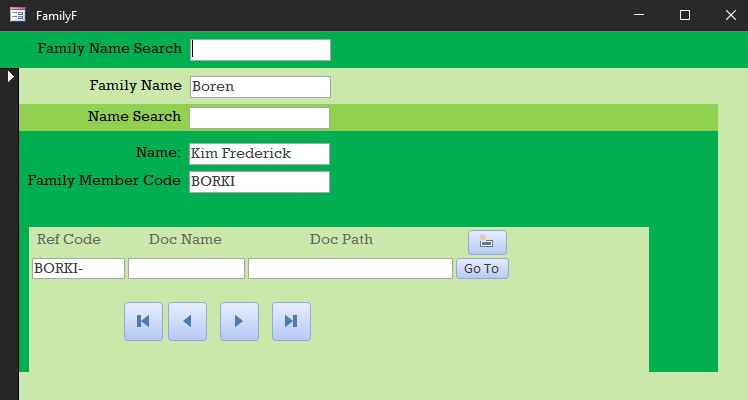
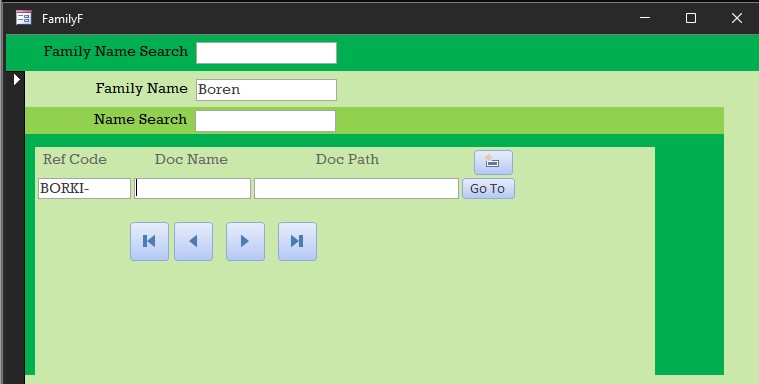
The uploads show what is happening, and I don't understand why.

As you can see the second upload has moved up, and I cannot see the Name and Family Member Code.

Thank you
Kim
Kim Boren OP  @Reply  
       
8 hours ago
I do not have code to position these forms.
Alex Lewis  @Reply  
        
7 hours ago
Check your Anchoring settings for both subforms. If your top sub form is anchored to stretch down and right on the main form, it’ll move relative to the main form and cause one subform to overlap the other. Try anchoring your top subform to the top left and the bottom subform to the bottom left of the main form and let us know if that fixes it.
Kim Boren OP  @Reply  
       
7 hours ago
Alex,
Thanks for your reply. No it did not fix the issue
Kim Boren OP  @Reply  
       
7 hours ago
Joe Joe, Can the move size code work with a subform on a main form? The video shows a subform being moved and saved however the subform is not part of the main form?
Thanks again
Kim
Joe Holland  @Reply  
      
7 hours ago
Kim I apologize but I did not read your post clearly enough to see you were speaking of subforms. Subforms are placed on the parent form in design view like Kevin said. They should anchor where you place them without anything else being required.
Kim Boren OP  @Reply  
       
6 hours ago
So I am looking at my design of the forms and realize that the main form FamilyF has a sub form FamilyMemberF and then inside the FamilyMemberF i have a subform named DocumentSubF. The DocumentSubF is moving up in the detail section of FamilyMemberF form.
Sorry, for the confusion.
Kim
Joe Holland  @Reply  
      
5 hours ago
Does it move based on the number of records showing in FamilyMemberF? Less records moves it up and more records moves it down? Maybe you have to set the height property of FamilyMemberF to what you want and set Can Grow and Can Shrink to No.
Add a Reply Upload an Image
Next Unseen

 
New Feature: Comment Live View


The following is a paid advertisement
Computer Learning Zone is not responsible for any content shown or offers made by these ads.
 

Learn
 
Access - index
Excel - index
Word - index
Windows - index
PowerPoint - index
Photoshop - index
Visual Basic - index
ASP - index
Seminars
More...
Customers
 
Login
My Account
My Courses
Lost Password
Memberships
Student Databases
Change Email
Info
 
Latest News
New Releases
User Forums
Topic Glossary
Tips & Tricks
Search The Site
Code Vault
Collapse Menus
Help
 
Customer Support
Web Site Tour
FAQs
TechHelp
Consulting Services
About
 
Background
Testimonials
Jobs
Affiliate Program
Richard Rost
Free Lessons
Mailing List
PCResale.NET
Order
 
Video Tutorials
Handbooks
Memberships
Learning Connection
Idiot's Guide to Excel
Volume Discounts
Payment Info
Shipping
Terms of Sale
Contact
 
Contact Info
Support Policy
Mailing Address
Phone Number
Fax Number
Course Survey
Email Richard
[email protected]
Blog RSS Feed    YouTube Channel

LinkedIn
Copyright 2026 by Computer Learning Zone, Amicron, and Richard Rost. All Rights Reserved. Current Time: 6/19/2026 6:38:12 PM. PLT: 0s