Free Lessons
Courses
Seminars
TechHelp
Fast Tips
Templates
Topic Index
Forum
ABCD
 
Home   Courses   TechHelp   Forums   Help   Contact   Merch   Join   Order   Logon  
 
Back to Access Forum    Comments List
Upload Images   @Reply   Bookmark    Link   Email   Next Unseen 
Relational Combobox
Colin Smyth 
      
30 hours ago
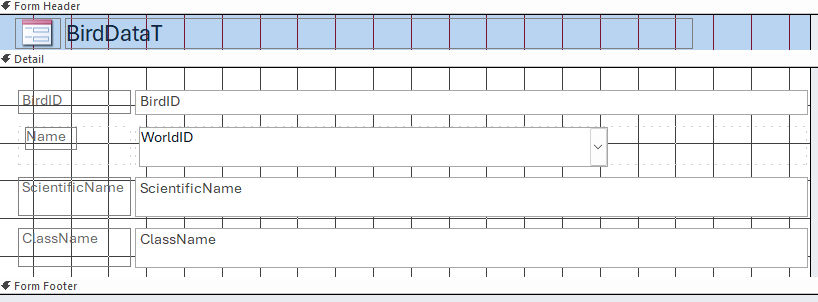
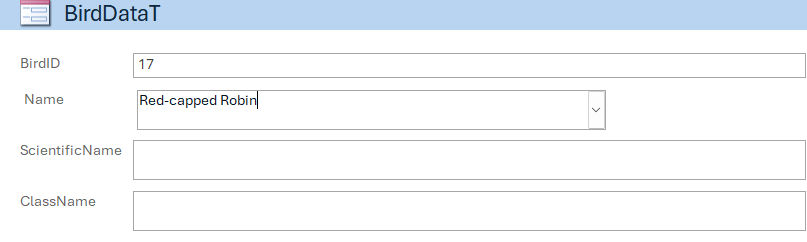
I have two tables - one is a new one I am setting up and the other is a table of world birds. I have set up a relational combobox on a form. Using the WorldID, it allows me to type in the name of the bird on the form and then it saves it in my bird table but only shows the WorldID number but not the Bird Name field is left blank. How do I get it to show the actual bird name in my Bird Table? I will attach a copy of the form and the my Bird Table
Colin Smyth OP  @Reply  
      
30 hours ago

Colin Smyth OP  @Reply  
      
30 hours ago

Colin Smyth OP  @Reply  
      
30 hours ago

Debbie Heaney  @Reply  
     
29 hours ago
Normally you wouldn't be viewing your data at the table level so the data in there is less important? It is then the relationships in forms and reports that would show you what you want to see.

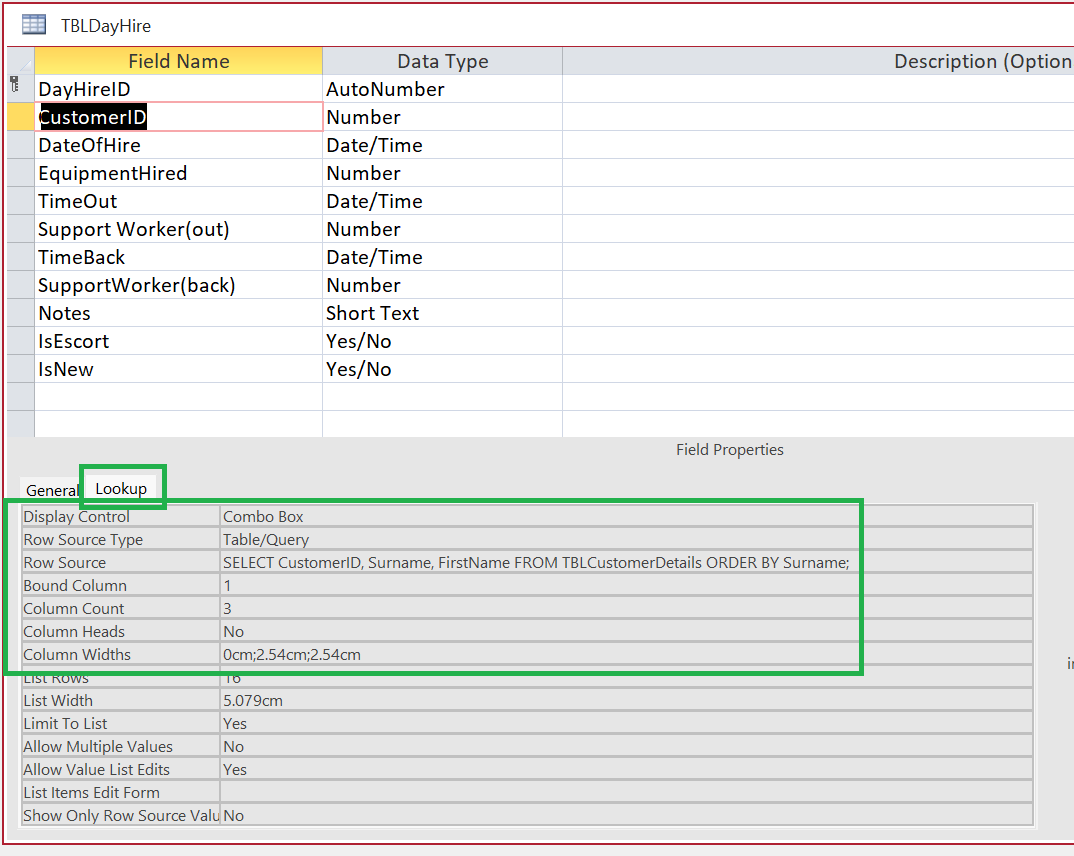
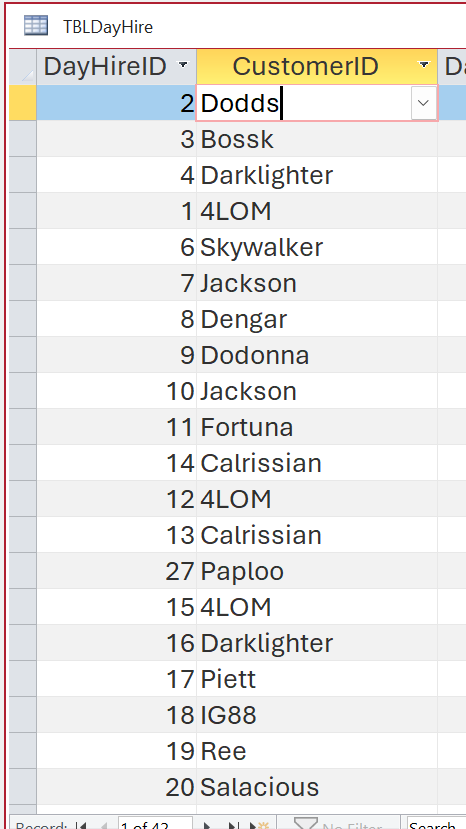
Here is how my manager at work set up a database we are working on. It let's you see the names instead of the numbers in DataSheet View.


Debbie Heaney  @Reply  
     
29 hours ago

Debbie Heaney  @Reply  
     
29 hours ago

Colin Smyth OP  @Reply  
      
12 hours ago
Thank you Debbie. I previously set up a database in a similar way that you have done. But using that method does cause some problems at times. I was told on the forum, that I shouldn't use that method. I am trying a different way, based on Richard's Tech help but I am obviously doing something incorrectly. Thanks for reaching out.
Donald Blackwell  @Reply  
       
9 hours ago
Colin what is the RowSource of your WorldID ComboBox? And, the Record Source for the form itself?

If your form is bound to the BirdDataT and the ComboBox is Bound to WorldID, then the only thing that will get updated in the BirdDataT is the bound column. You either need to have two separate fields:

1. One to select the World ID
2. One to enter the Bird Name

Or, you need to use some code to set the value of the Bird Name based on what is entered into the non-bound column.

Or, you need to set up a List Items edit form as shown in the List Items Edit Form video and then have some mechanism to put that in your table, if this is the format you want.

The better method, if Bird Name is bound to the World ID, is to have a "WorldT" where records have the WorldID and Bird Name, among other fields and remove the Bird Name field from your BirdT and use a query when necessary to join all the related data.
Colin Smyth OP  @Reply  
      
7 hours ago
Thank you Don. Your second paragraph was correct - the form is bound to the BirdDataT and the combox is bound to WorldID.
My current WorldT is a table that imported from Excel that lists all the birds in the world. When I imported it, I gave it an Autonumber field which is the WorldID. In your last paragraph, how do I bind the Bird Name to WorldID - I am relatively inexperienced in Access. Thank you for your suggestions
Donald Blackwell  @Reply  
       
6 hours ago
Since the Name is already in the WorldT, I would just remove the Bird Name field from Bird T. There is no reason to have it in two places.

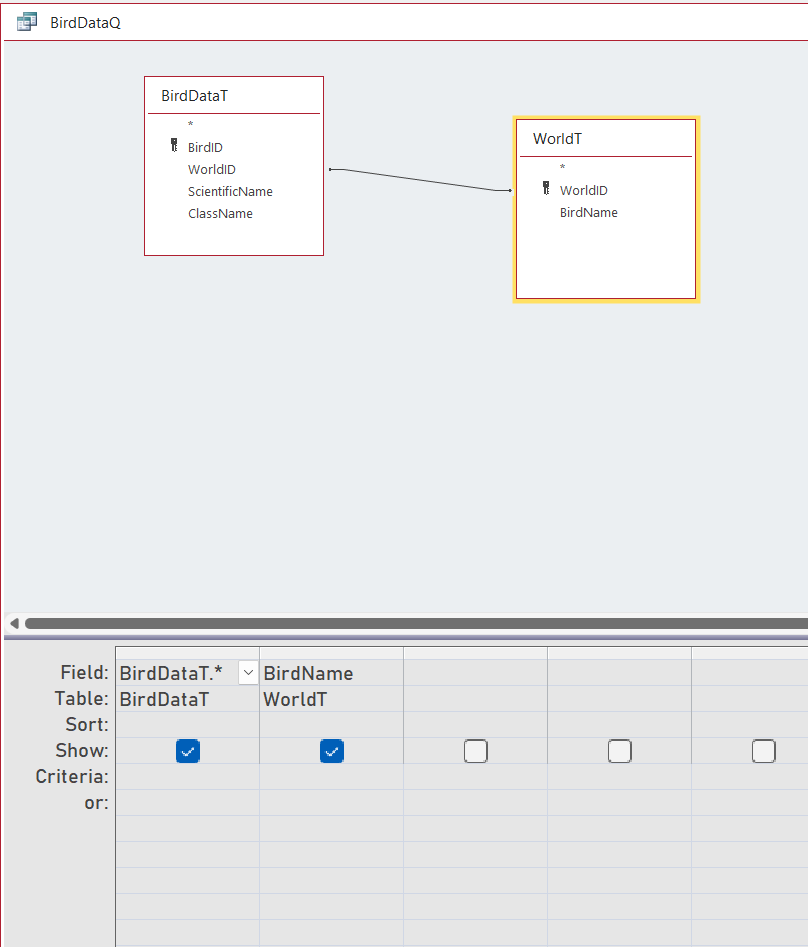
Then create a simple query that joins the BirdT to the WorldT in the Query Editor to be the form's record source if you need to see the name separate from the combo box. That way if you select a bird from the combo box, it will automatically populate the name field.

See the following image from the Query Editor. It may not be exactly like your tables, but should give you the idea.


Donald Blackwell  @Reply  
       
6 hours ago

Donald Blackwell  @Reply  
       
6 hours ago
If you're explicitly trying to move/copy information from the WorldT to your BirdT, then that's a different matter. If that's the case, let us know and we can help you with that as well or point you to videos.

Here are a couple videos for working with queries and the relationships used:

Relationships
Relational Combo
Outer Joins
Add a Reply Upload an Image
Next Unseen

 
New Feature: Comment Live View


The following is a paid advertisement
Computer Learning Zone is not responsible for any content shown or offers made by these ads.
 

Learn
 
Access - index
Excel - index
Word - index
Windows - index
PowerPoint - index
Photoshop - index
Visual Basic - index
ASP - index
Seminars
More...
Customers
 
Login
My Account
My Courses
Lost Password
Memberships
Student Databases
Change Email
Info
 
Latest News
New Releases
User Forums
Topic Glossary
Tips & Tricks
Search The Site
Code Vault
Collapse Menus
Help
 
Customer Support
Web Site Tour
FAQs
TechHelp
Consulting Services
About
 
Background
Testimonials
Jobs
Affiliate Program
Richard Rost
Free Lessons
Mailing List
PCResale.NET
Order
 
Video Tutorials
Handbooks
Memberships
Learning Connection
Idiot's Guide to Excel
Volume Discounts
Payment Info
Shipping
Terms of Sale
Contact
 
Contact Info
Support Policy
Mailing Address
Phone Number
Fax Number
Course Survey
Email Richard
[email protected]
Blog RSS Feed    YouTube Channel

LinkedIn
Copyright 2026 by Computer Learning Zone, Amicron, and Richard Rost. All Rights Reserved. Current Time: 7/7/2026 4:37:24 PM. PLT: 0s