Free Lessons
Courses
Seminars
TechHelp
Fast Tips
Templates
Topic Index
Forum
ABCD
 
Home   Courses   TechHelp   Help   Contact   Merch   Join   Order   Logon   Forums   
 
Back to Access TechHelp    Comments List
Upload Images   @Reply   Bookmark    Link   Email   Next Unseen 
Requery Subform From Another Form
Joel LaBo 
     
33 days ago
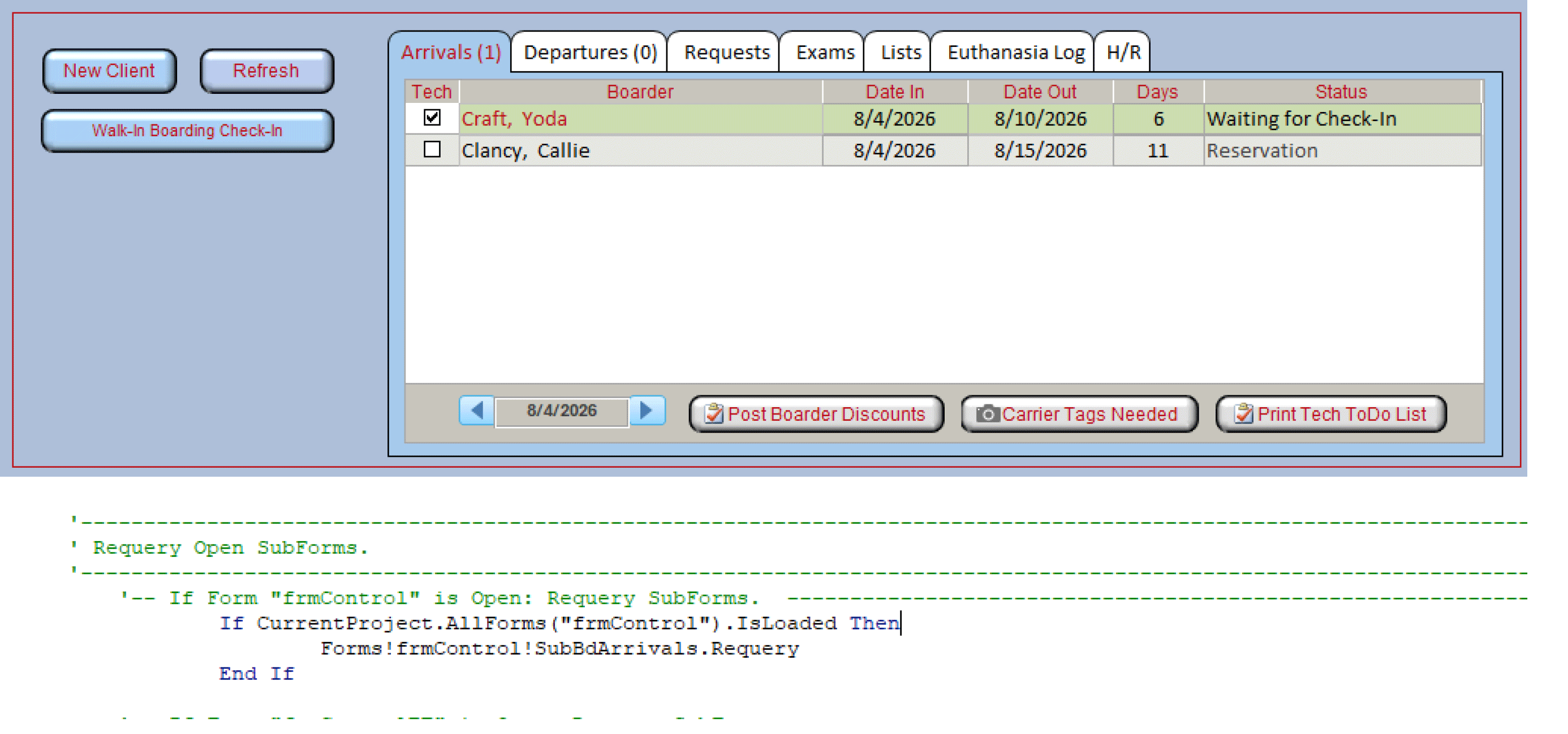
I have a main menu form that has a tabControl (named TabMain). the tab Control has 7 pages.  Page 1 has a subform showing the list of boarding arrivals to check in that day.  My user double-clicks on the particular boarding reservation when they arrive, which opens a popup form to complete the check-in process.  When the check-in is complete, I am trying to requery that subform in Page 1 of the tab control. I do not get any error msg, but the subform is not refresh.  Is there a limitation because the subform is in a tab control?

Main form:  frmControl
TabControl: TabMain
Tab Page1:  TabBdArrivals
Subform:    SubBdArrivals

Here is the syntax:

'-- If Form "frmControl" is Open: Requery SubForms.  
    If CurrentProject.AllForms("frmControl").IsLoaded Then
       ' Return Control object pointing to a combo box.
             Forms!frmControl.SubBdArrivals.Requery
    End If

Joel LaBo OP  @Reply  
     
33 days ago

Donald Blackwell  @Reply  
        
33 days ago
Joel

Did you try requerying the form in the subform instead of the control itself?

Forms!frmControl!SubBdArrivals.Form.Requery

Tab Controls can make the connection goofy sometimes. I've been able to do requeries before just as you've typed and I've had to go through the entire hierarchy Form!FormName!SubFormControl.Form!TabControlName!PageName!SubFormControlName.Form.Requery. I've never pinned down what makes Access behave differently, though I suspect it's environmental - such as version, etc.
Richard Rost  @Reply  
          
33 days ago
Donald has it. The tab control itself isn't the limitation. The important part is that SubBdArrivals is the subform control on frmControl, and the actual form loaded inside that control is its .Form property.

Try:

Forms!frmControl!SubBdArrivals.Form.Requery

Also, make sure "SubBdArrivals" is the name of the subform control, not just the name of the form object used as its Source Object. Those are often the same name, but they don't have to be.

If that code is running from the check-in popup, I'd put it right after the record is saved, or in the popup's Form_Close event if the check-in is always complete by then.

Plus, as everyone knows, I'm not a huge fan of tab controls. I prefer changing a subform's SourceObject property. But that's just me.
Joel LaBo OP  @Reply  
     
33 days ago
Thank you so much for your help.  It is now working as desired.  The actual cause of my problem was the missing vba command to save the record before executing the requery command. :)

Richard, intead of using at Tab Control, would you suggest creating an Option Group and change the SourceObject property to change the subform displayed?
Donald Blackwell  @Reply  
        
33 days ago
Richard talks about some different alternatives to the tab control in Quick Queries # 75.

He also discusses alternatives in other videos, but this was the first one that came to mind for me.
Kevin Robertson  @Reply  
           
33 days ago
Richard shows a good example in Vehicle Maintenance.
Joel LaBo OP  @Reply  
     
32 days ago
Thank you.

This thread is now CLOSED. If you wish to comment, start a NEW discussion in Access TechHelp.
 

Next Unseen


What's This?


The following is a paid advertisement
Computer Learning Zone is not responsible for any content shown or offers made by these ads.
 

Learn
 
Access - index
Excel - index
Word - index
Windows - index
PowerPoint - index
Photoshop - index
Visual Basic - index
ASP - index
Seminars
More...
Customers
 
Login
My Account
My Courses
Lost Password
Memberships
Student Databases
Change Email
Info
 
Latest News
New Releases
User Forums
Topic Glossary
Tips & Tricks
Search The Site
Code Vault
Collapse Menus
Help
 
Customer Support
Web Site Tour
FAQs
TechHelp
Consulting Services
About
 
Background
Testimonials
Jobs
Affiliate Program
Richard Rost
Free Lessons
Mailing List
PCResale.NET
Order
 
Video Tutorials
Handbooks
Memberships
Learning Connection
Idiot's Guide to Excel
Volume Discounts
Payment Info
Shipping
Terms of Sale
Contact
 
Contact Info
Support Policy
Mailing Address
Phone Number
Fax Number
Course Survey
Email Richard
[email protected]
Blog RSS Feed    YouTube Channel

LinkedIn
Copyright 2026 by Computer Learning Zone, Amicron, and Richard Rost. All Rights Reserved. Current Time: 9/6/2026 9:25:10 AM. PLT: 0s