Free Lessons
Courses
Seminars
TechHelp
Fast Tips
Templates
Topic Index
Forum
ABCD
 
Home   Courses   TechHelp   Help   Contact   Merch   Join   Order   Logon   Forums   
 
Back to Access Forum    Comments List
Upload Images   @Reply   Bookmark    Link   Email   Next Unseen 
Simple Question
Kenneth A Thomas 
       
27 days ago
How do I program a form to open to the last record I was working on when I last closed the form?
Matt Hall  @Reply  
          
27 days ago
The key is have a place to store that record ID, like a settings table or the tag property of the form.  The only way I can think of to do that would require a little VBA.  Maybe someone else has another way.

You might check out App Settings.
Donald Blackwell  @Reply  
        
27 days ago
This simplest method I think, would be to have a yes/no field in the table behind the form "LastEdited". Then in the on current event of the form have a global function run to set that record as the last viewed. Then look that up again on form load. Something like:

Global Function to Set the Last Viewed RecordPublic Function SetLastViewedRecord( TName as String, RecID as Long, PKey as String)

     Dim DB as Database
     Set DB as CurrentDb

     ' Make sure that the table name and record ID # were supplied; Exit if they weren't
     If Nz(TName,"") = "" OR Nz(RecID,0) = 0 Then
          Beep
          Exit Function
     End If

     ' Set all records "LastViewed" field to False and get an error if something doesn't work
     DB.Execute "UPDATE " & TName & " Set LastEdited = False", dbFailOnError

     ' Set the "LastViewed" field to True for the record you are viewing, and get an error if something goes awry
     DB.Execute "UPDATE " & TName & " Set LastEdited = True WHERE " & PKey & " = " & RecID, dbFailOnError

     Set DB = Nothing

End Function


Global Function to Retrieve the Last Viewed RecordPublic Function GetLastViewedRecord( TName as String, PKey as String) as Long

     GetLastViewedRecord = Nz(DLookup(PKey, TName, "LastViewed = True),0)

End Function


Form_Current procedure to set the LastViewed recordPrivate Sub Form_Current()

     ' Set the Current Record as the Last Viewed Record in this table
     SetLastViewedRecord( Me.Name, CurrentID, "CurrentID" )

End Sub


Form_Load procedure to retrieve the Last Viewed record and go to itPrivate Sub Form_Load()

     Dim ID as Long, rs as Recordset

     ' Retrieve the ID of the Last Viewed Record in the table
     ID = GetLastViewedRecord( Me.Name, "CurrentID" )
    
     ' If a Zero was returned, no records were set as last viewed
     ' If there are no records in the table, this will take you to the New Record form (or row in a continuous form)
     If ID = 0 Then
          SelTop = 1 ' This will either take you the first record in the table as it is sorted or to the new record row if there are no records
     Else
          Set rs = Me.RecordsetClone
          ' Find the record with the matching ID
          rs.FindFirst "CurrentID=" & ID

          ' Move the form to the found record
          Me.Bookmark = rs.Bookmark
          Set rs = nothing
     End If

End Sub


Anywhere you see CurrentID, replace it with the name of the ID/Primary Key field for the table in that form.

The sections listed as "Global Function"s would go in a Global Module, the rest would go in each form. The other option I thought of was to do something like Matt suggested with App Settings.
Matt Hall  @Reply  
          
27 days ago
Donald , I like that.  For Kenneth's purposes, it may be able to be distilled to something pretty simple, if it was local to the form.
Donald Blackwell  @Reply  
        
27 days ago
Matt I was trying to keep it basic but I wanted him to be able to plug in to any form he wanted as well. But, I actually didn't refer to any of my projects while I was typing so the fact that it wasn't more bloated actually surprised me, lol.

If he wanted, if he opens and closes forms a lot, it could also have a TempVar added for each form that would remember the last record as well. That way it wouldn't have to go to the tables every time to get the last viewed but only if he closed the database and reopens it.
Donald Blackwell  @Reply  
        
27 days ago
Oops, just noticed a typo:

Typo RepairPublic Function GetLastViewedRecord( TName as String, PKey as String) as Long

     GetLastViewedRecord = Nz(DLookup(PKey, TName, "LastViewed = True"),0)

End Function


I had left out a closing quotation mark in the DLookup.
Jeffrey Kraft  @Reply  
      
26 days ago
Private Sub Form_Load()
    On Error Resume Next
    Dim lastID As Long
    
    ' Retrieve the stored record ID
    lastID = CurrentDb.Properties("LastEditedID")
    
    ' If an ID was found, tell the form recordset to find it
    If Err.Number = 0 And lastID > 0 Then
        With Me.RecordsetClone
            .FindFirst "YourPrimaryKeyField = " & lastID
            If Not .NoMatch Then
                Me.Bookmark = .Bookmark
            End If
        End With
    End If
End Sub

I'm sure there is something better
Joe Holland  @Reply  
      
26 days ago
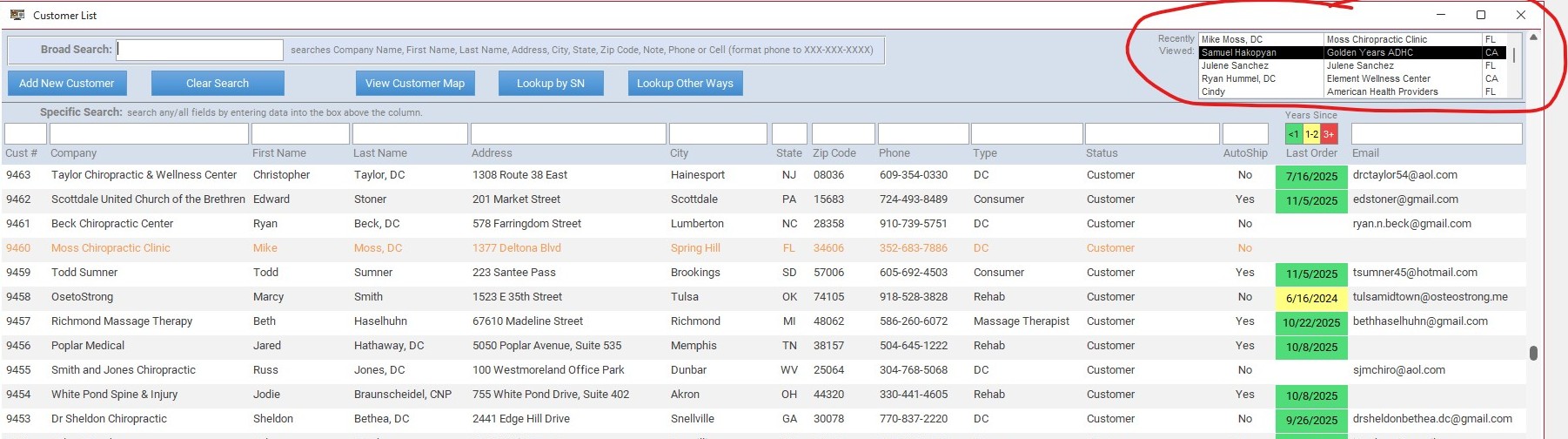
Another approach that I use is a recently viewed customer list box on my Customer List form. I show the last 10 which makes it really fast to get to them again. You can watch Richard's Favorite Customer video.
A Toykan  @Reply  
      
26 days ago
An alternative approach is to maintain a log table. If you are using or planning to record and monitor logs in your Access application you can also use an interaction records table, by inserting the record ID and timestamp into this table following form submissions, you can then use this data as a form filter condition.
Joe Holland  @Reply  
      
26 days ago

Joe Holland  @Reply  
      
26 days ago
The link did not work so I am trying it again: Favorite Customer.
Darrin Harris  @Reply  
     
26 days ago
https://599cd.com/FavoriteCustomers

Joe I'm about to add this feature to my YouTube database, haven't done one before shouldn't be to hard right?
Joe Holland  @Reply  
      
26 days ago
No. It is easy to follow the video.
Darrin Harris  @Reply  
     
26 days ago
Thanks Joe I just watch them Extended cuts got the goods lol
Kenneth A Thomas OP  @Reply  
       
26 days ago
My simple question is getting more complicated.
Matt Hall  @Reply  
          
26 days ago
Kenneth , I was thinking something like this:

'Clears LastEdited for all records and sets it for current record
Private Sub Form_BeforeUpdate(Cancel As Integer)
    CurrentDb.Execute "Update MagazineT Set LastEdited = FALSE"
    LastEdited = True
End Sub

'Goes to last record edited
Private Sub Form_Load()
    DoCmd.GoToControl "LastEdited"
    DoCmd.FindRecord True
End Sub


In this code, my table name is MagazineT and should be changed to your table name.  Also, it only tracks the last record edited.  I interpreted "working on" to mean editing.  It could also track last item viewed, with a couple more lines of code.

It basically works the same way Donald's does but is simpler and can be placed into the form module.  Donald's code is superior in that, it is more versatile and he uses a better method to navigate to the last record edited/viewed.  Richard discusses that extensively in developer lessons and Tech Help videos.  

If you are comfortable using Donald's code, you will be better off for it.  I am just offering this as a simpler way to get something working.  

I hope this helps.
Kenneth A Thomas OP  @Reply  
       
26 days ago
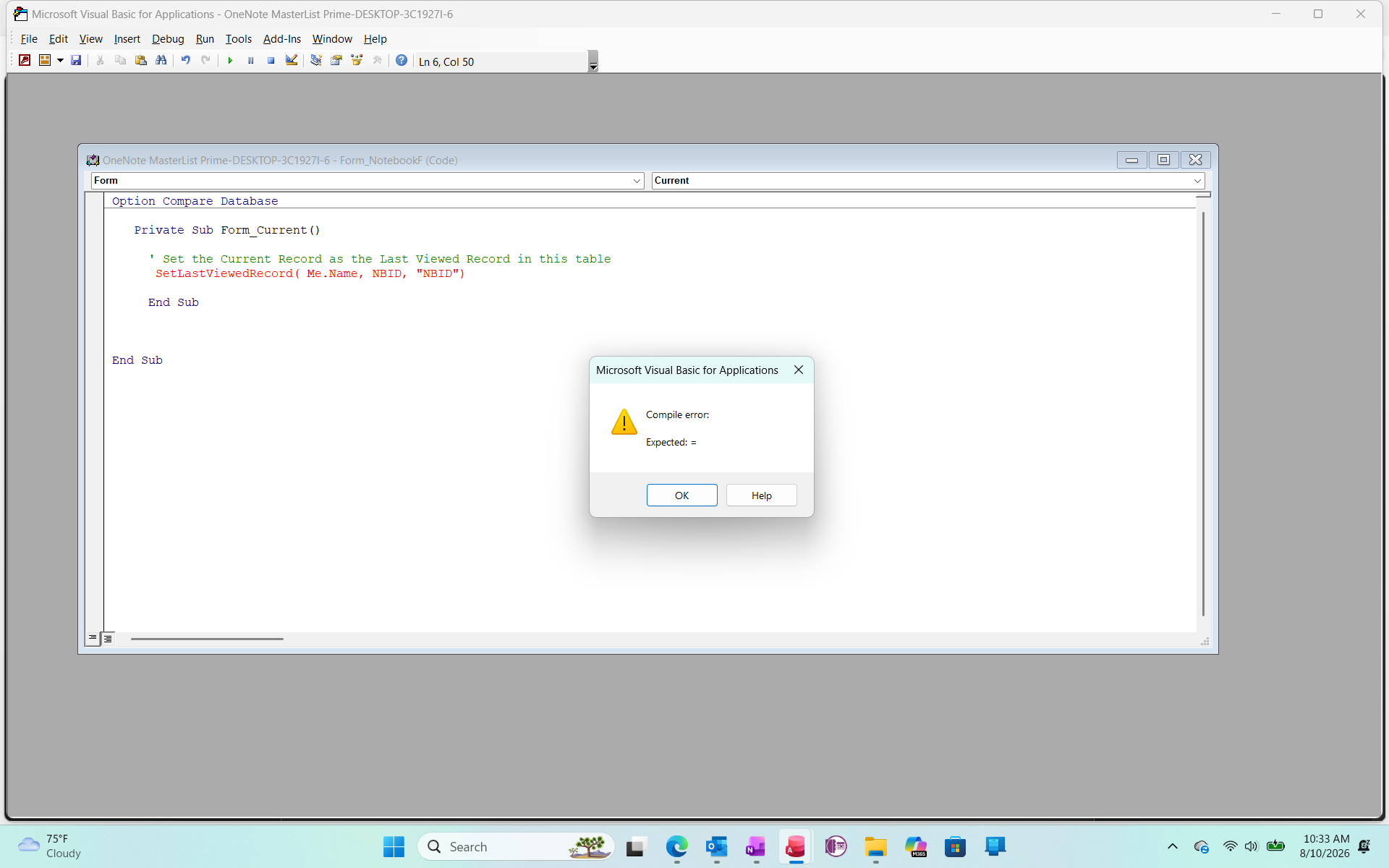
To Donald Bleckwell.  Can you explain this error?
Kenneth A Thomas OP  @Reply  
       
26 days ago

Donald Blackwell  @Reply  
        
26 days ago
Kenneth

Yup, another typo on my part. I should have committed the parenthesis around the parameters in the form function call.


Private Sub Form_Current()

     ' Set the Current Record as the Last Viewed Record in this table
     SetLastViewedRecord Me.Name, CurrentID, "CurrentID"

End Sub

Since we're not returning a value we don't need those.

Sorry for not catching my error before posting.
Kenneth A Thomas OP  @Reply  
       
26 days ago
Thank you, Donald.  I will try that formula when I get back to the Form in question.  
To further explain the issue; I have a Table/Form that contains 4,000+ records and I am currently going through and correcting data in one of the Fields that now included a Combo Box.  Because I built this table (NotebookF) before I watched enough of Richard's videos, I deleted several records and this table begins with Record 7 (ID 7).  Anyway, while I am updating records and happen to stop at record 2000, I would rather have the Form open to NBID 2000 instead of NBID 7.  If not, there is a lot of clicking between 7 and 2000, and I already have enough problems wirth my hands.
Kevin Yip  @Reply  
     
26 days ago
Hello everyone, just want to add my two cents here.  Kenneth, this is decidedly not a simple issue, not just on the coding and technical level, but also on the design level -- concerning whether this is even a good design or not.  In my 20+ years of using Access for business and home, I've never had my forms remembering which record I was viewing/editing.  In all the apps, websites, etc., you have ever used, have you seen this done?  I haven't.  They always start at the original default state.  If you desire fast access to your records, a good SEARCH function on your form is much more useful, and always useful.  You don't just need convenient access to the last record you viewed; you need it for ALL records in all possible circumstances.  If you make your form remember the last record, not only is the coding quite non-trivial (as the earlier comments have shown), but also other form operations may be impacted.  You *don't always* want to look at your last-viewed record whenever you open the form.  Sometimes you want to start afresh too.  It may end up driving you crazy if your form always opens to the last viewed record.  There are also minor tech issues to consider, such as when your last viewed record was a new record (i.e. the blank row at the end), or when you delete a record, which gives the focus to another record that you may not want the form to remember.  These are just my two cents, of course, which I hope will you make your decisions.
Kenneth A Thomas OP  @Reply  
       
26 days ago
Kevin, I appreciate you comments, but can you point me to a search function that will meet my needs?  The "stock" Search Function that comes with Access Forms doesn't do the job.  Thank you.
Kenneth A Thomas OP  @Reply  
       
26 days ago
P. s., my bottom line is this...with a table containing over 4,000 records (and growing), I don't want to have to manually scroll form 1 to 2000 (or higher) one record at a time.  I don't have the time to waste time scrolling.
Donald Blackwell  @Reply  
        
26 days ago
Kevin Your concerns are definitely valid however in the circumstance that Kenneth is in, having it open to that last viewed for his purposes is understandable. That being said...

Kenneth If my prior solution isn't working, I'm happy to help debug it. On the other hand, as I was reading some other posts here, I thought of an alternative which would be simpler to implement with significantly less code. I won't post it yet as you've already been given a lot of options and I don't want to overload you.
Kenneth A Thomas OP  @Reply  
       
26 days ago
I think it's all good everyone.  After my last post I found where I needed to code the filer to be able to achieve my desired outcome.  However, I am grateful for all the assistence.
Donald Blackwell  @Reply  
        
26 days ago
Always happy to help Kenneth and sorry if I went overboard.
Kenneth A Thomas OP  @Reply  
       
26 days ago
No problem, Donald.  All I had to do was go into the form's Property Sheet and change one of the filter settings.
Kevin Yip  @Reply  
     
26 days ago
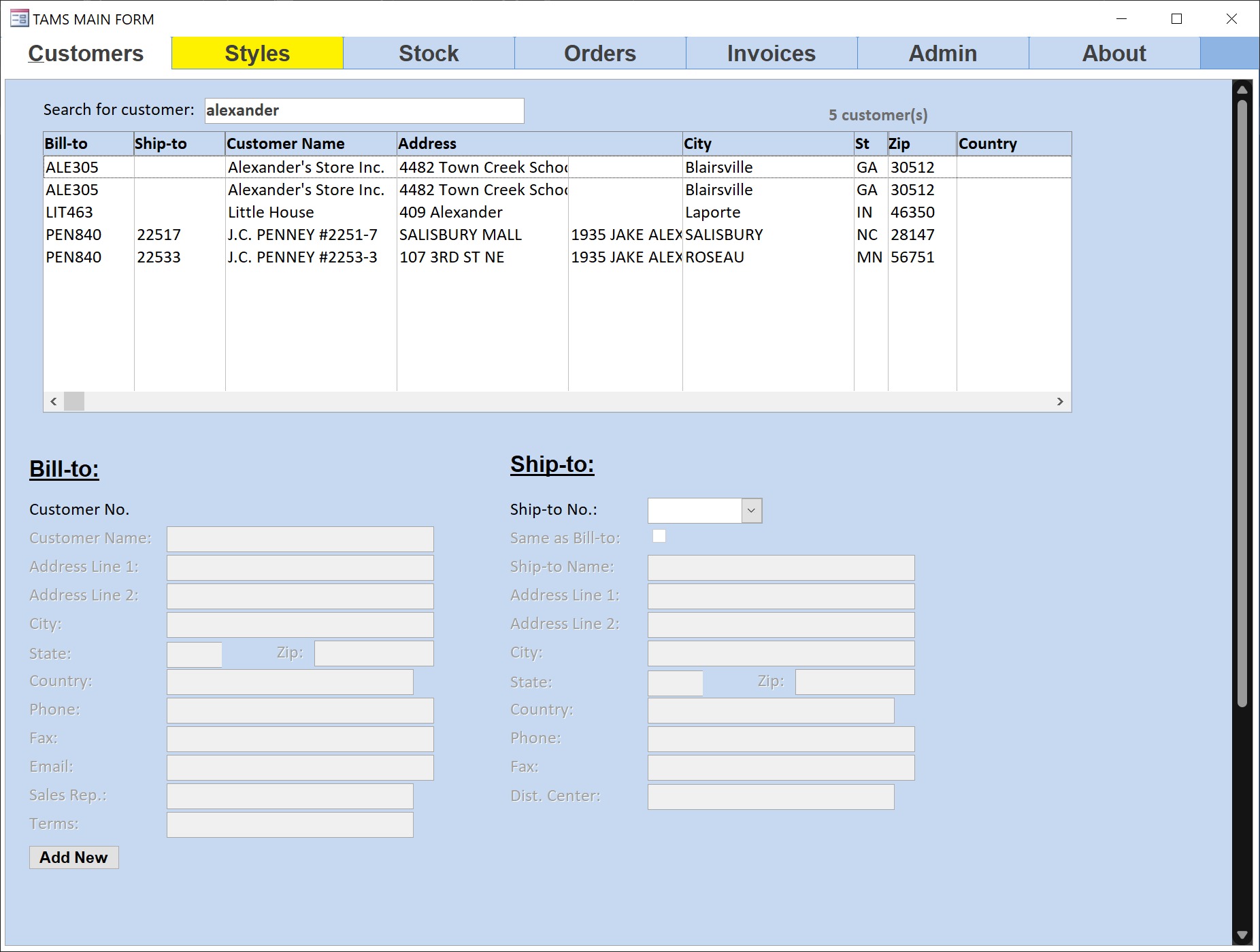
Hi Kenneth, in my old job, I used a form filter (pictured below) that let me search for a keyword in every field of the data source.  E.g. Searching for "alexander" would return company names that contained the word, street address that contained it, and so forth.  This was done with the InStr function (which finds text within another text) in an SQL statement.  This reduced the number of records on the form and minimized scrolling.  Richard may already have a video on this.  Unfortunately, I've never taken any of his courses so I can't suggest them to you.  (I'm only here because he invited me to post here a few years ago.)
Kevin Yip  @Reply  
     
26 days ago

Darrin Harris  @Reply  
     
26 days ago
Hi Kevin

Haven't seen you around for a while, I like the Idea of using the InStr to find text cool.
I use my search as you type text box.
The other search I like is search as you type combo that Richard did in the Fitness series.
I Think there the two best searching techniques I've found so far.
Kevin Yip  @Reply  
     
25 days ago
Hi Darrin, I haven't been using Access, so I've been absent the past few months.  But now I have a home project with Access, so I'm in the "Access state of mind" again.
Richard Rost  @Reply  
          
25 days ago
One approach I use is a LastOpened Date/Time field. In the Form_Current event, I update that field for the current record. Then you can sort or filter the form by LastOpened descending and immediately see the last few records you were working with.

That has a nice advantage over a single Yes/No LastEdited flag: it keeps a short history of recently opened records instead of remembering only one record. If you accidentally move off a record, you can still quickly get back to the previous few.

And yes, if changing the form's Filter settings got you where you need to be, then you've solved the immediate problem. That's the important part.
Donald Blackwell  @Reply  
        
25 days ago
Richard
The last edited date was the solution I thought of after, lol. Sometimes my mind jumps to trying to make everything robust before I step back and realize simplicity is often the must robust solution, lol.
Kenneth A Thomas OP  @Reply  
       
25 days ago
As far as I am concerned, I have what I want, or at least a good compromise.  We can end this discussion unless someone else needs feedback.
Add a Reply Upload an Image
Next Unseen


What's This?


The following is a paid advertisement
Computer Learning Zone is not responsible for any content shown or offers made by these ads.
 

Learn
 
Access - index
Excel - index
Word - index
Windows - index
PowerPoint - index
Photoshop - index
Visual Basic - index
ASP - index
Seminars
More...
Customers
 
Login
My Account
My Courses
Lost Password
Memberships
Student Databases
Change Email
Info
 
Latest News
New Releases
User Forums
Topic Glossary
Tips & Tricks
Search The Site
Code Vault
Collapse Menus
Help
 
Customer Support
Web Site Tour
FAQs
TechHelp
Consulting Services
About
 
Background
Testimonials
Jobs
Affiliate Program
Richard Rost
Free Lessons
Mailing List
PCResale.NET
Order
 
Video Tutorials
Handbooks
Memberships
Learning Connection
Idiot's Guide to Excel
Volume Discounts
Payment Info
Shipping
Terms of Sale
Contact
 
Contact Info
Support Policy
Mailing Address
Phone Number
Fax Number
Course Survey
Email Richard
[email protected]
Blog RSS Feed    YouTube Channel

LinkedIn
Copyright 2026 by Computer Learning Zone, Amicron, and Richard Rost. All Rights Reserved. Current Time: 9/5/2026 11:22:14 AM. PLT: 1s