Free Lessons
Courses
Seminars
TechHelp
Fast Tips
Templates
Topic Index
Forum
ABCD
 
Home   Courses   TechHelp   Help   Contact   Merch   Join   Order   Logon   Forums   
 
Back to Fitness 73    Comments List
Upload Images   @Reply   Bookmark    Link   Email   Next Unseen 
List Box RowSource And Parent Label
Kenneth A Thomas 
       
19 days ago
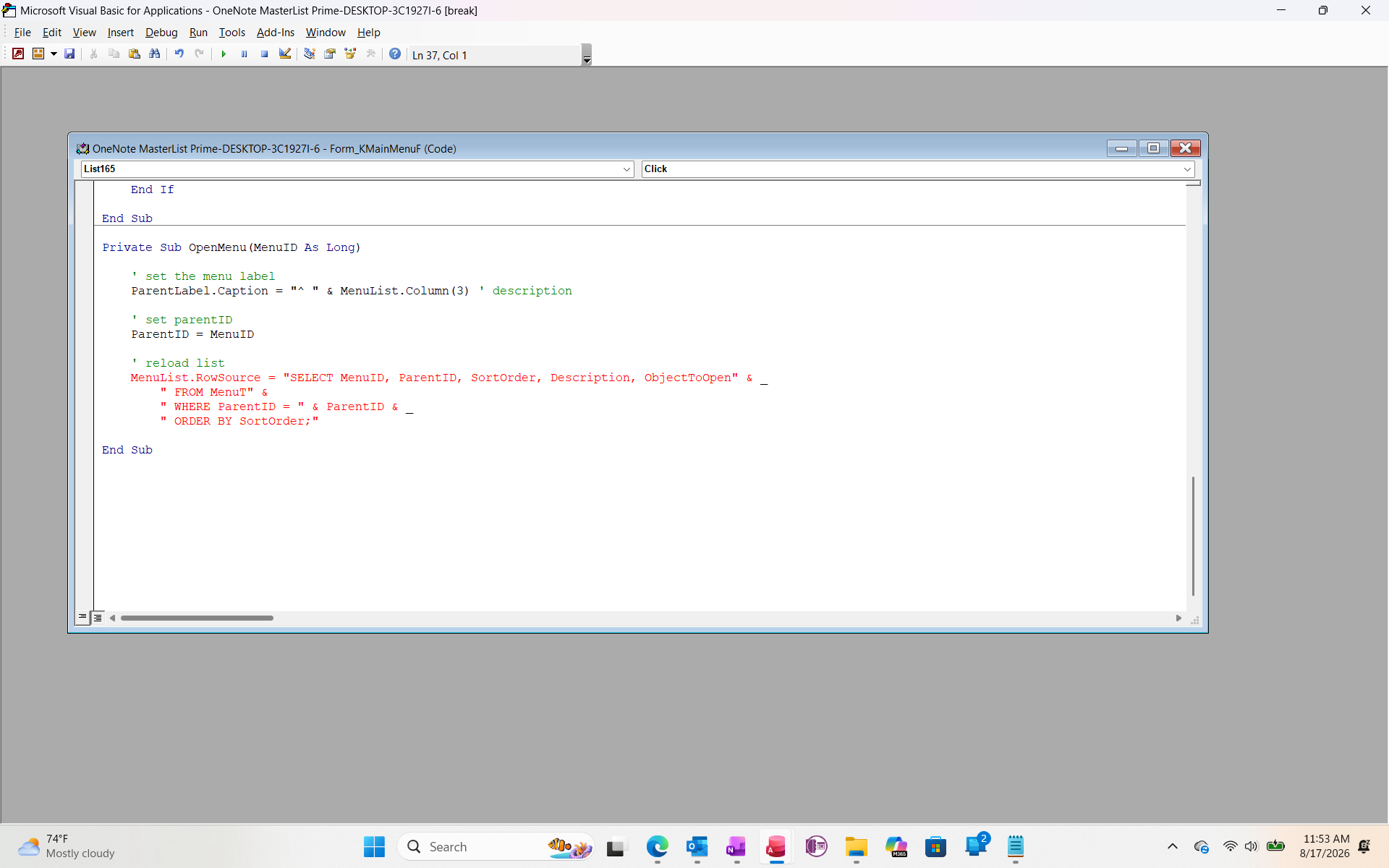
Richard, I was able to follow Fitness 72, but it looks like I am getting stuck on Fitness 73.  I stopped the video at 6:35 and don't want to go too far before I know what I am doing wrong up to this point.
Kenneth A Thomas OP  @Reply  
       
19 days ago

Kenneth A Thomas OP  @Reply  
       
19 days ago

Kevin Robertson  @Reply  
           
19 days ago
You are missing a line continuation character (_) at the end of the second line of the Row Source.
Jeffrey Kraft  @Reply  
      
19 days ago
" From MenuT " & _
Kenneth A Thomas OP  @Reply  
       
19 days ago
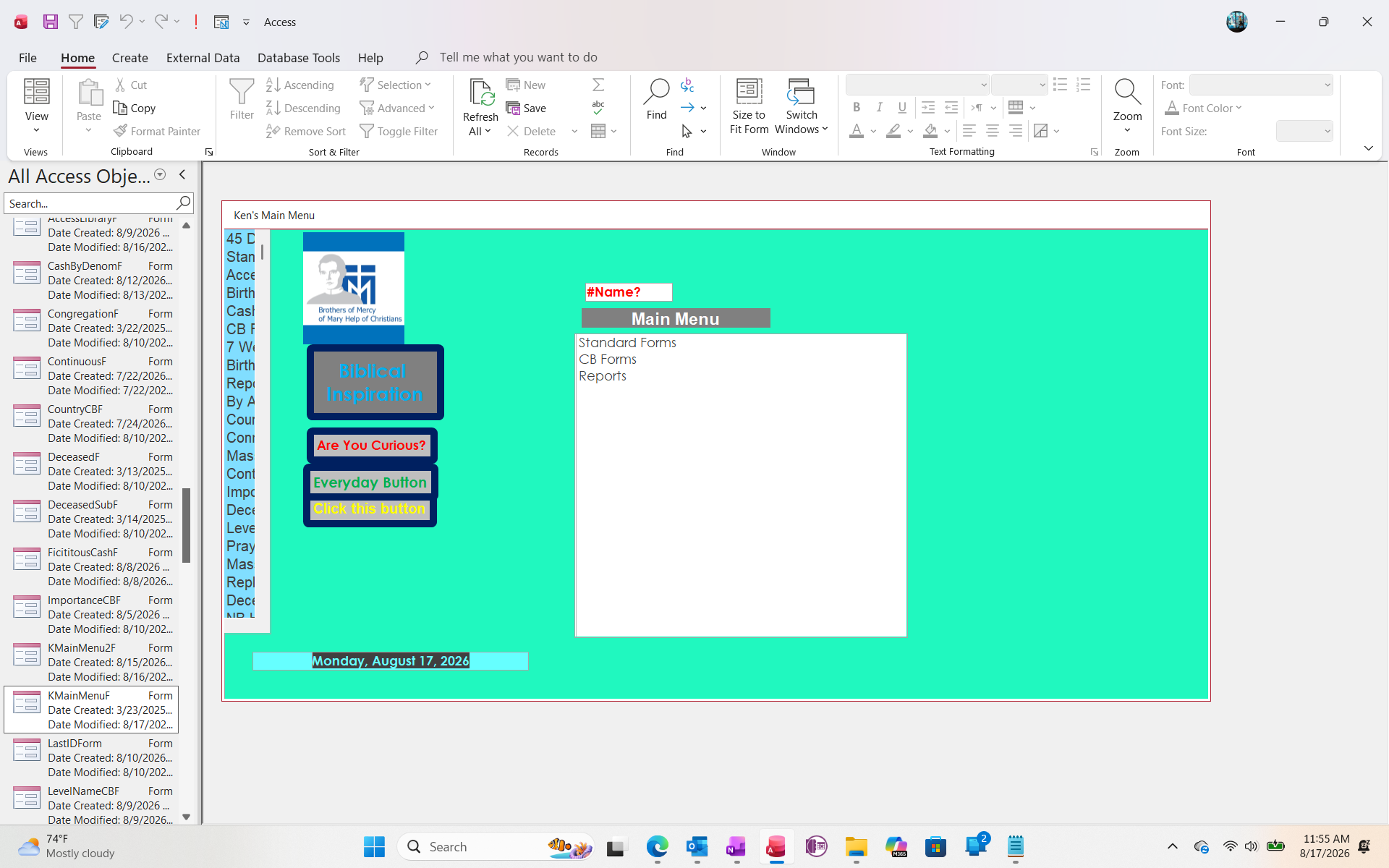
Thank you, gentlemen.  That extra character took care of all the red.  However, when I return to the main menu, the "^" character is not showing up.  Can you review the following statement:

' set the menu label
    ParentLabel.Caption = "^ " & MenuList.Column(3) ' description
Kevin Robertson  @Reply  
           
19 days ago
Set the Row Source first before setting the caption of your label.
Kenneth A Thomas OP  @Reply  
       
19 days ago
Kevin, I understand what the Row Source is, but I don't understand how to apply your last statement to what I am trying to achieve.  I'm still working on Baby Steps.

Richard Rost  @Reply  
          
19 days ago
Kevin is referring to the order of the statements inside your OpenMenu subroutine. However, at the 6:35 point in the video, follow the order I used:

ParentLabel.Caption = "^ " & MenuList.Column(3) ' Description

ParentID = MenuID

MenuList.RowSource = "SELECT ..."

The caption has to be set while MenuList is still pointing at the item you clicked. Once you change the Row Source, the list box reloads with the submenu items and you may no longer have the original selected row available in MenuList.Column(3).

If the "^" still isn't showing, make sure that line is actually inside the OpenMenu subroutine and that OpenMenu is being called when you click Food, Body, or Workout. Also make sure you typed a regular keyboard caret character: ^

Don't worry, you're doing the right thing by stopping and checking each step. This is exactly how you learn VBA without accidentally wandering into the Klingon section of the manual.
Add a Reply Upload an Image
Next Unseen


What's This?


The following is a paid advertisement
Computer Learning Zone is not responsible for any content shown or offers made by these ads.
 

Learn
 
Access - index
Excel - index
Word - index
Windows - index
PowerPoint - index
Photoshop - index
Visual Basic - index
ASP - index
Seminars
More...
Customers
 
Login
My Account
My Courses
Lost Password
Memberships
Student Databases
Change Email
Info
 
Latest News
New Releases
User Forums
Topic Glossary
Tips & Tricks
Search The Site
Code Vault
Collapse Menus
Help
 
Customer Support
Web Site Tour
FAQs
TechHelp
Consulting Services
About
 
Background
Testimonials
Jobs
Affiliate Program
Richard Rost
Free Lessons
Mailing List
PCResale.NET
Order
 
Video Tutorials
Handbooks
Memberships
Learning Connection
Idiot's Guide to Excel
Volume Discounts
Payment Info
Shipping
Terms of Sale
Contact
 
Contact Info
Support Policy
Mailing Address
Phone Number
Fax Number
Course Survey
Email Richard
[email protected]
Blog RSS Feed    YouTube Channel

LinkedIn
Copyright 2026 by Computer Learning Zone, Amicron, and Richard Rost. All Rights Reserved. Current Time: 9/5/2026 11:26:04 AM. PLT: 1s