Free Lessons
Courses
Seminars
TechHelp
Fast Tips
Templates
Topic Index
Forum
ABCD
 
Home   Courses   TechHelp   Help   Contact   Merch   Join   Order   Logon   Forums   
 
Back to Connecting Access    Comments List
Upload Images   @Reply   Bookmark    Link   Email   Next Unseen 
SQL Server Record Count Performance
Ray White 
      
2 days ago
I have SQL Server installed and setup on my computer, All is working well.
I have a database created and all of my Access tables moved to the SQL Server.
All is working good But one form that I have is a Zipcode database form
with 46K records, When I open that form Access will start to lockup and not respond .
The Record Count field will not populate total records.
If I click on anything in the form it will just freeze up.
I thought since I had the SQL Server running on this computer that it would not have any trouble pulling 46K records over to the form.
Kevin Yip  @Reply  
     
2 days ago
Open the zip code table in table view.  If it opens with no problem, the form itself may be the cause.  Check all the components of the form: properties, code, etc.  The form itself may be "corrupted," which is often a possibility.  46k records is not a lot, so that shouldn't be an issue.
Matt Hall  @Reply  
           
2 days ago
It shouldn't.  I have a few similarly sized tables.  You might check if your progress bar in the lower right advance at all.  

Is the form based directly on a table or on a query.  I had some poorly formed queries, when I changed over, that took hours to load but that was over a LAN.  Also, you might check in task manager, in the performance tab, to see if your disk, memory or cpu is maxxing out.
Ray White OP  @Reply  
      
2 days ago
Thanks Kevin and Matt
Not sure what it was, But I just rebuilt the form just like I had it and now it works great.
I guess just one of them SQL thinks. :)
Richard Rost  @Reply  
          
25 hours ago
Glad you got it working, Ray. Rebuilding the form points to something in the original form - possibly a property, event procedure, calculated control, or just a little form corruption. Kevin and Matt were both on the right track with testing the table directly and checking whether the form or its Record Source was the bottleneck.

Forty-six thousand records is not a particularly large table for SQL Server. Access normally retrieves linked SQL Server data as needed rather than pulling every row across immediately. I have tables with hundreds of thousands of records that work fine from Access.

The things that can slow it down are usually a complicated Record Source query, unindexed sort/join criteria, or Access-only functions in the query, such as Nz(). SQL Server doesn't know what Nz() is, so Access may have to do more of the work locally instead of letting SQL Server handle it efficiently. Also check any calculated controls or Record Count controls on the form. A DCount or similar aggregate can cause a separate query against the whole table.

For a basic ZipCodeT form, make sure the primary key is set and any fields used for sorting, searching, joining, or filtering are indexed. With that in place, it should open quickly.
Ray White OP  @Reply  
      
19 hours ago
Thanks Richard
I was using this to show Record count:    ="Record Count "& Count([ZipCode])
That was the problem. After taking that out it works fine.
Ray White OP  @Reply  
      
19 hours ago
What's the best way to show Recount Count on a form using SQL backend.?
Alex Hedley  @Reply  
           
18 hours ago
You could create another Query
SELECT Count([ZipCode]) FROM TABLE
* replace TABLE with your table name
Ray White OP  @Reply  
      
17 hours ago
Thanks Alex
How would I show that on the Recount Count form field On Current event?
I have some sort options on the form so I would need for the Record Count field to update after sorting.
Ray White OP  @Reply  
      
16 hours ago
With a little help of AI, I got it working great..

with a SQL Server backend, I would not use this in a text box:

="Record Count " & Count([ZipCode])

That kind of calculated aggregate can act funny or slow against linked SQL Server tables.

Use VBA instead.

Assume your unbound record count text box is named:

txtRecordCount

Put this code in the form module for frmZipCodeData:

Private Sub UpdateRecordCount()
    On Error GoTo EH

    Dim rs As DAO.Recordset
    Dim lngCount As Long

    Set rs = Me.RecordsetClone

    If rs.EOF And rs.BOF Then
        lngCount = 0
    Else
        rs.MoveLast
        lngCount = rs.RecordCount
    End If

    Me.txtRecordCount = "Record Count: " & Format(lngCount, "#,##0")

    rs.Close
    Set rs = Nothing

    Exit Sub

EH:
    Me.txtRecordCount = "Record Count: Error"
End Sub

Then call it from the form's On Current event:

Private Sub Form_Current()
    UpdateRecordCount
End Sub

Also call it after any sort/filter button code.

Example:

Private Sub cmdSortZipCode_Click()
    On Error GoTo EH

    Me.OrderBy = "ZipCode ASC"
    Me.OrderByOn = True

    UpdateRecordCount

    Exit Sub

EH:
    MsgBox "cmdSortZipCode_Click error: " & Err.Number & vbCrLf & _
           Err.Description, vbCritical, "Zip Code Data"
End Sub

If your sort buttons also apply filters, call it after the filter too:

Me.Filter = "State='TN'"
Me.FilterOn = True

UpdateRecordCount

This counts the records currently loaded in the form's recordset, including any form filter. Sorting itself does not change the count, but calling UpdateRecordCount after sorting keeps the display refreshed.
Richard Rost  @Reply  
          
13 hours ago
Yep, that's the culprit. Aggregate functions in a form footer or calculated control, such as Count([ZipCode]), are one of the things you generally want to remove when moving an Access database to SQL Server.

Access has to calculate that total across the form's entire recordset, which can force it to iterate through all 46,000 records. It may not sound like a lot, but over an ODBC connection it can make the form appear to freeze while Access does all that work.

I would also avoid the RecordsetClone / MoveLast method that AI suggested. That can force Access to fetch the entire recordset too, so it defeats much of the benefit of using SQL Server.

Alex's suggestion is the better general approach: run a separate COUNT query that SQL Server can perform on the server. Then Access receives just one value instead of thousands of records. Don't run it in Form_Current, though, because that event fires every time you move from one record to another. Update it when the form opens and whenever you apply or remove a filter. Sorting doesn't affect the number of records, so there is no need to recount after a sort.

For a large recordset, another perfectly valid option is simply not displaying a total at all unless the user specifically asks for it. Exact record counts are nice, but they can be surprisingly expensive in client-server databases.
Ray White OP  @Reply  
      
12 hours ago
what video do we have showing how to build Relationships on the SQL Server?
Can we move the Relationships from the access backend up to the SQL Server?
Or do we have to re-create them?
Alex Hedley  @Reply  
           
12 hours ago
Do you need them?
Are you creating your own Views (aka Queries) via SQL or the visual editor?
Ray White OP  @Reply  
      
11 hours ago
Alex Do you need them? Relationships?

I have a older database backend that I was going to move to SQL Server, and it has a lot of Relationships in it.
all of your relationships are built in the backend so I was just wandering what do I do with them or how do I move them
or do I have to rebuild them in the server?
Ray White OP  @Reply  
      
11 hours ago
One more thing, after I enter a new record from the Access side and save it , then it will not let me Edit it.
I get the Error message: Write Conflict
Ray White OP  @Reply  
      
10 hours ago
I did this in every table in the server, and it now let's me edit after saving the record. Not sure why or how.

ALTER TABLE dbo.TableName
ADD RowVer rowversion;
Kevin Yip  @Reply  
     
10 hours ago
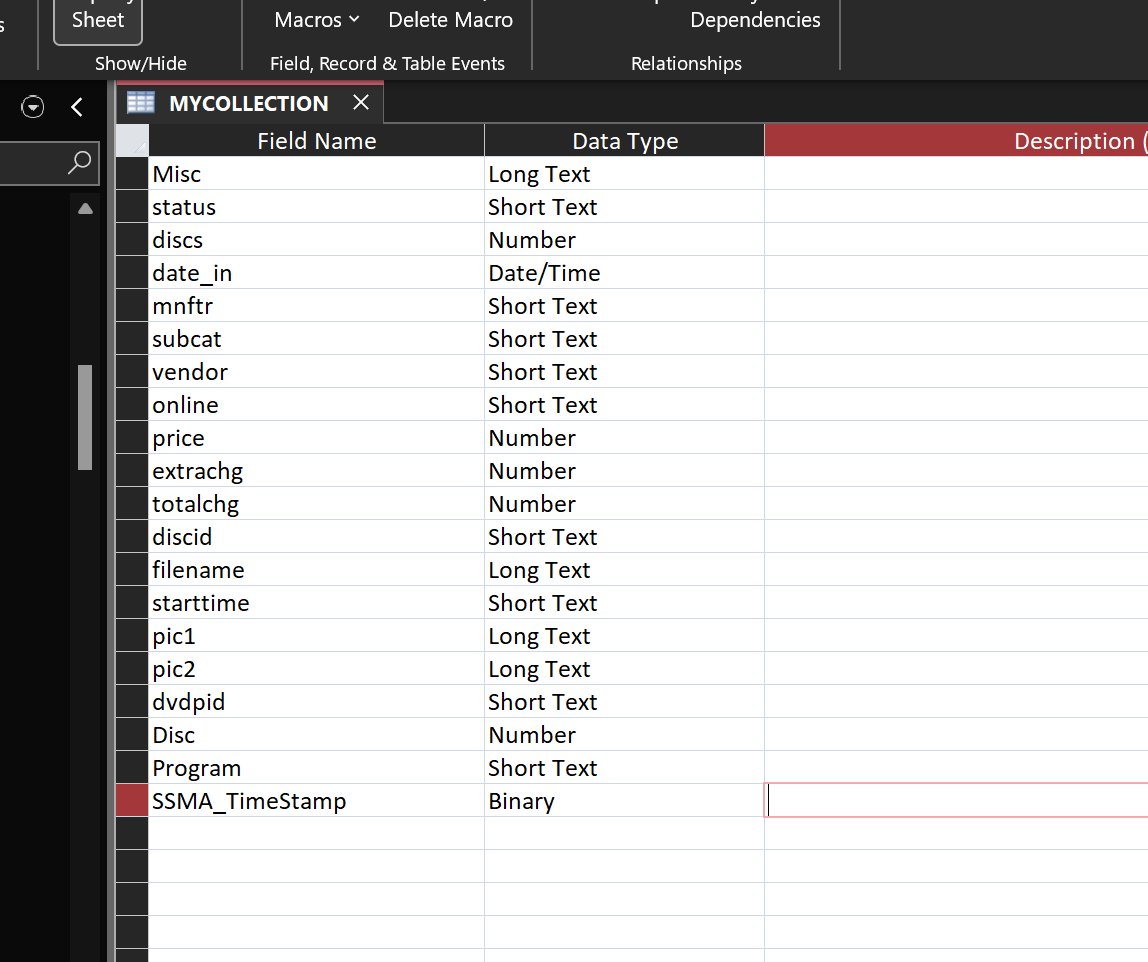
If you had used "SQL Server Migration Assistant" (SSMA) to migrate from Access to SQL Server:

     https://www.microsoft.com/en-us/download/details.aspx?id=54255

that rowversion column would've been automatically added to your tables.  The picture below shows my table having a "SSMA timestamp" field that prevents the write conflict error.

SSMA also would have let you migrate table relationships, which you asked about in another thread.
Kevin Yip  @Reply  
     
10 hours ago

Ray White OP  @Reply  
      
9 hours ago
So if you manually move the tables to the server then you Have to add the rowversion column to every table?
I have not seen in any of the videos.
Kevin Yip  @Reply  
     
8 hours ago
That's because the write conflict error doesn't always happen.  It happens when there is a discrepancy between what is entered in Access and what is actually stored in SQL Server, which may often be due to data type differences.  SQL Server has data types that don't exist in Access.  When you link SQL Server tables that have these data types, Access has to convert them to their closest equivalents.  For instance, the Varchar(1000) data type in SQL Server is a text field with a max length of 1000 characters.  Access doesn't have such a data type, and has to convert it to long text, which has a max length of 1 billion.  That could be the cause of such discrepancies.
Ray White OP  @Reply  
      
7 hours ago
Thank you Kevin
Ray White OP  @Reply  
      
6 hours ago
If you use the SQL Server Migration Assistant will it also move the Relationships to the server?
Kevin Yip  @Reply  
     
5 hours ago
That is what it is supposed to do.  But I haven't tried the latest version of SSMA, which came out 9/1/26.
Ray White OP  @Reply  
      
5 hours ago
I'll test it out and see if it will.
Thanks Kevin
I'll update after I try it.
Richard Rost  @Reply  
          
3 hours ago
SSMA is designed to migrate Access relationships as SQL Server foreign key constraints, along with primary keys and indexes. So yes, it should save you from having to rebuild them all manually. And no, I have not covered this yet in the course. I'm going to get to that soon.

That said, definitely review the SSMA migration report and then check the tables in SQL Server Management Studio afterward. Make sure the expected foreign keys are there and that any cascade update/delete behavior came across the way you intended. Relationships in Access that were not enforcing referential integrity may not translate into an enforced SQL Server foreign key, because there was nothing to enforce in the first place.

And no, a RowVer column is not automatically required in every SQL Server table. It is very helpful for tables that Access edits, however, because it gives Access a reliable way to detect whether a record changed between the time it was read and saved. SSMA normally adds one for this reason. If you are manually moving tables, adding RowVer to your editable tables is a good practice.

Let us know how your SSMA test goes. I personally haven't been a fan of the SSMA because older versions were kind of quirky and clunky and didn't really move stuff over the right way. Newer versions have gotten better, but it's still not perfect. You still got to check everything.
Add a Reply Upload an Image
Next Unseen


What's This?


The following is a paid advertisement
Computer Learning Zone is not responsible for any content shown or offers made by these ads.
 

Learn
 
Access - index
Excel - index
Word - index
Windows - index
PowerPoint - index
Photoshop - index
Visual Basic - index
ASP - index
Seminars
More...
Customers
 
Login
My Account
My Courses
Lost Password
Memberships
Student Databases
Change Email
Info
 
Latest News
New Releases
User Forums
Topic Glossary
Tips & Tricks
Search The Site
Code Vault
Collapse Menus
Help
 
Customer Support
Web Site Tour
FAQs
TechHelp
Consulting Services
About
 
Background
Testimonials
Jobs
Affiliate Program
Richard Rost
Free Lessons
Mailing List
PCResale.NET
Order
 
Video Tutorials
Handbooks
Memberships
Learning Connection
Idiot's Guide to Excel
Volume Discounts
Payment Info
Shipping
Terms of Sale
Contact
 
Contact Info
Support Policy
Mailing Address
Phone Number
Fax Number
Course Survey
Email Richard
[email protected]
Blog RSS Feed    YouTube Channel

LinkedIn
Copyright 2026 by Computer Learning Zone, Amicron, and Richard Rost. All Rights Reserved. Current Time: 9/5/2026 2:42:42 AM. PLT: 0s