Free Lessons
Courses
Seminars
TechHelp
Fast Tips
Templates
Topic Index
Forum
ABCD
 
Home   Courses   TechHelp   Help   Contact   Merch   Join   Order   Logon   Forums   
 
Back to Access Forum    Comments List
Upload Images   @Reply   Bookmark    Link   Email   Next Unseen 
Form Field Populate Based on Another Field
Kevin Rackliff 
      
5 days ago
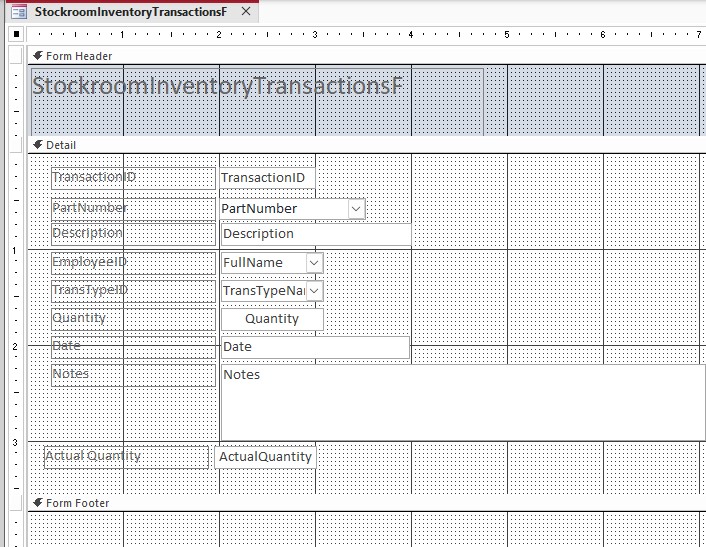
I have a form for transactions records of items put into and taken from inventory. I want the Description field for an item to populate based on the Part Number selected. The Part Number field is a Combo box where the User selects a Part Number. When the focus is moved to the next field, I want the Description field to auto populate the correct description for that Part Number item. The Part Number and Description information is held in a separate table called Inventory. I have tried using After Update and Lost Focus Events with no luck. Any guidance would be appreciated. I will post screen shots to help explain. Thanks
Kevin Rackliff OP  @Reply  
      
5 days ago

Kevin Robertson  @Reply  
           
5 days ago
Richard Rost  @Reply  
           
5 days ago
Kevin has you pointed in the right direction. Put the lookup in the AfterUpdate event of your PartNumber combo box. That's the event that fires after the user actually selects a different part.

Something like this:

Description = DLookup("Description", "InventoryT", "PartNumber=" & PartNumber)

Of course, adjust InventoryT, Description, and PartNumber to match your actual table and field names. If PartNumber is a text field rather than a number, it needs quotes around the value:

Description = DLookup("Description", "InventoryT", "PartNumber=""" & PartNumber & """")

Also, make sure your combo box is bound to the PartNumber field in your transaction table. If Description is simply informational and always comes from InventoryT, you may not need to store it in the transaction record at all. But if you need to preserve the description as it was at the time of the transaction, then copying it into the transaction record makes sense.
Kevin Rackliff OP  @Reply  
      
4 days ago
I tried multiple DLookup statements and finally it worked with Me.Description = DLookup("Description", "dbo_StockroomInventoryT", "PartNumber='" & Me.PartNumber & "'"). I found if I did not include the Me part then it would give errors. Thanks for the help
Richard Rost  @Reply  
           
4 days ago
That's weird, because you normally only need Me when you're referring to properties or methods of the form itself. A bound control on the form should generally work just fine as:

Description = DLookup("Description", "dbo_StockroomInventoryT", "PartNumber=""" & PartNumber & """")

The fact that Me.Description worked suggests Access may have had trouble resolving Description as the control name. Make sure both PartNumber and Description are actual controls on the form, and that their Name properties are PartNumber and Description. The control name matters here, not just the underlying field name.

If one or both fields aren't currently on the form, try adding them to the form and then test again. Access sometimes gets a little quirky about recognizing controls in the form's module, especially if controls have been renamed or copied around. Using Me.Description explicitly tells Access, "use the Description control on this form," so it can clear up that ambiguity.

In any case, you got it working, which is the important part.
Kevin Rackliff OP  @Reply  
      
4 days ago
I should give some background information that may or may not clarify what I am doing. My Transactions form is in my FE Access database and the tables were in a BE Access database. I have now built the same tables in SQL Server Express, shout out to Richard for the first SQL Server class. The Record Source for my Transaction form is a query on the Transactions table. The PartNumber field on the form is a Combo Box, Control Source is PartNumber result in the query and the Row Source is a Select Statement. The Description field is a Text Box with Control Source as Description result in the query. I have checked the names of the fields on the form and in the tables, they all match. Working with SQL Server and my Access FE is a challenge and I am working through these as they present themselves. Cant wait for SQL Server for Access User class 2. Thanks
Kevin Yip  @Reply  
     
4 days ago
When Me is required to avoid a run-time error, it's usually due to a name conflict with a local variable or an argument of a procedure.  I always use Me whether it's needed or not, so that it's clear to the reader that it's from a form.
Add a Reply Upload an Image
Next Unseen


What's This?


The following is a paid advertisement
Computer Learning Zone is not responsible for any content shown or offers made by these ads.
 

Learn
 
Access - index
Excel - index
Word - index
Windows - index
PowerPoint - index
Photoshop - index
Visual Basic - index
ASP - index
Seminars
More...
Customers
 
Login
My Account
My Courses
Lost Password
Memberships
Student Databases
Change Email
Info
 
Latest News
New Releases
User Forums
Topic Glossary
Tips & Tricks
Search The Site
Code Vault
Collapse Menus
Help
 
Customer Support
Web Site Tour
FAQs
TechHelp
Consulting Services
About
 
Background
Testimonials
Jobs
Affiliate Program
Richard Rost
Free Lessons
Mailing List
PCResale.NET
Order
 
Video Tutorials
Handbooks
Memberships
Learning Connection
Idiot's Guide to Excel
Volume Discounts
Payment Info
Shipping
Terms of Sale
Contact
 
Contact Info
Support Policy
Mailing Address
Phone Number
Fax Number
Course Survey
Email Richard
[email protected]
Blog RSS Feed    YouTube Channel

LinkedIn
Copyright 2026 by Computer Learning Zone, Amicron, and Richard Rost. All Rights Reserved. Current Time: 9/20/2026 1:22:32 PM. PLT: 1s