Free Lessons
Courses
Seminars
TechHelp
Fast Tips
Templates
Topic Index
Forum
ABCD
 
Home   Courses   TechHelp   Help   Contact   Merch   Join   Order   Logon   Forums   
 
Back to Access Forum    Comments List
Upload Images   @Reply   Bookmark    Link   Email   Next Unseen 
Missing FirearmID in Report Filter
Lee Shastid 
    
14 hours ago
I have a print button on a report and want to print it by clicking the print button.

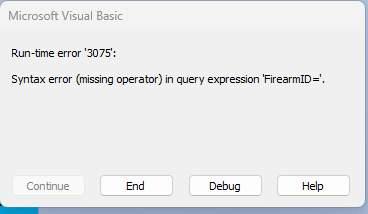
When I type this code DoCmd.OpenReport "FirearmMagR", acViewPreview, , "FirearmID=" & FirearmID I will get the below error message and cant figure it out and search results is not helping.

Lee Shastid OP  @Reply  
    
14 hours ago
> Run-time error: '3075'
> Syntax error missing operator in query expression FirearmiD=.

Alex Hedley  @Reply  
           
14 hours ago
If you MsgBox FirearmID first does it show a value?
Where is that? On a Form? Is the Form open?
Kevin Robertson  @Reply  
          
14 hours ago
FirearmID is missing its value on the form.
Are you on a new record?
Lee Shastid OP  @Reply  
    
13 hours ago
Alex I am not familiar enough with vba to do what you advise. Kevin this is a report that I created and put a print button on it and I cut and pasted the vba code from another DB where it works and all i changed was the name of the report once I did that.
Lee Shastid OP  @Reply  
    
13 hours ago
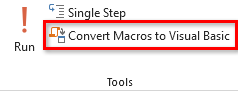
It works if I use the wizard to make the button, but I am trying to make this my first DB without any macros or using the wizards for an accomplishment for me.
Richard Rost  @Reply  
          
13 hours ago
Since the button is already on FirearmMagR, you don't need to open the report again. Just print the report that is currently open:

Private Sub PrintButton_Click()
    DoCmd.PrintOut
End Sub

The error is happening because FirearmID has no value at the moment this code runs, so Access is building this:

FirearmID=

That is incomplete SQL, hence the missing operator error.

The OpenReport code is what you would use from a form to open FirearmMagR filtered to a particular firearm. But for a Print button on the report itself, DoCmd.PrintOut is all you need.

And don't feel bad about using the wizard while you're learning. The wizard is often a good way to see what Access generates, then you can replace it with your own VBA once you understand it.
Lee Shastid OP  @Reply  
    
12 hours ago
Okay I got confused I explained what I want to do all wrong. I got a little ahead of myself. Apologies Gentlemen. I want to put a button on my main menu to open the report and preview it before I print it.
Kevin Robertson  @Reply  
          
12 hours ago
How are you getting the FirearmID if the button is on the Main Menu.
Combo Box? List Box?
Lee Shastid OP  @Reply  
    
12 hours ago
Okay I got it figured out yall got me back on track. Thank you...So Richard was saying to use the wizard to see what it generates. How do you see it and break it down, is there a lesson on that somewhere?
Alex Hedley  @Reply  
           
5 hours ago

Richard Rost  @Reply  
          
4 hours ago
Nice job figuring it out. That kind of troubleshooting is exactly how you learn this stuff.

To see what the Command Button Wizard generated, open the form in Design View, click the button, and open its Property Sheet. On the Event tab, find the On Click property. If it says [Event Procedure], click the ... button to the right. That opens the VBA editor and takes you directly to the code Access created.

The wizard-generated code is often more complicated than necessary, but it gives you a working example. You can read through it, identify the important line or two, and then simplify it as you get more comfortable with VBA.
Lee Shastid OP  @Reply  
    
3 hours ago
Thank you all for the help. Alex thank you didn’t know exactly what that did so was hesitant to touch it but I know now. Thank you
Add a Reply Upload an Image
Next Unseen


What's This?


The following is a paid advertisement
Computer Learning Zone is not responsible for any content shown or offers made by these ads.
 

Learn
 
Access - index
Excel - index
Word - index
Windows - index
PowerPoint - index
Photoshop - index
Visual Basic - index
ASP - index
Seminars
More...
Customers
 
Login
My Account
My Courses
Lost Password
Memberships
Student Databases
Change Email
Info
 
Latest News
New Releases
User Forums
Topic Glossary
Tips & Tricks
Search The Site
Code Vault
Collapse Menus
Help
 
Customer Support
Web Site Tour
FAQs
TechHelp
Consulting Services
About
 
Background
Testimonials
Jobs
Affiliate Program
Richard Rost
Free Lessons
Mailing List
PCResale.NET
Order
 
Video Tutorials
Handbooks
Memberships
Learning Connection
Idiot's Guide to Excel
Volume Discounts
Payment Info
Shipping
Terms of Sale
Contact
 
Contact Info
Support Policy
Mailing Address
Phone Number
Fax Number
Course Survey
Email Richard
[email protected]
Blog RSS Feed    YouTube Channel

LinkedIn
Copyright 2026 by Computer Learning Zone, Amicron, and Richard Rost. All Rights Reserved. Current Time: 9/20/2026 12:06:19 PM. PLT: 0s