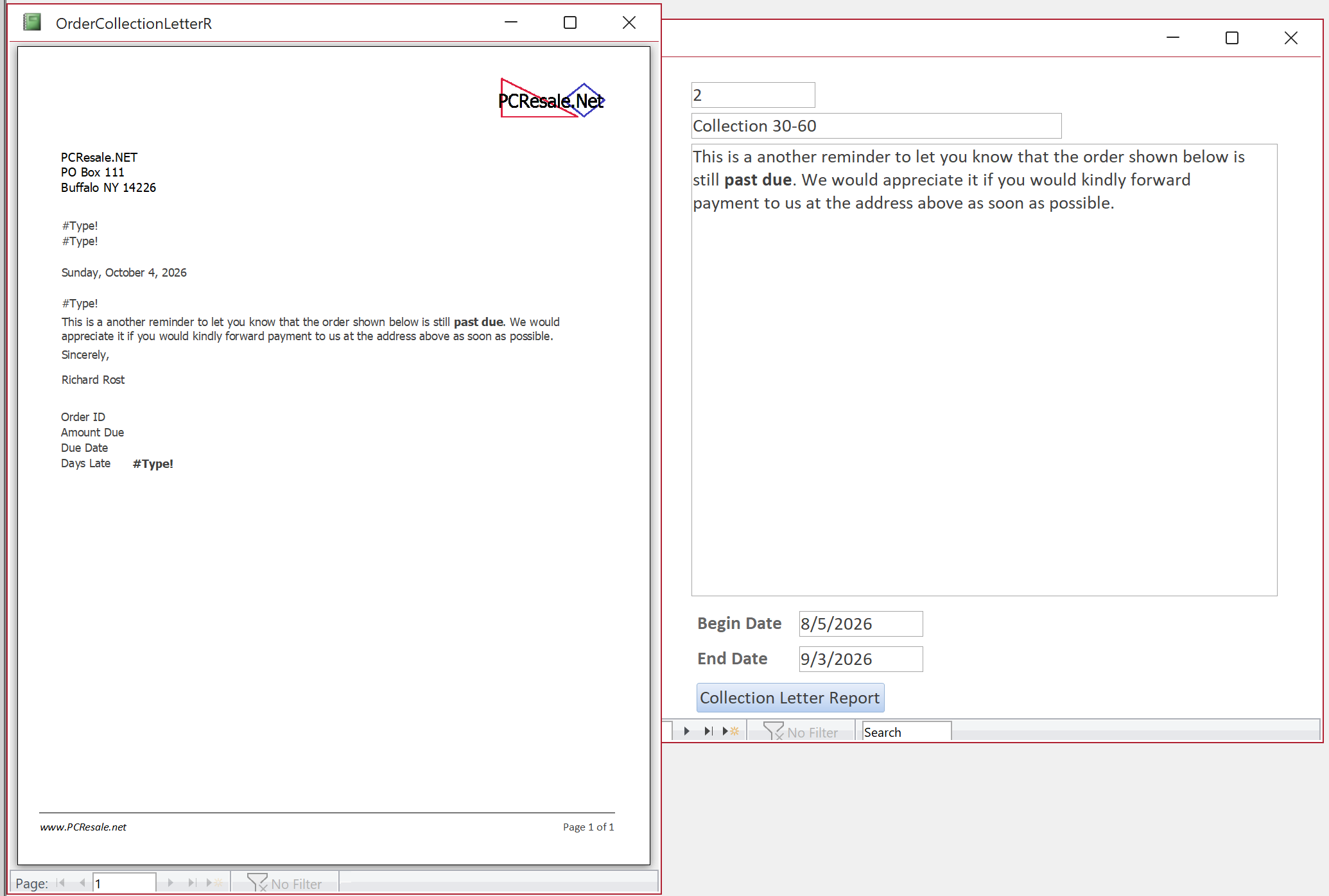
Through the end of Lesson 3, everything was working fine. At the end of the Lesson 4, however, I encountered this problem:
Clicking the "Collection Letter Report" button from the Collection <30 record in LetterF works fine. It generate letters for all of the orders less than 30 days overdue.
But when clicking the button from the other two records, for 30-60 days and >60 days, the report shows one page, and it displays #Type! errors in the following places:
- Recipient address. It replaces the entire address with two #Type! errors on consecutive lines. - The salutation line. Instead of "Dear Anna" or whatever, it just shows a #Type! error. - OrderID, Amount Due, and Due Date show no data and no error, but Days Late shows the #Type! error
I've hunted around for obvious problems, but, well, not much in Access is obvious to me yet, so troubleshooting can be a little daunting. Any ideas? Thanks!
Anthony CraineOP
@Reply 19 hours ago
Alex Lewis
@Reply 17 hours ago
Do you have those fields in the underlying query that feeds the report?
Alex is on the right track. Open the report's Record Source query directly after selecting each letter range and see whether it returns the expected records.
Also check the date-range fields in LetterT. Make sure the start and end date fields are Date/Time fields, and that the 30-60 and 60+ records contain actual dates, not text that looks like dates.
Since several calculated text controls are showing #Type!, I'd also compare the report's Record Source query and its calculated fields with the Lesson 4 version. If you can post a screenshot of the query design grid or SQL view, along with the field data types in LetterT, we can narrow it down quickly.
Anthony CraineOP
@Reply 2 hours ago
Aha! Even simpler than I thought: I hadn't put any data in LetterT that fell into the 30-60 or 60+ ranges. All of the unpaid orders I had entered were less than 30 days past due.
Thanks for the suggestions. They helped me narrow it down to that. Otherwise I'd have been grasping at straws for eternity.
Thanks!
Anthony CraineOP
@Reply 2 hours ago
Sorry — I meant I hadn’t put any appropriate data in OrderT. That’s where the order information is stored and where the underlying query was getting its data.
Kevin Robertson
@Reply 2 hours ago
You can use the On No Data event in your Report to pop up a MsgBox then cancel opening the Report.
Sorry, only students may add comments.
Click here for more
information on how you can set up an account.
If you are a Visitor, go ahead and post your reply as a
new comment, and we'll move it here for you
once it's approved. Be sure to use the same name and email address.