Free Lessons
Courses
Seminars
TechHelp
Fast Tips
Templates
Topic Index
Forum
ABCD
 
Home   Courses   TechHelp   Forums   Help   Contact   Merch   Join   Order   Logon  
 
Back to Access Forum    Comments List
Upload Images   @Reply   Bookmark    Link   Email   Next Unseen 
Form to display total hours
Michelle Seidelin 
    
5 years ago
Hello Richard

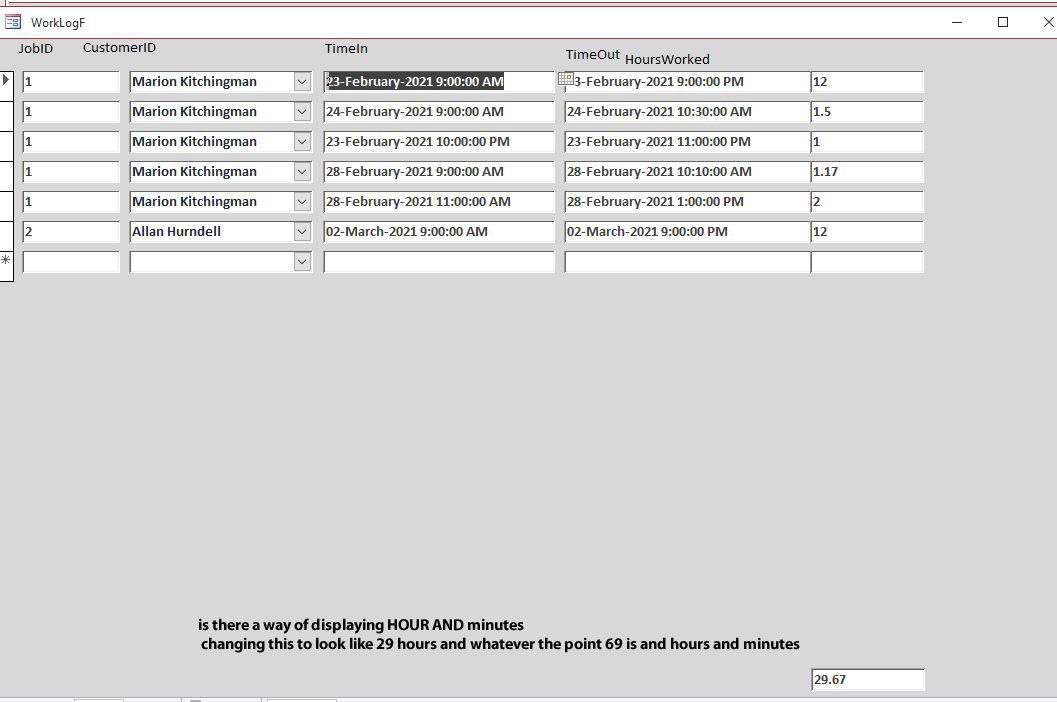
I have just made a time Clock like you show in expert 11 listen six my question is it possible to get a total for hours to display at the bottom of query or do you need to make that totaling query when you want to display this in a form or can you feed the query as shown in expert 12 listen 2 you are showing  demonstrating how to A timesheet which I'm using to work out how long it takes for how many hours of video when I have multitaps then one job this information is not going to be kept permanently after I have calculated how many hours I will eventually use a delete query to empty ready for the next job best will be in a form like you show an expert level 12 listen 2 but I need to be able to have a look at the title  like the query you made at the end of expert 11 listen six
Alex Hedley  @Reply  
           
5 years ago
Michelle Seidelin OP  @Reply  
    
5 years ago
Hello Richard.

Just wondering if there's a way of showing minutes rather than .5 for 30 minutes an expert level 11 listen Six I know there was a tick help video showing this sort of thing but not sure if that information can be combined into this query which was designed as I see it an expert 11 listen 6 that is when where you created the work log table and work log query
Michelle Seidelin OP  @Reply  
    
5 years ago
Richard I realize .5 is half an hour but when you say something like .25 it is harder to workout in your mind well for me it is yes that would be great to show minutes like your latest tech  help video showing it in hours in minutes don't know if we can combine those two ideas into this query any suggestions and advice you can give me would be greatly appreciated
Richard Rost  @Reply  
          
5 years ago
1 hour is 60 minutes, right? So if you have hours and you want minutes: H*60.
Adam Schwanz  @Reply  
           
5 years ago
Am I right that you're trying to convert hour values into minutes? What Richard said will convert your hour value into minutes, and then you could also do something like =[TotalMinutes]\60 & Format([TotalMinutes] Mod 60,"\:00") and that will return a value like 6:40 (6 hours, 40 minutes) for 400 minutes if you're looking for that kind of format.
Michelle Seidelin OP  @Reply  
    
5 years ago

Michelle Seidelin OP  @Reply  
    
5 years ago
Hello Richard

I am looking for a way of filtering the work log form as I'm able to type a number EG 5 in an click a button and it will filter the current customer to just show a job number I entered this has been modified from the form that you teach an expert level 12 listen 2 as I'm able to show which Beaver job number I want with the click of a button on the form I have uploaded a photo of my design at this stage the photo shows only one job but the reason for versa is that I didn't have anything else written an at the time plus I changed my mind how to do things as I went through the video more and more
Richard Rost  @Reply  
          
5 years ago
See Time as a Duration. Also I have a function called HowLong which is in the Code Vault that will give you an exact readout like "3 hours, 15 minutes, 12 seconds."
Michelle Seidelin OP  @Reply  
    
5 years ago
Hello Richard thank you wondering if you have a VIDEO  demonstrating hey this code vault code how long does work and F it would be compatible with what we built and level 12 also does it need any other information put into queries for this

Michelle
Richard Rost  @Reply  
          
5 years ago
I don't have a video specifically explaining how to use every function in the Code Vault, no. If you're not comfortable with using subs and functions, then keep watching the Developer series. I may do a video on the HowLong function specifically because it is one of the more popular ones. It's on the list. Not sure when though.
Michelle Seidelin OP  @Reply  
    
5 years ago
Thank you
Richard Rost  @Reply  
          
5 years ago
See if this video has what you need: Time Spent.

This thread is now CLOSED. If you wish to comment, start a NEW discussion in Access Forum.
 

Next Unseen

 
New Feature: Comment Live View


The following is a paid advertisement
Computer Learning Zone is not responsible for any content shown or offers made by these ads.
 

Learn
 
Access - index
Excel - index
Word - index
Windows - index
PowerPoint - index
Photoshop - index
Visual Basic - index
ASP - index
Seminars
More...
Customers
 
Login
My Account
My Courses
Lost Password
Memberships
Student Databases
Change Email
Info
 
Latest News
New Releases
User Forums
Topic Glossary
Tips & Tricks
Search The Site
Code Vault
Collapse Menus
Help
 
Customer Support
Web Site Tour
FAQs
TechHelp
Consulting Services
About
 
Background
Testimonials
Jobs
Affiliate Program
Richard Rost
Free Lessons
Mailing List
PCResale.NET
Order
 
Video Tutorials
Handbooks
Memberships
Learning Connection
Idiot's Guide to Excel
Volume Discounts
Payment Info
Shipping
Terms of Sale
Contact
 
Contact Info
Support Policy
Mailing Address
Phone Number
Fax Number
Course Survey
Email Richard
[email protected]
Blog RSS Feed    YouTube Channel

LinkedIn
Copyright 2026 by Computer Learning Zone, Amicron, and Richard Rost. All Rights Reserved. Current Time: 5/1/2026 8:46:13 PM. PLT: 1s