Free Lessons
Courses
Seminars
TechHelp
Fast Tips
Templates
Topic Index
Forum
ABCD
 
Home   Courses   TechHelp   Forums   Help   Contact   Merch   Join   Order   Logon  
 
Back to Access Forum    Comments List
Upload Images   @Reply   Bookmark    Link   Email   Next Unseen 
VLookup Equivalent
Leo Rivera 
   
5 years ago
Rick hi, I am so sorry for to many questions but I am developing a monster database and raise a lot of problems. For Example I have a calculation field that the total need to be compare with a risk matrix. My risk table is 1 for Low 2 for Medium and 3 for high.  The calculation field should locate the number in the Risk Matrix and come back with a risk value. I know how to do this perfectly on Excel with VLOOKUP what is the equivalent in access?  Also if I have a result of 2.33 the total risk should be High.
Richard Rost  @Reply  
          
5 years ago
Normally the equivalent function to VLookup would be DLookup if you had an exact match. Since you don't you'll need to use DMin which is a close cousin of DMax. You want to find the smallest value in your table that's larger than your target. For example, if you look up 2.33 it brings back 3 (smallest value that's larger than the target). I cover this in Access Expert 29.
Leo Rivera OP  @Reply  
   
5 years ago
Rick hi,  I am so sorry for bother you but you are my last resources. Please help me to figure out what is my mistakes. I have to tables one with number result two rows with 3 and 1.66666 I want to compare this two number with another table RiskMatrix I saw the chapter of Expert 29 where you explain the DMAX and DLookup I used but I have error in my output. See the syntax
RiskFinal: DMax([TotalRiskFinal],"RiskMatrix",[TotalRiskFinal]=[RiskValue])
What I got back is 3 and 1.6666 but as txt format.  When I try to put the Dlookup I got errors actualy I got #Error
Expr1: (DLookUp([RiskValue],[TotalRiskFinal]=DMax([TotalRiskFinal],"RiskMatrix",[TotalRiskFinal]=[RiskValue])))
Please let me send you images! I need help on this.
Richard Rost  @Reply  
          
5 years ago
Oh, and you can post images using the little "Upload Images" at the top of the thread on the right side.
Richard Rost  @Reply  
          
5 years ago
I just checked my course outlines, and you already have the class I cover something very similar to this in: Access Expert 29. There's a VLOOKUP replacement equivalent in Lesson 6. Watch that. Your problem with what you posted above, though, is that you can't NEST functions like that. You need to make them separate fields.
Leo Rivera OP  @Reply  
   
5 years ago
Got it, Thanks
Leo Rivera OP  @Reply  
   
5 years ago
Still having trouble.
And is DMAX because one of the results is 1.33333 and DMax bringing that number instead of 1.0 this is the DMas syntax I am using =DMax("TotalRiskFinal","RiskMatrix","TotalRiskFinal =" & [TotalRiskFinal])

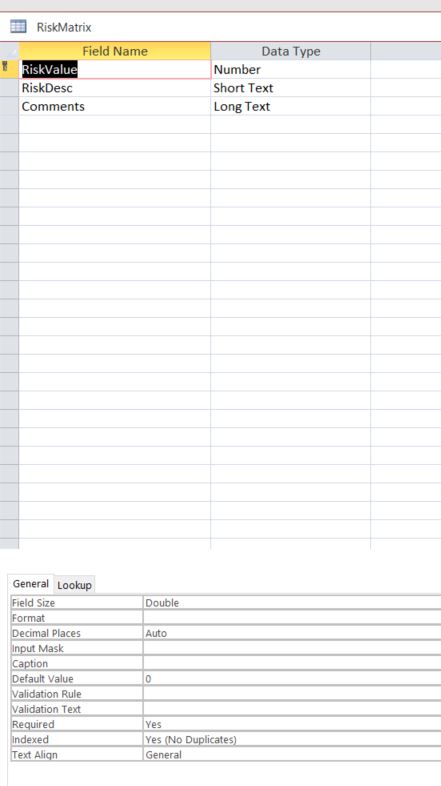
TotalRiskFinal is a query that do the calculation only two fields Member ID and calculated field.  My RiskMatrix tamble has 3 col RiskValue, RiskDesc and Comments.  RiskValue only has 3 rows 0, 2 and 3 Risk Desc has also 3 rows Low, Medium and High.

What could happen?

The Dlookup is working fine but becuase DMax not workng I have no results when the number is not whole numbers.
=DLookUp("RiskDesc","RiskMatrix","RiskValue= " & DMax("TotalRiskFinal","RiskMatrix","TotalRiskFinal =" & "TotalRiskFinal"))
Richard Rost  @Reply  
          
5 years ago
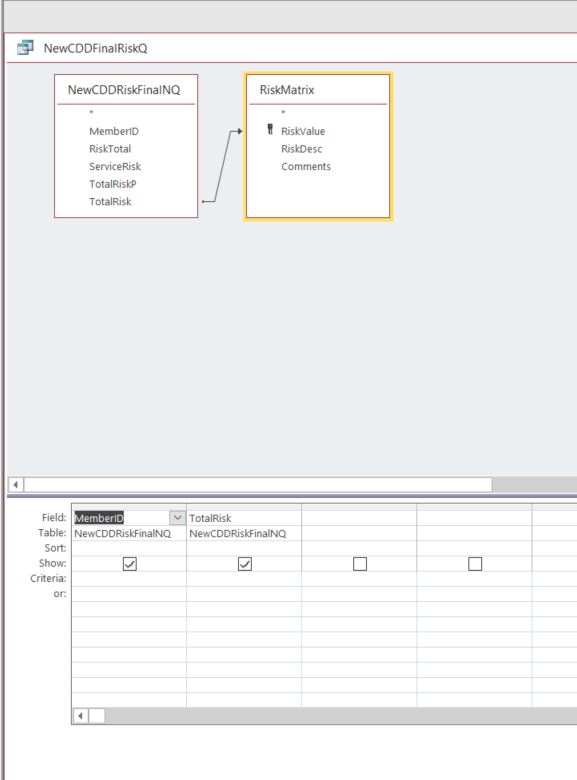
Let me see your data. Upload screen shots of your queries in design view and your tables in datasheet view.
Leo Rivera OP  @Reply  
   
5 years ago
I've got error when I clic the Upload link.
Richard Rost  @Reply  
          
5 years ago

Richard Rost  @Reply  
          
5 years ago
Seems to work OK for me. Try again. :)
Leo Rivera OP  @Reply  
   
5 years ago

Leo Rivera OP  @Reply  
   
5 years ago

Richard Rost  @Reply  
          
5 years ago
Someone else asked me a question very similar to this a little while back. I'm going to make a TechHelp video related to this. Hang tight.
Richard Rost  @Reply  
          
5 years ago
One thing I just caught with the formula you pasted in:

=DLookUp("RiskDesc","RiskMatrix","RiskValue= " & DMax("TotalRiskFinal","RiskMatrix","TotalRiskFinal =" & "TotalRiskFinal"))

See anything wrong with that? You've got the last TotalRiskFinal in quotes. It should be

=DLookUp("RiskDesc","RiskMatrix","RiskValue= " & DMax("TotalRiskFinal","RiskMatrix","TotalRiskFinal =" & [TotalRiskFinal]))

And it's hard for me to help you without seeing your data too.
Richard Rost  @Reply  
          
5 years ago
And wait... you don't even have a field called TotalRiskFinal in your RiskMatrix. What is that all about?
Adam Schwanz  @Reply  
           
5 years ago
The plot thickens ;p
Richard Rost  @Reply  
          
5 years ago
See if this helps: VLOOKUP in Access
Leo Rivera OP  @Reply  
   
5 years ago
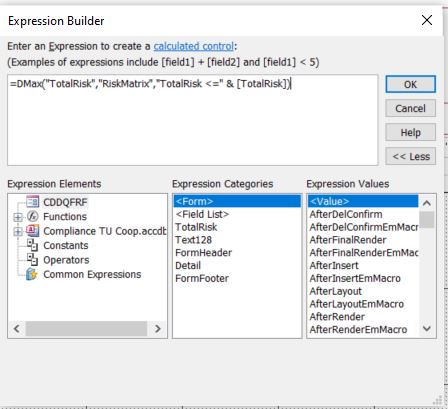
I saw it 1000 times! The code for the image is:
=DMax("TotalRiskFinal","RiskMatrix","TotalRiskFinal =" & [TotalRiskFinal])
Richard Rost  @Reply  
          
5 years ago
There is no field called "TotalRiskFinal" in your "RiskMatrix" table.
Leo Rivera OP  @Reply  
   
5 years ago
Apology is: =DMax("TotalRisk","RiskMatrix","TotalRisk =" & [TotalRisk])
But Total Risk is not in Risk Matrix neither! But if I put Risk Value I obtain an error #Name?
Leo Rivera OP  @Reply  
   
5 years ago

Leo Rivera OP  @Reply  
   
5 years ago

Juan C Rivera  @Reply  
            
5 years ago
Did you put a space in there?  I'm real bad about that. space = []

V/r
Juan
Leo Rivera OP  @Reply  
   
5 years ago
Space? Where?
Leo Rivera OP  @Reply  
   
5 years ago
between commas?
Richard Rost  @Reply  
          
5 years ago
His spacing is fine. The problem is that he's trying to look up a field that doesn't exist in the table! Review DLOOKUP please.
Leo Rivera OP  @Reply  
   
5 years ago
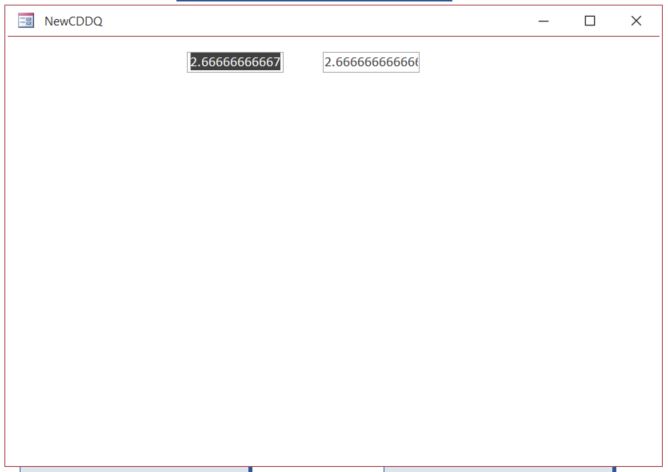
I still having problem with a query that I want to obtain a label value example I have a risk matrix 1 is Low 2 is medium and 3 is high after calculation if the result is a not exact number example 2.66666 I do not have any match I used DMAX but does work.
Leo Rivera OP  @Reply  
   
5 years ago
This is correct I still need guidance on this.
Alex Hedley  @Reply  
           
5 years ago
Have you managed to try the VLOOKUP example Rich linked above?
Copying that to see if it works for you first before applying to your scenario?
Richard Rost  @Reply  
          
5 years ago
The problem is you're trying to look up field names that don't exist in your table.
Leo Rivera OP  @Reply  
   
5 years ago
Let me show to you guys what I have.

This thread is now CLOSED. If you wish to comment, start a NEW discussion in Access Forum.
 

Next Unseen

 
New Feature: Comment Live View


The following is a paid advertisement
Computer Learning Zone is not responsible for any content shown or offers made by these ads.
 

Learn
 
Access - index
Excel - index
Word - index
Windows - index
PowerPoint - index
Photoshop - index
Visual Basic - index
ASP - index
Seminars
More...
Customers
 
Login
My Account
My Courses
Lost Password
Memberships
Student Databases
Change Email
Info
 
Latest News
New Releases
User Forums
Topic Glossary
Tips & Tricks
Search The Site
Code Vault
Collapse Menus
Help
 
Customer Support
Web Site Tour
FAQs
TechHelp
Consulting Services
About
 
Background
Testimonials
Jobs
Affiliate Program
Richard Rost
Free Lessons
Mailing List
PCResale.NET
Order
 
Video Tutorials
Handbooks
Memberships
Learning Connection
Idiot's Guide to Excel
Volume Discounts
Payment Info
Shipping
Terms of Sale
Contact
 
Contact Info
Support Policy
Mailing Address
Phone Number
Fax Number
Course Survey
Email Richard
[email protected]
Blog RSS Feed    YouTube Channel

LinkedIn
Copyright 2026 by Computer Learning Zone, Amicron, and Richard Rost. All Rights Reserved. Current Time: 5/2/2026 6:29:47 AM. PLT: 1s