Free Lessons
Courses
Seminars
TechHelp
Fast Tips
Templates
Topic Index
Forum
ABCD
 
Home   Courses   TechHelp   Forums   Help   Contact   Merch   Join   Order   Logon  
 
Back to Access Forum    Comments List
Upload Images   @Reply   Bookmark    Link   Email   Next Unseen 
Closed Captioning
Carol Herriot 
    
5 years ago
Can you tell me please how to turn on Closed Captioning?  You speak quickly sometimes and I need to "read" what you are saying to understand you.

There is a button on the bottom left of the screen that says "Choose subtitle File" but this just takes me to File Explorer.  

Thank you.
Alex Hedley  @Reply  
           
5 years ago
Unfortunately the videos don't have CC.
I think YouTube might automatically add them but the PAID courses don't.
You can purchase the Handbooks for most of the courses, if you own the videos.
Not word for word transcribed but generally the key points and screenshots.
Carol Herriot OP  @Reply  
    
5 years ago
That is unfortunate.  You should really consider adding it in future.  Accessibility ensures everyone an learn without having to purchase the handbook in order to understand what is being presented on the video.
Richard Rost  @Reply  
          
5 years ago
I understand your frustration, Carol. It's just a LOT of extra work for me to add CC to my videos. Like Alex said, YouTube adds them automatically, but I don't upload my paid videos to YouTube (for several reasons, some legal). So far, in my almost 20 years of doing this, I think you're the 2nd or 3rd person who has asked for them. It's just not something I can justify the time for.

If you want to download my videos, and upload them to a PRIVATE YouTube channel for your OWN use, so that you can get the automatic CC from them, you have my permission, provided you delete the files immediately when you're done with them.
Carol Herriot OP  @Reply  
    
5 years ago
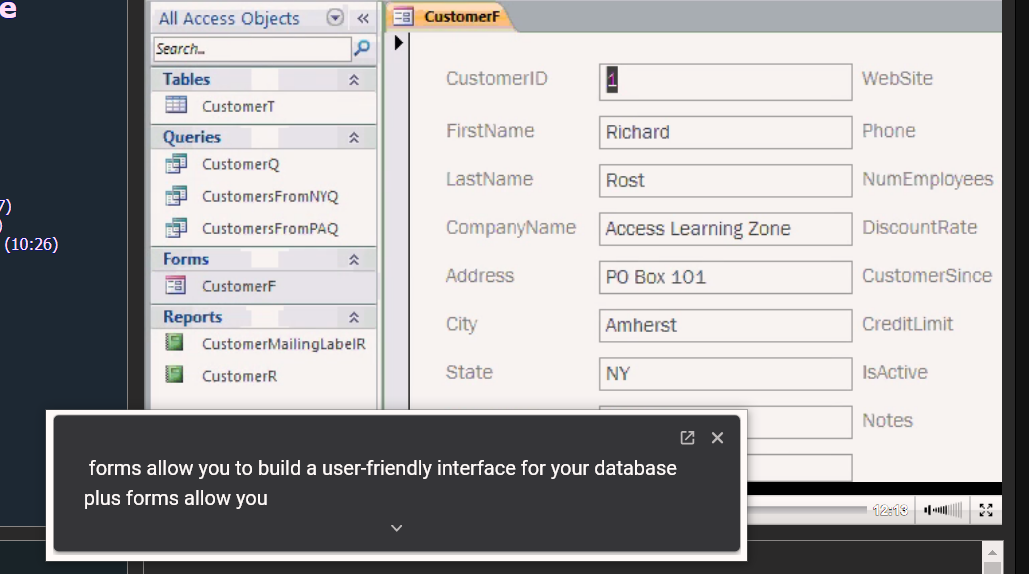
I was watching one of my classes this morning via the Theater when I noticed a box across the bottom of my screen with closed captioning in it!!!!  It did not look like the typical closed captioning format which is usually imposed over the video.  The text was in a separate box and changing as you spoke.  I would like to send a screen shot to you, but it appears that is not possible in the forum???  Is there a way I can send you a screen shot????

I am not sure HOW this happened but it makes a HUGE difference to me as I am hearing impaired.  I was playing around with closed captioning settings earlier today on Google Chrome and wonder if I did something to enable it.  Before I go looking to see what I may have done for this to happen, I want ask if perhaps something was done at your end?
Alex Hedley  @Reply  
           
5 years ago
See Image Uploads for how.

There an Upload Images button on your post where you can.
Carol Herriot OP  @Reply  
    
5 years ago
Here is the image (I hope)
Alex Hedley  @Reply  
           
5 years ago
Did you pick an image and press the Upload button?
Carol Herriot OP  @Reply  
    
5 years ago
I don't see an upload button.  It is supposed to be in the upper right corner.
Carol Herriot OP  @Reply  
    
5 years ago
It just says pending approval.
Carol Herriot OP  @Reply  
    
5 years ago

Carol Herriot OP  @Reply  
    
5 years ago
I clicked on the upload image link that you sent me.  I could not see it otherwise.
Richard Rost  @Reply  
          
5 years ago
Which video is that? Any content that is hosted on YouTube (even in the Theater) may have captions displayed. Those are added by YouTube. The majority of my PAID lessons are hosted on my web server and not YouTube due to licensing restrictions.
Carol Herriot OP  @Reply  
    
5 years ago
It works on all of the videos that I have purchased.  This is NOT YouTube captions (which is very inaccurate btw).   I have figured out how I did it, if you are interested.
Carol Herriot OP  @Reply  
    
5 years ago

Carol Herriot OP  @Reply  
    
5 years ago
I meant to mention that the box of text can be moved anywhere you want it on the screen so it does not cover the video content.
Richard Rost  @Reply  
          
5 years ago
I would VERY MUCH like to know how you did it. :)
Carol Herriot OP  @Reply  
    
5 years ago
I am sending you my notes in the next message.  I still can't figure out how to attach the image to this message :(
Richard Rost  @Reply  
          
5 years ago
Thanks. You can't attach an image to the current message. Sorry. You can click on the Upload Images link at the top of the thread to upload standalone images. I know, my site isn't as fancy as Facebook or Twitter, but I built it myself. :)
Carol Herriot OP  @Reply  
    
5 years ago
I am having trouble sending it.  I get an error message.  I will try changing the format.  Hang on . . . . I am learning!
Carol Herriot OP  @Reply  
    
5 years ago

Carol Herriot OP  @Reply  
    
5 years ago
Hope you can read the small print.  My notes were in word.
Richard Rost  @Reply  
          
5 years ago
Wow. That is so cool. Thank you very much for sharing that. I'll be sure to post a note about it for everyone to see. You just taught me something, and I love learning new things. I personally don't use captions, but I'm sure others will benefit from this.
Scott Axton  @Reply  
        
5 years ago
Carol You ROCK!  
That is way cool.  I've worn hearing aids since I was 40.  To many industrial noises, loud motorcycles, shooting, etc.
This is great to know!  Thanks for sharing.

Richard Rost  @Reply  
          
4 years ago
Look, Carol, you're famous: Live Captions.

It may sometimes take me 8 months to record a video, but I get to it eventually. :)

This thread is now CLOSED. If you wish to comment, start a NEW discussion in Access Forum.
 

Next Unseen

 
New Feature: Comment Live View


The following is a paid advertisement
Computer Learning Zone is not responsible for any content shown or offers made by these ads.
 

Learn
 
Access - index
Excel - index
Word - index
Windows - index
PowerPoint - index
Photoshop - index
Visual Basic - index
ASP - index
Seminars
More...
Customers
 
Login
My Account
My Courses
Lost Password
Memberships
Student Databases
Change Email
Info
 
Latest News
New Releases
User Forums
Topic Glossary
Tips & Tricks
Search The Site
Code Vault
Collapse Menus
Help
 
Customer Support
Web Site Tour
FAQs
TechHelp
Consulting Services
About
 
Background
Testimonials
Jobs
Affiliate Program
Richard Rost
Free Lessons
Mailing List
PCResale.NET
Order
 
Video Tutorials
Handbooks
Memberships
Learning Connection
Idiot's Guide to Excel
Volume Discounts
Payment Info
Shipping
Terms of Sale
Contact
 
Contact Info
Support Policy
Mailing Address
Phone Number
Fax Number
Course Survey
Email Richard
[email protected]
Blog RSS Feed    YouTube Channel

LinkedIn
Copyright 2026 by Computer Learning Zone, Amicron, and Richard Rost. All Rights Reserved. Current Time: 4/12/2026 7:57:58 PM. PLT: 1s