Free Lessons
Courses
Seminars
TechHelp
Fast Tips
Templates
Topic Index
Forum
ABCD
 
Home   Courses   TechHelp   Forums   Help   Contact   Merch   Join   Order   Logon  
 
Back to Access Forum    Comments List
Upload Images   @Reply   Bookmark    Link   Email   Next Unseen 
Hyperlinks Location Folder
Rajashree Natarajan 
      
5 years ago
Is there a way I can populate the location link as a default value in the field.  I tried to do it in the table but it does not accept it.  

For eg how would I put the following as a default in my location field  

G:\Shared drives\EARS IN BALANCE\[FirstName] [LastName]
I need it to pick up the first and last name from the form. This will take me into that patients folder in Google drive.

Please help.
Richard Rost  @Reply  
          
5 years ago
Sorry, but default values don't work that way. You can't pull another value from the same record. You would have to use an AfterUpdate Event in the FN and LN fields to set that location link after one or the other one of those is updated. Or make a button to auto-create it. It's as easy as:

LocationLink = "G:\Shared drives\EARS IN BALANCE\" & FN & LN & "\"

Not hard. You just have to know where to put it. :)
Rajashree Natarajan OP  @Reply  
      
5 years ago
THANK YOU THANK YOU THANK YOU...You make it look so easy!!!
Richard Rost  @Reply  
          
5 years ago
Only because I've been doing this for almost 30 years. :)
Rajashree Natarajan OP  @Reply  
      
5 years ago
I have an issue with the G drive. That's Google drive. I have a remote server with 5 users. The Google drive does not necessarily store in the G drive for all users. Some have it in E or F drives. Sometimes I get a pop up from Google that it has switched from G to E or G to F in the server. This makes it hard to open the folders for all the users as the Google drive location is different for all users. What do I do in this case?
Richard Rost  @Reply  
          
5 years ago
That's a tough one. Easiest thing would be to force it to map to the same drive for everyone. If not, you'll have to set some kind of value on each user's station in a table, perhaps, indicating where their shared drive is.
Rajashree Natarajan OP  @Reply  
      
5 years ago
So if I make a table of all the drives in it, what would be the VBA I would use to direct the location folder? Can a VBA code  look for the drive that contains the Google drive in that user station and open it accordingly? I have already contacted my remote server company to see how I can force Google to be on the same drive for all of us. Waiting on them. It works so beautifully on my server and so frustrated that it does not for my front desk, manager or audiology assistants.
Richard Rost  @Reply  
          
5 years ago
Getting all the drives the same is your best bet. You could manually map a drive letter that's the same for all of you. For example, if your front desk has Google drive on E: then you could manually map it to a Z: drive in your Windows Startup.

See NET USE
Rajashree Natarajan OP  @Reply  
      
5 years ago
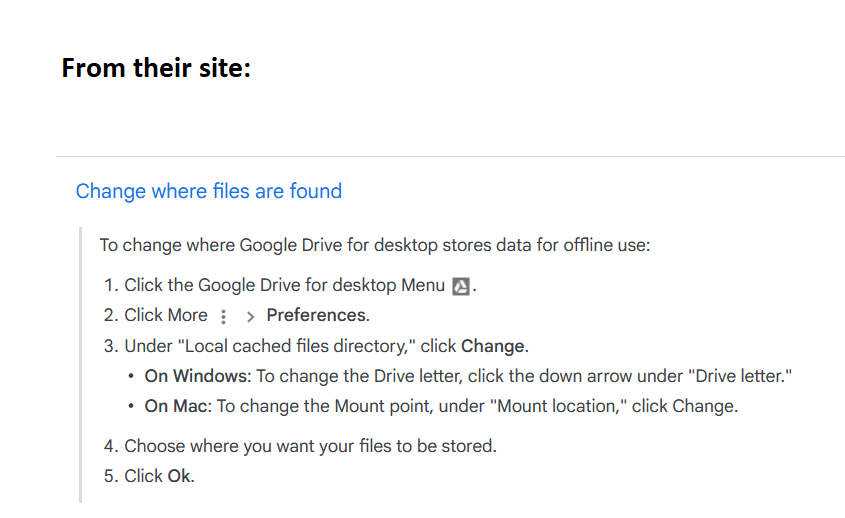
I am not able to get Google drive into my c drive with their new version. It usually is in G drive but depending on the day it switches to H, I, F or Z... these are new drives created in my RDP and it keeps changing time to time.  Is there a VBA code  to look for the drive everyday and then open the file. Extremely frustrated with the ever changing Google drive.
Scott Axton  @Reply  
        
5 years ago
Take a look at this article at Google Support.
Configure Google Drive for desktop

If that doesn't help ask me more.
Scott Axton  @Reply  
        
5 years ago

Richard Rost  @Reply  
          
5 years ago
Yeah, Google just "force pushed" an update to one of my PCs too... switched Chrome Remote Backup and Sync with Google Drive for Desktop. I'm still playing with it myself, but yeah... I hate when they do things like this too. The new drive seems to want to make itself G: which is fine with me, but I got used to it being under C:\Users\Richard\Google Drive\

This thread is now CLOSED. If you wish to comment, start a NEW discussion in Access Forum.
 

Next Unseen

 
New Feature: Comment Live View


The following is a paid advertisement
Computer Learning Zone is not responsible for any content shown or offers made by these ads.
 

Learn
 
Access - index
Excel - index
Word - index
Windows - index
PowerPoint - index
Photoshop - index
Visual Basic - index
ASP - index
Seminars
More...
Customers
 
Login
My Account
My Courses
Lost Password
Memberships
Student Databases
Change Email
Info
 
Latest News
New Releases
User Forums
Topic Glossary
Tips & Tricks
Search The Site
Code Vault
Collapse Menus
Help
 
Customer Support
Web Site Tour
FAQs
TechHelp
Consulting Services
About
 
Background
Testimonials
Jobs
Affiliate Program
Richard Rost
Free Lessons
Mailing List
PCResale.NET
Order
 
Video Tutorials
Handbooks
Memberships
Learning Connection
Idiot's Guide to Excel
Volume Discounts
Payment Info
Shipping
Terms of Sale
Contact
 
Contact Info
Support Policy
Mailing Address
Phone Number
Fax Number
Course Survey
Email Richard
[email protected]
Blog RSS Feed    YouTube Channel

LinkedIn
Copyright 2026 by Computer Learning Zone, Amicron, and Richard Rost. All Rights Reserved. Current Time: 5/6/2026 8:49:11 AM. PLT: 1s