Free Lessons
Courses
Seminars
TechHelp
Fast Tips
Templates
Topic Index
Forum
ABCD
 
Home   Courses   TechHelp   Forums   Help   Contact   Merch   Join   Order   Logon  
 
Back to Access Forum    Comments List
Upload Images   @Reply   Bookmark    Link   Email   Next Unseen 
Query Filter
Mark Pierce 
     
5 years ago
I am using a Dmax counter on a form to track new records (I am using it like a Revision tracker). I have a Query to create a list view and I only want to a part numbers and their highest revision number.
I am having trouble figuring out how to setup the filters on the query.
Any help would be greatly appreciated.

thanks,

Mark
Adam Schwanz  @Reply  
           
5 years ago
Are you storing the "counter" in your table anywhere?

Is the counter unique to each part or is it an overall of all the parts?

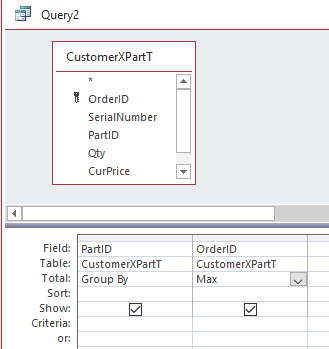
This works fine for me but it may not work with your counter setup depending how it's setup.

This would get me the max OrderID of a specific part in my database. It should be able to get you the max RevisionID too.

Adam Schwanz  @Reply  
           
5 years ago

Adam Schwanz  @Reply  
           
5 years ago
That's a total query / Aggregate Query
Mark Pierce OP  @Reply  
     
5 years ago
Yes I am storing the counter in the parts table. I tried the same setup as the picture above but used the Max Total on the MyCount field and that did not work.
Adam Schwanz  @Reply  
           
5 years ago
Can you upload some pictures to see what you have going on? It's near the top right of your first post. Image Uploads

If you can show your two fields in the table and the data types? The query you tried to make, and anything else you think may be relevant? This should be pretty straight-forward if the value you're looking for is being stored in the table. It's just impossible to visualize your database without more info.
Mark Pierce OP  @Reply  
     
5 years ago

Mark Pierce OP  @Reply  
     
5 years ago

Mark Pierce OP  @Reply  
     
5 years ago
Sorry, I did the upload twice.
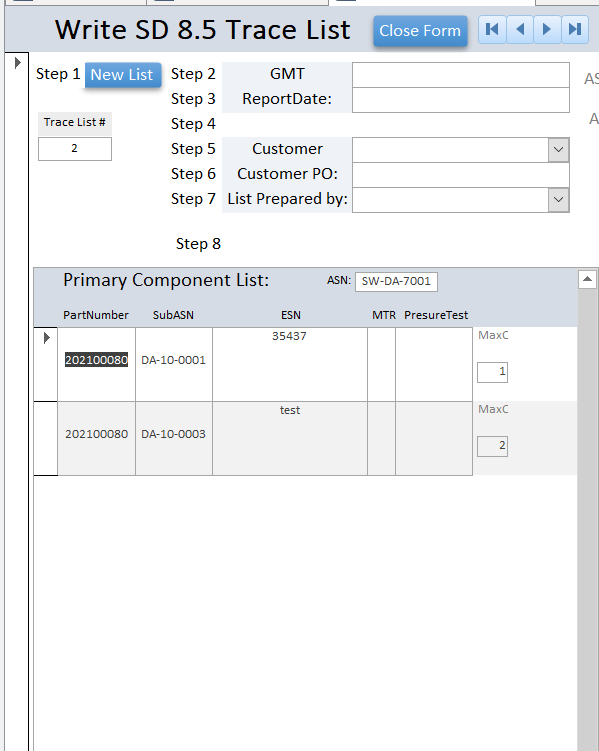
the first picture is the query, the second is the list output.
when the ASN: Is entered it pulls the parts used in that build, each time the assembly is rebuilt a new SubASN is created and the Rev. counter has +1 added to it.

in the trace List view the MaxC 1 is the oldest and MaxC 2 should be the newest rev. but both still show up in the list.

I want only the newest Rev. to be listed i.e. MaxC 2.

Adam Schwanz  @Reply  
           
5 years ago
I think the query has too much grouping going on, if you take out everything other than the part number and the count just like mine was setup, do you get the results you want? We can work if we can get more fields in after.
Mark Pierce OP  @Reply  
     
5 years ago
Great idea Adam!
Yes with part number and MYCount (Max) only in the query it works.
Mark Pierce OP  @Reply  
     
5 years ago
As soon as I add any more fields it stops working
Adam Schwanz  @Reply  
           
5 years ago
Yea the grouping levels are a serious pain to deal with sometimes. You could have it working great and then when you want to add other fields that have unique values, such as a date field, suddenly it sees there's multiple dates, so it has to group by the part number, and then group by the different dates as well, resulting in multiple records.

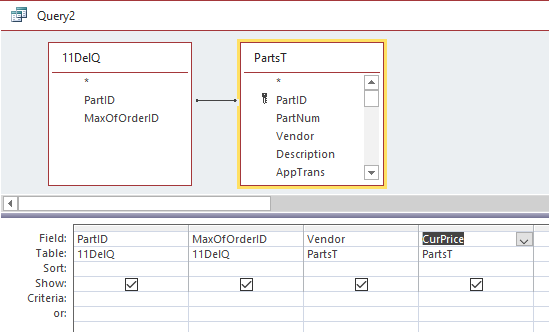
You can try saving the query with just those 2 fields and then try bringing that query into a new query with the fields. It may not work with all the fields in keeping only 1 record but worth a shot messing with. This gets me the PartID, HighestOrder Number, the Vendor and Current price for instance. You should be able to copy something like this with your fields.

Adam Schwanz  @Reply  
           
5 years ago

Mark Pierce OP  @Reply  
     
5 years ago
Thanks for the help Adam! I am going to check with the end user to see what the min fields are for this view and go from there.

This thread is now CLOSED. If you wish to comment, start a NEW discussion in Access Forum.
 

Next Unseen

 
New Feature: Comment Live View


The following is a paid advertisement
Computer Learning Zone is not responsible for any content shown or offers made by these ads.
 

Learn
 
Access - index
Excel - index
Word - index
Windows - index
PowerPoint - index
Photoshop - index
Visual Basic - index
ASP - index
Seminars
More...
Customers
 
Login
My Account
My Courses
Lost Password
Memberships
Student Databases
Change Email
Info
 
Latest News
New Releases
User Forums
Topic Glossary
Tips & Tricks
Search The Site
Code Vault
Collapse Menus
Help
 
Customer Support
Web Site Tour
FAQs
TechHelp
Consulting Services
About
 
Background
Testimonials
Jobs
Affiliate Program
Richard Rost
Free Lessons
Mailing List
PCResale.NET
Order
 
Video Tutorials
Handbooks
Memberships
Learning Connection
Idiot's Guide to Excel
Volume Discounts
Payment Info
Shipping
Terms of Sale
Contact
 
Contact Info
Support Policy
Mailing Address
Phone Number
Fax Number
Course Survey
Email Richard
[email protected]
Blog RSS Feed    YouTube Channel

LinkedIn
Copyright 2026 by Computer Learning Zone, Amicron, and Richard Rost. All Rights Reserved. Current Time: 5/6/2026 4:32:29 AM. PLT: 0s