Free Lessons
Courses
Seminars
TechHelp
Fast Tips
Templates
Topic Index
Forum
ABCD
 
Home   Courses   TechHelp   Forums   Help   Contact   Merch   Join   Order   Logon  
 
Back to Access Forum    Comments List
Upload Images   @Reply   Bookmark    Link   Email   Next Unseen 
What Would Richard Do
David Clement 
      
5 years ago

Hello Richard,
I am now a stand-by student of yours. I have found your videos to be very helpful in learning how to use Microsoft Access.

I have built 3 different Returned Goods Databases. The first one is the infamous 10 fields each for part number, quantity and description, which works just fine, especailly after you showed me how to search multiple fields. The other two are continuous forms with the same data fields as the first one. They too work just fine. The problem is, they just don't look and feel right. They are based on your Inventory Database Template. As I said, they work fine, but I am still wondering how YOU would do a similar
Return Goods Database.
No need for any kind of cost(s) for anything listed.

Just:
Customer Name, Date, Invoice Number, Part Number, Description, Quantity, Return Type(Core, Part or Warranty) and be searchable,especailly the part number.
The line items(s) may be 1 or 10 or more for each record. On my continuous forms, all records are listed, but I can see an individual customer record too.

Thank you so much for all your help.
David


Richard Rost  @Reply  
          
5 years ago
Hi David. Can you post some screen shots of what you have right now (that doesn't look right), tell me WHAT doesn't look right about them, and perhaps some mock-ups of what you THINK it should look like?
David Clement OP  @Reply  
      
5 years ago
Other than email, how do I post screen shots here, or can I?
Richard Rost  @Reply  
          
5 years ago
Use the "Upload Images" link up at the top of the thread - to the right of the subject.
David Clement OP  @Reply  
      
5 years ago

David Clement OP  @Reply  
      
5 years ago

David Clement OP  @Reply  
      
5 years ago
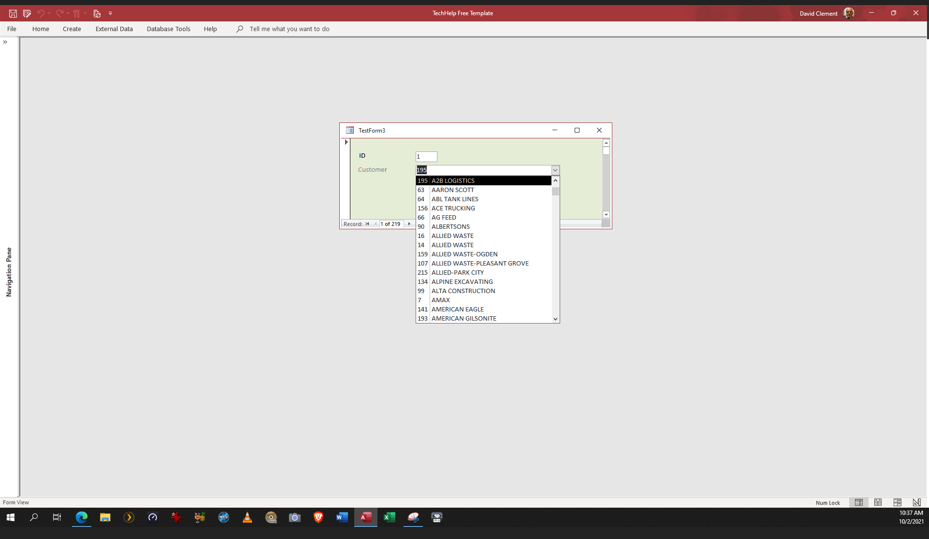
come to find out, my customer form is only showing the customer id and not the customer name
David Clement OP  @Reply  
      
5 years ago
My main interest in this database, is how you would do one. I feel like mine is maybe overkill?
Scott Axton  @Reply  
        
5 years ago
David -
Sticking my nose in here.  "overkill" is all relative.  Does it do what you need it to do?

I look back at my first data bases - heck even Richard's databases - and laugh at them sometimes.
You will find as you learn more and more you will change how you do things and the lay out of things.

One thing I'm finding as I get older is I really try and simplify my forms.  I used to put every single field I could on one form and they were gloriously complex and cluttered.  Now, as I age and screen resolutions have gotten better,  my eye sight doesn't see that little tiny type every well.
I've started to break up my forms to "enough data" - Stuff that I always use.  Then open up a 'details form' that has all the little details of that particular thing. if I need more.

As far as the CustomerCombo  - You probably just need to change the id in the properties to 0 (zero length)
Rewatch the Relational Combo  video.
Scott Axton  @Reply  
        
5 years ago
Eye appeal for you forms is subjective also.  Please know that this is my opinion.

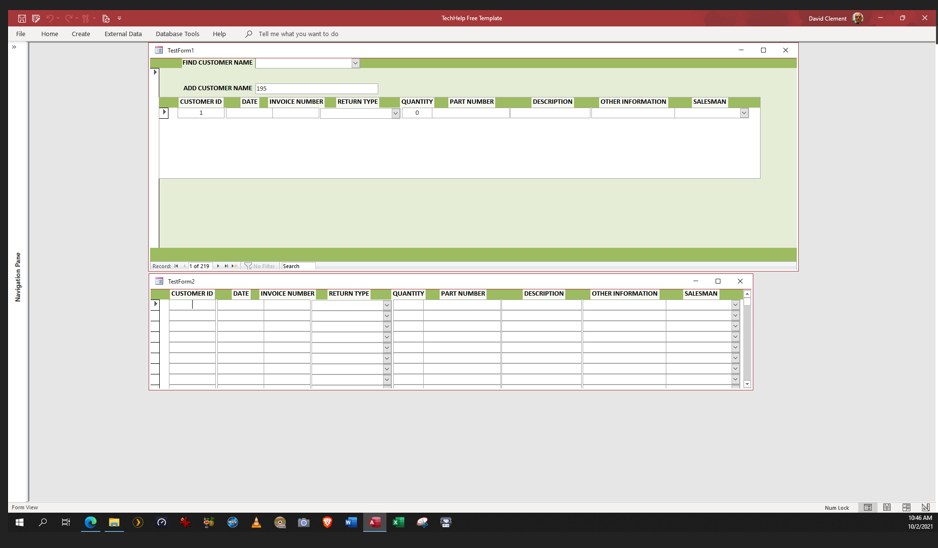
I like things lined up not "jagged".  If you look at your titles they are a bit jumbled. I would make the title boxes match the width of the field box underneath it.  Change the backgrounds to the same color as you dark green and make the text color a contrasting color. Dark text on lighter backgrounds of lighter text colors on dark backgrounds.
If you center one title center them all.  Or right align currency and number, left align everything else.  etc.  If you like a look - go for it!  Just be consistent in what you do from form to form.

'White space' can help group items on your forms as well as frames and rectangles of offsetting colors to call out different information on a form.
Richard Rost  @Reply  
          
5 years ago
I think it looks fine so far. Good start.

This thread is now CLOSED. If you wish to comment, start a NEW discussion in Access Forum.
 

Next Unseen

 
New Feature: Comment Live View


The following is a paid advertisement
Computer Learning Zone is not responsible for any content shown or offers made by these ads.
 

Learn
 
Access - index
Excel - index
Word - index
Windows - index
PowerPoint - index
Photoshop - index
Visual Basic - index
ASP - index
Seminars
More...
Customers
 
Login
My Account
My Courses
Lost Password
Memberships
Student Databases
Change Email
Info
 
Latest News
New Releases
User Forums
Topic Glossary
Tips & Tricks
Search The Site
Code Vault
Collapse Menus
Help
 
Customer Support
Web Site Tour
FAQs
TechHelp
Consulting Services
About
 
Background
Testimonials
Jobs
Affiliate Program
Richard Rost
Free Lessons
Mailing List
PCResale.NET
Order
 
Video Tutorials
Handbooks
Memberships
Learning Connection
Idiot's Guide to Excel
Volume Discounts
Payment Info
Shipping
Terms of Sale
Contact
 
Contact Info
Support Policy
Mailing Address
Phone Number
Fax Number
Course Survey
Email Richard
[email protected]
Blog RSS Feed    YouTube Channel

LinkedIn
Copyright 2026 by Computer Learning Zone, Amicron, and Richard Rost. All Rights Reserved. Current Time: 5/6/2026 5:19:00 AM. PLT: 0s