Free Lessons
Courses
Seminars
TechHelp
Fast Tips
Templates
Topic Index
Forum
ABCD
 
Home   Courses   TechHelp   Help   Contact   Merch   Join   Order   Logon   Forums   
 
Back to Access Forum    Comments List
Upload Images   @Reply   Bookmark    Link   Email   Next Unseen 
Drive Time Calculator
Jon Capps 
       
5 years ago
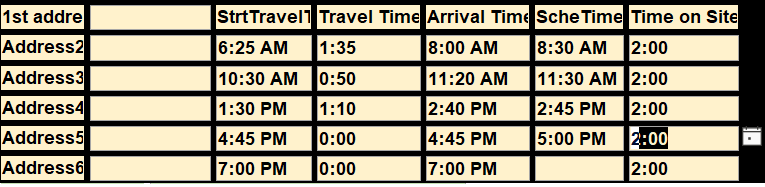
I may of missed it, and my google searching is not bearing fruit I need. Is there a way to calculate driving time from one address to another inside MS access? I found something for Excel and modified it to my needs, however I would like this to be done Access. The next step would be to have a form that would a start time such as 9:00 AM, a field for (time on site), plus drive time to the next destination and the answer would be the Arrival time to the next destination. I did make something that works in Excel, and I just paste and copy my database address into Excel and calculate each appointment if there is 6 appointments a day, however I am sure someone else has done this in access an can use the database address to make this happen?
Adam Schwanz  @Reply  
           
5 years ago
I know there's some maps stuff around here but I don't know if importing the time values has ever been done. You could look here Map a Location in Access. You might get some useful information out of THIS post too. But I don't think either one of those is getting the data into access if that is the end goal.
Jon Capps OP  @Reply  
       
5 years ago
Thank you for the link, I just finished watching it. I am opening google with different code, but the results are the same. Still something I need to learn to do with about 6 appointments a day.
Richard Rost  @Reply  
          
5 years ago
Usually, if you can do it with Excel, then you can do it in Access, even if you have to tell Access to make Excel do it, like I just showed with the Link to Excel extended cut. This sounds like an interesting project, however. I'll add it to the TechHelp list. :)
Shallena Ayers  @Reply  
      
13 months ago
Jon Hi Jon,  Were you ever able to figure out the drive time calculator from one appointment to the next?
Jon Capps OP  @Reply  
       
13 months ago
I did, the code worked for a while , then as usual Google updated the API and I quit trying to fix it.
Shallena Ayers  @Reply  
      
13 months ago
GAH!  So frustrating...  what did you end up doing instead?  
Jon Capps OP  @Reply  
       
13 months ago
so, I just built a spreadsheet of sorts in my scheduling, googled the address1 and then used the directions / time for address 2, same for address 3, then built my day for each field tech so that they would not be late. It's not pretty, but it's functional.
Jon Capps OP  @Reply  
       
13 months ago

Richard Rost  @Reply  
          
13 months ago
Google Maps has an API that can give you drive time and distance between two addresses. Here's a brief snippet from ChatGPT, but if you guys want, I can make a video out of this. It's pretty cool stuff:

The Google Maps Distance Matrix API is exactly what you're looking for. It lets you input two (or more) addresses and returns:

* Driving time (duration)
* Distance
* Multiple travel modes (driving, walking, bicycling, transit)
* Optional traffic-aware estimates

Here's a quick overview:

Endpoint:

Codehttps://maps.googleapis.com/maps/api/distancematrix/json


Sample GET request:

Codehttps://maps.googleapis.com/maps/api/distancematrix/json?origins=1600+Pennsylvania+Ave+NW,Washington,DC&destinations=1+Infinite+Loop,Cupertino,CA&key=YOUR_API_KEY


Parameters:

* `origins`: one or more addresses or lat/lng pairs
* `destinations`: same as above
* `key`: your Google API key
* Optional: `departure_time=now` for traffic-adjusted results

Returns JSON like this:

Code{
  "rows": [
    {
      "elements": [
        {
          "distance": { "text": "2,842 mi", "value": 4573452 },
          "duration": { "text": "41 hours", "value": 148320 },
          "status": "OK"
        }
      ]
    }
  ]
}


How to use:

1. Go to https://console.cloud.google.com/
2. Create a project and enable the Distance Matrix API
3. Set billing info (Google gives \$200/month free usage)
4. Generate an API key
5. Use a GET request via HTTP or your preferred language (VBA, Python, etc.)

Alternatives:

* OpenRouteService.org - Free with generous limits, based on OpenStreetMap
* MapQuest API - Also supports time/distance lookups
* Bing Maps API - Similar to Google's, but different pricing and key setup
Shallena Ayers  @Reply  
      
13 months ago
If you could do a video that would be awesome!  I am a visual learner...I bet it would be a very popular video!  Could even bring in more business for you when people see this really awesome and amazing video! Can't wait to see it!  It is gonna be epic!  Just like the most epic Star Trek episode The City on The Edge of Forever!!

This thread is now CLOSED. If you wish to comment, start a NEW discussion in Access Forum.
 

Next Unseen

 
New Feature: Comment Live View


The following is a paid advertisement
Computer Learning Zone is not responsible for any content shown or offers made by these ads.
 

Learn
 
Access - index
Excel - index
Word - index
Windows - index
PowerPoint - index
Photoshop - index
Visual Basic - index
ASP - index
Seminars
More...
Customers
 
Login
My Account
My Courses
Lost Password
Memberships
Student Databases
Change Email
Info
 
Latest News
New Releases
User Forums
Topic Glossary
Tips & Tricks
Search The Site
Code Vault
Collapse Menus
Help
 
Customer Support
Web Site Tour
FAQs
TechHelp
Consulting Services
About
 
Background
Testimonials
Jobs
Affiliate Program
Richard Rost
Free Lessons
Mailing List
PCResale.NET
Order
 
Video Tutorials
Handbooks
Memberships
Learning Connection
Idiot's Guide to Excel
Volume Discounts
Payment Info
Shipping
Terms of Sale
Contact
 
Contact Info
Support Policy
Mailing Address
Phone Number
Fax Number
Course Survey
Email Richard
[email protected]
Blog RSS Feed    YouTube Channel

LinkedIn
Copyright 2026 by Computer Learning Zone, Amicron, and Richard Rost. All Rights Reserved. Current Time: 8/17/2026 7:18:06 PM. PLT: 1s