Free Lessons
Courses
Seminars
TechHelp
Fast Tips
Templates
Topic Index
Forum
ABCD
 
Home   Courses   TechHelp   Forums   Help   Contact   Merch   Join   Order   Logon  
 
Back to Access Forum    Comments List
Upload Images   @Reply   Bookmark    Link   Email   Next Unseen 
MainSubFormF
Jean-Pierre Christen 
     
5 years ago
Dear Richard, trust you are well!

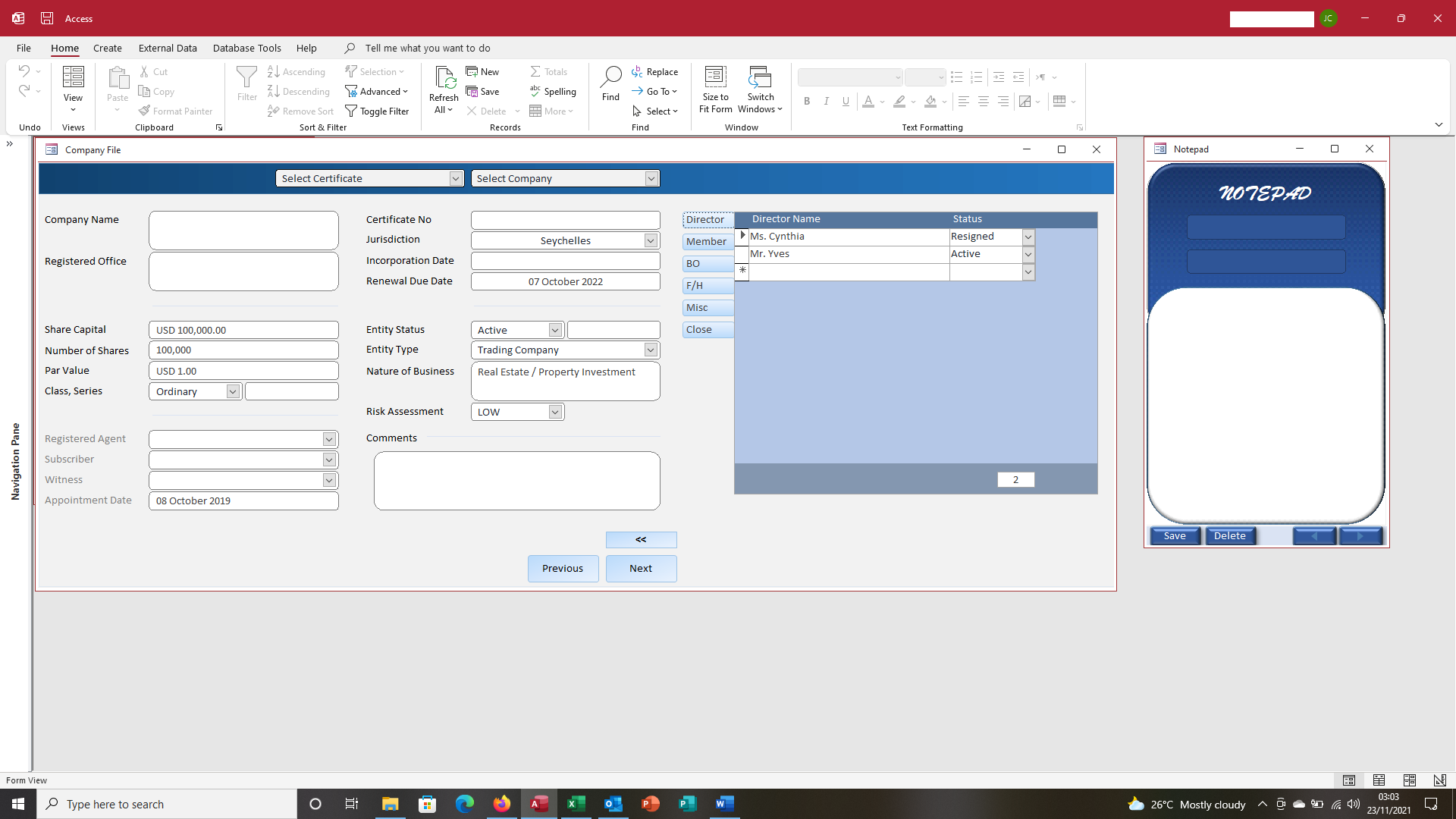
Im building a database for companies and their directors, members etc. Im using your example to have a MainSubForm and command buttons to open (make visible) other subforms.

On the company form, works great. I can see how many directors a company has.

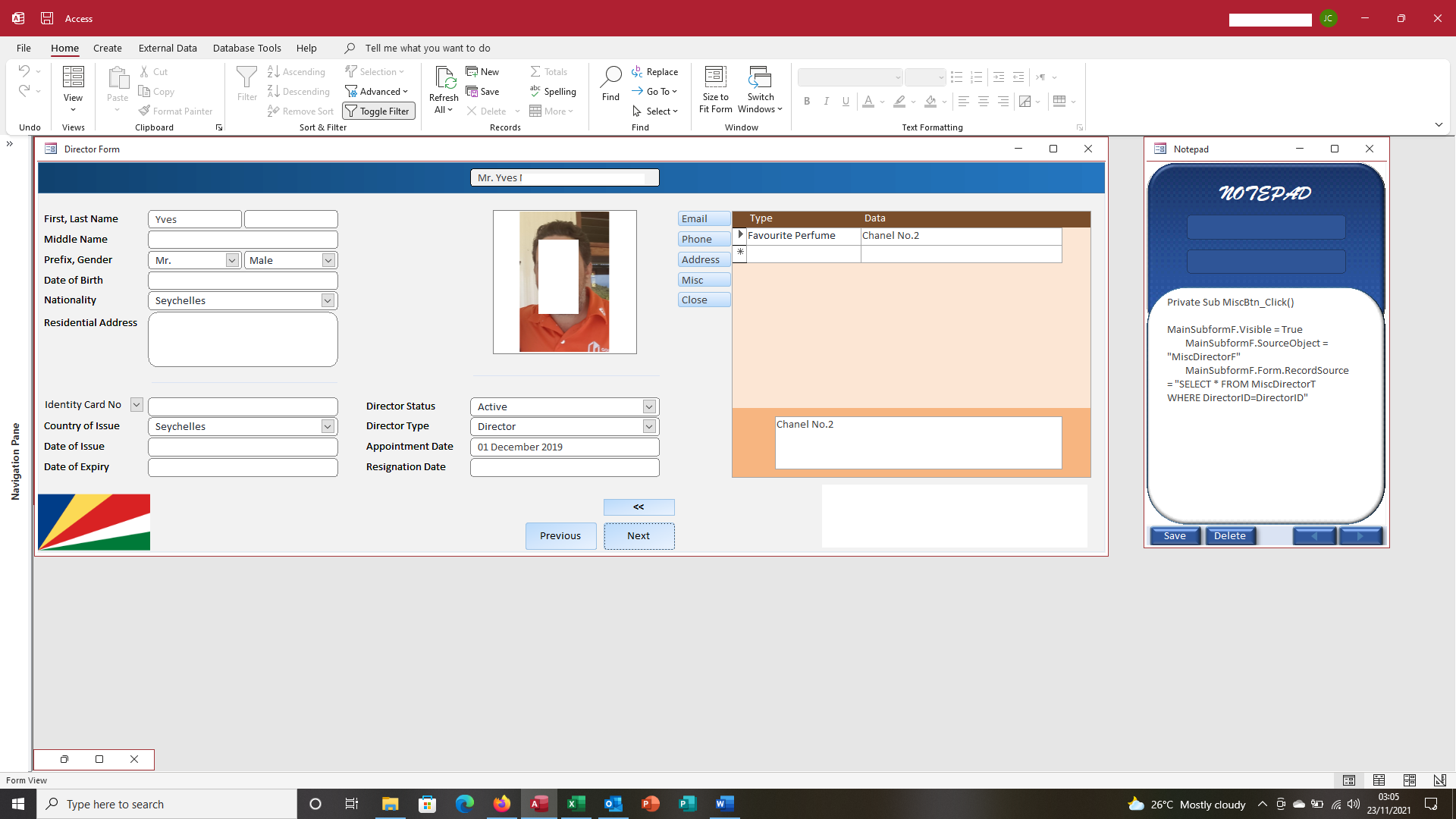
On the director form, Im getting a problem when it involves multiple records.

For example, the companys mainsubform shows theres 2 directors. When I open the director forms, I can navigate between them using the Next/previous button.

But the MainSubForm keeps showing the same information on both director forms (the perfume preference of director 1 should not be showing on the Misc subform of director 2).

Can you please help and advise where I messed up? Do I need to add another line to the VBA code?
Jean-Pierre Christen OP  @Reply  
     
5 years ago

Jean-Pierre Christen OP  @Reply  
     
5 years ago

Jean-Pierre Christen OP  @Reply  
     
5 years ago

Jean-Pierre Christen OP  @Reply  
     
5 years ago
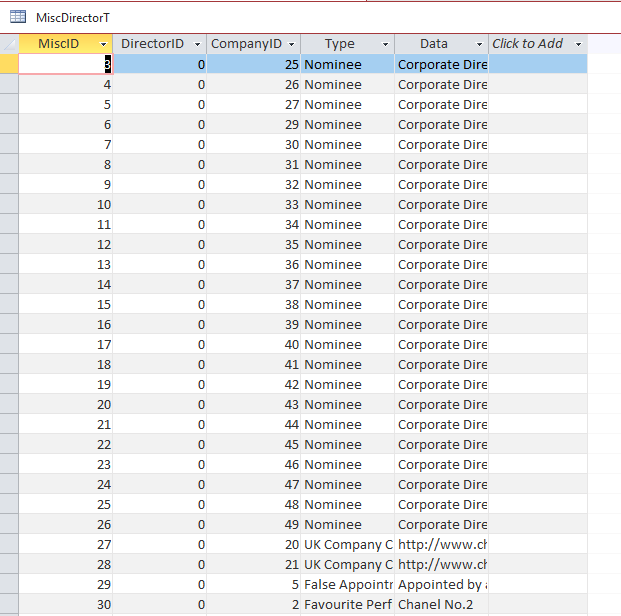
I think I pinpointed the problem by looking at the table. The DirectorID is 0 everywhere.

The Director Form has both CompanyID and DirectorID fields but set to Visible No.

The individual subforms also have CompanyID and Director ID fields (otherwise I get an Automation Object error because there is no CompanyID)

But this is Klingon to me...
Jean-Pierre Christen OP  @Reply  
     
5 years ago

Jean-Pierre Christen OP  @Reply  
     
5 years ago
Rewatched the techhelp video. The only foreign key needed was the customer ID.

In my case I should only need the DirectorID. I deleted the records from MiscDirectorT and removed CompanyID in designview. Also on subforms I deleted the DirectorID and CompanyID as Richard did not insert them in video.

With blank MiscDirectorT, I tried to add a new record in the form, and got this error (attached)
Jean-Pierre Christen OP  @Reply  
     
5 years ago

Jean-Pierre Christen OP  @Reply  
     
5 years ago
OK. Fixed It. The Link Master/Child Fields were set to CompanyID (no idea how that happened). Changed them to DirectorID and now everything is working.
Richard Rost  @Reply  
          
5 years ago
Doesn't it feel good to figure it out on your own? :)
Jean-Pierre Christen OP  @Reply  
     
5 years ago
Yes! :)
Michelle Maughan  @Reply  
      
5 years ago
Hi Jean-Pierre
I love your notepad to the side with the code for the MiscBtn.
Is this something you created in access to show the code for each button that has the focus?
Might be a great Tech Help video?
Jean-Pierre Christen OP  @Reply  
     
5 years ago
Hi Michelle!

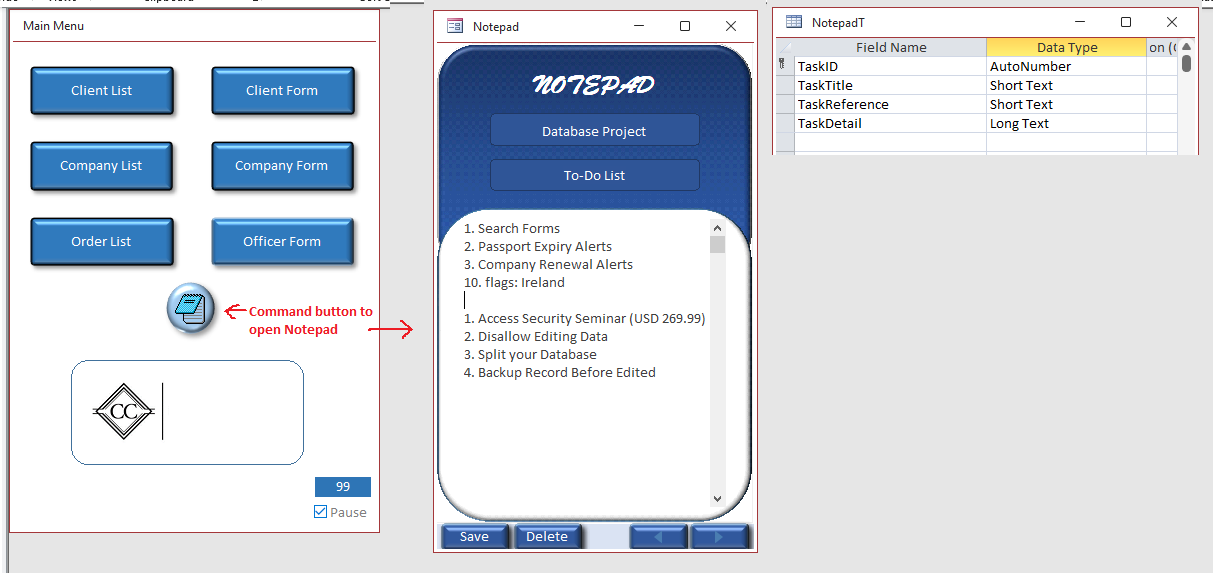
You know how a lot of people use the yellow post-it notes, write something on it, and then stick it on the edge of their PC monitors? Could be notes about anything, a to-do list, phone numbers, grocery shopping, appointment in the afternoon etc etc. It ends up being very messy, and my staff start panicking when one of their notes falls off the monitor or goes missing.

So I decided to create an electronic notepad stored on the database. I used Excel to make it look nice, copy-pasted into an Access single form and added 3 fields. My staff can use this instead of post-it notes and use it however they want to help them do their work. There's a button on the main menu that opens it.

I use it to list my different projects, and to records VBA codes in case I need to use them again, and when I'm done with something I just delete the record on the form. An added bonus is that on property setting popup is yes, so stays on my screen even if I minimise Access.

Jean-Pierre Christen OP  @Reply  
     
5 years ago
Your idea of a TechHelp video sounds very cool! But I have only started learning about Access since a month, so a bit too early for me :)
Jean-Pierre Christen OP  @Reply  
     
5 years ago

Michelle Maughan  @Reply  
      
5 years ago
I love it, well done!
Richard Rost  @Reply  
          
5 years ago
Very cool.

This thread is now CLOSED. If you wish to comment, start a NEW discussion in Access Forum.
 

Next Unseen

 
New Feature: Comment Live View


The following is a paid advertisement
Computer Learning Zone is not responsible for any content shown or offers made by these ads.
 

Learn
 
Access - index
Excel - index
Word - index
Windows - index
PowerPoint - index
Photoshop - index
Visual Basic - index
ASP - index
Seminars
More...
Customers
 
Login
My Account
My Courses
Lost Password
Memberships
Student Databases
Change Email
Info
 
Latest News
New Releases
User Forums
Topic Glossary
Tips & Tricks
Search The Site
Code Vault
Collapse Menus
Help
 
Customer Support
Web Site Tour
FAQs
TechHelp
Consulting Services
About
 
Background
Testimonials
Jobs
Affiliate Program
Richard Rost
Free Lessons
Mailing List
PCResale.NET
Order
 
Video Tutorials
Handbooks
Memberships
Learning Connection
Idiot's Guide to Excel
Volume Discounts
Payment Info
Shipping
Terms of Sale
Contact
 
Contact Info
Support Policy
Mailing Address
Phone Number
Fax Number
Course Survey
Email Richard
[email protected]
Blog RSS Feed    YouTube Channel

LinkedIn
Copyright 2026 by Computer Learning Zone, Amicron, and Richard Rost. All Rights Reserved. Current Time: 4/30/2026 7:05:29 AM. PLT: 0s