Free Lessons
Courses
Seminars
TechHelp
Fast Tips
Templates
Topic Index
Forum
ABCD
 
Home   Courses   TechHelp   Forums   Help   Contact   Merch   Join   Order   Logon  
 
Back to Access Forum    Comments List
Upload Images   @Reply   Bookmark    Link   Email   Next Unseen 
Updatable Checklist keep data
Joshua Price 
   
5 years ago
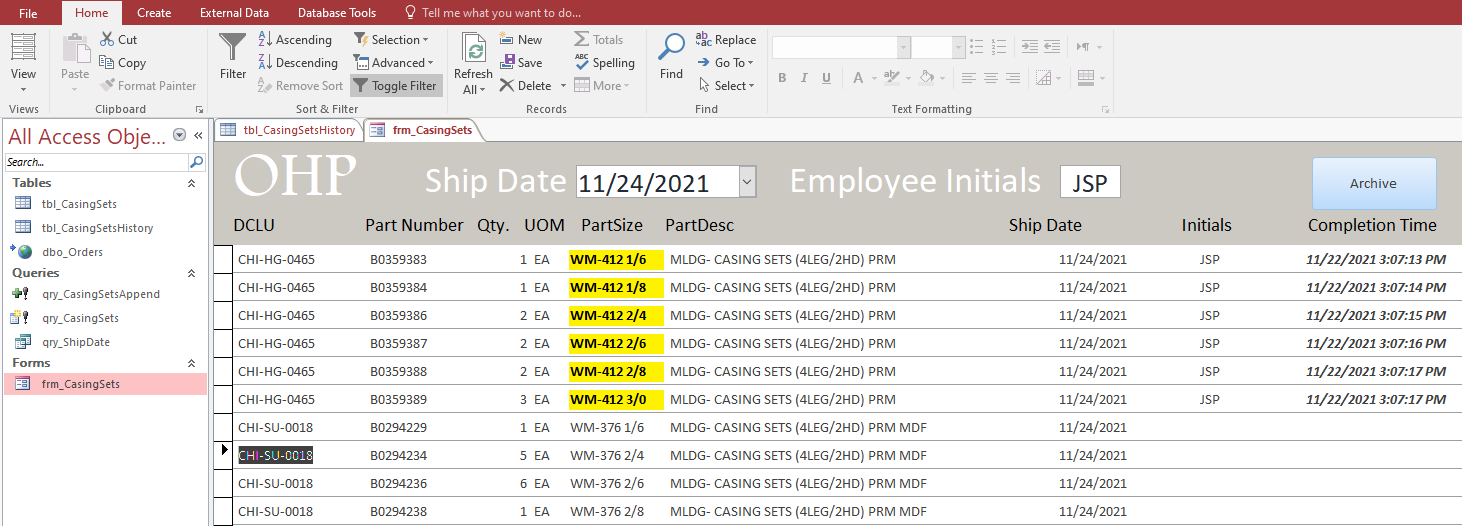
I have a database that I have created for our production facility. It pulls the data via a SQL server into a linked table. I have a form created that will allow me to click on the cell and timestamp a 'completion' date so that it will mark a part item complete for a certain job and production cell. I then have it set up to archive it to a table which all works good. (all information pulled off of your videos)
The problem is that when I requery the table from the server to update the information the completed date that has been stored is now gone and is back to the default value. How do I keep that stored so that production knows not to rebuild the item.
Richard Rost  @Reply  
          
5 years ago
Are you SURE it's a linked table and not an imported table?
Joshua Price OP  @Reply  
   
5 years ago
It was created via external data - from odbc database and I selected the link to the data source by creating a table option. From there I have a make table query created that filters the needed information to a table. The form pulls the information from the table created from the make table query.
Joshua Price OP  @Reply  
   
5 years ago

Scott Axton  @Reply  
        
5 years ago

If you are using a make table query to pull a subset of data into, you are just taking a 'snapshot' of the data from your main tables.  
If you then make changes to the copy, that information isn't being saved in the server table if you are not updating that data back to the server somehow.
When you are done making changes you would have to perform an update to the server tables so that when you rerun the query in the future the correct information is pulled out.
Joshua Price OP  @Reply  
   
5 years ago
Unfortunately, I don't have access to modify that data as it is controlled by corporate and used by several plant locations. If I were treating it as an excel file I would essentially be asking that if the DCLU, PartNumber, and Quantity match the information on the Archive table, that it would pull the [completion time] field. Basically a vlookup formula. And if it is not found then the value would be blank and/or a default value.
Scott Axton  @Reply  
        
5 years ago
So how is that information updated with corporate now?
I don't know your / their business model but it seems to me that they would have the same desire to not over produce.  How are the records updated now?
Joshua Price OP  @Reply  
   
5 years ago
I'm not 100% sure but I believe that it is a DOS-based system. And our tech department uses but does not support MSoffice.
Scott Axton  @Reply  
        
5 years ago
You would need to get with your tech department and figure out how to update the fields.  Once you have  a method in place we could probably help you come up with a solution.
Unfortunately there isn't a real good path going forward if you can't update the records that are there.
Sorry.
Richard Rost  @Reply  
          
5 years ago
Yeah, you're just modifying the data locally. Once you re-import the data from your server, it's overwriting what you've done. You need to either figure out a way to connect to the server OR store your changes in a different table so you can compare them. Not much else I can tell you here.

This thread is now CLOSED. If you wish to comment, start a NEW discussion in Access Forum.
 

Next Unseen

 
New Feature: Comment Live View


The following is a paid advertisement
Computer Learning Zone is not responsible for any content shown or offers made by these ads.
 

Learn
 
Access - index
Excel - index
Word - index
Windows - index
PowerPoint - index
Photoshop - index
Visual Basic - index
ASP - index
Seminars
More...
Customers
 
Login
My Account
My Courses
Lost Password
Memberships
Student Databases
Change Email
Info
 
Latest News
New Releases
User Forums
Topic Glossary
Tips & Tricks
Search The Site
Code Vault
Collapse Menus
Help
 
Customer Support
Web Site Tour
FAQs
TechHelp
Consulting Services
About
 
Background
Testimonials
Jobs
Affiliate Program
Richard Rost
Free Lessons
Mailing List
PCResale.NET
Order
 
Video Tutorials
Handbooks
Memberships
Learning Connection
Idiot's Guide to Excel
Volume Discounts
Payment Info
Shipping
Terms of Sale
Contact
 
Contact Info
Support Policy
Mailing Address
Phone Number
Fax Number
Course Survey
Email Richard
[email protected]
Blog RSS Feed    YouTube Channel

LinkedIn
Copyright 2026 by Computer Learning Zone, Amicron, and Richard Rost. All Rights Reserved. Current Time: 5/2/2026 6:28:47 AM. PLT: 0s