Free Lessons
Courses
Seminars
TechHelp
Fast Tips
Templates
Topic Index
Forum
ABCD
 
Home   Courses   TechHelp   Forums   Help   Contact   Merch   Join   Order   Logon  
 
Back to Access Forum    Comments List
Upload Images   @Reply   Bookmark    Link   Email   Next Unseen 
Append Query
Taruna Matharu 

5 years ago
Hello Richard,
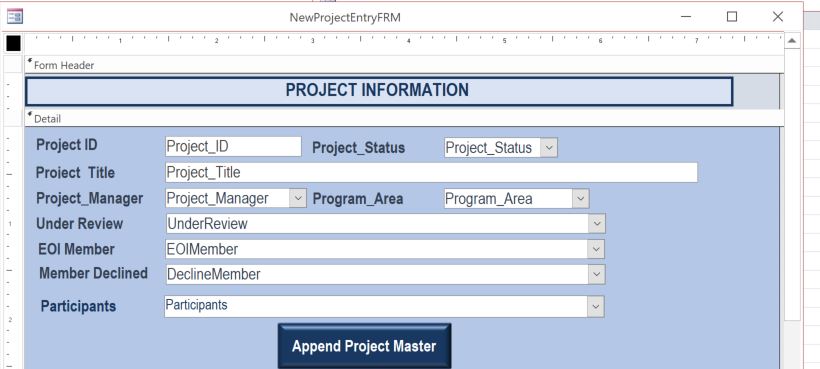
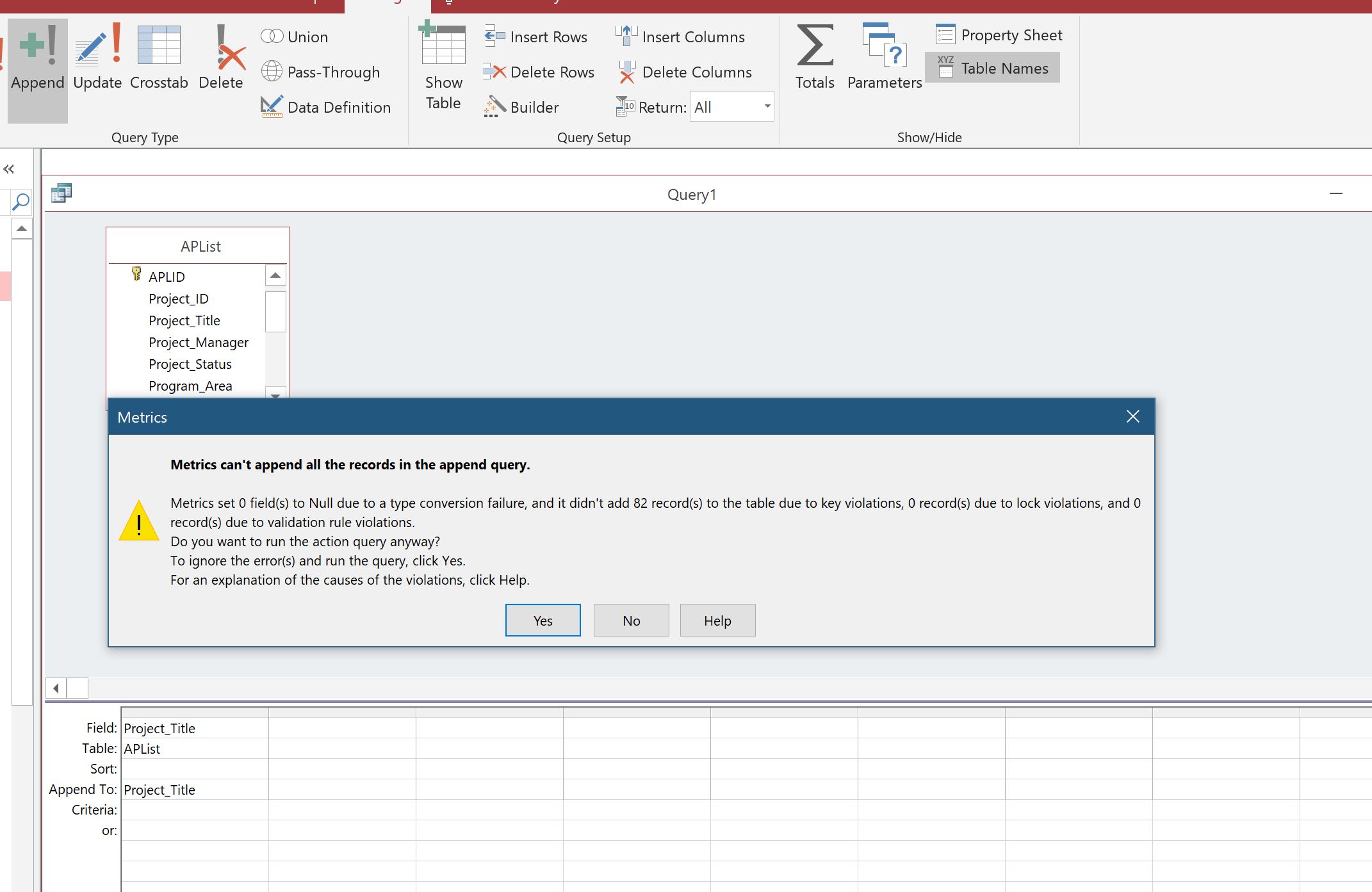
I have a form New Project Entry (APL TBL). I have 2 tables some of the fields are similar, instead of typing again I need these field to be appended in the master table.  I need the new records only to be appended in (JPPJPPA TBL) I have watched the APPEND Query Video. Is there any video that mentions on the errors that occur due to any factors?  I am posting images but just letting you know that the issue I am facing is that record does not append in the destination table however, in design query when I view via datasheet I do see the desired record.  
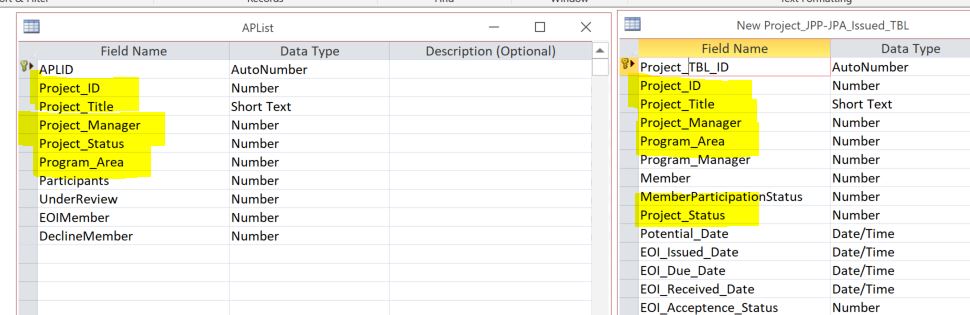
    APLTBL Field        Data Type              JPPJPPA Filed
Project ID      Number                Project ID                  
Project Title   Short Text            Project Title              
Project Manager Number                Project Manager      
Program Area    Number                Program Area          
Project Status  Number                Project Status      

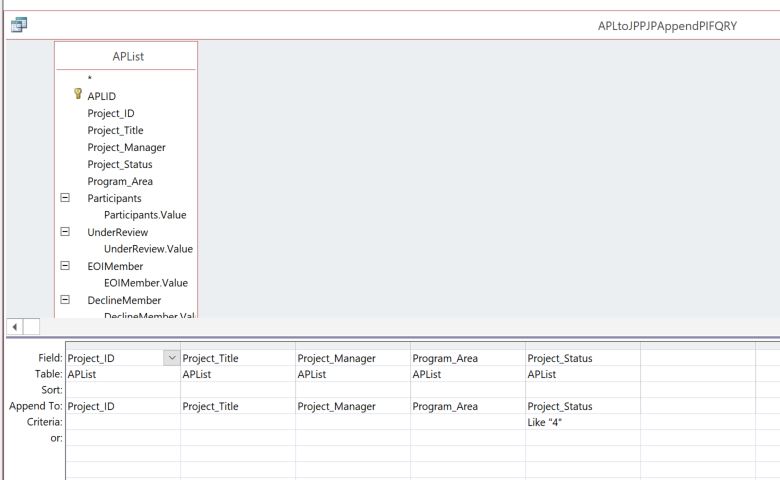
In Query, under Criteria I have used the #4 as the status Field identifies that # 4 as PIF status. Projects that have status PIF will be appended to JPPJPPA Table.

Appreciate your help !

Thanks
Taruna
Taruna Matharu OP  @Reply  

5 years ago

Taruna Matharu OP  @Reply  

5 years ago

Taruna Matharu OP  @Reply  

5 years ago

Taruna Matharu OP  @Reply  

5 years ago

Taruna Matharu OP  @Reply  

5 years ago

Adam Schwanz  @Reply  
           
5 years ago
ProjectStatus Like 4, why not just do = 4? Someday when you get to 14 status options that's going to cause an issue.

I see that you have ProjectStatus as a number, and then in your example it shows as a string. This makes me think you are using lookup values in your table. Evil Access Stuff. I'm guessing that is also the cause of your problem, one of the bound columns is a string that is expecting a number or vice versa.
Taruna Matharu OP  @Reply  

5 years ago

Taruna Matharu OP  @Reply  

5 years ago
Hi Adam,
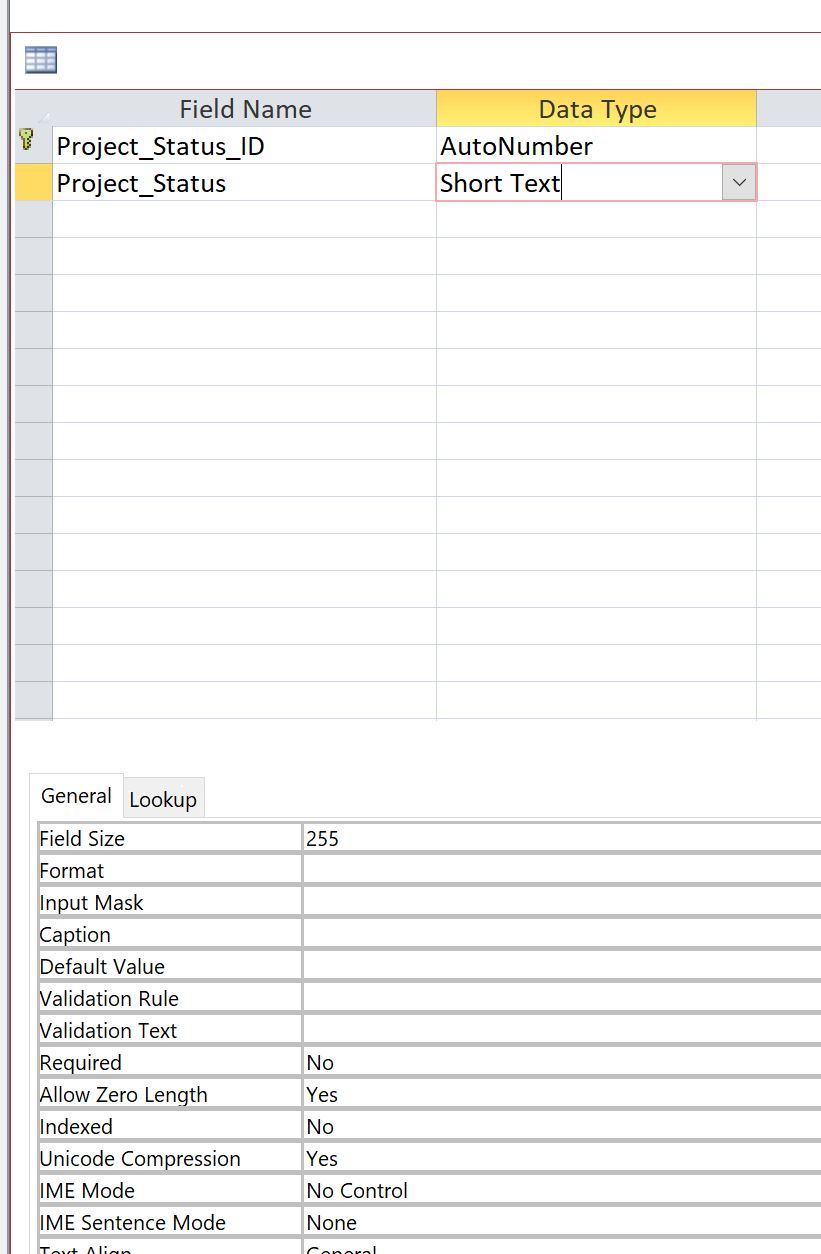
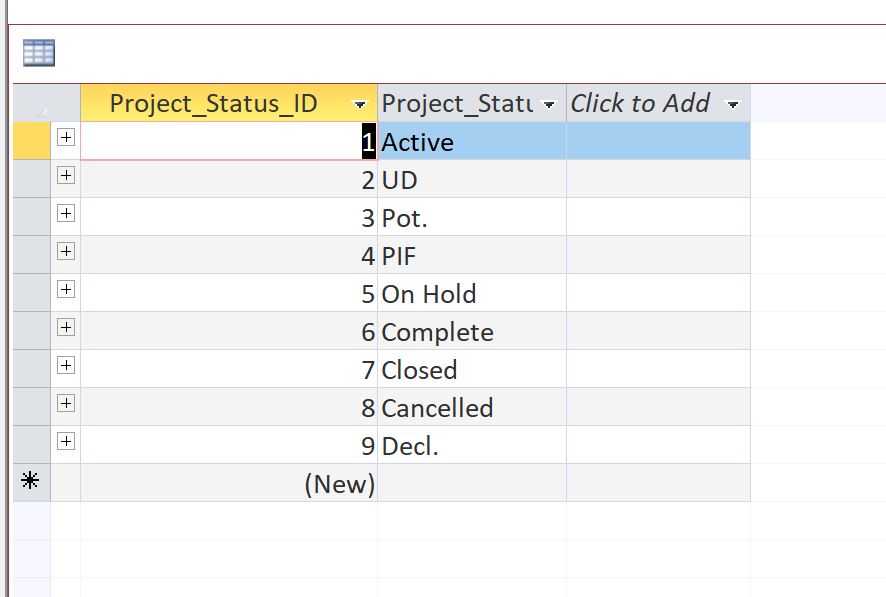
I referred to status id  # 4 as it was returning data type mismatch when I add the status name. I recall you and Richard mentioned  this earlier, lookup value in table is not right choice and trust me I have not used it in the new tables that I have done but these were used previously.
Adam Schwanz  @Reply  
           
5 years ago
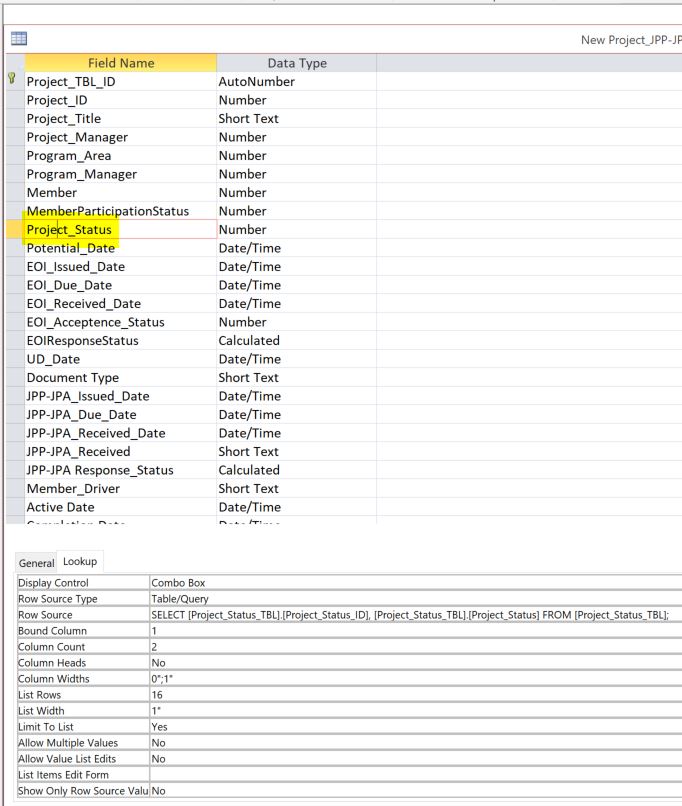
What is the lookup on the other Project_Status in the other table?
Taruna Matharu OP  @Reply  

5 years ago

Taruna Matharu OP  @Reply  

5 years ago

Taruna Matharu OP  @Reply  

5 years ago
Hi Adam,
I have added the snapshot above. I was watching the relational combo box video and it seems much easier to have taken that route. I am checking to see the impact it may take to change.
Adam Schwanz  @Reply  
           
5 years ago
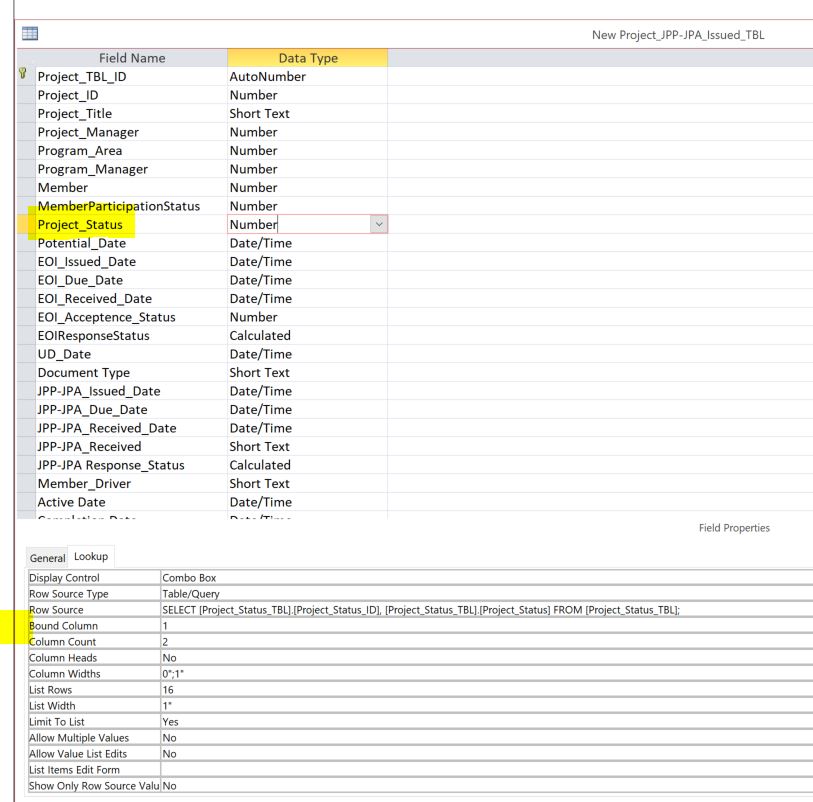
Sorry I meant the other table you're appending to. Is that setup the same way? ID and Status in that order with bound column 1?
Taruna Matharu OP  @Reply  

5 years ago

Taruna Matharu OP  @Reply  

5 years ago
Hi Adam,
Yes it is, snapshot above.
Adam Schwanz  @Reply  
           
5 years ago
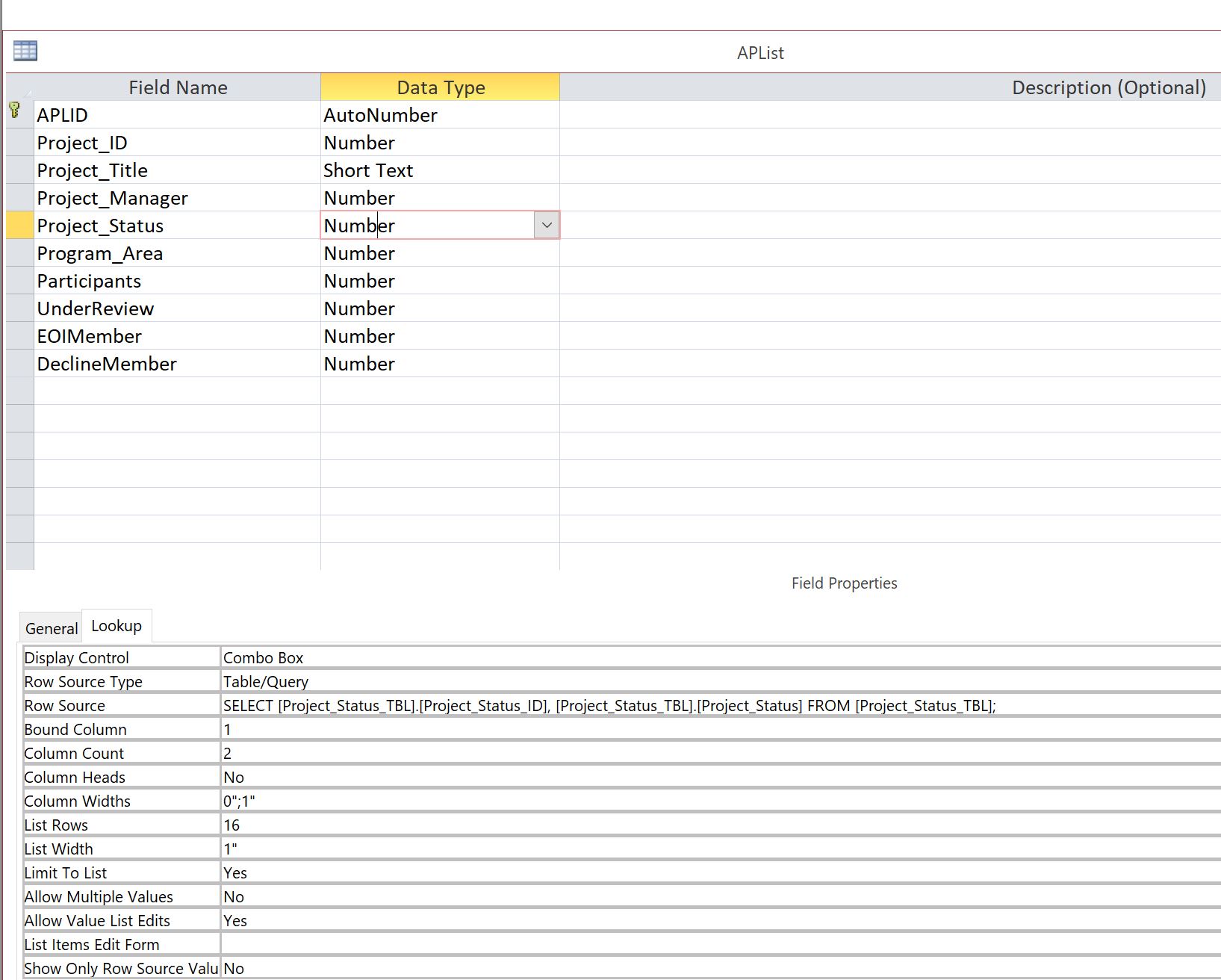
Both of the screenshots you've submitted are of the NEW Project_JPP-JPA_Issued_TBL it looks like, what is the field in APList look like?

You're trying to append the records from the APList into that New Project_JPP-JPA_Issued_TBL right?

Also just noticed the space in your New Project table, that could cause some issues too. Make sure anywhere that's referenced that you're doing brackets around the table name, or if it's not used in too much code that it would be a massive headache, look into changing it
Taruna Matharu OP  @Reply  

5 years ago

Taruna Matharu OP  @Reply  

5 years ago
Hi Adam,
I have uploaded the APLList Table. screen shot. Yes I am trying to append the records from the APList into that New Project_JPP-JPA_Issued_TBL. For the  the space in New Project table, you had mentioned this earlier and I have referenced them with brackets.

Thanks
taruna
Adam Schwanz  @Reply  
           
5 years ago
Lets try a really simple test, make another query same tables and only append one field, say the status title since that doesnt look like its a lookup field. See if that appends, then we can add more in after we try that part.
Taruna Matharu OP  @Reply  

5 years ago

Taruna Matharu OP  @Reply  

5 years ago
Hi Adam,
I just tested as suggested with Title and 0 records appended.
Kevin Robertson  @Reply  
          
5 years ago
I found this online:

"Key violations:   You may be trying to append data into one or more fields that are part of the table's primary key, such as the ID field. Check the design of the destination table to see if the primary key (or any index) has the No Duplicates property set to Yes. Then, check the data you are appending to make sure it doesn't violate
the rules of the destination table."
Taruna Matharu OP  @Reply  

5 years ago
Hi Kevin, Both tables Primary Key is No Duplicates property set to Yes.
Adam Schwanz  @Reply  
           
5 years ago
You can try checking if it's an indexed field. If not i dug around google and found this, it may be your problem as well.

"Found the solution, it was a mistake on my part: tblTarget's F1 and F2 fields were in a relationship with another table,and I accidentally tried to append values of F1 and F2 which didn't exist in that other table"

Basically, check the relationships of those two tables.
Adam Schwanz  @Reply  
           
5 years ago
Your primary key should be indexed, he was saying check if the project title field we tried to append was indexed in either table.
Taruna Matharu OP  @Reply  

5 years ago
Both tables for Project Title is index is No
Taruna Matharu OP  @Reply  

5 years ago
Hi Adam and Kevin, Thanks for the google solution that was the problem !
Appreciate your kind support !
Adam Schwanz  @Reply  
           
5 years ago
Glad it works now sometimes it just takes a while to find the problem :).

This thread is now CLOSED. If you wish to comment, start a NEW discussion in Access Forum.
 

Next Unseen

 
New Feature: Comment Live View


The following is a paid advertisement
Computer Learning Zone is not responsible for any content shown or offers made by these ads.
 

Learn
 
Access - index
Excel - index
Word - index
Windows - index
PowerPoint - index
Photoshop - index
Visual Basic - index
ASP - index
Seminars
More...
Customers
 
Login
My Account
My Courses
Lost Password
Memberships
Student Databases
Change Email
Info
 
Latest News
New Releases
User Forums
Topic Glossary
Tips & Tricks
Search The Site
Code Vault
Collapse Menus
Help
 
Customer Support
Web Site Tour
FAQs
TechHelp
Consulting Services
About
 
Background
Testimonials
Jobs
Affiliate Program
Richard Rost
Free Lessons
Mailing List
PCResale.NET
Order
 
Video Tutorials
Handbooks
Memberships
Learning Connection
Idiot's Guide to Excel
Volume Discounts
Payment Info
Shipping
Terms of Sale
Contact
 
Contact Info
Support Policy
Mailing Address
Phone Number
Fax Number
Course Survey
Email Richard
[email protected]
Blog RSS Feed    YouTube Channel

LinkedIn
Copyright 2026 by Computer Learning Zone, Amicron, and Richard Rost. All Rights Reserved. Current Time: 4/30/2026 8:24:58 AM. PLT: 1s