Free Lessons
Courses
Seminars
TechHelp
Fast Tips
Templates
Topic Index
Forum
ABCD
 
Home   Courses   TechHelp   Forums   Help   Contact   Merch   Join   Order   Logon  
 
Back to Access Forum    Comments List
Upload Images   @Reply   Bookmark    Link   Email   Next Unseen 
Reports Groups and Subtotals
Kimberley Gill 
    
4 years ago
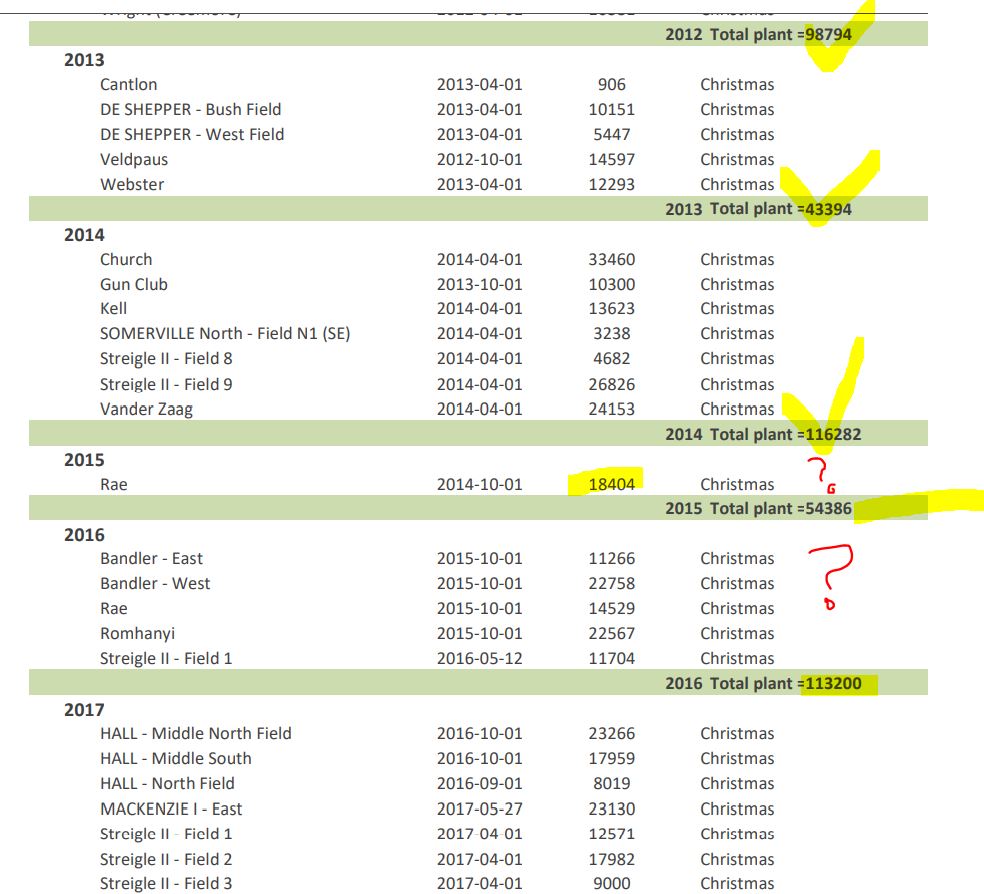
Hello everyone.  I just completed building a report that I thought was awesome.  I shared it at work and then noticed the sub groups are totaling as I wanted, and then the whole category totals, then it moves to the next product using the same format.  What happened is that MOST subtotals are correct, but a few don't add up correctly.  At further scrutiny, I can tell that a line item did not show up in the report, but the totals are correct (they re using the data, just not showing it).  The data came from a query and I can see the missing line items in the query.  The report is 20 pages and most are correct.  So, I have gone from a nervous beginner, so feeling pretty pumped last night when the report finally came together, and now I am back to feeling like a confused newbie. Is there any type of easy answers to this situation?  Hoping someone says "of ya, that happened to all of us when we started out".  lol.  (This is a brand new database that I am still getting the data into and checked for integrity), but I have been able to pull out what I need when I need it.  I am just starting to go back and build the reports they will need and then set up for other people to use later.  So, for now, I would like to have some confidence that this is the answer to the company's woes... in this moment, I don't have it.  Help!
Adam Schwanz  @Reply  
           
4 years ago
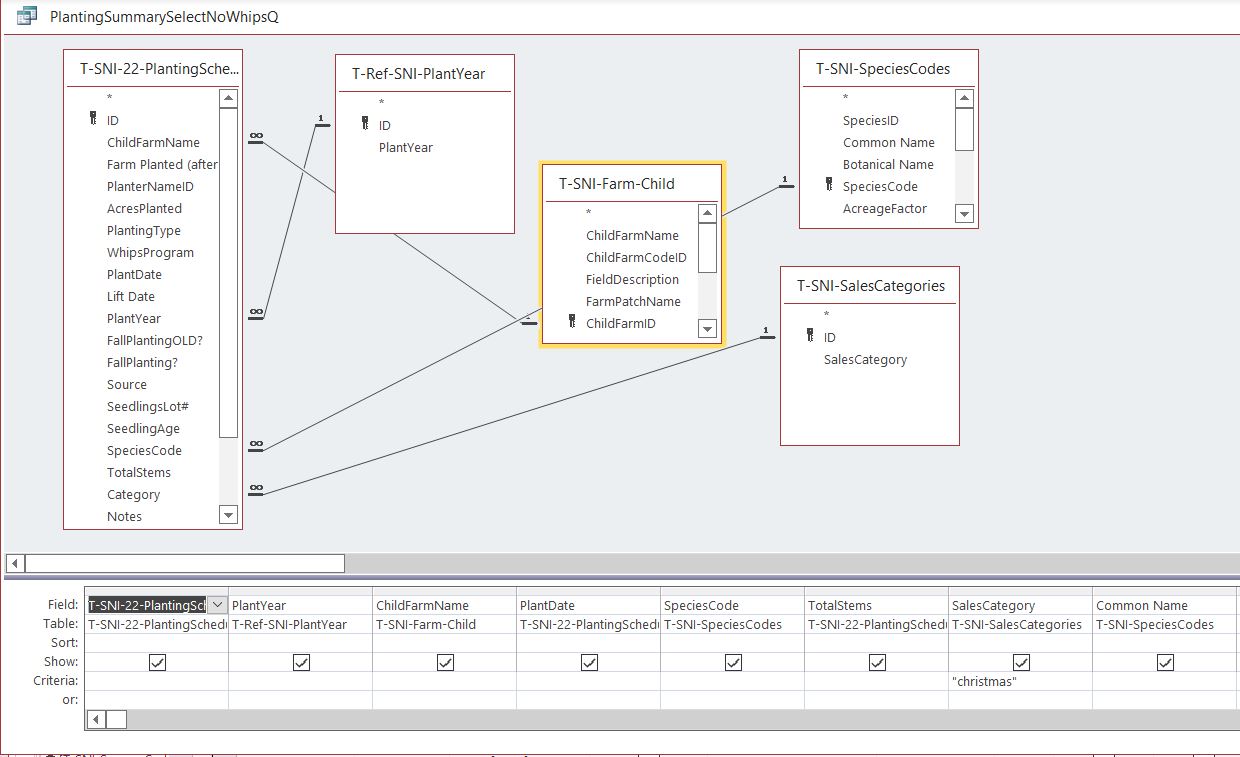
Well, it definitely has happened to all of us when we first started out, so don't worry there. You're missing a few records then that aren't showing up in the query? It must be some kind of criteria or join issue, can you upload an image of the query in design view? Snip & Sketch

Are there anything you notice about the records not included? Are they all missing a certain field or have something unique to them?
Kimberley Gill OP  @Reply  
    
4 years ago

Kimberley Gill OP  @Reply  
    
4 years ago

Kimberley Gill OP  @Reply  
    
4 years ago

Kimberley Gill OP  @Reply  
    
4 years ago
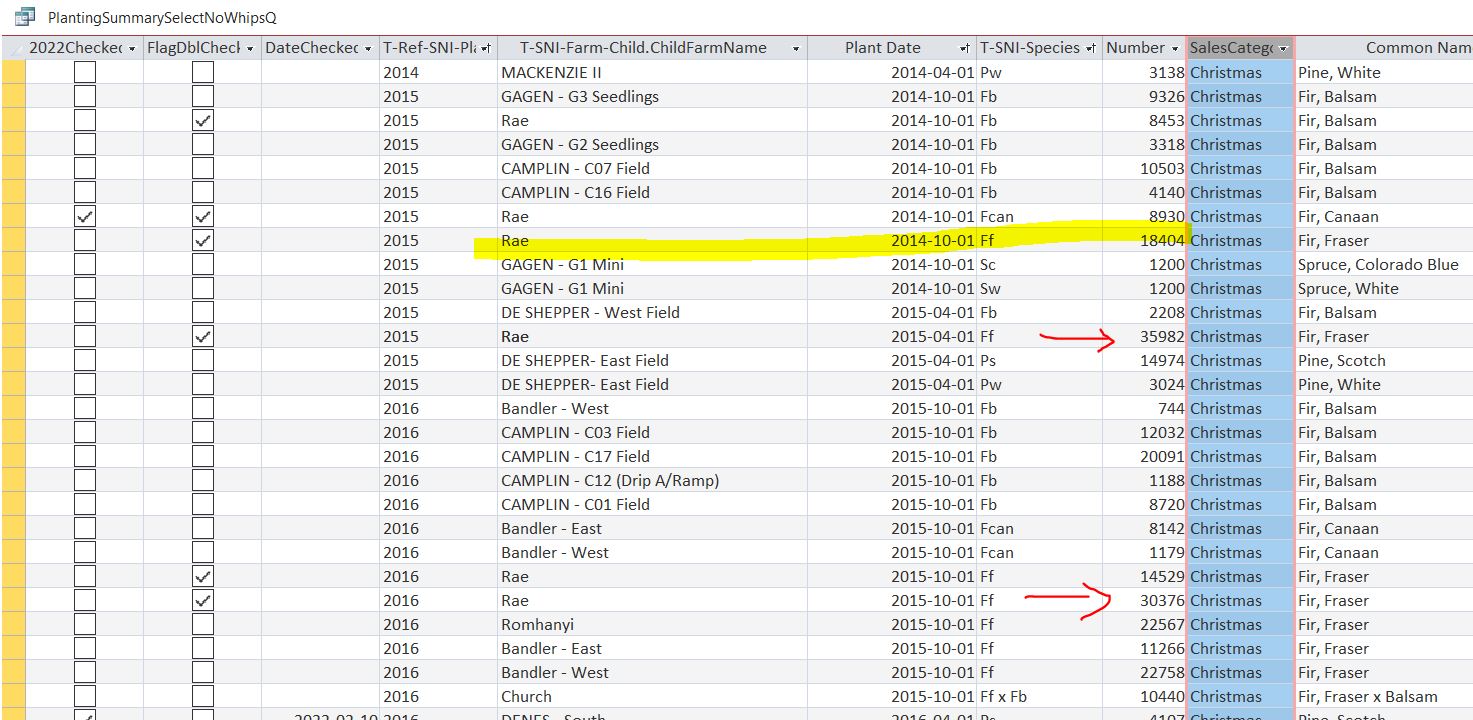
The 2 entries I show with red arrows are the exact amounts that are missing in the two samples totals I screenshot.
Kimberley Gill OP  @Reply  
    
4 years ago

Adam Schwanz  @Reply  
           
4 years ago
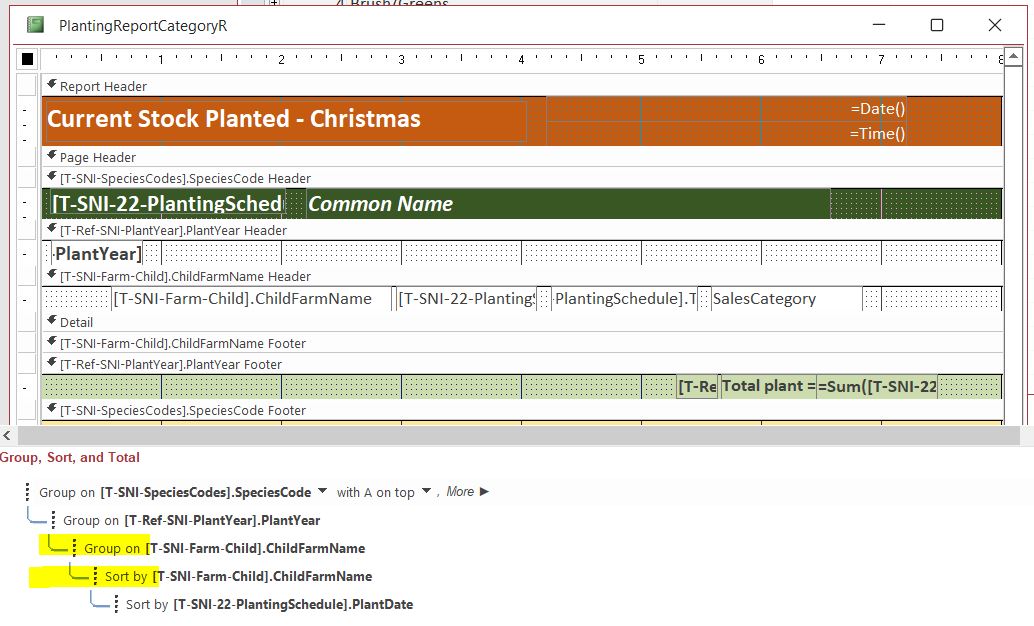
Oh so they are actually showing up in the query, just not on the report?

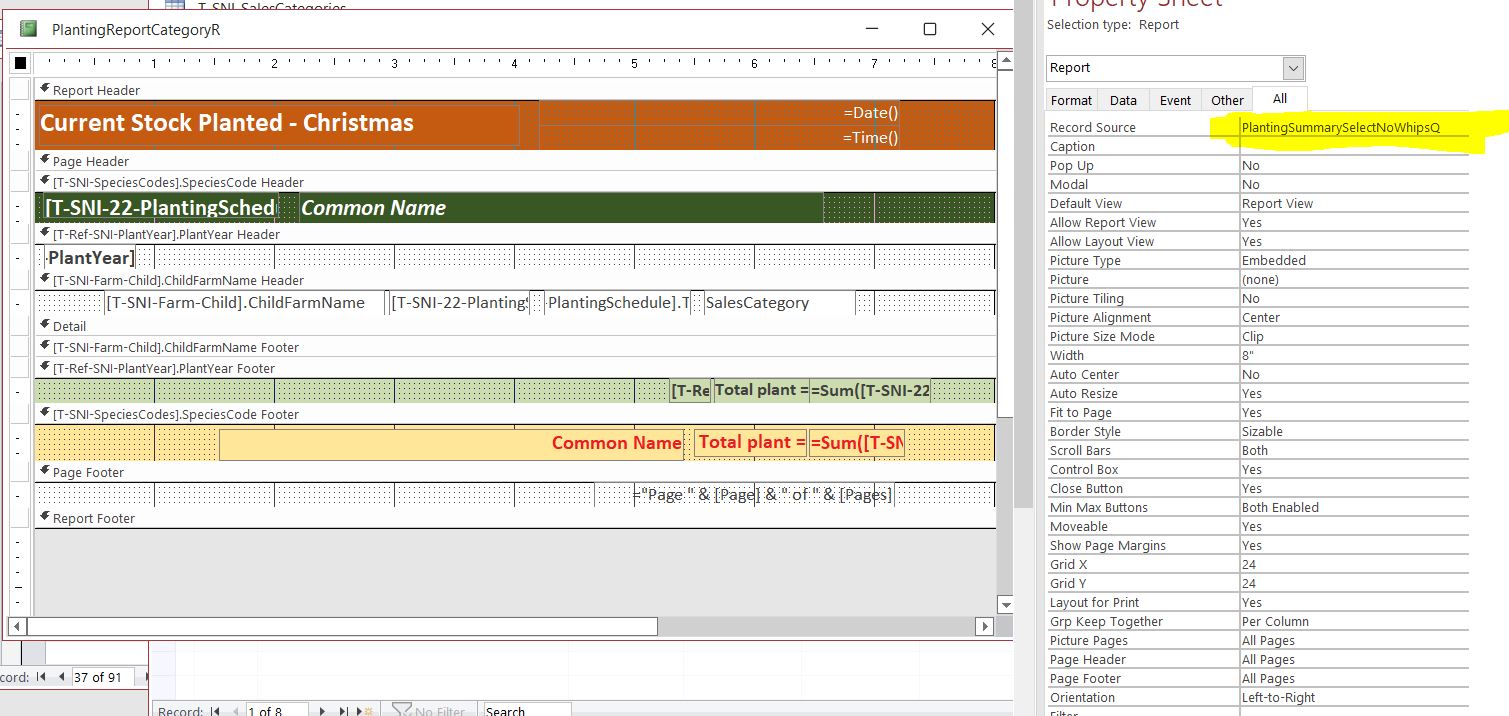
I'm going to take a guess that it has to do with your grouping settings in the report then, since each name is only appearing once in each section. What do your grouping settings look like?
Kimberley Gill OP  @Reply  
    
4 years ago
Ah ha!  You are so smart....  that does sounds like a possible answer.  Glancing back I do see no repeat farm names in those groups.  Let me go take a screen shot of the groupings and send it.  I really just took a run at this whole thing last night using books and online help to build it.  Making mistakes is the best way for me to learn.  The most painful, but also the most helpful!  bbs.
Kimberley Gill OP  @Reply  
    
4 years ago

Kimberley Gill OP  @Reply  
    
4 years ago
Not sure why I m sorting and grouping my child farm name.  I guess I saw it working (mostly it turns out) and didn't want to touch anything.  What should I adjust?  Take out the sort by?
Adam Schwanz  @Reply  
           
4 years ago
I don't consider myself a report expert, usually if I ran into a situation like this I would just play with it for a little bit until it worked, so it's hard to give you an exact correct "do this" answer.

I think that group by child farm name needs to be a sort, or maybe removed all together, the only grouping should be the year I believe. You might need to play with those a little but but im pretty sure that is your problem.
Kimberley Gill OP  @Reply  
    
4 years ago
Ok... great!  I will go fiddle.  Thank you so much.
Scott Axton  @Reply  
        
4 years ago
Kimberly -
Make a copy of the report first.  Then play with the copy.  That way if you get really hosed you have something to go back to.

Remember backup, backup, BACKUP!

This thread is now CLOSED. If you wish to comment, start a NEW discussion in Access Forum.
 

Next Unseen

 
New Feature: Comment Live View


The following is a paid advertisement
Computer Learning Zone is not responsible for any content shown or offers made by these ads.
 

Learn
 
Access - index
Excel - index
Word - index
Windows - index
PowerPoint - index
Photoshop - index
Visual Basic - index
ASP - index
Seminars
More...
Customers
 
Login
My Account
My Courses
Lost Password
Memberships
Student Databases
Change Email
Info
 
Latest News
New Releases
User Forums
Topic Glossary
Tips & Tricks
Search The Site
Code Vault
Collapse Menus
Help
 
Customer Support
Web Site Tour
FAQs
TechHelp
Consulting Services
About
 
Background
Testimonials
Jobs
Affiliate Program
Richard Rost
Free Lessons
Mailing List
PCResale.NET
Order
 
Video Tutorials
Handbooks
Memberships
Learning Connection
Idiot's Guide to Excel
Volume Discounts
Payment Info
Shipping
Terms of Sale
Contact
 
Contact Info
Support Policy
Mailing Address
Phone Number
Fax Number
Course Survey
Email Richard
[email protected]
Blog RSS Feed    YouTube Channel

LinkedIn
Copyright 2026 by Computer Learning Zone, Amicron, and Richard Rost. All Rights Reserved. Current Time: 5/7/2026 3:56:26 AM. PLT: 5s