Concerning the callback date field, I can't type in any date. When I tried to type in the date it tells me "The value u entered isn't valid for this field", so help me out
Scott Axton
@Reply 4 years ago
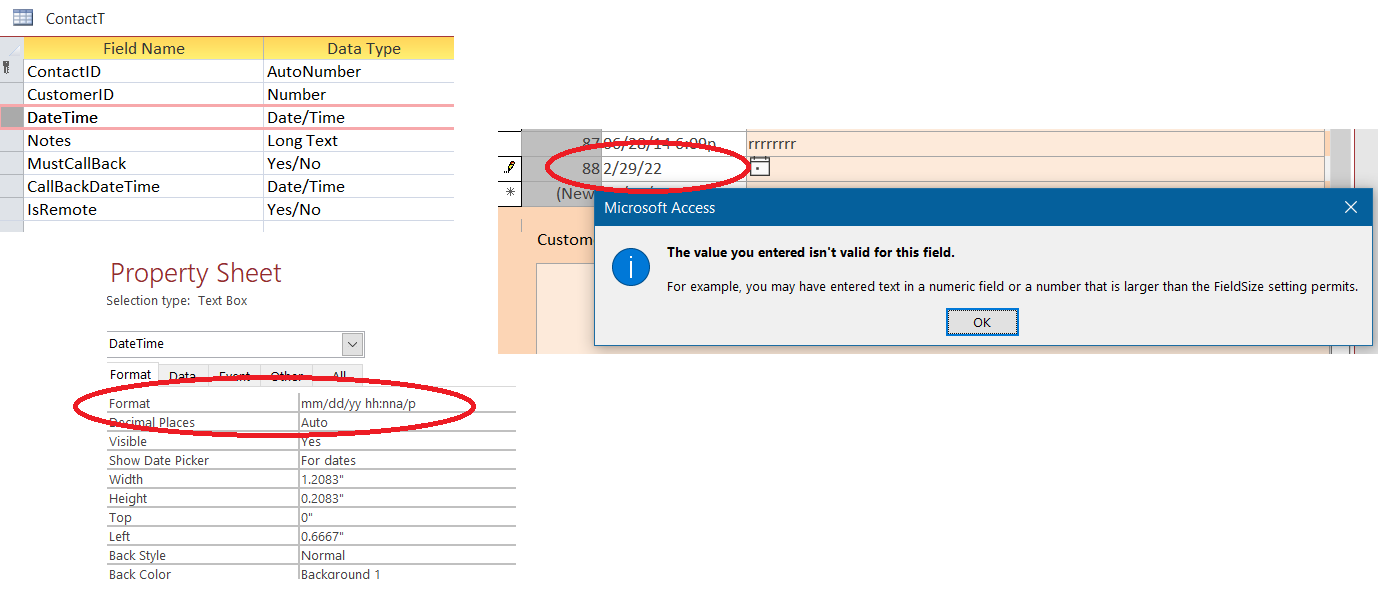
1. Make certain that your field type is set to Date/Time time in the table.
2. Double check the formatting on your date field in any form.
3. Be sure that you are entering in a valid date. In the right most picture below you can see the date 02/29/22 is
a NOT valid date. There is not 29 days in February 2022.
Scott Axton
@Reply 4 years ago
Scott Axton
@Reply 4 years ago
I don't see where you are located. Since Microsoft is a USA based company and we use the common date format of mm/dd/yyyy here Access can confuse dates if you are in a place that uses dd/mm/yyyy.
I've never had to deal with that issue.
Kevin or Alex - Maybe you can add some insight to the things you deal with?
Kevin Robertson
@Reply 4 years ago
Yeah Scott I have had some issues when dealing with dates. Some con be resolved with the Format function, while other more complicated scenarios I can't even begin to fix. Microsoft really should look in to this issue (though they probably won't).
Had a major issue with some DLOOKUPS and date formats.
If you don't put a format on the table field and set a default date what does it show?
Also you could move the format to the Form field instead
If you are a Visitor, go ahead and post your reply as a
new comment, and we'll move it here for you
once it's approved. Be sure to use the same name and email address.
This thread is now CLOSED. If you wish to comment, start a NEW discussion in
Access Expert 3.