Free Lessons
Courses
Seminars
TechHelp
Fast Tips
Templates
Topic Index
Forum
ABCD
 
Home   Courses   TechHelp   Forums   Help   Contact   Merch   Join   Order   Logon  
 
Back to Access Forum    Comments List
Upload Images   @Reply   Bookmark    Link   Email   Next Unseen 
Table Fields
Teri Bridges 
    
4 years ago
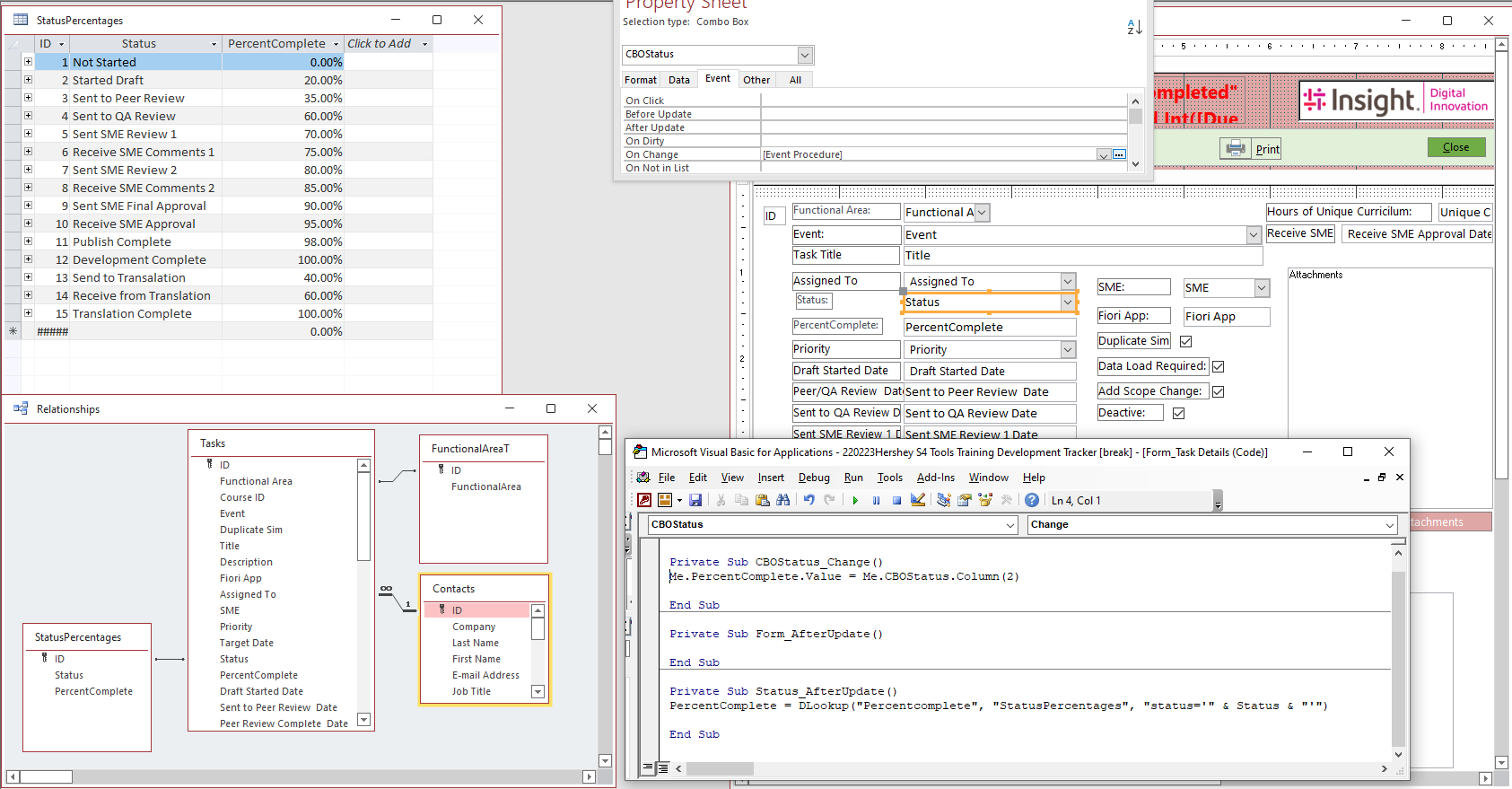
Guys, I have a task table with 2 fields a status field and a Percent complete field. I created a form to select from dropdowns for the entries. Worked great. Then my boss said he would like to see the percent complete auto populate. So I went and watched some more lessons and figured out that I needed to create a combo box and point to storing the data in my Task Table. I can't seem to get it to work using the code in the attached image. Funny thing is if I change the column to 1 I get the correct corresponding Status ID I cannot get the percent value to show.
Teri Bridges OP  @Reply  
    
4 years ago

Scott Axton  @Reply  
        
4 years ago
Teri check out the Progress Bar Form Completion video.
Not only might this be a good way to learn to solve your issue, but it may be a cool addition to your form.

Make sure to watch the After Update video if you haven't already.  Even if you have you may need to watch it multiple times.


Teri Bridges OP  @Reply  
    
4 years ago
Thank you
Teri Bridges OP  @Reply  
    
4 years ago
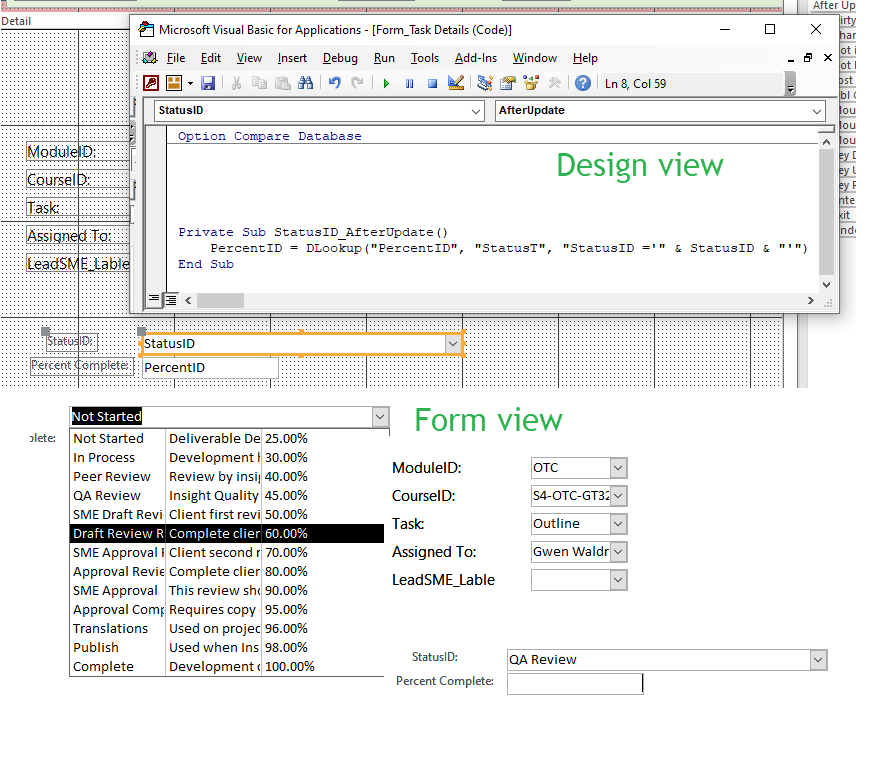
I am about to give up. I don't know what I am doing wrong. I have watched the DLookup and After update videos multiple times, I still can't seem to figure out what I am doing wrong. the code used in the video was
zone = Dlookup ("Zone","StateZoneT","State='" & State &"'") I replaced my values for the example

percentID = Dlookup ("PercentID","StatusT","StatusID='" & StatusID &"'")

I cannot get it to work is it because my PercentID is a %? I don't know I have spent 3 days on this one issue and easy resolution is to have them manually enter percent. LOL
Teri Bridges OP  @Reply  
    
4 years ago

Scott Axton  @Reply  
        
4 years ago
Teri - -
Assuming here so correct me if I'm wrong.
StatusID is Type Number - Long Integer, correct?
If that is the case you would NOT put quotes around it.  Quotes only surround Text (String) values, not numbers.

so you DLookup would be:
percentID = Dlookup ("PercentID","StatusT","StatusID=" & XXXX)

XXXX should be the name of your Combo Box. Looking above I believe it is CBOStatus.
The StatusID is the hidden column 0 in the combo.
Teri Bridges OP  @Reply  
    
4 years ago
No it is short text but my Percent Id is a Number so should I take the "" off the PercentID....
percentID = Dlookup ([PercentID],"StatusT","StatusID='" & StatusID &"'")

Well I am a gonna try it
Teri Bridges OP  @Reply  
    
4 years ago

Teri Bridges OP  @Reply  
    
4 years ago
BTW Thank you.
Teri Bridges OP  @Reply  
    
4 years ago
Well that was a nope
Scott Axton  @Reply  
        
4 years ago
OK, I misunderstood.  So lets rewind a bit to make sure I understand. (I think you / we have to many videos filling our minds= Info overload.  LOL)

So see if I've got this right...
You want to pick a value from the Status Combo and it's name on the form is CBOStatus.
From there, based on your selection, you would like to "fill in" the Percent Complete: text box with the percentage that you looked up from the StatusPercentages table.
Correct so far?

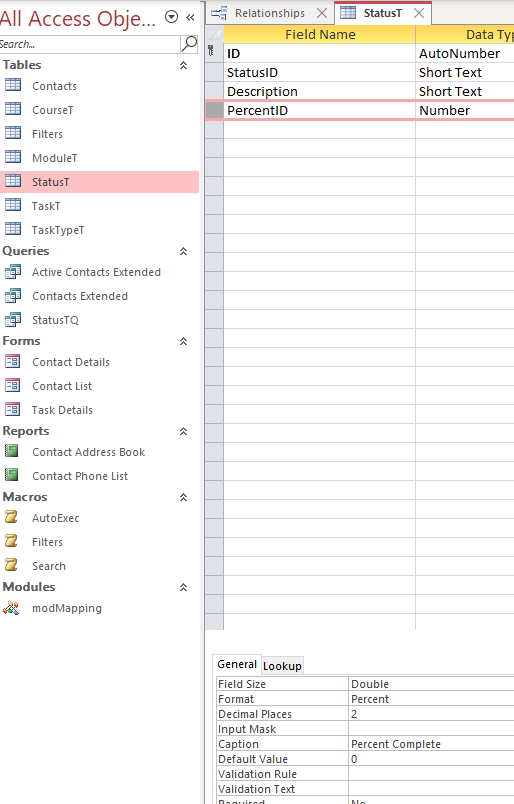
Based on the last image, I'm not seeing that StatusPercentages table any longer.  Did it go away?

Teri Bridges OP  @Reply  
    
4 years ago
I tried this too. PercentID = Dlookup ("PercentID","StatusT","StatusID=" & StatusID") I am going to have to let it go. I am not a dog with a bone. Well maybe I am.
Scott Axton  @Reply  
        
4 years ago
Some thoughts after studying your images above.
1 - I would not just name your auto number fields "ID"  While acceptable, you should give them meaningful names.
     When you get to making related tables you will have to give different names.  You can't have two ID fields in the same table.  You will almost never see Richard just use ID - it's always CustomerID, ContactID, OrderID, etc.

2- Don't use spaces or other characters in your field names.  On occasion I use a dash or underscore but vary, vary rarely.  Try and stick with just letters and numbers.  You'll be glad you did in the future. If you don't you will always have to enclose your fields in [ ] brackets.  [Target Date] and [Draft Started Date] for example.

3- Be consistent in your naming.  Cust, Customer, CST would get confusing after awhile.  Pick one 'style' and stick with it.  Another example:  Stay singular in the things you do - OrderT vs OrdersT, CustomerT vs CustomersT


3-
Scott Axton  @Reply  
        
4 years ago
4- I never use ID in a field name that is not either a Primary Key field or when using it as a Foreign Key field.
StatusID being Short Text really threw me because of thinking relationships.  You can have Short Text as a Primary Key but I don't recommend it.
Scott Axton  @Reply  
        
4 years ago
Now now - no giving in!  You are in your learning mode.  I guarantee I've made many more errors than successes.
The only way to fail is to give up.
Scott Axton  @Reply  
        
4 years ago
That being said Teri, sometimes setting an issue aside for a while and working different issues can be a good tactic.
Letting things rest a bit can refresh your mind and you can look at it with differing perspective when you come back to it.
Teri Bridges OP  @Reply  
    
4 years ago
I rebuilt a subset of my tables. I followed one of the videos and did as said. Named the tables XXXT Queries XXXQ etc., I also did not use space in any of my field names. I used auto number for all my primary keys. But I did call some of my fields ID just so I could easily identify which ones I was wanting to pull into my form. I can go back and take the "ID" off the field names.

You are right I need to give it a rest. But Rick made it look so easy. I am like why am I not getting this? I am looking to see if I missed something, I had to have. I am thinking it has to maybe do with my field types on the percentage but I made sure in the TaskT and the StatusT they were both set the same Double, percent, 2 decimals. and there is a relationship between the StatusT and the TaskT on the status field.

This thread is now CLOSED. If you wish to comment, start a NEW discussion in Access Forum.
 

Next Unseen

 
New Feature: Comment Live View


The following is a paid advertisement
Computer Learning Zone is not responsible for any content shown or offers made by these ads.
 

Learn
 
Access - index
Excel - index
Word - index
Windows - index
PowerPoint - index
Photoshop - index
Visual Basic - index
ASP - index
Seminars
More...
Customers
 
Login
My Account
My Courses
Lost Password
Memberships
Student Databases
Change Email
Info
 
Latest News
New Releases
User Forums
Topic Glossary
Tips & Tricks
Search The Site
Code Vault
Collapse Menus
Help
 
Customer Support
Web Site Tour
FAQs
TechHelp
Consulting Services
About
 
Background
Testimonials
Jobs
Affiliate Program
Richard Rost
Free Lessons
Mailing List
PCResale.NET
Order
 
Video Tutorials
Handbooks
Memberships
Learning Connection
Idiot's Guide to Excel
Volume Discounts
Payment Info
Shipping
Terms of Sale
Contact
 
Contact Info
Support Policy
Mailing Address
Phone Number
Fax Number
Course Survey
Email Richard
[email protected]
Blog RSS Feed    YouTube Channel

LinkedIn
Copyright 2026 by Computer Learning Zone, Amicron, and Richard Rost. All Rights Reserved. Current Time: 4/30/2026 8:47:06 AM. PLT: 0s