Free Lessons
Courses
Seminars
TechHelp
Fast Tips
Templates
Topic Index
Forum
ABCD
 
Home   Courses   TechHelp   Help   Contact   Merch   Join   Order   Logon   Forums   
 
Back to Access Forum    Comments List
Upload Images   @Reply   Bookmark    Link   Email   Next Unseen 
Compact and Repair Question
Bert Harmsma 
     
4 years ago
Hi Richard and other profesionals,

I've a question about Compact & Repair.

I made a dBase (BE & FE) with the Shift key disabled, no navigation menu and no access to Full Menus etc.

I did make 2 small admin forms. One for myself (with password) as a developer where I enable the Shift-key again and one for the manager.

Now I would like to add a button where the manager is given the option to perform a Compact & Repair. What do you suggest?

Or is this something for a TechHelp video or can you refer me to a Course or Seminar.

Thanks in advance for your reply.
Bert
Alex Hedley  @Reply  
           
4 years ago
dBase as in a database in MS Access or dBase itself?

You could add a custom ribbon with buttons there.
Can't remember if you can permission those buttons or just check in the code when you press them.
Bert Harmsma OP  @Reply  
     
4 years ago
Hi Alex,

Of course made in MS-Access!!!! And with the help of the excellent TechHelp videos. And also the security seminar.
Scott Axton  @Reply  
      
4 years ago

Just so you know, dBase is an old database technology.  That is the purpose of Alex's question.
There are still dBase applications out there.

I regard to your question for your manager form you should be able to create a button and put the following in the on click event:

   DoCmd.RunCommand acCmdCompactDatabase

I'm not real sure about the ins and outs of doing this through code but it is doable.
Bert Harmsma OP  @Reply  
     
4 years ago
Thanks  you, Scott. This  should be the answer. I'll  give  it a try.
Bert Harmsma OP  @Reply  
     
4 years ago

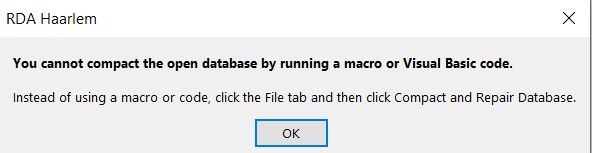
Bert Harmsma OP  @Reply  
     
4 years ago
Hi Scott, as you can see  ... it's not possible. I'll have to think for an another solution
Scott Axton  @Reply  
      
4 years ago
I was afraid of that.  
I know Richard covers this in depth in the Access Developer 31 course but there are issues with the database needing exclusive control while doing certain operations.  Apparently that is one.

I'm not real up to speed on that lesson myself as I haven't watched it in a while.

If i were you, I would just take care of it manually for now yourself.  If this is an application you are developing for someone else, you could train your admin how to take care of it.

You would be well advised to continue on with the Expert and Advanced courses rather than jumping into courses that are outside of your knowledge level at the moment.  That is just asking for issues and headaches if you want my honest opinion.
Richard Rost  @Reply  
          
4 years ago
While it's possible to allow a normal user (even a manager) to compact and repair your database with a single click, I recommend against it. In case something goes wrong, they could corrupt the database further by not knowing how to deal with an error message. Unless you've got a crazy busy, super-high use database, you shouldn't have to compact it more than once a month. I compact mine every couple of months. And yes, EVERYONE needs to be OUT of the database, and you need to have exclusive access to compact a shared database. Lots going on there... which is why it's best done on "maintenance" day once a month.
Bert Harmsma OP  @Reply  
     
4 years ago
Gentlemen.

Thanks you for your input. I think I'll just drop by that company once in a while and then run a Compact & Repair.

Just like Richard said it doesn't need to be done every week or so.

Have a nice weekend
Scott Axton  @Reply  
      
4 years ago
Bert -
More important is to make sure they have a good backup strategy and routine.  Including offsite storage.

Take a look at some of the Remote Support Software out there. I have used a product called Splashtop for about 5 years now and am very happy with it.  It saves me an hour drive 1 way to do 5 minutes work.  That company was more than willing to foot that bill rather than pay my TTM charges. (travel, time, mileage)
Plus, I can be much more responsive if they have a minor tweak they want done.

I don't know how they are now, but I had issues with Log-Me-In and can't recommend that you use them.
Richard Rost  @Reply  
          
4 years ago
Or even set up Google Remote Desktop. I use it all the time when I'm travelling.
Bert Harmsma OP  @Reply  
     
4 years ago
Thanks again for your advices. I'll definitely take a look at that.

This thread is now CLOSED. If you wish to comment, start a NEW discussion in Access Forum.
 

Next Unseen


What's This?


The following is a paid advertisement
Computer Learning Zone is not responsible for any content shown or offers made by these ads.
 

Learn
 
Access - index
Excel - index
Word - index
Windows - index
PowerPoint - index
Photoshop - index
Visual Basic - index
ASP - index
Seminars
More...
Customers
 
Login
My Account
My Courses
Lost Password
Memberships
Student Databases
Change Email
Info
 
Latest News
New Releases
User Forums
Topic Glossary
Tips & Tricks
Search The Site
Code Vault
Collapse Menus
Help
 
Customer Support
Web Site Tour
FAQs
TechHelp
Consulting Services
About
 
Background
Testimonials
Jobs
Affiliate Program
Richard Rost
Free Lessons
Mailing List
PCResale.NET
Order
 
Video Tutorials
Handbooks
Memberships
Learning Connection
Idiot's Guide to Excel
Volume Discounts
Payment Info
Shipping
Terms of Sale
Contact
 
Contact Info
Support Policy
Mailing Address
Phone Number
Fax Number
Course Survey
Email Richard
[email protected]
Blog RSS Feed    YouTube Channel

LinkedIn
Copyright 2026 by Computer Learning Zone, Amicron, and Richard Rost. All Rights Reserved. Current Time: 9/6/2026 1:55:39 AM. PLT: 1s