Free Lessons
Courses
Seminars
TechHelp
Fast Tips
Templates
Topic Index
Forum
ABCD
 
Home   Courses   TechHelp   Forums   Help   Contact   Merch   Join   Order   Logon  
 
Back to Access Forum    Comments List
Upload Images   @Reply   Bookmark    Link   Email   Next Unseen 
Minor Detail Question
James Gray 
     
4 years ago
Where is the setting allowing captions to be centered?  Captions seem to default to left aligned when I open Access.  Thanks.
Scott Axton  @Reply  
        
4 years ago
That is the default setting in Access.  If you want to change them you have to do so for each on individually.
There isn't something you can change in Access to make that default change.

Sorry.
James Gray OP  @Reply  
     
4 years ago
So, on an individual basis, do I just add spaces to the front of the caption in my VB code?
Scott Axton  @Reply  
        
4 years ago
Just click on the label for your field in the FORM.  Up on the tool bar choose alignment, color, font, what ever you want.
I'd have to play with it but I'm not sure you can adjust it with VBA.  Don't quote me on that though as I've never tried.
James Gray OP  @Reply  
     
4 years ago
Thanks Scott.  I am setting some form captions in VBA.  I just wanted to have these captions centered instead of defaulting to left aligned.  I think I am going to play around with the formwidth property and maybe create a public function using twip values to get it centered.  Seems like a lot of work though....
Scott Axton  @Reply  
        
4 years ago
James -
Can you post a pic of what you are trying to format?  Maybe I'm not understanding correctly.
Scott Axton  @Reply  
        
4 years ago
---------------
OK taking a poke in the dark here.  I think I figured out what you want to do.

To get the Main Menu label to "dynamically center" no matter the width of the form -
Stretch the label control to the width of your form.
With the Label selected - In the properties go pretty much all the way to the bottom on the format Tab. Look for Horizontal Anchor and change it to Both.
Make sure that the Text properties for the label are set to Centered.

Now, no matter how narrow or wide your form is it will shrink or stretch to the width of the form and your caption text will stay centered.

If that isn't it I'm afraid I may be out of ideas depending on your response.
Scott Axton  @Reply  
        
4 years ago

James Gray OP  @Reply  
     
4 years ago
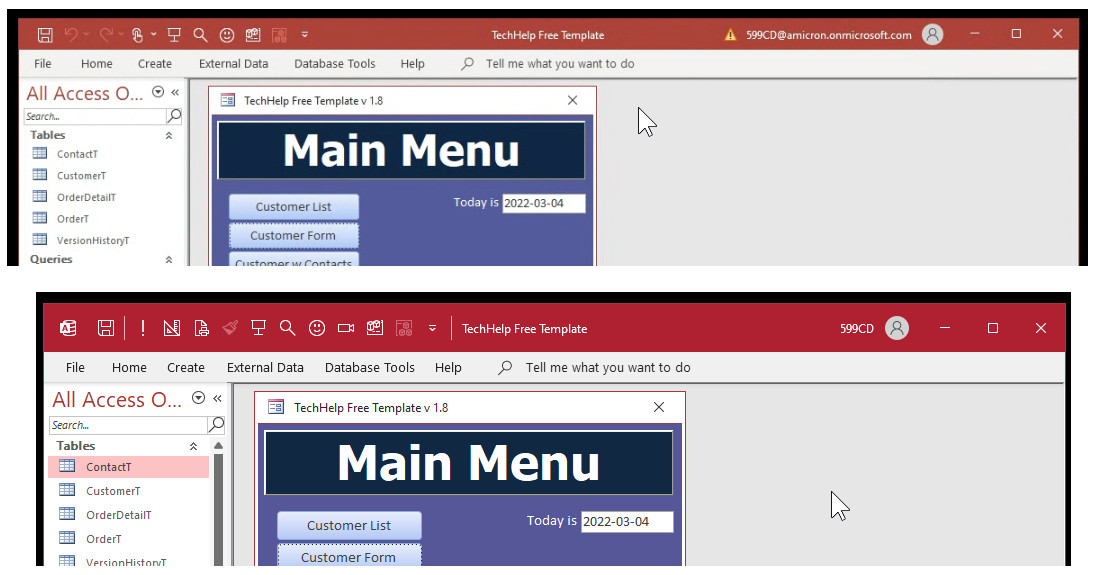
I'm not communicating very well, Scott, sorry.  I am actually setting the caption for the form itself, not a lobal on the form.  I am using VBA code to set that caption value.  Without any intervention, Access will establish its own caption property based on the value set in the form property sheet.  From what I have experienced, that value is defaulted to left justified.  I am setting this value with VBA code and wanting to have it centered on the form title bar instead of it being pushed to the left.  Not sure how to get a screenshot into this conversation....
Richard Rost  @Reply  
          
4 years ago
James, I have two identical installations of Office on two identical machines, and they both have the caption in different locations. To this day I have NO IDEA why they're different. I've googled it and can't find any logical explanations.
Richard Rost  @Reply  
          
4 years ago

James Gray OP  @Reply  
     
4 years ago
Thanks Richard, at least I know I am not an idiot.  I have been playing around with the formwidth proerty and determining the center of the form, converting that to spaces and using the space() function to add to the front of the caption.  Seems to work.  I am just liking the looks of the caption centered and I am determined to find a way to do it.  Anal I am....
Richard Rost  @Reply  
          
4 years ago
If you really want to get anal, go with Custom Form Backgrounds and then a Splash Screen where you can completely hide the entire Access interface.
Scott Axton  @Reply  
        
4 years ago
Well shoot - Shot missed.

At least you know you pretty much don't have control over that.  LOL
Richard Rost  @Reply  
          
4 years ago
Yeah... I remember googling it a few months ago when someone asked. I just tried AGAIN and can't find anything on it. I've got two identical laptops... same version of Windows... same version of Office... everything updated... one is left aligned, one is centered. Beats me. Don't really care though... aside from it being a curiosity.

This thread is now CLOSED. If you wish to comment, start a NEW discussion in Access Forum.
 

Next Unseen

 
New Feature: Comment Live View


The following is a paid advertisement
Computer Learning Zone is not responsible for any content shown or offers made by these ads.
 

Learn
 
Access - index
Excel - index
Word - index
Windows - index
PowerPoint - index
Photoshop - index
Visual Basic - index
ASP - index
Seminars
More...
Customers
 
Login
My Account
My Courses
Lost Password
Memberships
Student Databases
Change Email
Info
 
Latest News
New Releases
User Forums
Topic Glossary
Tips & Tricks
Search The Site
Code Vault
Collapse Menus
Help
 
Customer Support
Web Site Tour
FAQs
TechHelp
Consulting Services
About
 
Background
Testimonials
Jobs
Affiliate Program
Richard Rost
Free Lessons
Mailing List
PCResale.NET
Order
 
Video Tutorials
Handbooks
Memberships
Learning Connection
Idiot's Guide to Excel
Volume Discounts
Payment Info
Shipping
Terms of Sale
Contact
 
Contact Info
Support Policy
Mailing Address
Phone Number
Fax Number
Course Survey
Email Richard
[email protected]
Blog RSS Feed    YouTube Channel

LinkedIn
Copyright 2026 by Computer Learning Zone, Amicron, and Richard Rost. All Rights Reserved. Current Time: 5/2/2026 8:30:31 AM. PLT: 1s