Free Lessons
Courses
Seminars
TechHelp
Fast Tips
Templates
Topic Index
Forum
ABCD
 
Home   Courses   TechHelp   Forums   Help   Contact   Merch   Join   Order   Logon  
 
Back to Access Forum    Comments List
Upload Images   @Reply   Bookmark    Link   Email   Next Unseen 
Merging Data for Household
Katherine Bradshaw 
    
4 years ago
I've got a series of queries I'm working on to be able to take couples' names from individual "person" records and merge them into a "household greeting" field, to be able to deal with couples with different last names. I've come to a point that should be simple to do, but with my limited experience, I'm drawing a blank. (I've watched the "combining names" extended cut, which was helpful, but I need my Name 1 and Name 2 on the same line.)

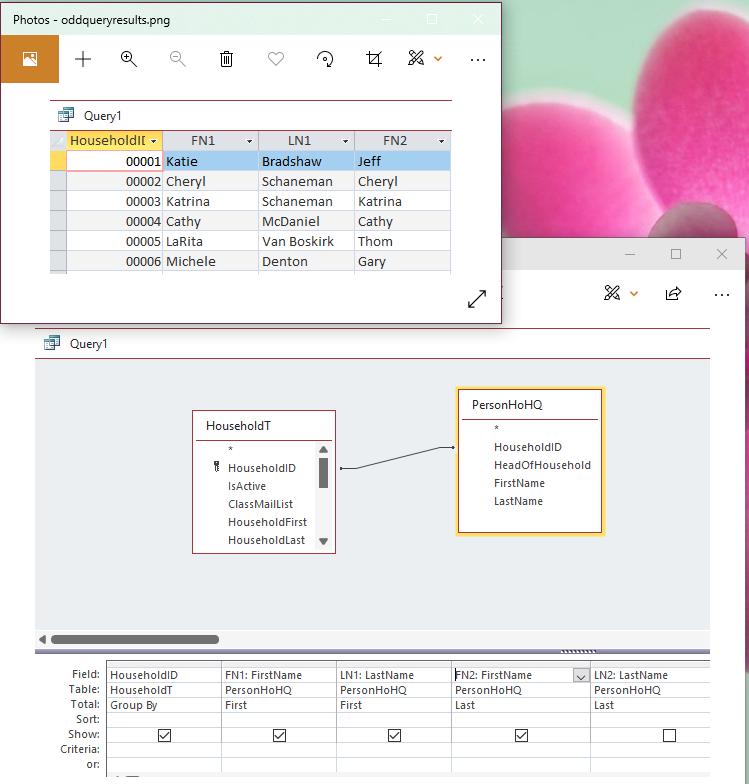
How can I merge the rows for a household so that FN1, LN1, FN2, LN2 all appear on the same line for the household?

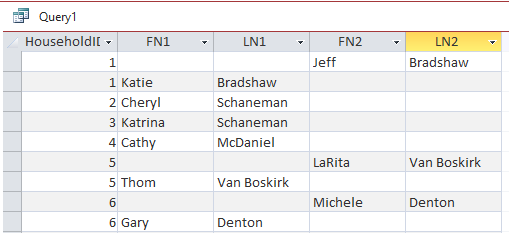
So, for the screenshot below, I want to end up with:

Household 1 FN1 Katie LN2 Bradshaw FN2 Jeff LN2 Bradshaw
Household 2 FN1 Cheryl LN2 Schaneman FN2  LN2
Household 3 FN1 Katrina LN2 Schaneman FN2  LN2
Household 4 FN1 Cathy LN2 McDaniel FN2  LN2
Household 5 FN1 Thom LN2 Van Boskirk FN2 LaRita LN2 Van Boskirk
Household 6 FN1 Gary LN2 Denton FN2 Michele LN2 Denton
Katherine Bradshaw OP  @Reply  
    
4 years ago

Juan C Rivera  @Reply  
            
4 years ago
I think Developer 17 Dlookup Plus may help you with what you are trying to do.
Katherine Bradshaw OP  @Reply  
    
4 years ago
Alas, I'm only on Access Expert Level 20 at this point.
Maybe I can try searching some Dlookup stuff in other places. I've used a very simple Dlookup before, but when I try to apply it to this situation, I get lost in trying to think of ways to write IIF functions.
Scott Axton  @Reply  
        
4 years ago
Katherine it's been a minute since I watched that video but that is exactly the one I was going to suggest.

Again - just break it up into pieces. Actually follow along and do the db that Richard is doing.  Type in his names and his example. Start and stop the video, backup even - as needed.
Then once you do it - try it with your database.
You are making great progress and I applaud you for staying the course.

Baby steps.  Don't expect to know it all over night. It takes practice.

Think of this.  When you were a child how many times did your Mom and Dad sit in front of you teaching you how to tie your shoes?  Now - you can sit in front of the TV watching the morning news and eating a bowl of cereal while putting on your shoes and you don't even remember doing it.

Somethings will be easy - others not so much.  Thing is, just keep moving forward.
Scott Axton  @Reply  
        
4 years ago

PS - Don't tell me you gave up and just wear flip flops!!

LOL
Katherine Bradshaw OP  @Reply  
    
4 years ago
So, for sure Developer 17 Dlookup Plus?
At my current rate of progressing through the courses, I might be able to fix this problem by July. Thanks for letting me know.

I'll just have to abandon course and proceed with hand-edited mail merges for mixed-name households for now.
Scott Axton  @Reply  
        
4 years ago
The Developer 17 is a good one but I was referring to the Combining Names video you mentioned.

You would only need the query to do what you need.  Then use that query as your data source for your merge.

Keep going in order, as you have been, as time and dollars allow.  The TechHelp are a great supplement to the courses.

If you hit a hiccough just post here and we'll work through it.
Katherine Bradshaw OP  @Reply  
    
4 years ago
Oh, yes, I already watched the combining names extended cut, and it gave some great info. I love having examples to be able to work through a new idea. I've gotten the module to work. My trouble is, I don't have the name data all in the same row.

I need to have "household" info to track membership payments and benefits. This is where address information is as well.

Within each household are people. I need these individual person records to track classes, volunteer hours, and inventory for sale in the art center gift shop.

Currently, I am typing in names separately in the "people" subform in my "household" form, e.g.,
Jane Doe
John Smith

And then having to type in separate first and last name fields into the household, which gets super awkward for households with mixed last names. The best I can do is:
FirstName Jane Doe and John
LastName Smith
Katherine Bradshaw OP  @Reply  
    
4 years ago
To try to fix this, I went back and added a "head of household" field to my person records so each person is HH1, HH2, for NOT (if kids). Then I was able to run a query to create aliases for
FN1 and LN1 if Head of household = HH1 and
FN2 and LN2 if head of household = HH2

I fed that query into the one I screen-capped above, thinking I could find a way to merge the two rows together so I could run the module I built from the Combining Names video. But I got stuck.

The idea is, once I get that figured out, I will feed the results into a "FullGreeting" field in my household form, so I can just enter people's names one time, in their "person" record, and then have the queries fill in the greeting info for the household.
Katherine Bradshaw OP  @Reply  
    
4 years ago
I was thinking about an aggregate query to group by Household ID, but of course, because there is different data in FN1, LN1, FN2, LN2, it won't group.
Scott Axton  @Reply  
        
4 years ago
How are you storing each individual person in your tables?  As separate records or is the husband / spouse / SO in the same record?
Are they differentiated in some way between HOH, child, etc. ?

Kevin Robertson  @Reply  
          
4 years ago
Hi Katherine,

If you are only dealing with 2 people (FN1, LN1, FN2, LN2) this may be a possible solution. See screenshot.
Kevin Robertson  @Reply  
          
4 years ago

Juan C Rivera  @Reply  
            
4 years ago
Hi Katherine just a thought did you nested IIF or you havent gotten to that part yet in your training.  I did a nested IIF with null math and it worked.  just a thought  :)
Katherine Bradshaw OP  @Reply  
    
4 years ago
Thank you all for all the help and suggestions. Maybe I need to back up the solution I had tried. Sometimes it's hard to shift thinking.

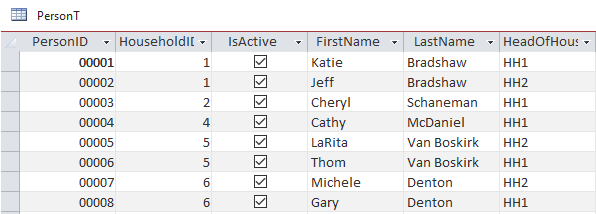
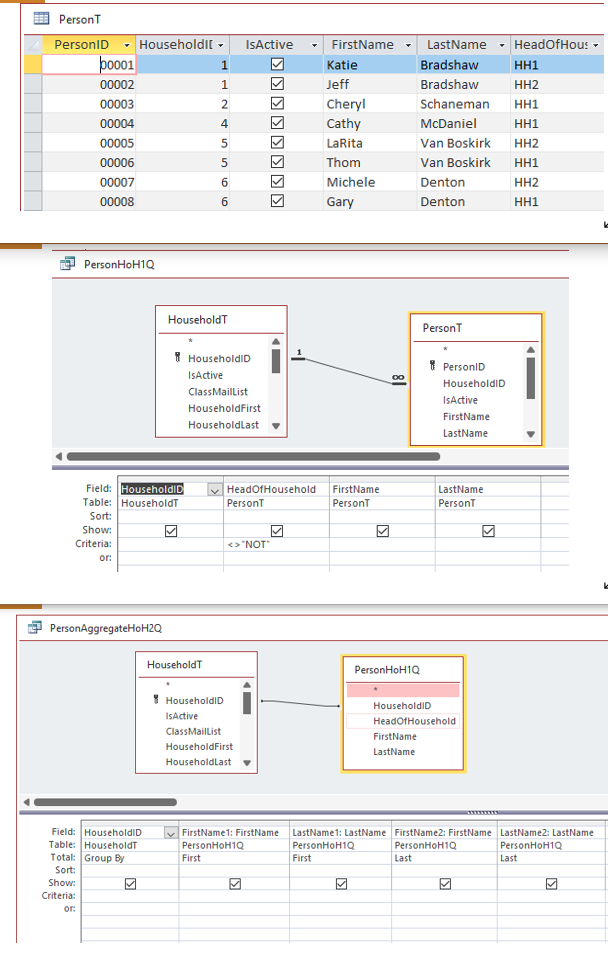
I started with this table. In this screen grab, all of the people are HH1 or HH2, but they can also be NOT, in which case, I don't care about their name for this query.
Katherine Bradshaw OP  @Reply  
    
4 years ago

Katherine Bradshaw OP  @Reply  
    
4 years ago
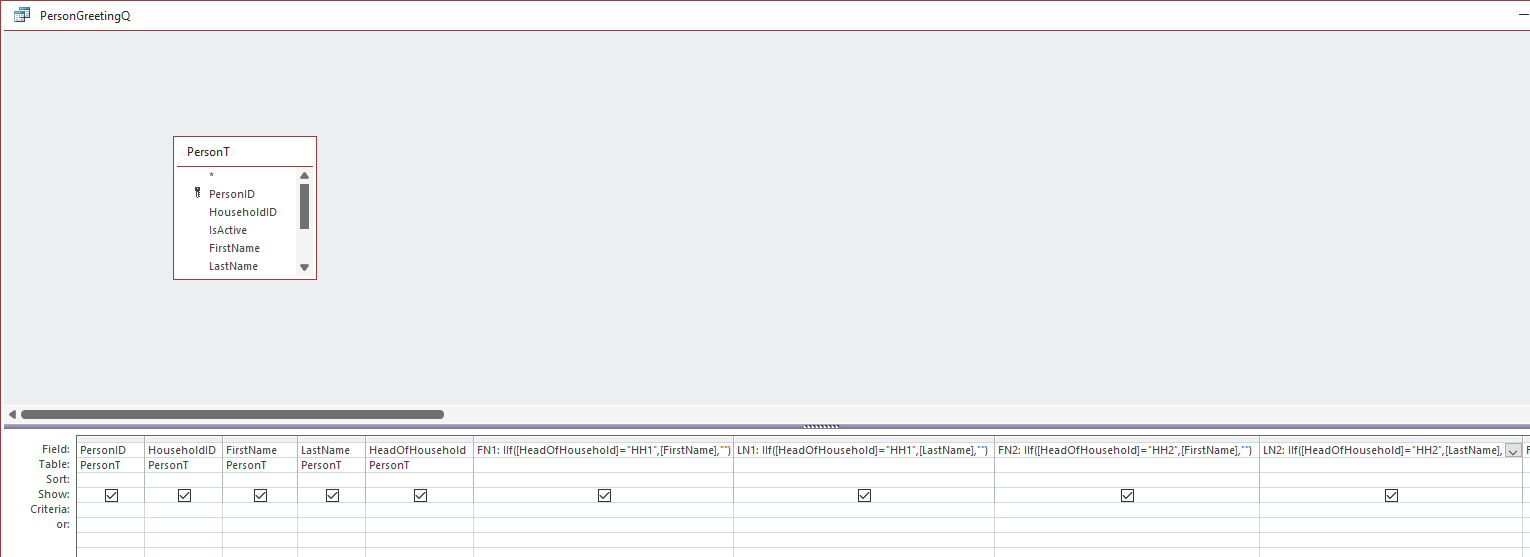
I wanted to get it to assign FN1 LN1 and FN2 LN2 based on their HH1/HH2 status, so I could use the module from the "combining names" video. So I ran a query with IIF functions.
Katherine Bradshaw OP  @Reply  
    
4 years ago

Katherine Bradshaw OP  @Reply  
    
4 years ago
But that got me stuck with two different records per households and the problem of trying to merge them.

Kevin, I'm intrigued by how you used first and last with the grouped household. That might work if I eliminate the NOT records. I'm going to try it!

And Juan, I do need to try some more IIFs. It's just that sometimes, I get so stuck and turned around, I can't determine what direction I need to take anymore.
Katherine Bradshaw OP  @Reply  
    
4 years ago
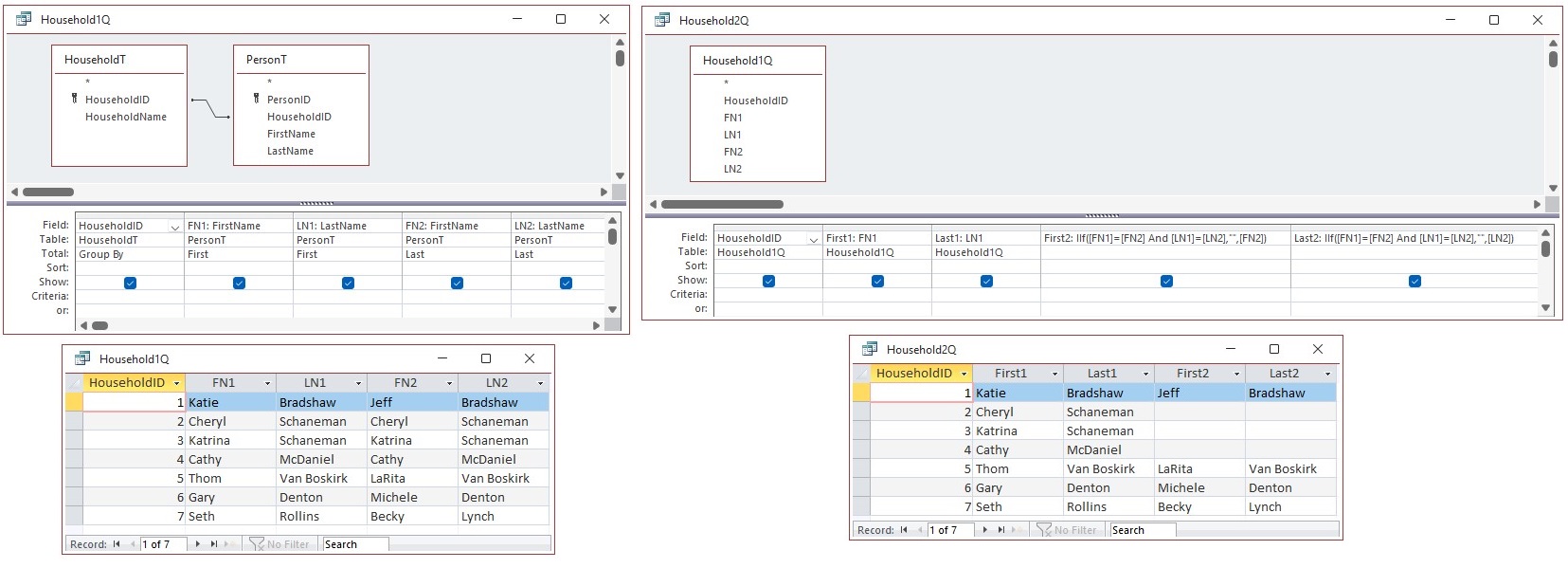
Kevin, I tried your query method, and ALMOST - except, why won't it allow the FN2? I'm only getting 3 of my 4 name columns, and I can't figure out why. I tried renaming from FN1 to FirstName1, etc., but that didn't help.

What could be wrong?
Katherine Bradshaw OP  @Reply  
    
4 years ago

Kevin Robertson  @Reply  
          
4 years ago
The Show box for LN2 is unchecked. That's why you aren't seeing it.
Katherine Bradshaw OP  @Reply  
    
4 years ago
Oh. My. Gosh. *facepalm*
Thank you for pointing this out.
This is what happens when I try to work when there are other people milling around talking.
Katherine Bradshaw OP  @Reply  
    
4 years ago
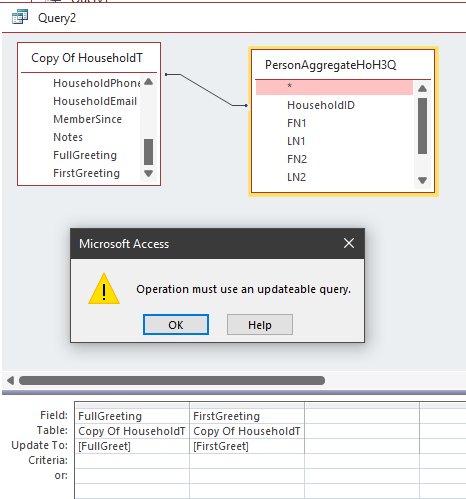
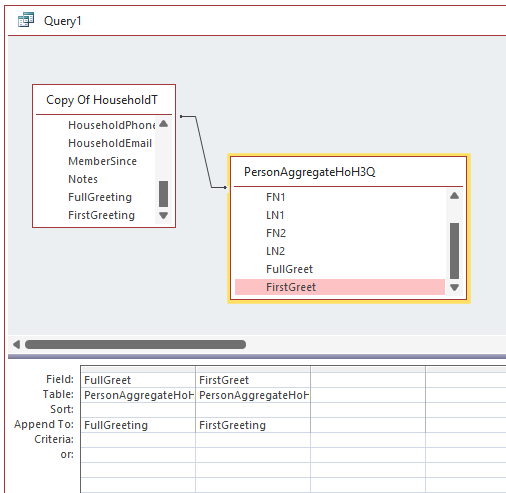
OK, I got things to work, but now a big question - how can I get the FullGreeting and FirstGreeting generated through these queries into the HouseholdT?

I'm picturing a button on the HouseholdF (which displays PersonT in a subform) that would say "Update Household Greetings" and would run a query to update the greetings for the household when changes / new entries have been made to the person table.

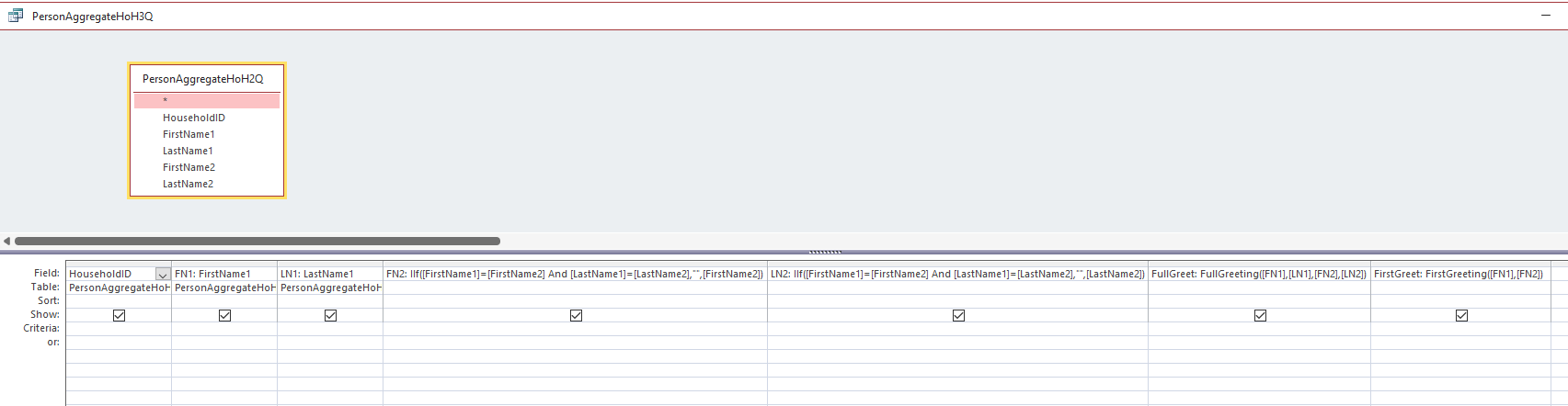
I'll put images below of the query steps I've taken so far based on Kevin's example, plus the final query I did, using global modules from the "combining names" video.

It all works. I'm stuck figuring out how to get this info into the HouseholdT.

I've tried an update query, but it says I can't use a query that isn't modifiable. I tried an append query, too, and that didn't seem to work - the "FullGreeting" and "FirstGreeting" fields I added to HouseholdT remained blank.

Maybe I've just got too many queries in series? Maybe I need to take a different tack?
Katherine Bradshaw OP  @Reply  
    
4 years ago

Katherine Bradshaw OP  @Reply  
    
4 years ago

Katherine Bradshaw OP  @Reply  
    
4 years ago

Katherine Bradshaw OP  @Reply  
    
4 years ago

Katherine Bradshaw OP  @Reply  
    
4 years ago
Back at it again.

So, the append query DID work, but it added the records at the bottom of the table, instead of into the fields associated by household ID. I was clearly misunderstanding append queries.

For now I will have to continue to double-enter HouseholdFirst and HouseholdLast information into the database and just live with the awkwardness of the issue of households with duplicate names.

But at least I can go ahead with my mail merge. I'm going to work to set up a Word mail merge for membership mailings from a query. For some reason I was thinking I needed all the data in a table to do a merge, but I realize I can pull the person and household information together into a query to do the mailing. (The folks I'm working with are more comfortable with a merge than if I were to set up a letter within Access.)
Alex Hedley  @Reply  
           
4 years ago
The records could be anywhere in the table
Use a query to sort them how you need

This thread is now CLOSED. If you wish to comment, start a NEW discussion in Access Forum.
 

Next Unseen

 
New Feature: Comment Live View


The following is a paid advertisement
Computer Learning Zone is not responsible for any content shown or offers made by these ads.
 

Learn
 
Access - index
Excel - index
Word - index
Windows - index
PowerPoint - index
Photoshop - index
Visual Basic - index
ASP - index
Seminars
More...
Customers
 
Login
My Account
My Courses
Lost Password
Memberships
Student Databases
Change Email
Info
 
Latest News
New Releases
User Forums
Topic Glossary
Tips & Tricks
Search The Site
Code Vault
Collapse Menus
Help
 
Customer Support
Web Site Tour
FAQs
TechHelp
Consulting Services
About
 
Background
Testimonials
Jobs
Affiliate Program
Richard Rost
Free Lessons
Mailing List
PCResale.NET
Order
 
Video Tutorials
Handbooks
Memberships
Learning Connection
Idiot's Guide to Excel
Volume Discounts
Payment Info
Shipping
Terms of Sale
Contact
 
Contact Info
Support Policy
Mailing Address
Phone Number
Fax Number
Course Survey
Email Richard
[email protected]
Blog RSS Feed    YouTube Channel

LinkedIn
Copyright 2026 by Computer Learning Zone, Amicron, and Richard Rost. All Rights Reserved. Current Time: 6/16/2026 7:33:47 PM. PLT: 0s